


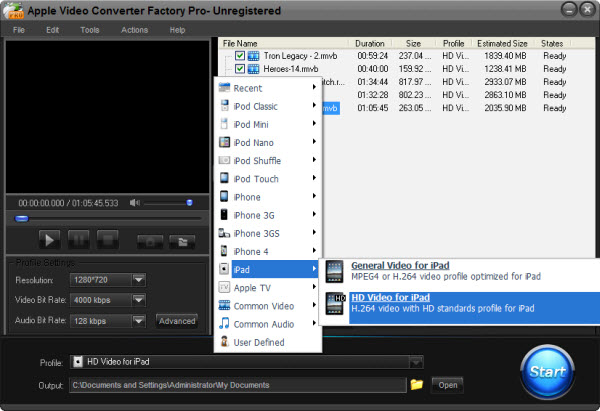
If someone owns an iPad and wants play some wonderful flash video on iPad, first, he has to clear that "could flash video be played on iPad directly?" and "how to play flash on iPad?"
iPad is a tablet and it's more powerful than some other multimedia portable devices on multimedia files playing. For video playing, iPad does not just support MP4, 3GP even MOV; it also supports MP4 (ISMA), AVI and M4V, even some more. Unfortunately, iPad does not support flash videos; as far as I know. But for "how to play flash on iPad", there still lies two ways.
iPad, the powerful tablet; it may support lots of third party software. So, for play flash video on iPad; install some third party software on iPad for flash video is a good way. Such as Flash.deb, it is just for flash video playing on iPad; and there is lots of related software like that. All iPad user and flash fans, just google the keywords and select one as you like to install on iPad. That's it - how to play flash on iPad.
The other way for "how to play flash on iPad" is to convert flash video to the right format for iPad. In this way, we just have to get related video conversion software. And follow the user guide to convert the flash videos to MP4, MOV, and AVI even 3GP, and then transfer the converted videos to iPad. That's OK.
Here, Apple Video Converter Factory Pro is available. The software supports to convert the popular video to Apple device. It is easy to operate and provides fast conversion speed with high image quality. Besides, the advanced editing is also available such as merge, clip, crop and effect for users to add some special idea. But all advantages just cost $19.95. What a worthy deal!
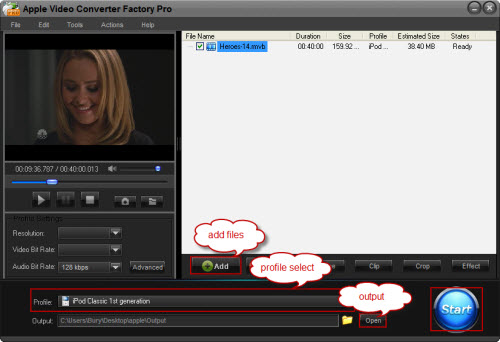
How to Convert Videos to iPad with the Apple Video Converter: 1. Download and install the software > 2. Click "Add" to import videos > 3. Select output format in "Profile" setting > 4. Click "Start" to begin converting process > 5. Open output profile to get the output video
No matter a third-party multimedia player or a video converter, with such an assistant, "how to play flash on iPad" would get easy.
Screenshot of Apple Video Converter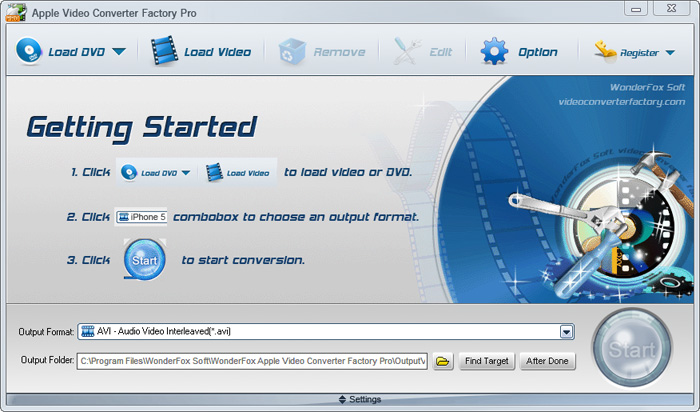


If you have several different Apple devices and also want to enjoy videos on them without video and audio format limitation, the below tips or guides may be helpful to you.
If you want to convert iPod music to MP3 so that you can play your iPod music resources on your other MP3 players, it is necessary for you to know how to convert iPod music to MP3. Also, if you want to enjoy MKV videos on yur iPod, Apple Video Converter Factory Pro can help you easily convert MKV to iPod . This powerful video converter can easily help you convert video to iPod Touch 4, convert video to iPod Classic, convert AVI to iPod compatible videos, convert video to iPod Nano and so on. In a word, it can convert nearly all popular videos and audios to iPod series compatible videos and audios.
I hope the above tips and guides will be useful to you, and if you have any problems on using Apple Video Converter Factory Pro, please see the User Guide of this software for more details.


