Home > Resource > Tips > How to Play Flash Videos on iPad
Product Information
WonderFox DVD Video Converter 50% OFF
Featured Products
Related Tips

Nokia Lumia 610 Video Converter

Play FLAC on iPhone 4

Nokia N8 Video Converter

Convert AVI to HD Video

Nokia Lumia 710 Video Converter

Convert Video & DVD to Nokia C7

Nokia X2 Video Converter

SD Video to HD Video

Convert Videoto PlayBook

Play Flash Videos on iPad 2

Nokia Lumia 800 Video Converter

Convert MKV to Cell Phone

Transfer Video to Android

Convert MTS File to Video

HTC One V Video Converter

BlackBerry 9300 Video Converter

PlayBook Video Converter

Play MKV on Windows Player

How to Convert AVI to MKV

How to Convert MP4 to MKV

HD Video Editing Software

HD DVD Ripper

Play OGG on iPhone 4

Nokia X6 Video Converter

Play DVD on Tablet

BlackBerry 9780 Video Converter

Free 3GP Video Convertor.

Powerful Free Video Converter

3GP Video Format Converter

Free iPod Video Converter

Free iPhone Video Converter

Video Format Converters

Convert Video to Zune.

Converting MPEG to MP4

Converting FLV to MP3

Extract Audio Software

How to Convert WMV to MPEG

How to Convert Video to MP4

Convert Video to FLV Format

Convert MOV to MPEG

Convert YouTube Video to 3GP

Convert Video to MOV?

Convert Video to Nokia

Free Zune Video Converter

Free Nokia Video Software

MP4 Video Converter Software

Free Nokia Video Converter

Free AVI Converting Software

BlackBerry Converting Software.

Converting MP4 to MPEG

Free FLV Converting Software

Free iPhone Video Software

Free MP4 Converting Software

Free Video Converting Software

PSP Video Converting Software.

iPhone Converting Software

Convert AVI Files to WMV

Free Zune Converting Software

PSP Video Converter

How to Convert Video to MP4

Extracting Audio from Video

Free SWF Video Converter

Free HD Video Converter

Free Flash Video Software

How to Convert Flash to Video

Free Video Conversion Software

How to Play Video on iPad, iPad 2, The New iPad, iPad 4 and iPad mini

Apple Video Converter Factory Pro (for Windows) is such software to convert copyright protected DVD and all formats of video to iPad, iPad 2, The New iPad, iPad 4 and iPad mini

iPad is best Tablet PC have 9.7-inch screen, powerful CPU and long-lasting battery. The Retina display on newest iPad makes everything look crisp and lifelike, flash and videos are rich with detail. So iPad is best mobile device for video playback. But there are some problems iPad can not play flash video, SWF, MKV, VOB, etc. iPad also can not play DVD disc because it has no DVD-ROM. So we need a software to solve this problem.

As we know, there are lots of people who want to know how to play flash, videos and DVD on iPad, iPad 2, The New iPad, iPad 4 or iPad mini. However, we may see that it is impossible for us to play flash, swf, mkv, vob and others on iPad directly. Then how are we going to do it? What’s the means available to help us play DVD movie, incompatible videos and flash on iPad?

In order to do so, we have to convert videos from those incompatible videos to iPad compatible videos, this is the easiest and safest way to play flash, swf, mkv, vob and all incompatible videos on iPad, iPad 2, The New iPad, iPad 4 and iPad mini. This article below will teach you to do that step by step.

play flash video on ipad

The Newest iPad Still Can not Support Play Flash, SWF, MKV, VOB, etc.

As we know, there is a gap between the Apple Company and the Adobe Flash. We will see lots of news and arguments of Apple Company and Adobe flash, the two companies seems to have a lot of resentments. Maybe because of this reason, we can not play the Flash videos on Apple devices besides the all of iPads! Therefore, we can often see the attendant question, which is, how to play flash on iPad, iPad 2, The New iPad, iPad 4 or iPad mini or other Apple devices. I think all of us really hope that one day Apple devices will support playing Flash videos or one day the resentments between the two companies will be resolved!

In addition, I don't understand why iPad can not support some hot video formats like SWF, MKV, VOB, DV, etc. But this is true. This problem take great inconvenience to every users, so many people are look for how to paly video on iPad.

last problem, iPad can not play DVD disc because it has no external DVD-ROM, so if you want to watch DVD move on your iPad that is impossible.

Recommended Apple Video Converter Factory to Help You Play Flash, Video and DVD on iPad

Since we have known that iPad can not support flash, DVD and some videos, we need to find a way to convert flash, video and DVD to the iPad 2 formats. Actually, it is not a difficult job for you, all you need to do is to find a related software that can help you convert Flash video and rip DVD to iPad compatible formats.

Among so many related video converters, I think Apple Video Converter Factory Pro is one of the best. It is the really easiest way to help you play flash, videos and DVD movie on iPad.

Now, let's see the key features of Apple Video Converter Factory Pro to see why it is the best way to play flash videos on iPad.

1. It can help you convert all videos including online flash videos (online FLV, SWF, F4V, etc.) to iPad, iPad 2, The New iPad, iPad 4, iPad mini compatible videos.

2. It can also input your computer's or laptop's video (AVI, MPG, MP4, WMV, M4V, MOV, MKV, ASF, DV, 3GP, MTS, etc) files and help you convert them to iPad, iPad 2, The New iPad, iPad 4, iPad mini compatible videos.

3. It can support rip content of copyright protected DVD to iPad, iPad 2, The New iPad, iPad 4, iPad mini compatible videos。

4. It has the iPad 2 as its direct output device, so you do not have to figure out the iPad 2 compatible video format, display resolution, bitrate, framerate, encoder, etc. You just need to select the iPad 2 as your output choice, and then you will get the most compatible videos for your iPad 2.

5. It will ensure the video quality to help you enjoy high-definition videos on your iPad 2.

6. It is one of the fastest video converter - 6X faster conversion speed boosted with Intel® CoreTM, NVIDIA® CUDATM and AMD®

7. It is an easy-to-use software, three main steps and then you can finish how to play flash videos on iPad 2.

The Steps of How to Play Flash Videos on iPad 2

Now I will use the Apple Video Converter Factory Pro (Free Trial>> or Buy Now>>) to show how to play flash, video and DVD movie on iPad 2 ( support all iPad models) step by step.

1. Download the software first, and install it to your computer (For windows user)

Download

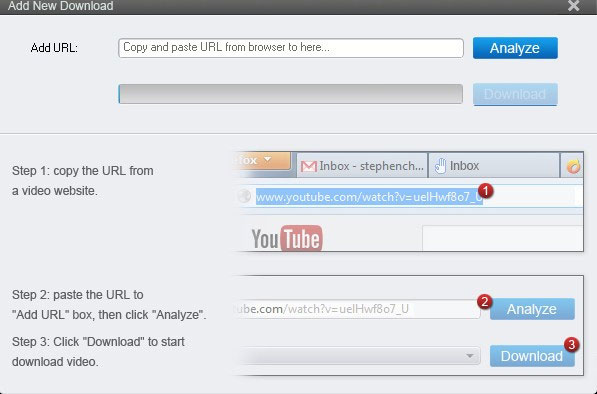
2. Add your source media (DVD, Flash, video) to the software like below: (You can choose add your local flash videos, download online flash videos or record flash videos)

Add video, flash or DVD to software and wait for converting to iPad

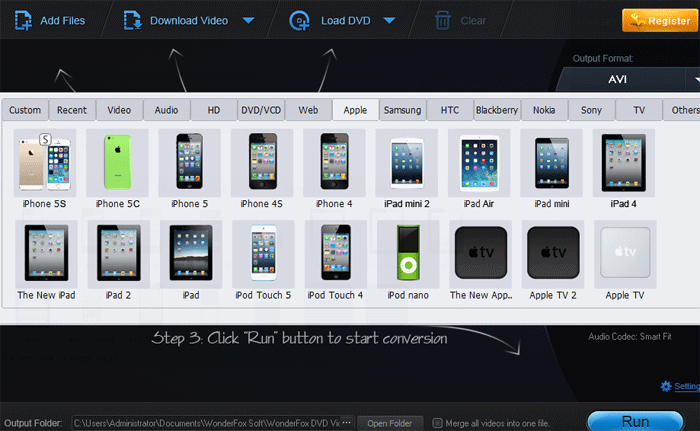
3. Choose a target format for output, such as iPad 2 (it support all iPad models).

select-ipad-2

4. Start the converting by clicking the "Start" button

start-converting

5. Open the output folder after the converting processes has ended.

get-output

That's all, you can see that it is easy for every users! Just go for one, do not be annoyed by how to play Flash videos on iPad, iPad 2, The New iPad, iPad 4, iPad mini any more!

The unregistered version of Apple Video Converter Factory Pro will put a watermark on processed video, please purchase license to remove this limitation. If you have any questions please contact order@videoconverterfactory.com

The Limits of Free Trial License benefits  
  The unregistered edition will limited to converting maximum 5 minutes. Free Trial

Secure Download

  • Free upgrade lifetime.
  • Free technical support.
  • Get back license key free.
  • 30 day money back.
  • Buy Now

    $29.95 (save $20)

    Related Sources:

    There are some related tips and how-to guides about Apple devices like iPhone, iPod, iPad and Apple TV, they may be helpful to you.

    Convert MKV Video to iPhone: Convert MKV to iPhone | Convert Video to iPhone4: iPhone4 Video Converter

    How to Convert FLV to iPhone: Convert FLV to iPhone | iPhone Video Converting Software: iPhone Video Converting Software

    Convert Video to Apple iPhone 4: Apple Video Converter for iPhone 4 | How to Play OGG on iPhone 4: Play OGG on iPhone 4

    How to Play FLAC on iPhone 4: Play FLAC on iPhone 4 | How to Convert WMA to iPhone 4: Convert WMA to iPhone 4

    How to Get iPad Supported Video Format: iPad Video Format | How to Convert Video for iPad: Convert Video for iPad

    Does iPad Support Flash: Does iPad Support Flash | How to Play Flash Videos on iPad 2: Convert Flash Video to iPad 2

    How to Convert Flash Video to iPad 2: Flash Video to iPad 2 Conversion | Convert YouTube to iPod: Convert YouTube to iPod?

    How to Transfer AVI to iPod: Transfer AVI to iPod? | How to Convert WMA to iPod Touch: Convert WMA to iPod Touch

    30-day Money Back Guarantee Email service within 24 hours VeriSign Secured McAfee SECURE Approved by Norton