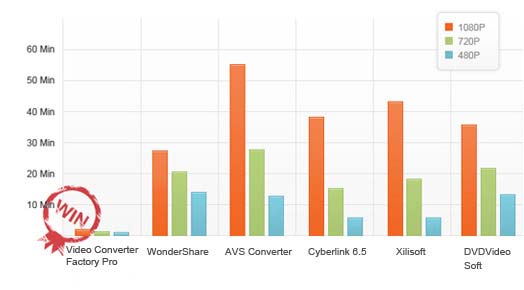
50X Faster Conversion Speed with 0-Quality-Loss
- Best Video Conversion Solution

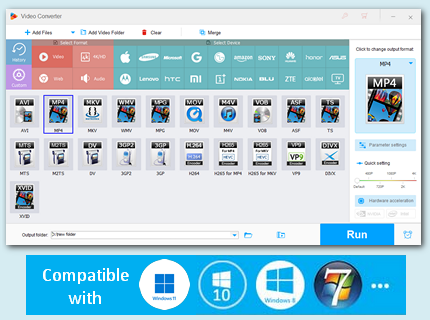
WonderFox Video Converter Factory Pro is an all-in-one, fast, reliable, and easy-to-use video conversion software. 500+ video/audio formats and device profiles are supported. New frequently used formats are constantly added to meet the needs of every user.
WonderFox owns unique encoding technology, which generates 50x faster conversion speed than ever before. What's more, WonderFox batch conversion function can help you save lots of time while converting video files. You can convert up to 10 videos at a time with faster speed than any other video converters. 0-Quality-Loss Guaranteed. The built-in video editor of this fast video converter can let you merge videos, clip or cut videos into parts, crop videos, and add effects to touch up your homemade video. Through this video converter, you can even compress large video files while preserving the highest quality.
Run into compatibility issues when trying to play movies or music? Use WonderFox Video Converter Factory Pro! It’s a versatile video conversion software that can help fix the playback errors by transcoding.
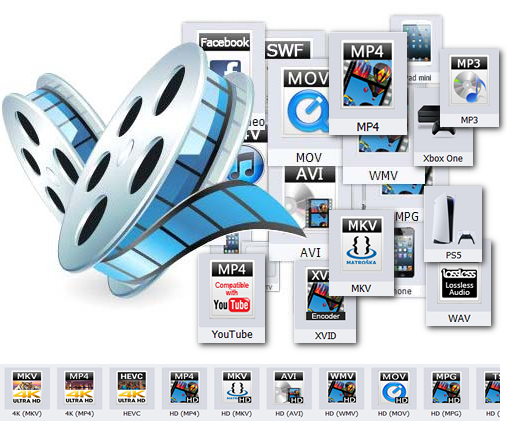
Convert video/audio format. For example, video to HD video, video to AVI, video to MP4, video to MKV, video to WMV, video to 8K video, video to H.264, video to 4K H.265, video to AV1, video to AVC, video to MPG, video to MOV, video to 3GP, video to MP3, WAV, OGG, AC3, AAC, MKA, WMA, FLAC, M4A, etc.
Convert video to web formats for YouTube, Facebook, X (Twitter), TikTok, Vimeo, Twitch, etc.
Convert video to portable devices. Provide optimized presets for almost all popular devices like iPad, iPhone, iPod, Apple TV, Samsung smartphones and tablets, Nexus, Kindle Fire, HTC, Nokia, Sony cell phones and game consoles (PS4, PS5), Microsoft Surface, Xbox One and Xbox Series X/S, Android TV, etc.
WonderFox Video Converter Factory Pro features a batch conversion mode which allows you to convert multiple videos (up to 10) at a time.
Furthermore, this fast video converter supports Intel® Core TM and QSV, NVIDIA® CUDA and NVENC technologies to deliver faster video conversion speed. Unique encoding technology boosts up to 50x faster conversion speed.
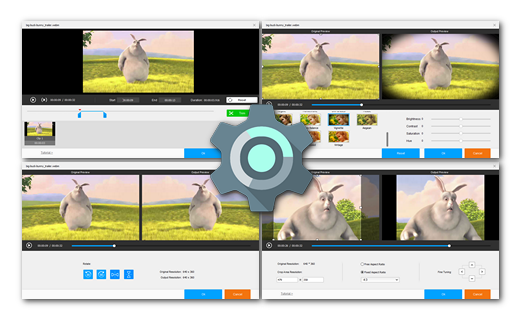
Rich video effects: Mosaic, Blur, Sharpen, Emboss, Noise, Old Film, etc.
Crop video to remove the black bars and cut off unwanted areas to highlight a subject.
Cut part of the video to get the desired output, saving time in the conversion process.
Merge multiple video files into one without losing quality. Batch merging is allowed.
Rotate videos 90, 180, or 270 degrees, and flip or mirror videos.
Clip
 Split large video files into multiple smaller files.
 Crop
 Reset the video resolution by cropping off black bars.
Merge
 Merge multiple video clips into one video file.
Screen Record
 Record your computer screen and audio in high quality.
Subtitle
 Embed, remove, or extract subtitles from a video.
Effect
 Set video brightness, mosaic, blur, and other special effects.
Automatic shutdown
 After it is done, set your computer to shut down or restart automatically.
 Automatic updates
 Automatically check for updates to ensure you have the latest version.
 Video Converter Factory Pro is really one of the best video converter programs; it really can support many video and audio formats as it advertised. I am really appreciate for your develop team to make such a brilliant software."
Get license code immediately and enjoy our best service or get your money back.


Batch Convert MOV to MP4, MOV to AVI, AVI to DivX, FLAC to WAV, WAV to MP3, Video to MP3, Music to MP3, AVI to MPG, Reduce MP4 File Size, DAV Converter, AVCHD Converter, 60fps Converter, Change Video Formats