

Do you want to watch any DVD movies or videos on your Android video player? Do you want to make your Android video player become more powerful? Do you still feel troublesome when it can't play the videos that you like?
If you say yes, keep reading, maybe this article can help you solve all your problems.
If you are very familiar to Android, I think you can skip this part and go directly to next paragraph. If you don't, you can take a quick look at it to learn more about Android OS. In fact, Android is a mobile operating system initially developed by Android Inc., a firm purchased by Google in 2005. The platform consists of the operating system, middleware, and user interface and application software.
Android OS is mainly applied on smartphone. The Android smartphone is popular in America, even around the whole world. As for video players on Android OS, at the beginning years there was no really video player for Google Android's platform. The built-in video player is bundled with Android's picture viewer and only supports few video formats. And now many video players designed for Android platform are also facing the same problem, many people felt upset about its few supported formats. This is the inevitable flaw for Android video player.
Google has done many improvements for this flaw, but that is not enough. Now there are a lot of third party apps were launched to solve this problem, such as video converter. You can use it to convert video formats to what Android supports. Since the birth of WonderFox DVD Video Converter, it was acclaimed by people.
It is capable of converting almost all frequently used DVD/video/audio files to optimized format for Android video player, including MKV, Xvid, WMV, and DiVX etc. This DVD video converter contains powerful functions could meet high requirements for users. It offers much better video/audio quality. Meanwhile, this video converter supports more than 100 different video formats as input video formats.

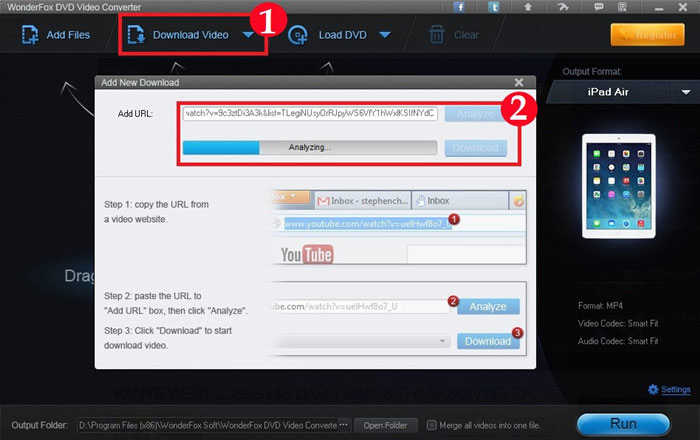
What’s more, it provides useful video downloading and powerful video editing features; you can make different effect videos and play it on Android video player, making do more with your videos.
Download and install the software. Click "Add Video" to import videos.
Select output format in "Profile" setting.
Click "Start" to begin converting process. Open output profile to get the output video.
If you like it, it’s time to free download WonderFox DVD Video Converter and it will make your Android video player become a more powerful player. Your decision, you control!


Apart from converting AVI to MKV, WonderFox DVD Video Converter can help you do more. This professional video conversion software can help you convert virtually any DVD movies/videos to a wide range of video formats, audio formats and the latest digital devices.
The input video file supported by this video converter software includes all frequently used video files, Flash video files, DVD(VOB) file, etc. And, it also can support outputting all frequently used video files and popular digital devices, including AVI, MP4, DAT, MPG, MPEG, H.264, NSV, VOB, MOV, FLV, MKV, TS/TP/TRP(AVHD H.264, VC-1, MPEG-2 HD), DV, WMV, ASF,3GP, 3G2, iPhone, iPod, iPad, Nokia, HTC, BlackBerry, Zune, Window Mobile device: Pocket PC, Dell Axim X51, HP iPaq hw6500 series, etc
For more information about WonderFox DVD Video Converter: please visit product page of WonderFox DVD Video Converter >>
With WonderFox DVD Video Converter, you will definitely enjoy videos on the go without any format limitation.


