


The WMA (Windows Media Audio) format is developed by Microsoft and widely supported by Windows Media Player and other Windows programs. Compared to MP3, it has a smaller size and better audio quality. But it may be difficult when processing WMA on other devices other than those with a Windows OS. So to make the .wma files more compatible with devices and software, a simple way is to convert WMA audio to AAC, which is a high-quality audio format with good compatibility.
In the following parts, I’ll show you how to convert WMA to AAC with offline and online audio converters. Read on to get more details!
To convert WMA files to AAC, a professional WMA AAC converter is required. And I strongly advise you to use WonderFox HD Video Converter Factory Pro to do this conversion easily. It is a powerful audio & video conversion tool that can convert nearly all the audio and video files, such as WMA to AAC, MKA to WAV, MKV to MP4, etc. Besides changing audio formats, you can use it to cut and merge audio files with ease. It also allows you to adjust the audio parameters, like audio bitrate, channels, etc. to meet your specific needs. And the user-friendly interface helps to complete the conversion procedure within several clicks.
Free downloadFree download this time-saving application to get ready now!
HD Video Converter Factory Pro provides the most efficient way to solve your audio and video playback issues. With it, you can convert audio & video to various formats and devices easily with the best output quality. Download and give it a try now!
 Download for Free
Download for Free
Download for Free
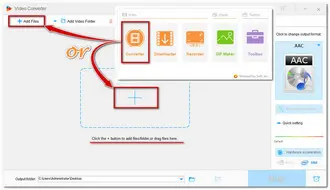
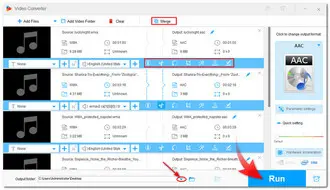
Launch HD Video Converter Factory Pro and open the Converter module on the left of the home interface. Then click the + button or the +Add Files button to load the source audio files to the program. You can also straightly drag and drop the WMA files into this converter.
This file converter supports batch conversion, so you can import multiple audio files and start the conversion at the same time!
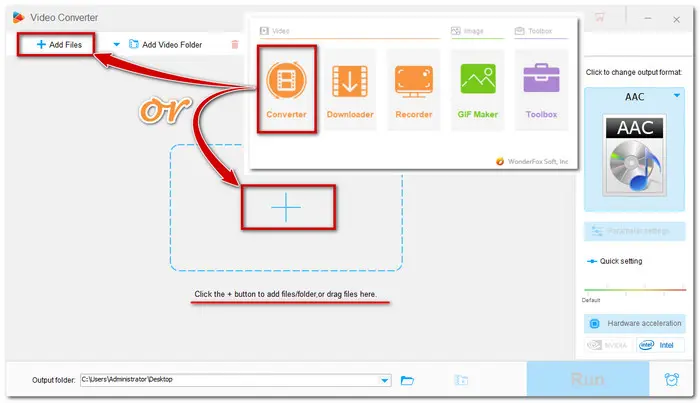
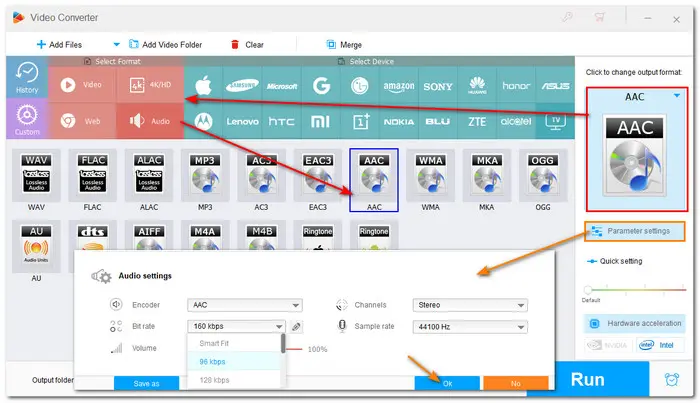
Press the big format image on the right side of the interface to unfold the output formats and devices list. Go ahead to the Audio category and choose AAC in the first line.
Back to the converter interface, you can hit the Parameter settings under the format image to modify the default audio parameters, like changing bit rate, converting mono channel to stereo, adjusting sample rate, and turning up the audio volume.
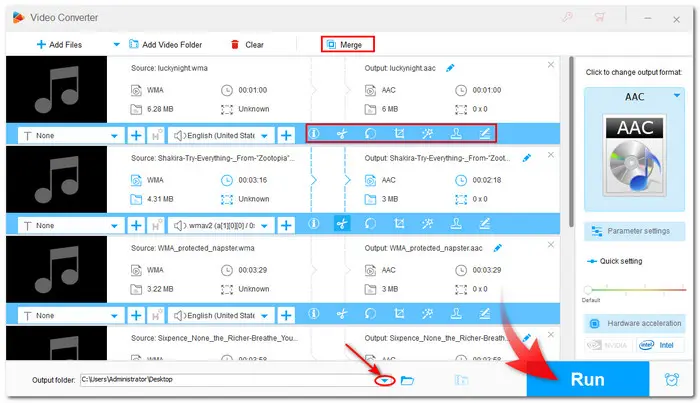
The toolbar below the conversion list allows you to edit audio files. Then tap on the bottom triangle button to specify an output path, or you can leave it as default. Finally, press Run to start the WMA AAC conversion at once.
Also See: Free WMA Editors | Play WMA on Android | MP4 to WMA | DVD to WMA
 Download for Free
Download for Free
Download for Free
Online tools can also manage WMA files to AAC conversion easily and effortlessly. And you can convert audio to other formats without installing any software. Online converters usually have similar functions and limitations. And you can just open your search engine and select the one you preferred.
Here is an example of Online WMA AAC converter — Cloudconvert
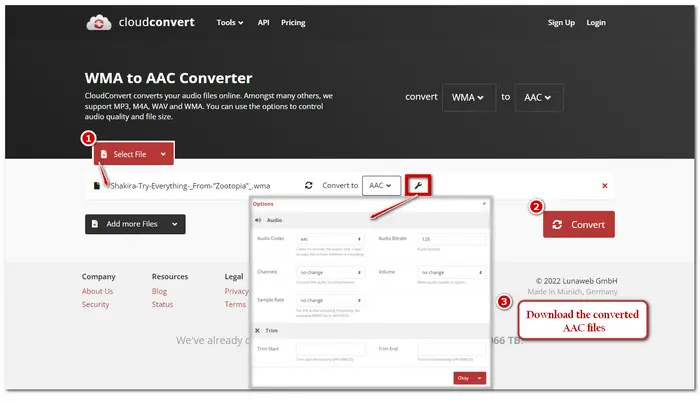
The online WMA to AAC conversion is now finished. When converting online, however, you should ensure that the online converter you utilize is reliable and secure. In addition, most online converters usually have a file size restriction and the internet connection may also affect the conversion speed. So the desktop HD Video Converter Factory Pro is the ideal way to go if you want to convert multiple files without any unpleasant limits.
Both offline and online converters are good helpers to us for files conversion. You can just choose one better suit your demands. Above is what I want to share with you. Hopefully, you can find this post helpful to your problems. Thank you for reading!

Terms and Conditions | Privacy Policy | License Agreement | Copyright © 2009-2024 WonderFox Soft, Inc.All Rights Reserved


 Buy Now
 Buy Now