Convert between any video including HD video and copy protected DVD to LG Optimus L7 or over 100 other devices with WonderFox DVD Video Converter
These days, I see some similar questions on how to convert video to LG Optimus L7.There are kinds of answers. Some really help a little bit while others do not. So in order to solve such problem; I decide to write an article to help those you know how to convert video to LG Optimus L7 step by step.
Before converting video to LG Optimus L7, we should know the video formats supported by the LG Optimus L7 supported videos. According to its official website, it's indicated that the LG Optimus L7 can only support users to play MP4, 3GP, AVC, AVI and MPEG-4.That is, when we get a movie in the format of MKV, MOV, HD AVI, etc, we can't play it on our LG Optimus L7.What a pity! What's more, we can't enjoy YouTube video or SWF as well. So to play more videos on LG Optimus L7, we need an LG Optimus L7 video converter to help us.
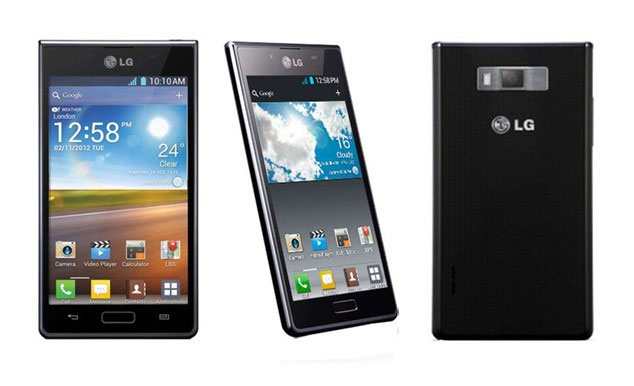
Actually the easiest and best way to convert video to LG Optimus L7 is to use an LG Optimus L7 video converter. However, how to choose a LG Optimus L7 video converter is a difficult job for us because the related market is flooded with so called LG Optimus L7 video converters.
To save your time, I highly recommend you with WonderFox DVD Video Converter to help you convert video to LG Optimus L7.
WonderFox DVD Video Converter is a versatile but very easy-to-use DVD video tool. It can not only help you convert between any pop video formats but also enables you to copy any protected DVDs including the Disney DVDs to any pop IOS, Symbian or Android devices. Besides, this smart tool also supports you to download YouTube video, Vimeo video, Facebook video and any more online videos. If you really like WonderFox DVD Video Converter, you can free download one here.

Now, I will use this great LG Optimus L7 video converter to show you how to convert video to LG Optimus L7 step by step.
First you need to install the LG Optimus L7 video converter. It’s fast and clean. And then launch this software.
Click “Add Files” to input a video to the converter. Actually you can see clearly some detailed information like the video format, size, resolution, etc. For example, I import an FLV video file here.
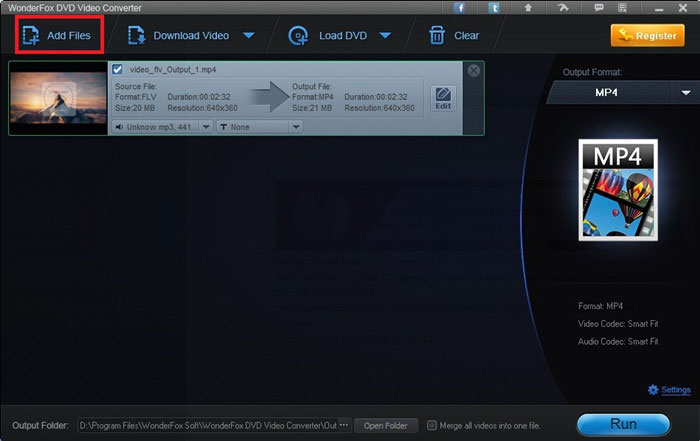
Note: It’s also available to load DVD or download online video as well as edit and crop videos.
Click the output format dropdown list on the right of the main interface. Choose a suitable video format like MP4.
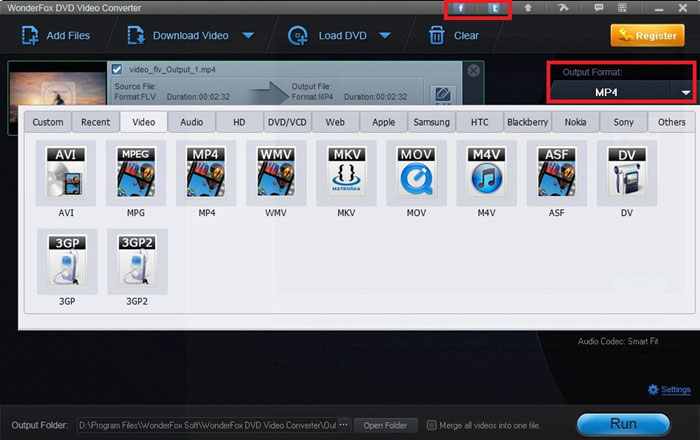
Note: If you’d like to convert the video to other video formats or portable devices, it’s OK. You are provided with plenty of formats and almost all pop devices like iPhone, iPod Touch, iPad, Apple TV, Nokia cell phones, BlackBerry cell phones, Samsung Galaxy series and more. Moreover, you can have a try to extract audio from video or DVD.
If the two steps above are finished, hit the “Run” button to get the video converted. It will take a few minutes and you’d be content with the output video’s excellent video and audio quality.
1. Still have trouble? Please feel free to Email Us
2. Or you can follow our Facebook to get free professional support.
WonderFox Nokia Video Converter Factory Pro is powerful and easy to use program designed to convert videos, audios and encrypted DVDs to Nokia Lumia series (Lumia 920, Lumia 900, Lumia 822, Lumia 810, Lumia 800, Lumia 710, ect), Nokia Nseries (N9, N950, N900, N8, etc.), Xseries (X7, X6, X5, X3,etc), Eseries (E7, E73, E72, E6, etc.), Asha series, 5 series. It well supports all key video formats (like AVI, MP4, MPG, WMV, MKV, MOV, 3GP, etc). Its editing function makes it extremely easy to customize your videos before conversion, for example you can clip, trim, crop video and even add special effects to it.
Nokia Lumia 610 Video Converter
Nokia Lumia 710 Video Converter
Convert Video & DVD to Nokia C7
Nokia Lumia 800 Video Converter
BlackBerry 9300 Video Converter
BlackBerry 9780 Video Converter
BlackBerry 9790 Video Converter
DVD to Toshiba Thrive Converter
Galaxy Tab 7.7 Video Converter
Google Nexus S Video Converter
LG Optimus Pad Video Converter
Motorola DEFY+ video converter