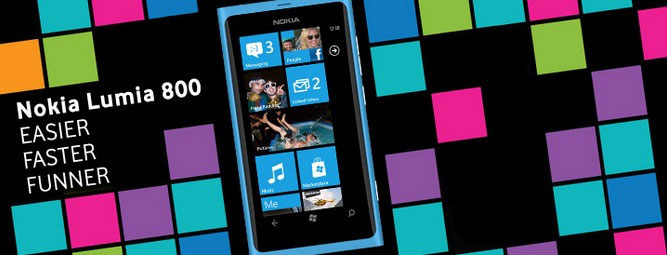
Nokia Lumia 800 is Nokia’s first mobile phone to run Windows Phone OS. It is also a part of the first wave of Windows Phone devices to be released, which is designed with very nice multimedia features. And there will be more apps available for Lumia 800 users.
Moreover, Nokia Lumia 800 has powerful multimedia features and a big screen, so playing video on Nokia Lumia 800 is a good idea. Many videos can be watched on Nokia Lumia 800, but there are still some special video formats that cannot be played on it such as H264, FLV, FLAC, etc.
So for video playback on Nokia Lumia 800 without difficulty, we'd better convert videos to the Nokia Lumia 800 video format first. And also we can enjoy our DVD collection on Lumia 800 and share them with friends on the go.
Based on the detailed specifications for Nokia Lumia 800, we can know that the Lumia 800 is indeed a very powerful video player. Playing our favorite videos or DVD movies on Nokia Lumia 800 is wonderful. It is able to play ASF videos, AVI videos, WMV 9 videos, MPEG-4 videos, H.264/AVC videos and 3GPP formats (H.263). But there are still some other popular video formats that Nokia Lumia 800 can’t play such as MKV (HD videos), MOV, MTS, WEBM, TRP and FLV (YouTube videos). To play such video on Nokia Lumia 800, we need a Nokia Lumia 800 video converter which allows us to convert DVD/video/audio to Nokia Lumia 800 with few click and high quality.
Here, I just suggest Nokia Video Converter Factory Pro (for Windows) for all Nokia users. It is really a good choice for us to convert video and copyright protected DVD to Nokia mobile phones. With it, we don't have to install the third-party video players on your cell phone. It's good for machine maintenance.
The recommended converter - Nokia Video Converter Factory Pro is very easy to use. Even if you’re the most novice, you can handle this software very well. There are just three simple steps to charge the whole conversion process: Load Vide Files > Set Profile > Get Start. The following is to show the details with pictures:
First download the Nokia Lumia 800 video converter and install it. The installation is clean and fast.

Step 1: Run this video converter and Load your video files.
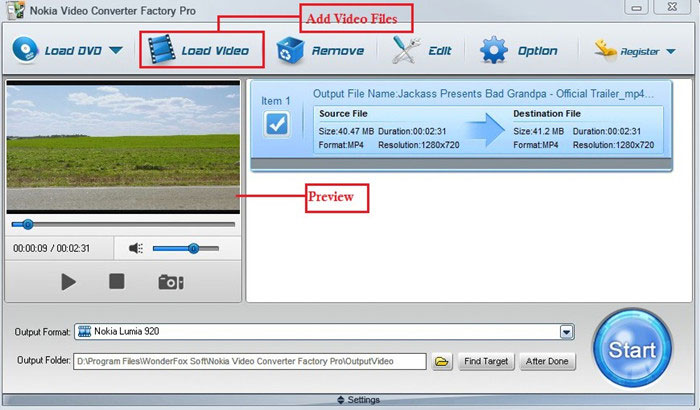
Note: If you want to rip your DVDs, insert DVD to the DVD-ROM drive and then click “Load DVD”.
Step 2: Choose the target output format as you want.
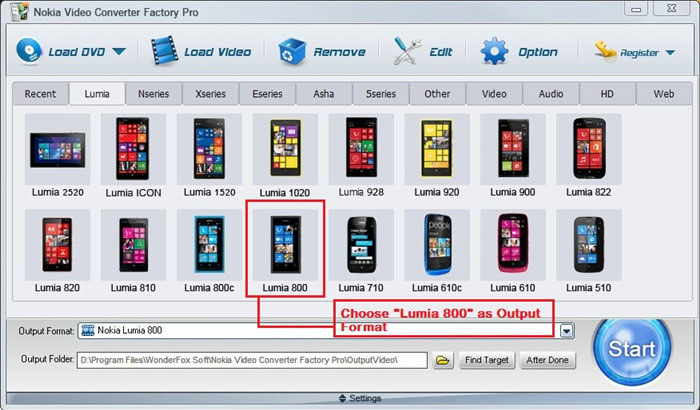
Note: As you can see, the converter is updated to support the latest Nokia devices including Nokia Lumia 2520, Nokia Lumia ICON, Lumia 1520, etc.
Step 3: Click "Start" to run the conversion process. And after the process is finished, open output folder.
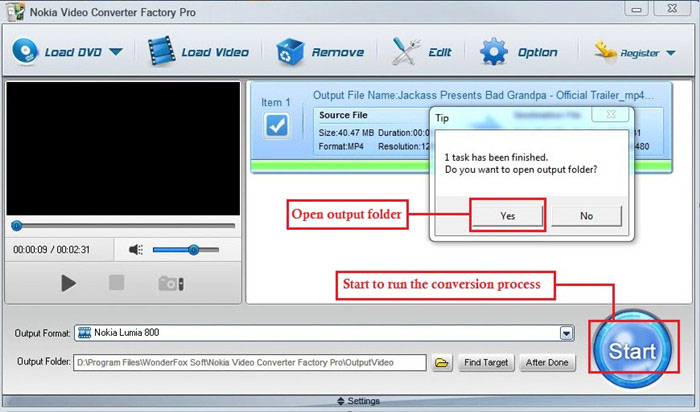
That's just the whole conversion process above. With the Nokia Lumia 800 video converter, we can convert video to Nokia Lumia 800 easily.
Indeed, there are many video converters for Nokia on the internet. We just need to search the target keywords online, and then, we will get over hundreds of results. But among such results, which one is better? How to get a good one? There’re some tips for you.
1. Input and Output Formats: The software should support any popular media formats and convert video to the target formats as we need.
2. Quality and Speed: The software should help us preserve the original video quality. And if the Nokia Lumia 800 video converter has fast conversion speed, that would be great.
3. Easy to Use: The software must be easy to use. Then we don't have to spend too much time learning the user guide.
4. Finally, the software should be Clean, No virus, No spyware, No malware, No adware.
Just follow the tips above, it will be very easy for you to find one good Nokia Lumia 800 video converter and convert video to your Nokia Lumia 800.
Here’s an advanced edition of Nokia Video Converter Factory Pro. It’s WonderFox DVD Video Converter. Want to enjoy more with your Nokia devices? Or you just have more than one handset or related media device. You are most likely to try this four-in-one converter.
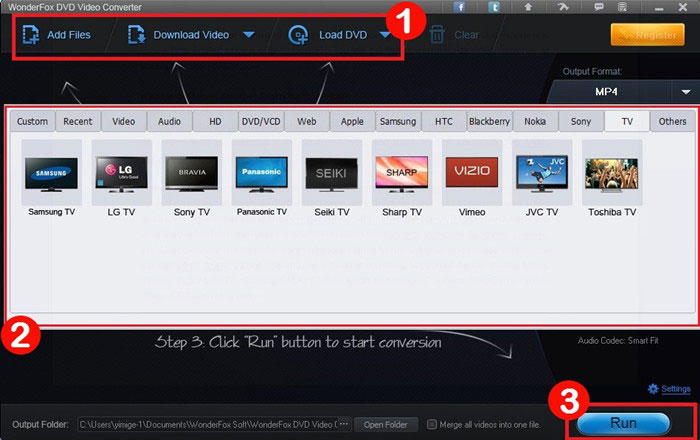
It has the key features that Nokia Video Converter Factory Pro does. For example, you can convert any video and audio, and rip any DVD to Nokia. But, it can help you do more tasks. The DVD Video Converter lets you download videos from YouTube, Metacafe, Facebook, Vimeo, etc. Meanwhile, it supports other pop devices, like Apple device (iPhone 5S/C, iPad Air and more included), BlackBerry phone and Tab, Samsung phone and Tab, Kindle Fire, Google Nexus, Microsoft Surface, different types of TVs and many more.
Its interface is in cool black and supports users to drag and drop files into the program, which is very friendly. If you like it, click here to free download.
Still have trouble about converting DVD and video for Nokia Lumia? Please feel free to Email Us >>
WonderFox DVD Video Converter - all-in-one media solution includes DVD Backup, DVD Rip, Video and DVD Converter, Video Downloader, Video Editor/Player
HD Video Converter Factory Pro - equipped with advanced High-Definition (HD) video conversion technology. It can help users convert videos from Standard-Definition (SD) to High-Definition (HD) like HD MP4, HD MKV, HD AVI, HD MTS, HD TRP and also enables users to cut down the video size (convert HD videos to SD videos)
Video Converter Factory Pro - easy-to-use video conversion software inculdes 100+ formats and devices are supported
WonderFox DVD Ripper - A professional dvd ripping tool, bypass encrypted DVD and region code, and convert DVD content to most video formats and handheld devices
For Users who get Nokia E-series like Nokia E66, Nokia E63, Nokia E65, etc or X-series like Nokia X6, Nokia X2, Nokia X5, etc or 5-series like Nokia 5230, Nokia 5530 as well as Nokia N-series like Nokia N9, Nokia N8, etc. This converter can easily help you guys convert any videos to these Nokia cell phones’ compatible videos, for example, convert video to Nokia E66, convert video to Nokia E63, convert video to Nokia E71, convert video to Nokia E73 and so forth.
Also, if you have any other Nokia cell phones like the popular Nokia N8, N9, even Nokia Lumia 800, Lumia 900 and Lumia 710, it can also help you convert any videos to these popular cell phones’ compatible videos easily. See the related how to tutorials here: how to convert video to Nokia N8, how to convert video to Nokia N9, how to convert video to Nokia Lumia 800, how to convert video to Nokia Lumia 900, how to convert video to Lumia 710. It is really powerful and useful for you to convert videos to nearly all Nokia cell phones with the help of this video converter for Nokia. From now on, your Nokia cell phone will become more powerful in the field of video playback. Learn more related tips about Nokia conversion here.
Nokia Lumia 710 video converter - convert Video and DVD to Lumia 710 compatible video formats
Nokia Lumia video converter - convert video and DVD to Nokia Lumia 610
Convert DVD to Nokia Lumia 710 - for playing DVD videos on Nokia Lumia 710, we have to ...
Nokia X a mid-tier smartphone developed by Nokia, unveiled as part of the new Nokia X family on February 24, 2014...
Special Offer: WonderFox DVD Video Converter
Want to enjoy a complete movie night with your family instead of waiting long time for conversion? WonderFox DVD Video Converter is the best choice, which provides one-stop total solution to Rip DVDs (Disney, Paramount, Sony Included), Convert videos, Download online videos, Edit and Play movies/video with excellent performance.