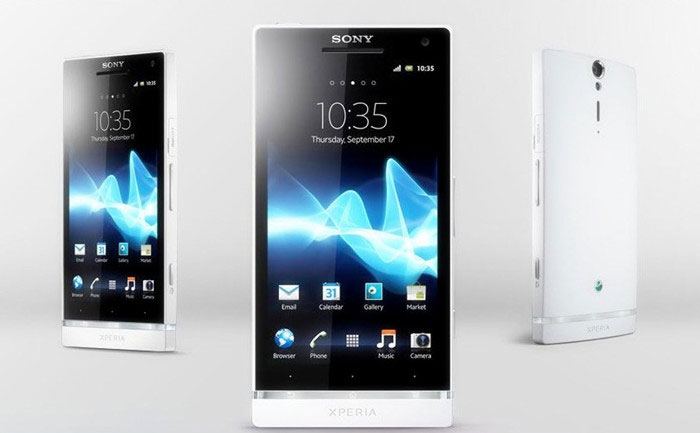
If you do like big screen and cool phone design, Sony Xperia S seems to be a right one for you. It is definitely a fashionable cell phone with special features. As for the video playback, Xperia S can provide high-quality video effect with big display and HD 1280*720 pixels. In some way, this phone is more like a video player with powerful capability. The video formats supported include MP4, 3GP, AVI, MPEG-4, etc. But, unfortunately there are still many other pop video formats that can't be directly played.
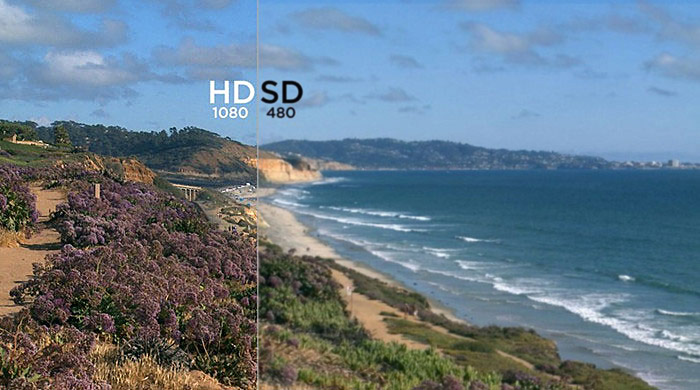
Meanwhile, if a video is MP4 file but doesn't match the video resolution or other parameters required by Xperia S, the video may also display in an abnormal way. So if you want to enjoy video on Xperia S without format limitations, you'd better get a Sony Xperia S Video Converter.
How to choose an Xperia S Video Converter is a difficult job for us because the related market is flooded with so called Xperia S Video Converters. Or you just search the target words on the Internet and will get hundreds of results. Here comes one question: how to find a professional one? Here I'd like to share some useful tips.
1. HD Standard. Playing the HD videos on Xperia S is the highlight, so the Xperia S video converter should support HD video conversion.
2. Supported formats and devices: The software should support all pop video formats and portable devices.
3. Fast Conversion Speed and Safety: The converter must help you convert video with fast speed and has no viruses and spyware.
4. Quality: The video to Xperia S Converter should ensure quality effect of videos.
5. Easy to use: You can easily navigate the converter.
6. Additional Features: It ought to have extra functions like video editing, trimming, cropping and DVD copying that enable users to enjoy more.
Based on the above requirements, I can show you two professional ways to convert video to Xperia S freely!
As Xperia S gets the 1280*720 pixels, why don’t we enjoy this feature as possible? HD Video Converter Factory Pro really does what it says, helping us convert SD video to HD video with excellent video audio quality! Of course the quality of the SD video can’t be too poor. The following are 3 simple steps. Keep reading.
Before adding videos, make sure you have downloaded this Xperia S converter.
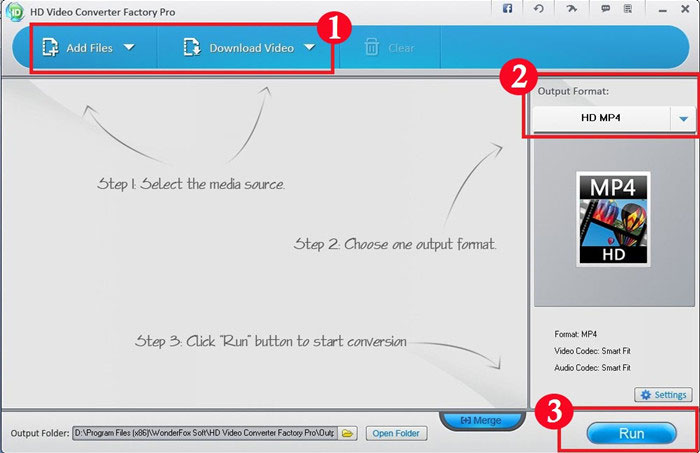
Step 1.Click “Add Files” to input the videos that you want to convert to your Xperia S. Or just download multiple videos simultaneously by hitting “Download Video”.
Step 2.Open the output dropdown list and then choose HD MP4 as output format.
Note: You can also choose a certain portable device. A wide range of devices supported like Apple devices including iPhone 5S, iPhone 5C, iPad mini, iPod Touch 4, Apple TV and more, Samsung GALAXY series, Captivate, HTC One, BlackBerry phones, PlayBook, Nokia, PS3, Zune, Xbox, etc.
Step 3.Click “Run”.
Tip: Converting a video from SD to HD means you scale up the video image to fill a HD format. Many video converters can do that, but the video quality will not change or become worse. So a good HD video converter that can push on maximum image quality and maximum bitrate allowed is needed.
If you are an Xperia user and love collecting DVDs, you should use the second solution. WonderFox DVD Video Converter is more than a toolbox, which can be used as a powerful video converter, a DVD ripper with the latest DVD encrypted technology like CSS, region code, RCE, Sony ArccOS, UOPs, Disney X-project DRM, a online video downloader (YouTube, Vimeo, Facebook, liveleak, metacafe, etc),a pretty cool video editor. It can smoothly convert video to Xperia S and let you watch video on Xperia S freely. Here is a step-by-step guide for all of you.
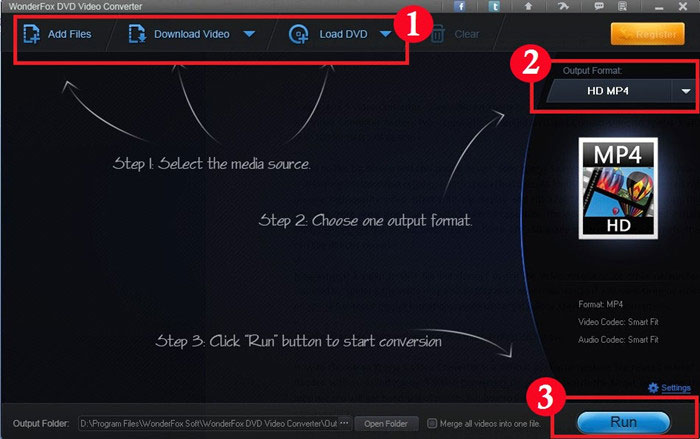
Step 1.Click “Add Files” to import the videos. Or insert DVD disc to your computer and click “Load DVD”. Or press “Download video” to get your favorite YouTube videos to your PC or Devices. Do as you want! (Download)
Step 2.Select “HD MP4”as output format. (You could also convert MKV to Xperia S, convert any virtually formats with this Sony phone video converter.)
Step 3.Hit “Run” to start the whole conversion process.
HD Video Converter Factory Pro is versatile video conversion software. It builds in 150+ video formats and converts nearly all popular videos including converting SD to HD. Learn more information from its online guide.
So, it cannot only help you solve how to convert MP4 to MKV, but also it can help you solve nearly all video conversion problems. For example, if you want to convert SD video to HD video, HD Video Converter Factory Pro will help you do it easily. And, if you want to convert videos from your Camcorders or DV like Sony HD camcorder, Cannon HD Camcorder or some other camcorders, this HD video converter will also help you convert them to your desire video formats without quality loss while in a high converting speed (Featured as Camcorder video converter), for example, it can help you convert MTS video, convert video taken from your DV (Featured as a DV file converter), etc. What's better, with its built-in 150+ video formats, you can convert virtually any video to a wide range of video formats, audio formats and popular digital devices with optimized presets.
WonderFox DVD Video Converter is a blazing-fast Xperia S video converter with powerful functions. One tool can meet all your demands. Learn more information from its online guide.
HD Video Converter Factory Pro unregistered version will put a watermark on processed video, please purchase license to remove this limitation. If you have any questions please contact order@videoconverterfactory.com
| The Limits of Free Trial | License benefits | |||
| The unregistered edition will limited to converting maximum 5 minutes. | 
Secure Download |
|

$29.95 (Save $10) |

Nokia Lumia 610 Video Converter
Nokia Lumia 710 Video Converter
Convert Video & DVD to Nokia C7
Nokia Lumia 800 Video Converter
BlackBerry 9300 Video Converter
BlackBerry 9780 Video Converter
BlackBerry 9790 Video Converter
DVD to Toshiba Thrive Converter
Galaxy Tab 7.7 Video Converter
Google Nexus S Video Converter
LG Optimus Pad Video Converter
Motorola DEFY+ video converter