


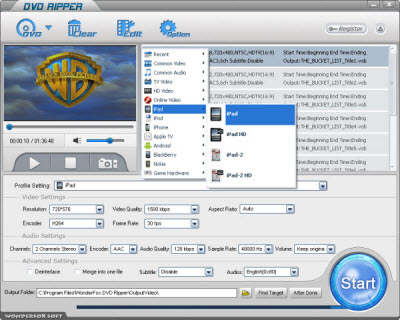
Have you ever imagined that watch HD movies in widescreen with stereo sound on your iPad 3? The easy to use software to rip HD DVD file to iPad 3 - WonderFox DVD Ripper gives you 400% faster conversions and takes all DVDs, including copyprotected. Unlike other more expensive products, which refuses to take protected HD DVDs, this product takes HD DVDs. In an review, this software was picked as the best iPad 3 DVD Ripper, calling it "slick, simple, and fairly cheap". From the above part, we see we that only 3 clicks convert HD DVD to a high quality compressed file, which will play on the iPad 3's built-in video player. Enjoy movies with an amazingly crisp picture and stereo CD-quality sound. In 50% of the whole movie times you can put a feature film on your iPad 3 and watch it on the gorgeous widescreen LCD of the iPad 3. So wherever you go, you can watch HD DVD on iPad 3.
Since we know WonderFox DVD Ripper is a suitable HD DVD to iPad 3 converter, now we should know the detail steps on using this iPad 3 DVD Ripper. With only three clicks, we can enjoy movies on iPad 3.
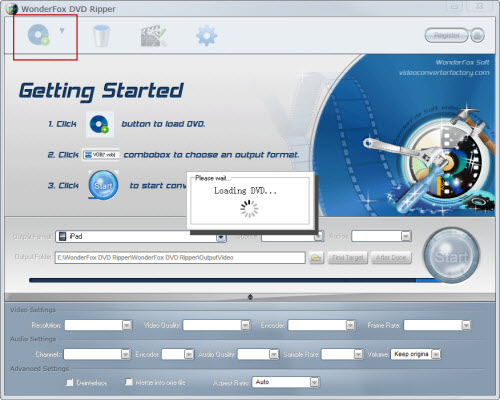
Step 1: Load DVDs
Click "Load" button, you can load DVDs from DVD Rom/Folder(data DVD)/IFO/ISO files respectively.
Step 2: Select the output formats
You can select iPad 3 format from the categorized output format list in "Profile" drop-down list and specify the output directory to save your converted files in "Output" drop-down list. MP4 format is also OK

Step 3: Start to convert
Click "Start" button, and all the tasks will be done quickly.
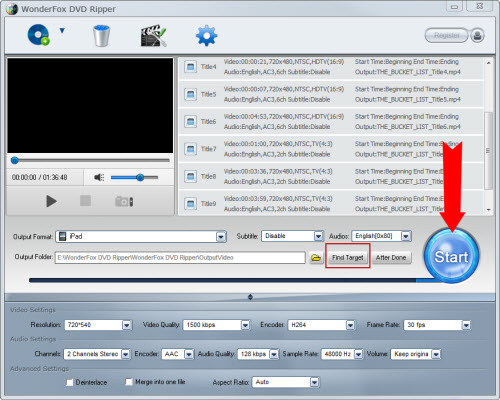
OK, it has finished its work, and now you can watch HD DVD on ipad 3, through cable and you can watch DVD movies freely to keep you from getting bored on a long flight or enjoy more fun.
After we figure out how to convert HD DVD to iPad 3, more details of WonderFox DVD Ripper is the last thing we should know. There are some factors that we will fin when we use it. Besides good converting quality and fast converting speed, it also has following features:
1. it has rich parameter settings, with this feature, you can define your video by setting the parameters to get more suitable videos for your iPad 3;
2. Over 150 kinds of output formats and devices are well-compatible with. So owning WonderFox DVD Ripper means that you also own a good DVD Ripper for AVI, MKV, MP4, FLV, 3GP, iPhone, iPod, Nokia Phone, BlackBerry Phone, Android Phone, etc
3. Powerful editing function. Trim, cut, merge and adding special effects to move are included by this ripper.
Well, although we cannot watch HD DVD on iPad 3 directly, this iPad 3 DVD Ripper can help us enjoy HD movie on iPad 3 as we like.
In conclusion, the WonderFox DVD Ripper is really a good choice for us to rip/convert DVD to iPad 3. With the DVD to iPad 3 ripper, we can easily make a backup on iPad. By the way, the DVD ripper runs well on Windows, so, we can easily convert DVD to PC, convert DVD to Hadr Drive, copy DVD to tablet, convert DVD to cell phone with it. Furthermore, the software also allow us to convert DVD to AVI, convert DVD to MKV, convert DVD to WMV, convert DVD movies to MP4, rip DVD files to audio; and besides, rip DVD to file to iPhone, convert DVD to Nokia video type, convert DVD to BlackBerry video formats and convert DVD to Android devices are also available for us.




