


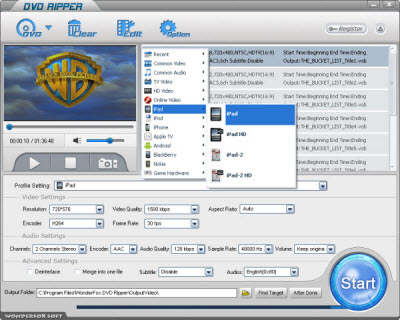
What can you gain from the DVD to iPad conversion process? Let me help you figure out. iPad 3 is a newly-published tablet computer with powerful functions. As for its definition, it can offer a resolution of 2048*1536 pixels, which will make the video playback of iPad 3 a great enjoyment. Except for the downloaded videos, DVD video is really popular for its excellent video effect. iPad 3 is a nice video playing device, but not a DVD player. Users can not play DVD directly without a CD-drive on iPad 3. Here is the main focus, DVD to iPad 3 conversion can make you free from this limitation. You can enjoy DVD videos on your iPad 3 after the conversion process. As for this problem, a DVD to iPad 3 converter can help you a lot.
There are many DVD to iPad converters on the Internet, you do need know some useful tips on how to choose a great DVD converter for iPad 3. The features go as follows:
1. High-quality output video effect.
2. Fast speed and safe conversion process without viruses or spywares.
3. Easy-to-use handling process.
4. Provide the capability for you to set the resolution of the output video and many other options.
5. Extra function to meet users more demands, such as video editing, adding special effect and preview of videos.
A great DVD converter can finish the DVD to iPad 3 conversion process fast and easily with more extra functions.
As for the features of a great DVD to iPad 3 converter, I recommend WonderFox DVD Ripper to you. Here are the handy steps:
Download WonderFox DVD Ripper and install it.
Step1. Load DVD disk first after running the software.
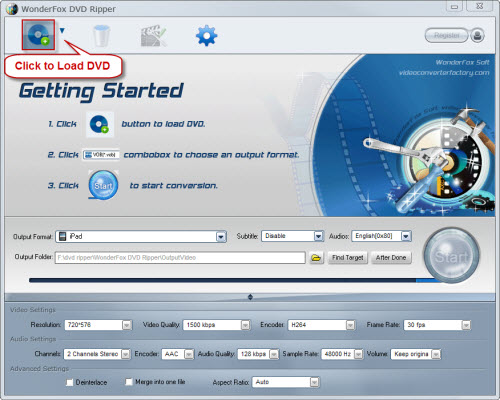
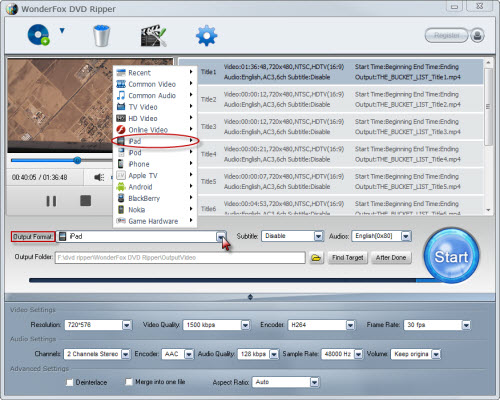
Step2. Choose iPad 3 as the output video device.
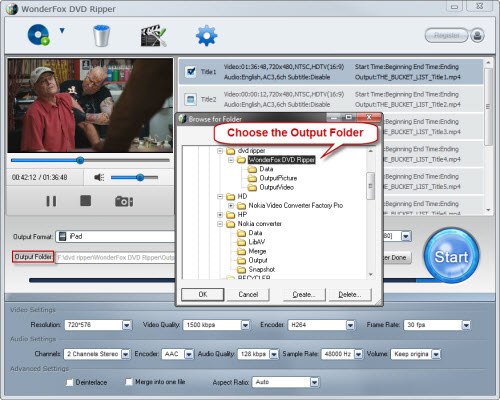
Step3. Select the output folder like you want. (optional)
Step4. Click "Start" to launch the whole converting process.
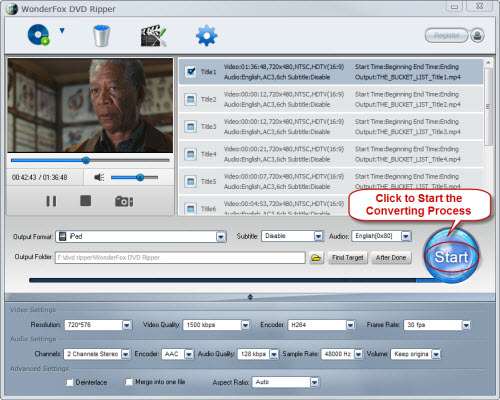
Step5, Get the output video for iPad 3 and put it into your iPad 3.
After the DVD to iPad 3 conversion, you can enjoy DVD videos on your iPad 3 freely and enjoyably. Just have a try!
In conclusion, the WonderFox DVD Ripper is really a good choice for us to rip/convert DVD to iPad 3. With the DVD to iPad 3 ripper, we can easily make a backup on iPad. By the way, the DVD ripper runs well on Windows, so, we can easily convert DVD to PC, convert DVD to Hadr Drive, copy DVD to tablet, convert DVD to cell phone with it. Furthermore, the software also allow us to convert DVD to AVI, convert DVD to MKV, convert DVD to WMV, convert DVD movies to MP4, rip DVD files to audio; and besides, rip DVD to file to iPhone, convert DVD to Nokia video type, convert DVD to BlackBerry video formats and convert DVD to Android devices are also available for us.




