Free Download
YouTube to ringtone creator – Make your own ringtones with ease.
 Recommended by the authorRecommended by the author
Fed up with the default ringtone on your phone? You can make a short and personal ringtone from a YouTube clip, a downloaded song, a royalty-free track, or your own audio file. This guide shows an easy Windows-based way to download, trim, and convert audio to a ringtone for Android or iPhone.
You're recommended to install the YouTube ringtone maker and get started:
https://www.videoconverterfactory.com/download/hd-video-converter-pro.exe
Convert YouTube Video/Music to Your Ringtone
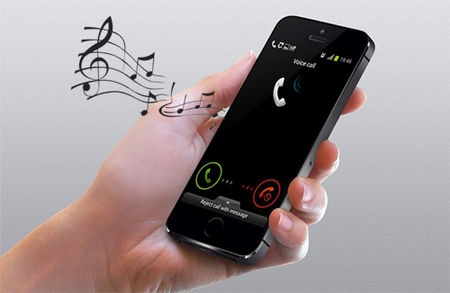
Default ringtones get old quickly. A short chorus, instrumental hook, podcast intro, game sound, or a clip from your own video can make your phone feel more personal.
However, making a ringtone can still feel confusing for beginners because Android and iPhone use different ringtone formats and transfer methods. The good news is that you do not have to buy a ready-made tone. As long as you use audio you own, have permission to use, or can legally download, you can cut the best part and make it a ringtone yourself.
In the tutorial below, we use WonderFox HD Video Converter Factory Pro to download a video or song from YouTube, trim the audio, and export it as an Android ringtone or iPhone ringtone. The same workflow also works for local music files, recordings, and songs downloaded from other supported websites.
YouTube is a common place to find music and sound clips, but it is not the only option. If a song is available for download from a legal source, such as Free Music Archive, Jamendo, Pixabay, Bandcamp, SoundCloud, or the artist's own page, you can save it first and then make it a ringtone. If you already have a song on your PC, simply skip the downloading part and go straight to trimming and conversion.
For better compatibility, keep the ringtone short. Around 20 to 30 seconds is usually enough for calls, messages, and alarms. Android commonly accepts MP3 and other audio files as ringtones, while iPhone custom ringtones are usually saved as M4R.
M4R is the file type commonly used for custom iPhone ringtones. M4R and M4A can both contain AAC audio, but simply renaming an .m4a file to .m4r is not a real conversion and may fail when the source encoding or container is not suitable. For a more reliable result, use the iPhone Ringtone preset in Converter or select iOS in Ringtone Studio so the program creates the ringtone in the proper format.
Also note that Apple's current GarageBand instructions limit a custom ringtone to 30 seconds. GarageBand can shorten a longer clip during export, but trimming it to 30 seconds or less beforehand gives you better control over the exact section. Protected Apple Music subscription tracks cannot be used as ringtone sources in GarageBand; use an unprotected audio file that you own, have permission to use, or can legally download.
To get started, a user-friendly YouTube ringtone converter is needed. WonderFox HD Video Converter Factory Pro is a practical solution that combines a YouTube downloader, HD video & audio converter, audio trimmer, and ringtone maker. With it, you can create one ringtone or batch process multiple songs without switching between several tools.
If you only need a basic free workflow, WonderFox Free HD Video Converter Factory can also help download a supported song link, trim the audio, and export it with ringtone presets. This tutorial uses the Pro version because it is more convenient for batch processing and Ringtone Studio.
Download and install this YouTube ringtone downloader on your Windows-based computer, then follow the simple steps below to download a song from YouTube and make it a phone ringtone. If your song is already saved on your PC, you can directly add it to the Converter module in Step 2.
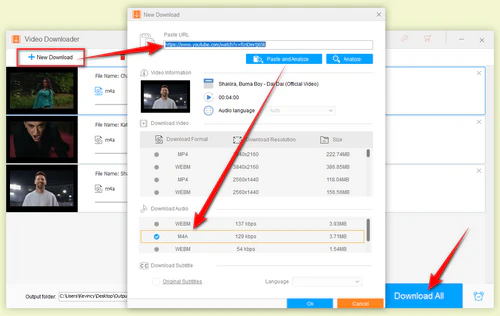
Open this YouTube to ringtone converter, go to "Downloader" and click "+ New Download" button. Copy and paste your preferred YouTube video URL, then press "Analyze" button. After a short-time process, the YouTube URL will be analyzed and it will list the available resolution, format, and size options.
If an audio-only option is available, choose it to save time and avoid downloading unnecessary video data. Click "Ok" and then hit "Download All". You can add more links to the list for YouTube bulk downloads.
Download YouTube Video/Music
Tips: This step also works for many supported video and music sites. Please download only content that you own, have permission to use, or is offered for legal download.
Close the Downloader and open the Converter module from the main interface. Then click "Add Files" to add the audio or video files you downloaded.
To keep the desired part for your ringtone, click the scissors icon below the file to cut audio and keep the highlight you want, such as the chorus or intro. A 20-to-30-second clip is a safe choice for most phones.
Repeat the process for each file if there are several files in the list.
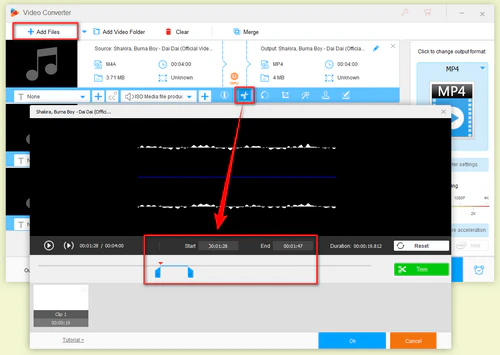
Select the Highlight for the Ringtone
Open the Output Format list on the right and select iPhone Ringtone profile or Android Ringtone profile under the Audio tab. No need to care about complicated settings, just click on your desired profile.
Optional: If needed, open "Parameter settings" to change audio bitrate, encoder, audio channel, sample rate, and increase audio volume.
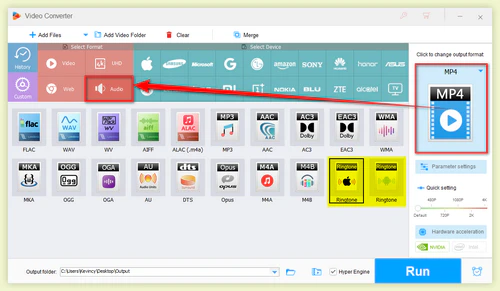
Choose a Ringtone Format
Set your output folder and hit "Run" button to create ringtone from YouTube.
When the conversion is finished, transfer the ringtone to your phone. For Android, copy the file to the Ringtones folder or select it from your phone's sound settings. For iPhone, a current Apple-supported route is to make the audio available in the Files app or iCloud Drive, open it in GarageBand, and export it as a ringtone. In GarageBand, tap Share > Ringtone > Export, then choose Use sound as; you can also select it later under Settings > Sounds & Haptics > Ringtone.
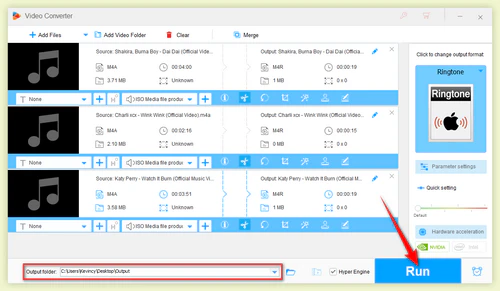
Batch Convert YouTube to Ringtones
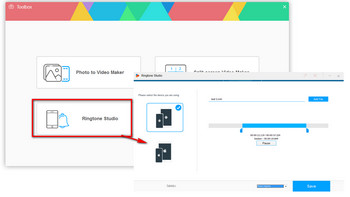
Make Unique Ringtone with Ringtone Studio
You can also create an M4R ringtone for iPhone or an Android ringtone directly with the built-in Ringtone Studio. This method is more direct if you only need to cut one ringtone and do not need batch conversion.
1. Select Toolbox on the main window, then open Ringtone Studio.
2. Select the device (iOS or Android) you're using.
3. Import the downloaded YouTube video, a local song, your own recording, or a legally downloaded track, then cut your needed section. For iPhone, keep the selected part at 30 seconds or less.
4. Choose Phone ringtone or SMS ringtone and save the file. When iOS is selected, Ringtone Studio creates an iPhone-compatible M4R ringtone.
This is the whole process for converting YouTube to Ringtone for Android & iPhone. The same steps can also help you make a song your ringtone after you download it from a supported music site or import it from your local collection.
Download WonderFox HD Video Converter Factory Pro to make your favorite ringtone now!
Yes. Some music apps and websites provide a built-in download option, and some royalty-free music sites let you download tracks directly in the browser. After that, you can use a phone ringtone editor or audio trimmer to cut a short clip. On Android, you can usually set the trimmed audio from Settings or a file manager. On iPhone, Apple officially supports using GarageBand to import an audio file stored on the device or in iCloud and export it as a ringtone. A song from the Apple Music library must be downloaded and unprotected; protected subscription tracks cannot be used for this purpose.
That said, phone-based workflows are not always smooth. Downloaded files may be stored inside an app, the audio may be too long, or the final format may not be accepted by the phone. If you want more control over trimming, format, bitrate, volume, and batch processing, making the ringtone on a computer first is usually easier.
I know some of you always give priority to converting YouTube video/music to ringtone with the help of certain online YouTube ringtone makers for convenience. Admittedly, an online video converting service can be quick for a small local file. But online tools may have file size limits, slow uploads, unstable conversion, ads, privacy concerns, and limited iPhone M4R support. Some sites also fail to analyze online video links.
For occasional local audio trimming, an online ringtone maker may be enough. For YouTube links, long songs, multiple files, or iPhone M4R output, the desktop workflow above is more reliable.
Q1. What format should I use for Android and iPhone ringtones?
For Android, MP3 is the most common choice and works well on most devices. For iPhone, use M4R. If your phone rejects the file, shorten the audio and try exporting again with the device ringtone profile.
Q2. How long should a ringtone be?
Keep it short. For iPhone, Apple's current GarageBand workflow supports custom ringtones up to 30 seconds. Android limits vary by device, but a 20-to-30-second clip is usually practical and easy to manage.
Q3. Can I use a full song as a ringtone?
On some Android phones, a longer audio file may work, but a short clip is more practical. For iPhone, GarageBand exports custom ringtones at up to 30 seconds, so trim the part you actually want to hear.
Q4. Can I make a ringtone from a downloaded song instead of YouTube?
Yes. Add the song to the Converter or Ringtone Studio, cut the part you like, and export it as Android or iPhone ringtone format. The source can be a local song, recording, or legally downloaded track.
Q5. Is it legal to download YouTube music for a ringtone?
Only use content you own, have permission to use, or that is made available for download under the applicable terms and laws. Rules can vary by source and jurisdiction, so check the source terms before downloading or reusing music.
So here is the whole tutorial of how to turn a YouTube video or downloaded song into a ringtone. I hope it helps you make a cleaner, shorter, and more personal ringtone for your phone.
Disclaimer: Download and use only content that you own, have permission to use, or that is made available for download under the applicable terms and laws. WonderFox does not approve of copyright infringement. End users are responsible for how they obtain and use media.

Kevincy joined the WonderFox team in 2014 and has been a senior columnist ever since. With over two decades of experience in the video editing industry, he shares tutorials, tips, and how-to guides on video/audio processing and personal DVD backups. Family-oriented and passionate about helping others, he is dedicated to making video and audio processing easier for readers.


More Special Features on HD Video Converter Factory Pro
Product line: DVD Software | Video Software | Watermark Software | GIF software | Office Software
Featured product: Free DVD Ripper | Free Video Converter | Video Converter | Free HD Video ConverterService: Submit A Ticket | Retrieve Key | Order support | Product Support | Money Back Guarantee | 24 Hours Service
Terms of use: Refund Policy | License Policy | FAQ

About | Company | Contact | Affiliate | Privacy
Copyright © 2009-2026 WonderFox Soft, Inc. All Rights Reserved.