Try to open a TRP file but to no avail? This guide explains what TRP is, why it may fail to open in common players or editors, and how to convert TRP to MP4, MKV, AVI, TS, and other usable formats without complicated steps.
You're recommended to download this functional video processor and get ready.
A TRP file is a high-definition video transport stream file often created by DVB, free-to-air, satellite, and set-top box recording devices. It is related to the MPEG transport stream family, but it is better to understand TRP as a container rather than a single video codec. Depending on the recorder and broadcast source, a .trp file may contain H.264, MPEG-2, AC3, MP2, AAC, subtitles, or even multiple streams.
Because of this broadcast-oriented structure, TRP is not as widely accepted as MP4, MOV, AVI, or MKV. Some users try to open .trp files by renaming the extension to .mpg, .ts, or .mp4, but this usually does not work because renaming does not change the actual container structure or codecs inside the file.
Therefore, it is more practical to convert TRP files to a more compatible format. This gives you two main benefits:
#1. Your videos can be played, edited, and shared across common media players, devices, and editing software without format errors.
#2. The converted videos can better meet the upload/post requirements of YouTube, social media sites, cloud drives, and mobile devices.
That's why a real TRP video converter is more reliable than simple file renaming.
When choosing an effective and qualified tool, consider the following criteria:
a. It should be intuitive and easy to navigate for users of all experience levels.
b. It should handle a wide range of input and output formats to accommodate various conversion needs.
c. It should offer fast, stable conversions without compromising quality, ideally with features like GPU acceleration.
d. It should be better if it has additional features for editing, batch processing, and parameter customization.
Take all aspects above into account, WonderFox HD Video Converter Factory Pro is a robust Windows TRP converter. It can import TRP files and convert them to MP4, MKV, AVI, MOV, TS, and many other common formats. Additionally, it offers multiple features to tailor the output to your needs.
For example, you can import several TRP recordings at once, choose a format or device preset, adjust video/audio parameters, and trim, crop, rotate, merge, compress, or add subtitles before conversion. This is especially helpful when your TRP files come from a recorder and need to be cleaned up before playback or sharing.
Wanna convert TRP to MP4, MKV, AVI, TS, or other popular formats for editing, sharing, and smooth playback on Windows? WonderFox HD Video Converter Factory Pro is a practical TRP file converter for you! Learn more >
Download and install it on your Windows-based computer, run it and open "Converter" module.
Click the "Add Files" button or drag your TRP video into this interface. If you have multiple TV recordings, you can add them all and convert TRP files in batches.
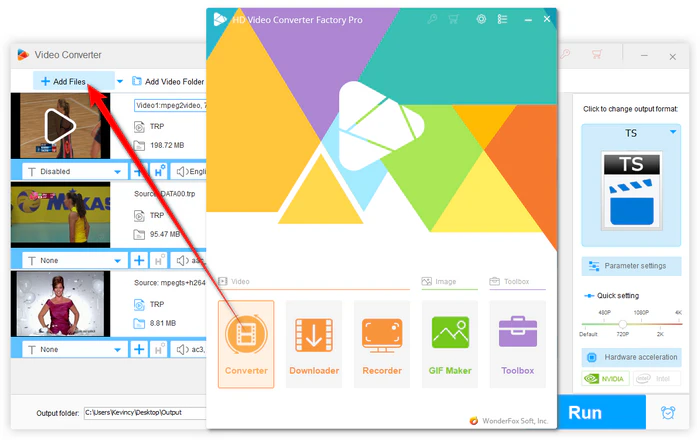
Import TRP Files into TRP Converter
Open the Output Format list of 500+ configured presets on the right side. To convert TRP to MP4 for better compatibility, go to the "Video" category and choose the "MP4" profile directly.
You can also choose MKV, AVI, MOV, TS, or a device-friendly preset based on your needs. For most users, MP4 is recommended. For users who still need a transport-stream file for a specific device or workflow, TS is available in the same format list.
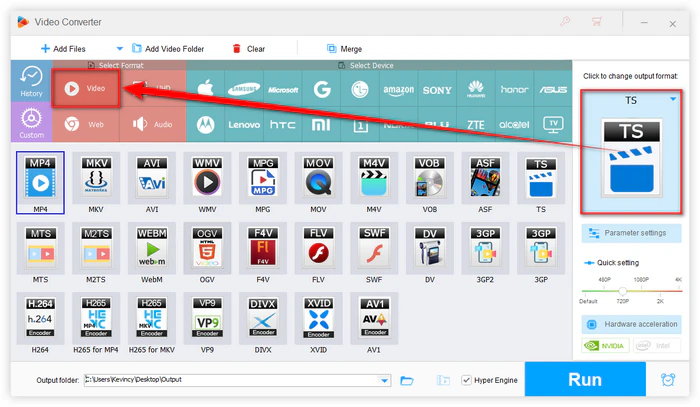
Select an Output Format for TRP Files
Optional - Advanced users can click "Parameter settings" to adjust the preferences like video encoder, resolution, aspect ratio, bitrate, frame rate, audio codec, channel, sample rate, and volume.
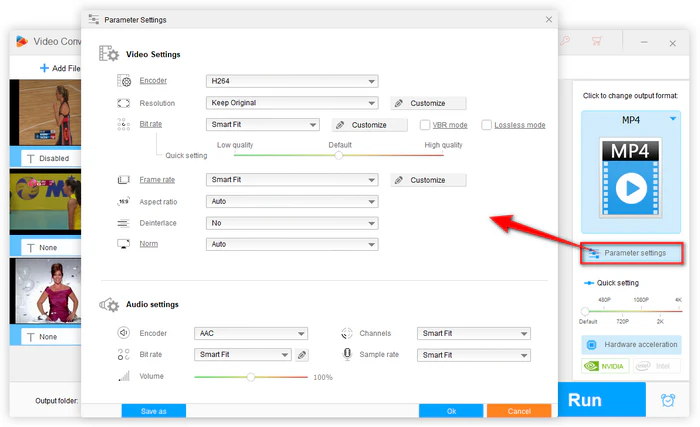
Adjust Video Parameters
When everything is set, specify an output folder path and hit the "Run" button to batch convert TRP files with GPU acceleration.
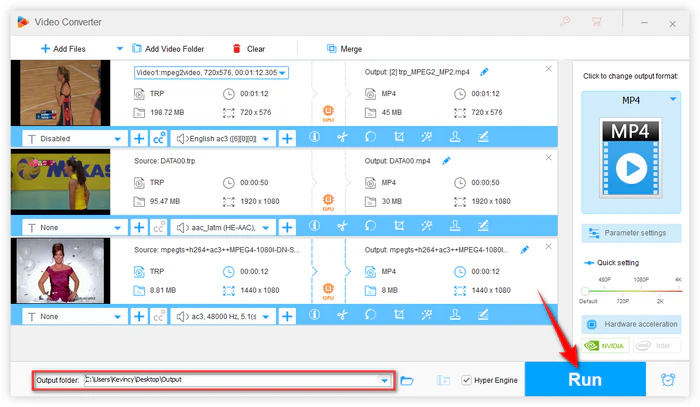
Start TRP Conversion
Before conversion, you can still use the built-in tools to make the TRP recording easier to watch or share:
1. Trim off unwanted parts from a TV recording.
2. Merge several TRP clips into one file before output.
3. Compress large HD recordings or adjust resolution, bitrate, frame rate, encoder, and audio settings.
Besides video conversion, the program also allows you to convert HD/FHD/2K/4K/8K videos, download videos from 1000+ popular sites, record live streams and screen activities, and make quick edits on Windows.
Not every TRP file can be converted successfully. Some recordings made by free-to-air or satellite receivers may be encrypted or locked to the original recorder. If a TRP file only plays on the device that created it, or only opens in the manufacturer's own player, a regular video converter may not be able to decode it.
In that case, first check whether the file can be played normally. You can try VLC or the recorder's official software to verify the file. If the file is corrupted, incomplete, or protected by the recording device, conversion will likely fail no matter which output format you choose.
Q1: Can I convert TRP by changing the file extension?
No. Renaming .trp to .mp4, .ts, or .mpg only changes the file name, not the actual video container or codecs. It may work in rare cases when a player already recognizes the stream, but it is not a real conversion and is not reliable.
Q2: Should I convert TRP to MP4 or TS?
For everyday playback, editing, uploading, and sharing, MP4 is usually the better choice. TS is more suitable when you need to keep a transport-stream structure for a TV, set-top box, or broadcast-related use.
Q3: Can VLC convert TRP files?
VLC can sometimes open and convert TRP files, especially when the file uses common video/audio streams. However, VLC's conversion profiles and batch workflow are limited, so it may not be the best option for beginners or large batches of recordings.
Q4: Why does my converted video have no sound?
TRP recordings may contain audio streams that some players do not decode well, such as AC3 or MP2. Try converting the file to MP4 with AAC audio, or open "Parameter settings" and manually select a more compatible audio codec before conversion.
Q5: Why can't my TRP recording be converted?
The file may be encrypted by the recording device, damaged during copying, or incomplete because the recording was interrupted. If the source TRP file cannot be played normally, conversion usually cannot repair it.
While TRP files serve niche recording and broadcast-related purposes, converting them to a more flexible format like MP4, MKV, AVI, or TS can make your videos easier to play, edit, upload, and store. WonderFox HD Video Converter Factory Pro combines efficiency, ease of use, batch conversion, hardware acceleration, and useful editing options, making it a practical choice for handling TRP files on Windows.


Easily convert TRP to MP4, AVI, MKV, TS, and more on Windows. 500+ presets are available for one-click fast conversion.





Kevincy joined the WonderFox team in 2014 and has been a senior columnist ever since. With over two decades of experience in the video editing industry, he shares tutorials, tips, and how-to guides on video/audio processing and personal DVD backups. Family-oriented and passionate about helping others, he is dedicated to making video and audio processing easier for readers.


Product line: DVD Software | Video Software | Watermark Software | GIF software | Office Software
Featured product: Free DVD Ripper | Free Video Converter | Video Converter | Free HD Video ConverterService: Submit A Ticket | Retrieve Key | Order support | Product Support | Money Back Guarantee | 24 Hours Service
Terms of use: Refund Policy | License Policy | FAQ

Store | Download | About | Contact | Support | Privacy
Copyright © 2009-2026 WonderFox Soft, Inc. All Rights Reserved.