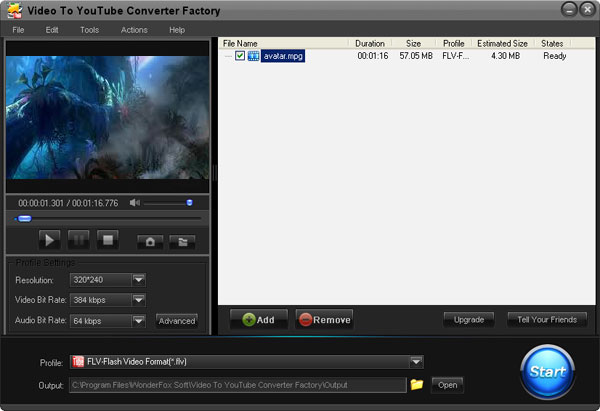
YouTube is a video-sharing website on which users can upload, share, and view videos. YouTube is very popular in the world, there are many YouTube fans in the world, if you are full of talent but nobody knows you or you have some interesting videos but do not have the right format, Free Video to YouTube Converter Factory can help you deliver your videos to YouTube or other pop websites to share your experiences. The free video to YouTube converter is easy, fast, reliable, safe, and loaded with features. This Free Video Converter is an all-in-one best video converter for you. It's capable of converting videos of all pop formats like FLV, SWF, AVI, MPEG, WMV, 3GP, MP4, etc . It also can convert all pop formats of audio like MP3, WMA, WAV, etc. So it is the right video converter for you to help you convert the original format to the format that is fit for YouTube like FLV.
 WonderFox DVD Ripper

 DVD Ripper + HD Video Converter Pack
| Supported Input Files: All popular videos and audios that you want, such as MKV, MP4, AVI, 3GP, FLV, WMV, DV, AAC, MP3, WMA, WAV, MKA, OGG, etc. |
 |
 |
| Supported Output Formats: AVI, VOB, ASF, MOV, M4V, MPG, MP4, WMV, MKV, FLV, HD formats, HD AVI, HD MP4, HD MOV, HD MPG, HD VOB, HD WMV, etc. |
|
|
| Supported Output Devices: iPad, iPhone, iPod, Apple TV, PSP, Xbox, BlackBerry, Nokia, HTC, Samsung, Android devices, Windows Phones, Tablets, etc. |
|
|
| Excellent Output Quality: Help you convert videos/audios with excellent video quality |
|
|
| Easy to Use Interface: Three steps to convert any videos and audios |
|
|
| Fast Converting Speed: Support Hyper-Threading technology, help you convert videos and audios in a high speed. |
|
|
| Support Batch Conversion: Help you convert multiple video or audio files in a time. |
|
|
| Cut Video Clip: Split a large file to several ones or separate segments. |
|
|
| Crop Video: Reset the video resolution by cropping off black bars. |
|
|
| Add Effects to Videos: Set video brightness, mosaic, blur and others special effects. |
|
|
| Technique Support: Free lifetime technical support within 24 hours. |
|
|
| Lifetime Update: Enjoy the software update for lifetime with one single payment. |
|
|
| Once you complete the online order, you will receive your license code immediately. 30 days unconditional money-back guarantee. | |
Snapshot
 Capture pictures from the video and save it as picture.
Subtitle
 Converting and keep original subtitle of the target video.
Effect
 Set video brightness, mosaic, blur and others special effects.
Automatic shutdown
 After done, it able to shut down or restart with automatically.
Automatic updates
 Automatically check updates to ensure the latest version. Free lifetime upgrade for every user.
 Free Email Service
 Free lifetime technical support within 24 hours.

Thanks for your great software to help me so that I can share my videos online. "
- Comment by Maggie