
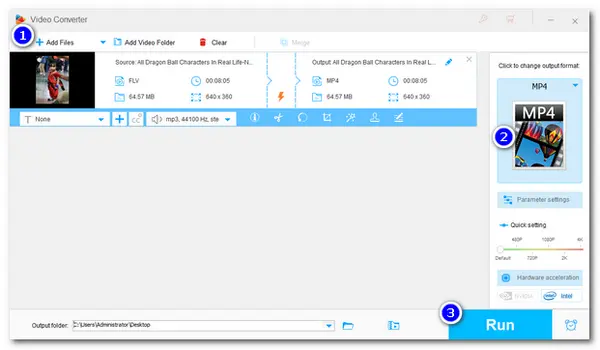


FLV video has long been used to transmit digital video content over the Internet. It has been used for many years on many video distribution sites due to its small file size and fast loading speed. However, with Flash Player support ending at the end of 2020, FLV is gradually being replaced by the HTML5 format. Therefore, converting FLV to MP4 is a good option if you want to smoothly play or upload flash videos. Here I will show you how to convert FLV files to MP4 with an excellent FLV MP4 converter. Just download it here and follow the steps below:
https://www.videoconverterfactory.com/download/hd-video-converter-pro.exehttps://www.videoconverterfactory.com/download/hd-video-converter-pro.exe
“How do I convert an FLV file to MP4?”
Guess you don't want to be bothered by the complicated conversion steps, so give this product—WonderFox HD Video Converter Factory Pro a try. It is an all-in-one FLV to MP4 converter for Windows, which only takes three steps to convert flash video to MP4. If you have multiple files to be converted, this FLV video converter allows you to convert multiple FLV videos to MP4 in batch mode to save your time and energy. More than that, you can also take it as a Windows video editor to edit FLV and MP4 videos with ease. Now, free download this software and follow the guide below to change .flv to .mp4.
HD Video Converter Factory Pro can effortlessly accomplish multiple FLV to MP4 conversions in a breeze with the support for hardware acceleration and batch conversion. You can also use it to compress the file size with high-quality preserved. Download this beginner-friendly converter now!
 Download for Free
Download for Free
Download for Free
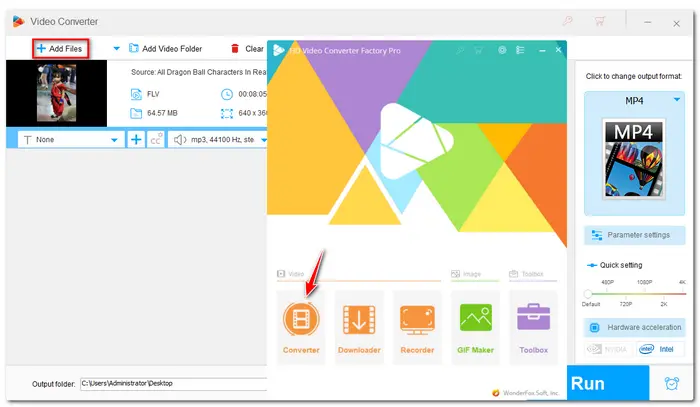
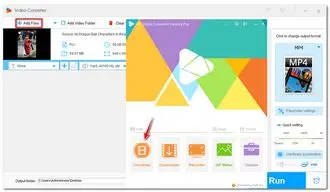
Launch WonderFox HD Video Converter Factory Pro and open the “Converter”. Click “+Add Files” or “+” button to import your FLV videos or drag the target files from your PC and drop them into the interface.
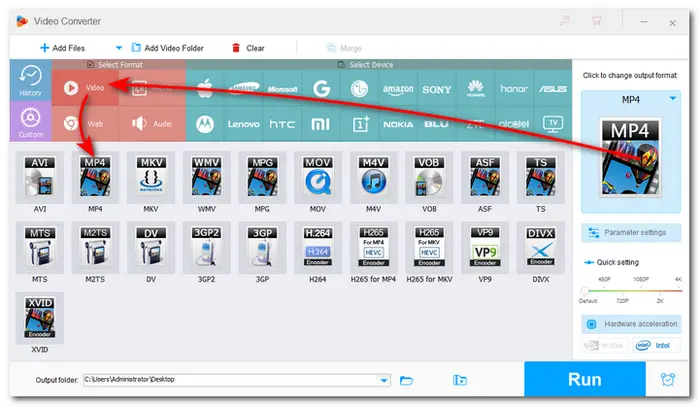
Hit the big format icon on the right side of the interface to open the output format list. Go to the “Video” format and choose “MP4” to convert FLV file to MP4. In addition, you can also choose other formats or devices from the list if needed.
Tips: The provided Parameter settings can allow you to change video resolution, bitrate, audio volume, and other settings for better viewing experience.
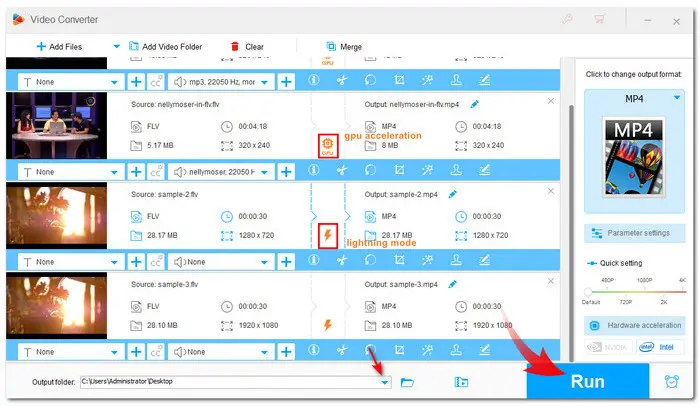
Before starting conversion, you can use the video editing tools provided in the toolbar below each video task to edit videos with ease. Then press the triangle button at the bottom of the interface to choose your output folder. When all settings are OK, click the big “Run” button and then start conversion with high speed and high quality at once.
If you want a free program with a simple process to convert FLV files to MP4, you can also give the free version of HD Pro - [Free HD Video Converter Factory] a shot. It can also convert FLV videos to 500+ profiles, including MP4, within 3 steps. Other basic video editing, downloading, compressing features also provided as well. 100% free, no file size/lengt limit, and watermark-free! But without the batch conversion mode and hardware acceleration, the conversion speed may be slower than that of the Pro version.
WonderFox HD Video Converter Factory Pro
Download for Free
Download for Free
Besides the provided video converter program, you can also try online video converters. However, most online converters restrict file sizes and conversions. Some also contain annoying ads. Anyway, the desktop video converting program may always be the best choice for video conversion. That’s all I want to share with you about FLV to MP4 conversion. Hope it can be helpful to you. Thanks for your reading.

Terms and Conditions | Privacy Policy | License Agreement | Copyright © 2009-2024 WonderFox Soft, Inc.All Rights Reserved


 Buy Now
 Buy Now