

WonderFox HD Video Converter Factory Pro
Batch Convert MTS to/from Video in 3 Steps


In this article, you’ll learn how to convert MTS files to or from videos in other formats using 3 great video transcoding tools, both desktop software and online services included. Let’s get started now!
With wide format and codec support, WonderFox HD Video Converter Factory Pro enables you to import virtually all video formats and convert them to MTS. Similarly, you can convert MTS to MOV, MP4, AVI, LG TV, XBOX, YouTube, and 500+ presets with optimized settings. Besides, this batch video converter allows you to edit and compress videos as well as adjust resolution, fps, bitrate, aspect ratio, and more. Download the robust converter and then follow the steps below:
 Download for Free
Download for Free
Download for Free
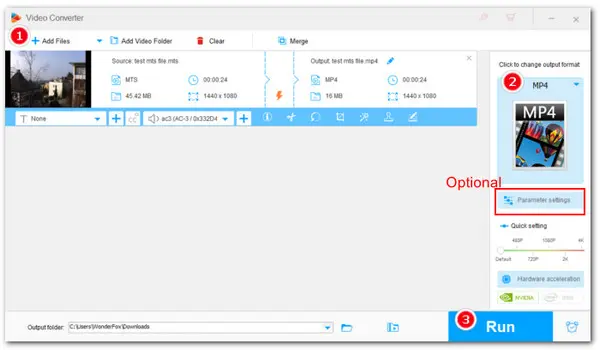
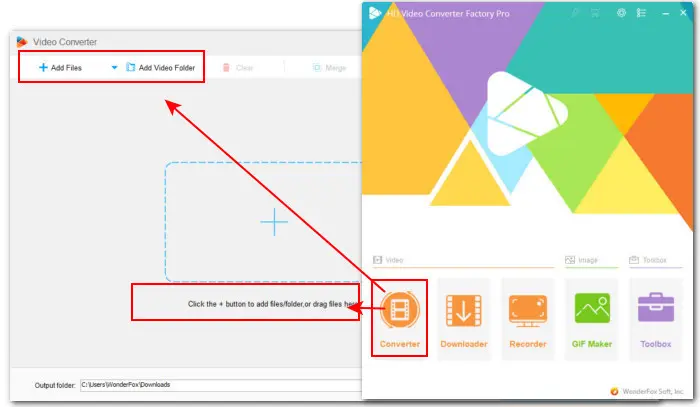
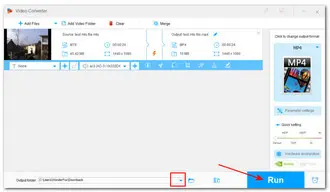
Step 1. Launch HD Video Converter Factory Pro and enter Converter. Click the above Add Files or Add Video Folder to import your videos. Also, you can simply drag and drop them into the program.
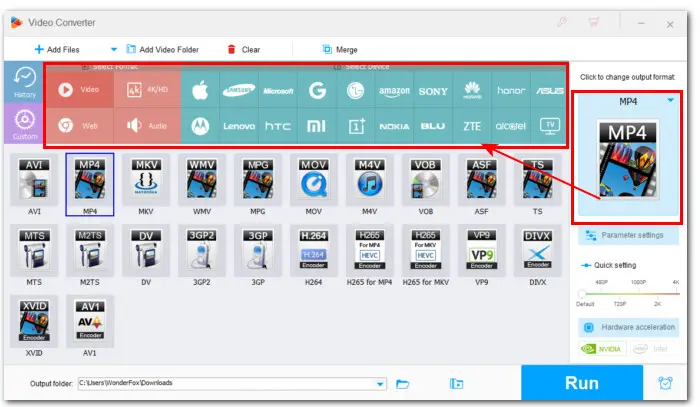
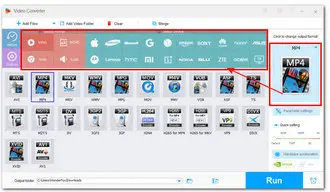
Step 2. Click the right-side format image to open the format library. Then you can select MTS from the Video category or any desired format, platform, or device profile from the listed 5 categories.
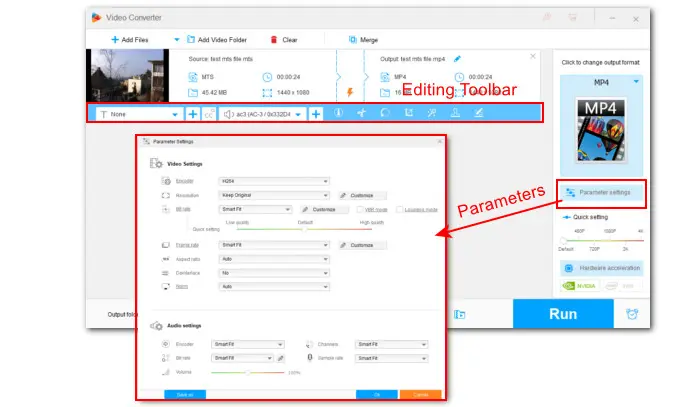
Optional step: For those who have specific requirements on encoding settings, they can enter Parameter setting to modify encoder, resolution, bitrate, fps, sample rate, audio channel, etc.
You can also use the editing toolbar to trim/crop/rotate/watermark/add effects/attach subs, and do more.
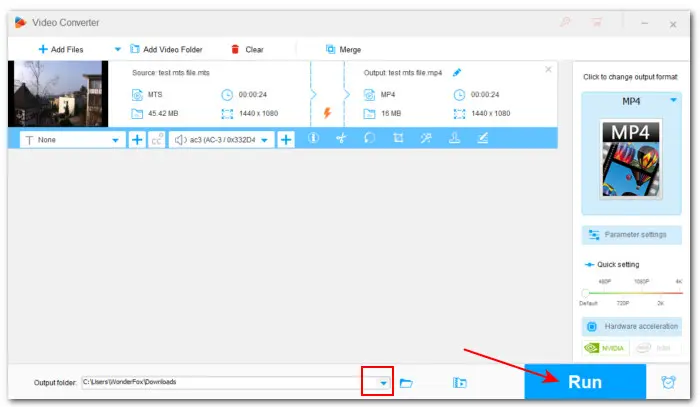
Step 3. Hit the bottom triangle button to choose a new output folder. Finally, click Run to start converting MTS videos to other formats and vice versa.
Handbrake is a famous open-source video transcoding program and can run on various operating systems including Windows, Mac, and Linux. Though it is free, it comes with a wide range of output presets for popular devices and platforms. Besides, this transcoder features a strong ability to decode MTS or other digital video files in bulk and then encode them to MP4, MKV, or WebM with needed codecs. Check how to convert MTS files using Handbrake:
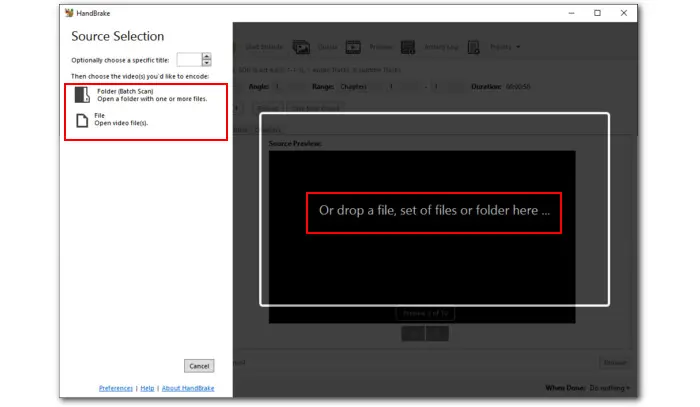
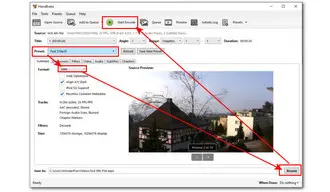
Step 1. Launch HandBrake. Then click Folder or File to add the MTS files you want to convert. Drag-and-drop is supported.
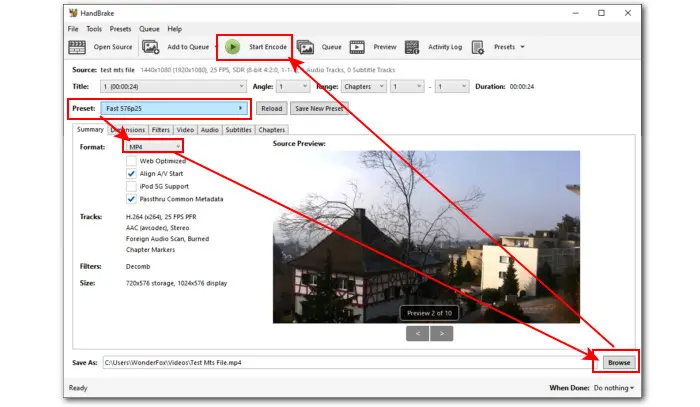
Step 2. After importing, click on the Preset to expand the drop-down menu and choose you can choose a desired option.
Step 3. Hit the Summary tab and select MP4 from the Format drop-down list. Switch to other tabs to edit the video or modify settings if needed.
Step 4. Press Browse to choose a new output folder for the exported files and rename the file with the right extension (.mp4).
Step 5. Finally, hit the green Start Encode button at the top of the program window to begin the conversion.
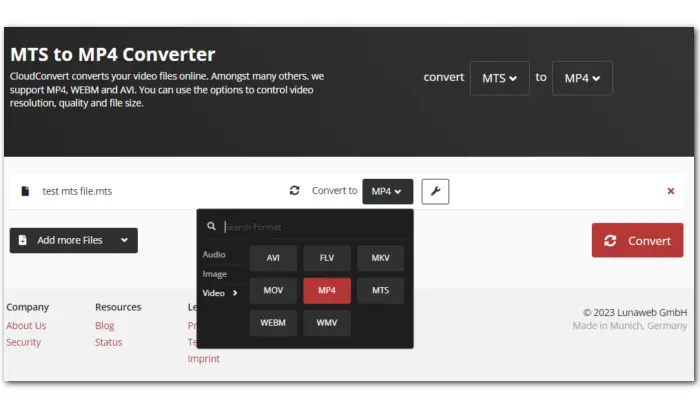
CloudConvert is a popular online platform that provides fast and easy solutions to convert different types of files including video, audio, image, document, PDF, archive, e-book, and more. With this online converter for MTS files, you can convert .mts video files to 3GP, AVI, MKV, MOV, MP4, WMV, Android, iPad, iPhone, etc. With sign-up, free users can upload files up to 1GB in total for conversion. Let’s see how to convert MTS files with CloudConvert below:
Step 1. Visit CloudConvert: https://cloudconvert.com/mts-converter
Step 2. Click the arrow icon near the Select File button to load the video file from local drive, Google Drive, Dropbox, OneDrive, or URL.
Step 3. Click the wrench icon to adjust the output settings and click OK to confirm the changes.
Step 4. Hit the Convert button to start converting MTS files online.
Step 5. Once the conversion is done, download the converted file to a local drive.
With the above detailed guide on how to convert MTS files along with the recommended tools, you now should have no trouble viewing MTS files on any device.
Of course, there is a wider number of video converters that can convert video from or to MTS format. WonderFox HD Video Converter Factory Pro is the overall best thanks to its wide format support, leading transcoding capability, simplicity, and rich features. Get this all-in-one toolkit here to ease your digital life now!
Download for Free
Download for Free
 Download for Free
Download for Free
Download for Free
1. How to convert MTS files for free?
Both Handbrake and CloudConvert can convert MTS files for free. WonderFox HD Video Converter Factory Pro also offers a free version—Free HD Video Converter Factory—allowing you to convert, edit, and compress MTS as well as download videos online.
2. How do I convert MTS files to MP4?
You can use the above three converters to convert MTS files to MP4. In addition, you can make this conversion using VLC, FFmpeg, Freemake Video Converter, FreeConvert, and more.
3. How do I open an MTS file?
With an MTS player such as Windows Media Playe, VLC player, or MPV player, you can easily view MTS video. You can check this post for more MTS players you can try: => MTS Video File: How to Play MTS Files?

Terms and Conditions | Privacy Policy | License Agreement | Copyright © 2009-2024 WonderFox Soft, Inc.All Rights Reserved


 Buy Now
 Buy Now