


MP4 is the most commonly used format for video creation, editing and sharing, and we often need MP4 videos to work better with programs and devices. Therefore, a good MP4 converter is necessary.
Below, we've collected the best MP4 video converters on the market, ranging from free to paid, from simple to complex, to meet various needs. We'll cover their compatibility, costs, features, and pros and cons so that you can easily find the program that's right for you.
Need a program to convert your videos to MP4? Start with the options below!
Platform: Windows
Price: Free version; $34.95/life (50% off)
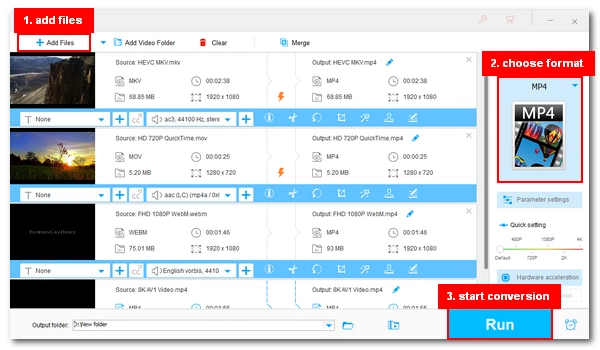
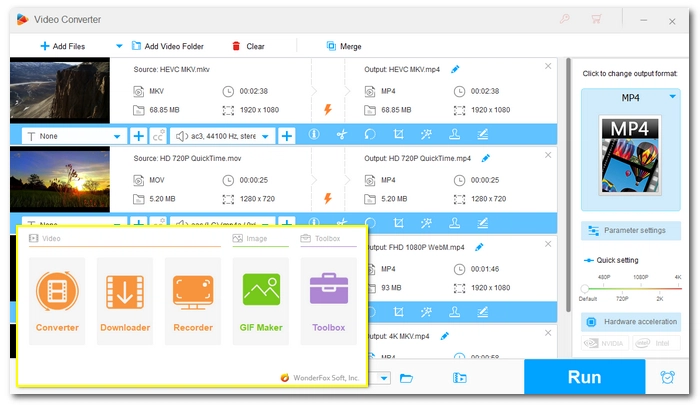
WonderFox HD Video Converter Factory Pro is a top video to MP4 converter for Windows users who want speed and output control. It can help you convert any video to MP4 and vice versa perfectly.
Powered by hardware acceleration technology, the software can deliver fast MP4 conversion with stable output quality. It also provides advanced settings, such as encoder, bitrate, resolution, and frame rate, to ensure you achieve the exact results you desire. And, with its unique Lightning Mode, you can perform MP4 conversion without quality loss.
The software also comes with other useful tools, including a video downloader, screen recorder, GIF maker, and a toolbox. So choosing this MP4 converter means you get a complete multimedia solution.
✅ Pros:
❌ Cons:
⇒ Download HD Video Converter Factory Pro Download HD Video Converter Factory Pro
Platform: Windows
Price: Free
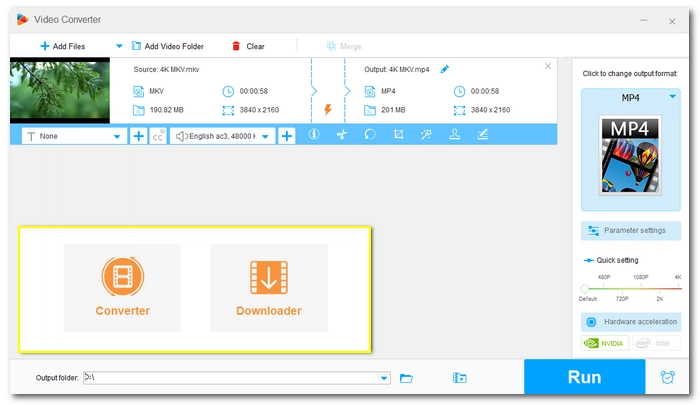
Free HD Video Converter Factory is the best free MP4 converter for Windows users who need simple conversion.
It's the toned-down version of the first application and is best suited for beginners. With just a few clicks, you can easily convert videos to MP4 or convert MP4 to other formats. On top of that, the software also offers device presets with which you can optimize your MP4 for specific devices.
The software is capable of editing video and audio files, compressing large videos, extracting audio from videos, and also comes with a video downloader that can be used as a free YouTube to MP4 converter to download videos, music, and playlists from YouTube and other sites. Despite many features, the software is completely free with no size or watermark limitations.
✅ Pros:
❌ Cons:
⇒ Download WonderFox Free HD Video Converter Factory Download WonderFox Free HD Video Converter Factory
Platform: Windows, Mac
Price: Free version; $69.95/life ($49.95 with discounts)
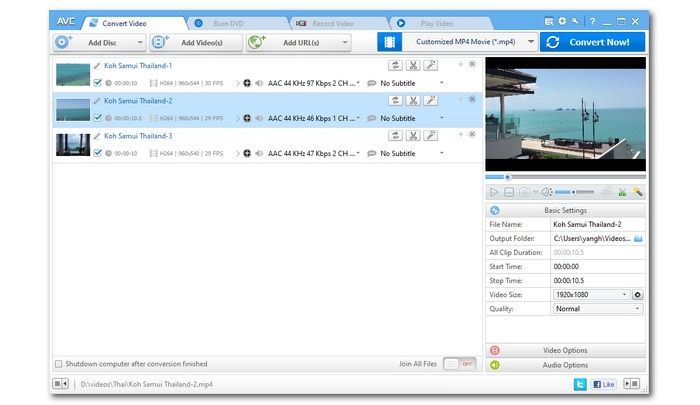
Any Video Converter Ultimate focuses on converting video, DVD, and online sources inside one single program.
As the name suggests, Any Video Converter Ultimate can convert any video file. It provides 200+ output options, covering most mainstream video formats and device profiles. It also gives pretty good output quality when you convert MKV, MOV, and AVI to MP4. Additionally, it can convert DVD files and online URLs to MP4 videos. As a bonus, you can even create DVDs from your video files and screen record on your computer.
✅ Pros:
❌ Cons:
Platform: Windows
Price: Free version; $59.95/life
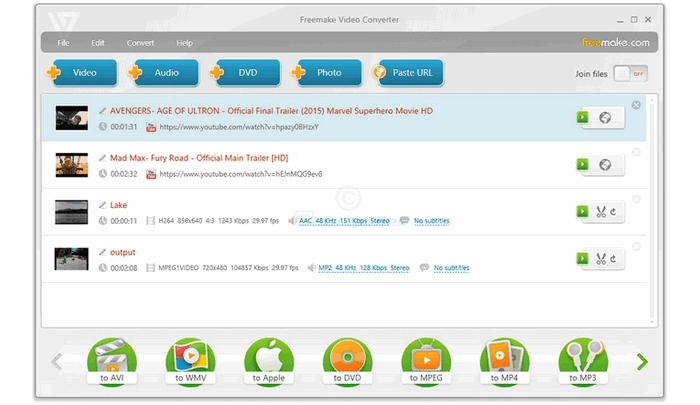
Freemake Video Converter can also be a decent video to MP4 converter for Windows users.
It can help you convert a lot of video files to MP4 format. The supported input formats include AVI, MKV, WMV, 3GP, SWF, FLV, HD, MOV, RM, QT, Divx, Xvid, and many more. Besides MP4, it can also output video to a wide selection of formats and popular devices, such as iPhone, iPad, Google Android, Sony PSP, Xbox, Samsung, Nokia, Huawei, Xiaomi, BlackBerry, etc.
Like other software mentioned on the list, Freemake comes with more tools to fulfill different multimedia needs. With Freemake, you can also convert DVD videos, create photo slideshow, edit video files, and playback video and audio. However, these features come with watermarks and ads and the conversion speed will be slow unless upgraded to its Mega Pack.
✅ Pros:
❌ Cons:
Platform: Windows, Mac
Price: Free
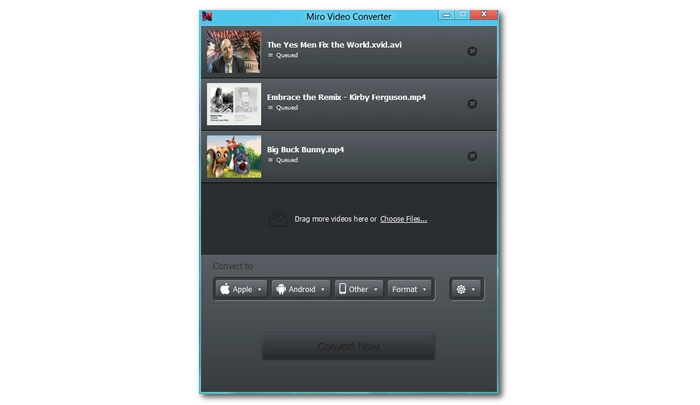
If you just need a program to simply do the conversion and nothing else, Miro Video Converter is the answer.
It's a very lightweight program with a small interface, but it has every function you need for MP4 conversion. With it, you can convert almost any video to MP4, Ogg and WebM formats. While the output format is limited, it can still enrich your videos by using different codecs, such as H264 for distribution, DNxHD and ProRes for post-production, and Ogg Theora for web video streaming. You can also directly convert videos to the wanted sizes and formats for popular phones, iPods, and other media players. One more thing we like about Miro is that it supports batch conversion. Just drop all your videos into the program and convert them to MP4 at once.
This entry-level software has no confusing workflow, and you can perform any conversion you want without mistakes. Moreover, Miro Video Converter is free and open, and it has both Windows and Mac versions.
✅ Pros:
❌ Cons:
Platform: Windows, Mac
Price: Free
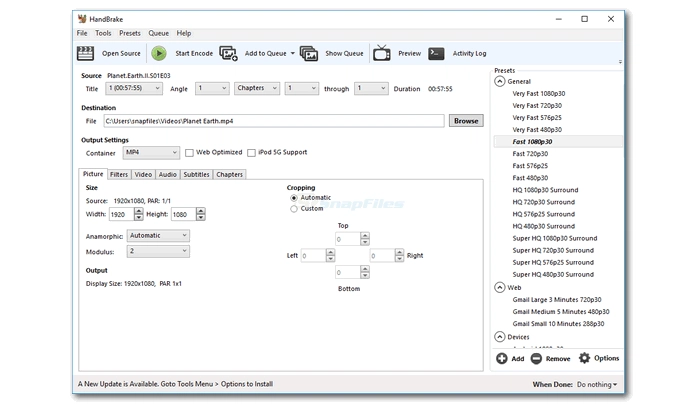
The famous free, cross-platform, and open-source video converter HandBrake is also one of the best MP4 converter software. It can quickly convert any non-protected video and even DVD files to MP4, MKV, and WebM. It's also a 4K video converter that can let you convert MP4 4K videos or upscale video to 4K resolution.
Besides being an MP4 format converter, it also allows you to access a wide array of configuration options to tweak every aspect of the conversion. For example, you can control what codecs to use for your MP4 video, how many frame rate to convert, what quality to output, what subtitles to add or delete, and so much more. However, it can be a little difficult to use HandBrake professionally. If you are just getting started with HandBrake, this HandBrake tutorial might be helpful to you.
HandBrake has one downside, which is that it's a video transcoder and it will transcode every video file to a new format with some quality drop inevitably. But you probably won't notice any difference if you use an appropriate profile.
✅ Pros:
❌ Cons:
Platform: Windows, Mac
Price: Free
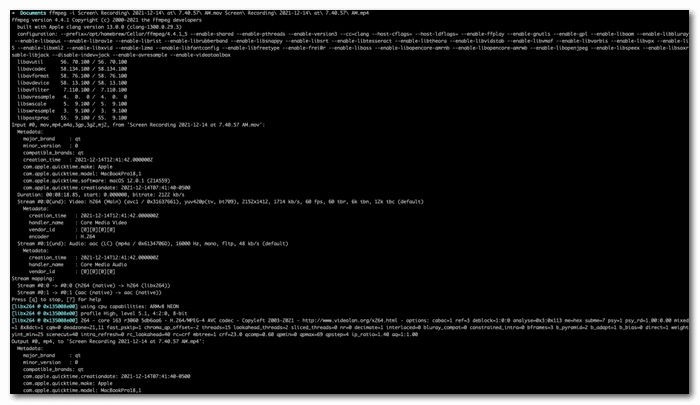
FFmpeg is considered the most powerful video converter. Yet, unlike other products, FFmpeg does not have a GUI and you need to process every conversion through command lines.
In FFmpeg, you can convert any video file to MP4 with high quality and top speed. It allows video remuxing, e.g. remux MKV to MP4, without changing the video and audio stream. Therefore, you can have your MP4 video output with the same quality as the original and enjoy the fastest conversion process ever. However, it's not limited to this - it can decode, encode, transcode, mux, demux, stream, filter and play pretty much any video, audio, and photo.
As mentioned earlier, FFmpeg works through command lines, of which if you have little or no knowledge, you will find it has a steep learning curve. However, if you are willing to devote some time to FFmpeg, you'll eventually see its charm.
💡 Tip: You can use a GUI for FFmpeg, such as QWinFF, which provides a simple UI with basic controls.
✅ Pros:
❌ Cons:
Platform: Windows, Mac
Price: Free
If you've ever used VLC Media Player to play your movie files, you know it's a good video player program. But do you know it can also work as a video converter to convert your media files? Actually, it can be a pretty awesome video converting tool that you can use to convert your media to MP4 completely for free.
The best part about VLC is that it can convert whatever video it plays, meaning basically any video. And it can help you export the video to MP4 format as well as many other common video/audio types. Moreover, you can edit the video, audio, and subtitle settings if needed. With hardware acceleration enabled, it can process the conversion pretty fast.
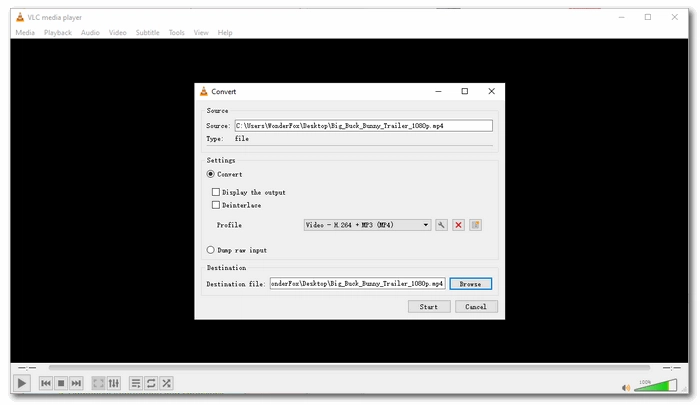
Now, how can I use VLC as a video-to-MP4 converter? Easy. You can access the VLC converting feature by clicking Media > Convert/Save. Then you can follow the on-screen instructions to complete the rest conversion steps. Or you can read this guide How to Convert Video to MP4 with VLC? for more help.
✅ Pros:
❌ Cons:
Platform: Mac
Price: $29.99/life
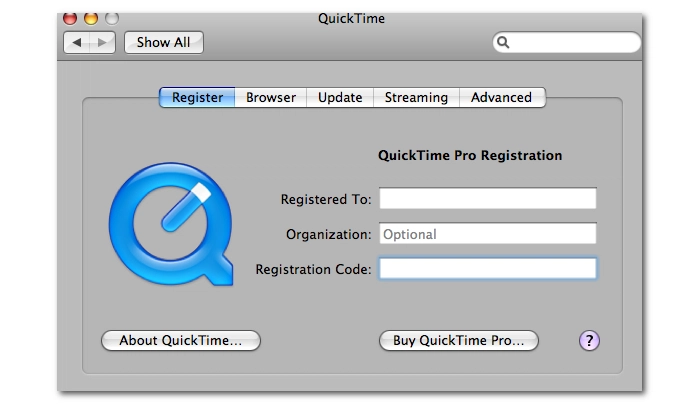
Apple's QuickTime is the native media player on Mac that can open and play .mov files for free, while QuickTime Pro is its paid version that includes some premium features, such as the video conversion function that can help you convert MOV files to MPEG-4, H264 (.mp4), and other formats optimized for iPhone, iPod, Apple TV, or a variety of other devices.
It can maintain a very high video quality during conversion. The only drawback is its limited codec support, and you don't really have many input/output choices. But if you are a Mac user who mainly converts .mov files to MP4, QuickTime Pro is definitely your go-to option.
You can upgrade your free QuickTime Player to Pro in the "Register" menu by entering a Name and a Serial Number that you can purchase at the Apple Store. After that, you can also enjoy other Pro features, like recording video and full-screen playback.
✅ Pros:
❌ Cons:
Platform: Windows
Price: Free
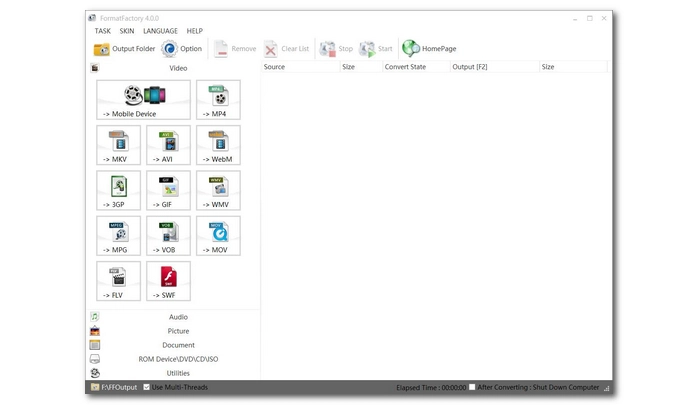
You might've heard of Format Factory before, about how powerful it is for handling video, audio, photo, document, and CD/DVD files. Well, this old program is still impressive and can work efficiently to help you convert video to MP4 files.
It supports all common videos you see daily, including AVI, MKV, 3GP, WMV, MPG, MOV, WebM, and so forth. And its preset MP4 converter allows you to convert your files to MP4 format with easy clicks. It can even repair slightly damaged MP4 videos during conversion. Apart from the MP4 converter, it offers an MKV converter, an AVI converter, a 3GP converter, and other converter tools to help with your other conversion demands. Though feature-packed, there is no challenge to using this software at all, as it has a self-explanatory interface with streamlined controls.
Yet, remember that Format Factory is ad-supported. It will ask you to install additional software during the installation, and you should decline all the offers to avoid potential risks it might bring.
✅ Pros:
❌ Cons:
| Tool | OS | Price | Best For |
|---|---|---|---|
| WonderFox HD Video Converter Factory Pro | Windows | $34.95/life (50% off) | Fast, high-quality MP4 conversions with output control. >> Try it now >> Try it now |
| Free HD Video Converter Factory | Windows | Free | Simple free conversion solution for everyday use. >> Try it now >> Try it now |
| Any Video Converter Ultimate | Windows, Mac | $49.95/life (discounts) | Comprehensive video, DVD, and online video conversions. >> Try it now |
| Freemake Video Converter | Windows | $59.95/life | MP4 conversions to various device presets. >> Try it now |
| Miro Video Converter | Windows, Mac | Free | Lightweight, minimal MP4 conversion with very simple controls. >> Try it now |
| HandBrake | Windows, Mac | Free | Full encoding control and open-source MP4 conversion. >> Try it now |
| FFmpeg | Windows, Mac | Free | Maximum control and lossless command-line conversion. >> Try it now |
| VLC Media Player | Windows, Mac | Free | Occasional conversion using an existing media player. >> Try it now |
| QuickTime Pro | Mac | $29.99/life | Converting MOV files to MP4 with Apple-optimized output. >> Try it now |
| Format Factory | Windows | Free | Converting videos to/from MP4 with repair features. >> Try it now |
If you want a simple way to convert videos to MP4 on Windows, most users will find WonderFox HD Video Converter Factory Pro and Free HD Video Converter Factory cover the main needs. The Pro version focuses on speed and output control for users who want higher quality results, while the free version focuses on simple conversion with basic editing features for everyday use. But you can explore other options in the list to find the one that best suits your needs.
That's all I wanted to share about the best MP4 converters for Windows and Mac users. Hope you find it useful!
💡 Want more conversion solutions? Check out other articles below:
 Download for Free
Download for Free
Download for Free
The best MP4 converter depends on your needs. For basic conversion needs, Free HD Video Converter Factory is an excellent choice. But for advanced features such as hardware acceleration, WonderFox HD Video Converter Factory Pro is ideal.
Yes, you can use tools like WonderFox HD Video Converter Factory Pro or FFmpeg, which can convert videos without quality loss by not re-encoding the video files.
Yes, there are many free MP4 converters available, including:
Note, however, that free tools may have limitations, such as limited outputs or slower speeds.
WonderFox HD Video Converter Factory Pro can offer exceptional conversion speed, as it supports hardware acceleration and provides lightning mode that can convert video formats instantly.
Yes, these MP4 converters are all safe to use. But be cautious with unofficial downloads to avoid malware or adware.

I write about multimedia topics, including video and audio conversion, compression, editing, and downloading. I joined WonderFox in 2020, and my goal is to help readers solve everyday tech problems more easily. In this guide, I tested popular video converter software on the market and selected 10 of the best MP4 converters for you to choose from. Pick a tool you like and happy converting!


I write about multimedia topics, including video and audio conversion, compression, editing, and downloading. I joined WonderFox in 2020, and my goal is to help readers solve everyday tech problems more easily. In this guide, I tested popular video converter software on the market and selected 10 of the best MP4 converters for you to choose from. Pick a tool you like and happy converting!

Terms and Conditions | Privacy Policy | License Agreement | Copyright © 2009-2026 WonderFox Soft, Inc.All Rights Reserved