The full name of Nokia C6 video converter is 'WonderFox Nokia Video Converter Factory Pro ', helping you convert between almost all video or audio formats and copy any protected DVD to the formats compatible with Nokia effortlessly.
Nowadays, new smart phones are emerging in an endless stream. They are powerful and have so many functions. However, if you don't take a fancy to these and just want to have a cell phone with high performance and price rate, the Nokia C6 is a good choice.
With an 8 MP camera (C6-01), it supports to take 720p video 25 fps with codecs H.264 and MPEG4. It has a 3.2 inch display and can play HD 720p video file. Enjoying a video with C6 is indeed great.
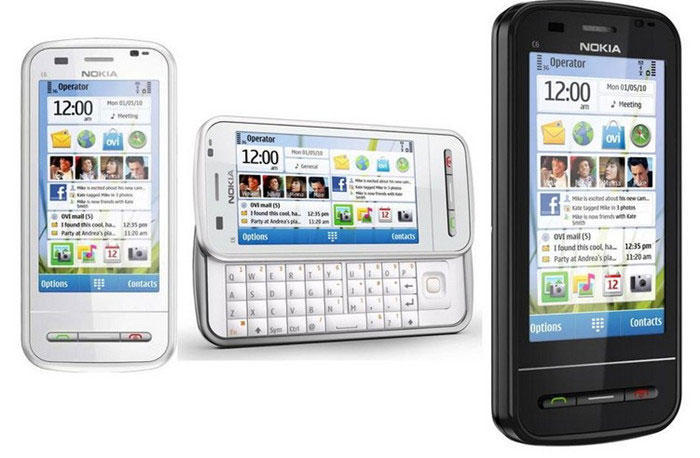
As we know, almost all cell phones including the newest versatile Smartphone have format limitation. So in order to play any video or audio on Nokia C6 effectively, we’d better use a Nokia C6 video converter. MP4 is the ideal format which is supported by most cell phones. The videos we download or save may be not in the format of MP4.Or they are in the format of MP4 but their resolution may not fit for the phone. Thus, we need a Nokia C6 video converter.
There are some tips helping you choose a good video converter for Nokia C6.
1. Formats Supported: The conversion software for Nokia C6 should enable you to convert any video or audio file to Nokia C6 video format or audio format.
2. Ease of Use: It's simple to navigate the converter even if you’re the most novice user.
3. High Quality: The output file cold preserve original quality.
4. Extra Functions: Apart from key features, the converter must provide other functions. For example, we’re able to edit our home-made video, extract audio and download favorite video or music from the web as well as rip and backup our DVD collection and many more.

WonderFox Nokia Video Converter Factory Pro can convert all pop video file formats, such as MPEG, WMV, MOV, RM, RMVB, ASF, VOB, AVI, MKV, FLV, SWF, etc to Nokia C6 or any other pop Nokia devices. It supports all pop Nokia cell phone like Nokia Lumia 920, Lumia 900, Lumia 822, Lumia 820, Lumia 810, Lumia 800, Lumia 710, Lumia 610, Lumia 510, N9, N98, N8, X series, E series, Nokia Asha, 5 series, etc. You don't have to figure out what the right video format or resolution or frame rate for your Nokia phone. Just select the right model like Nokia C6 from the output option. Everything will be OK within minutes.
If you are interested in this video converter and want to know how to use it, you’re able to free download it here. 3 simple steps are as follows.
Launch the Nokia Video Converter Factory Pro.
Click the "Load Video" button to import video(s).You can also click the "Remove" button to delete video(s).
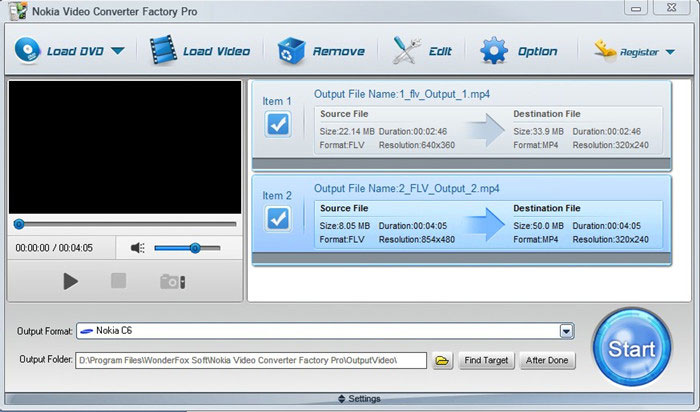
Click the "Output Format" combo box to select an output format. Here we choose Nokia C6.
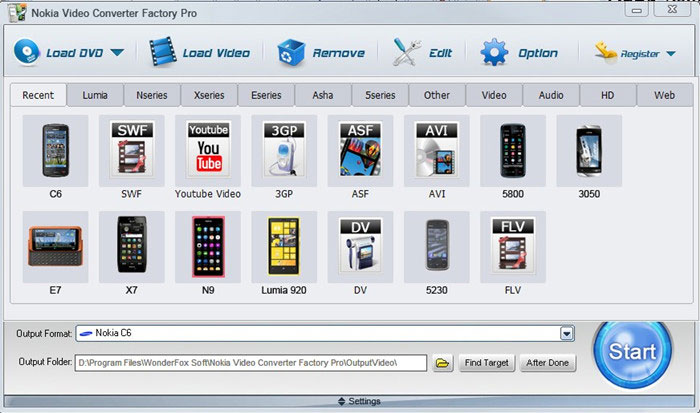
Hit the "Start" button to convert video(s).Just wait for a few minute, you'll be satisfied with its performance.
Or before the conversion process, you are able to edit these videos. Just click the “Edit” button.
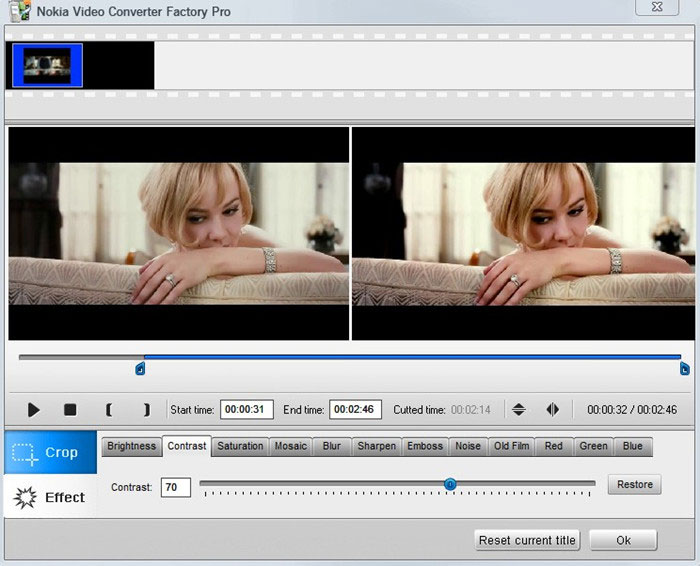
Like what you have seen, you just need three steps and then you can finish the whole converting process. For more information, see the user guide of this Nokia video converter.
Nokia Video Converter Factory Pro unregistered version will put a watermark on processed video, please purchase license to remove this limitation. If you have any questions please contact order@videoconverterfactory.com
| The Limits of Free Trial | License benefits | |||
| The unregistered edition will limited to converting maximum 5 minutes. | 
Secure Download |
|

$19.95 (Save $10) |
Nokia Video Converter Factory Pro always keep us with the development of Nokia cell phones, will add new profiles for new Nokia cell phones. Now, Nokia Lumia and N series are new and still popular with people, for users who want to convert video to these popular cell phones, Nokia Video Converter Factory Pro can easily help you do that, see the related tips here: How to convert video to Nokia N8, how to convert video to Nokia N9, how to convert video to Nokia Lumia 800, how to convert video to Nokia Lumia 900, how to convert video to Lumia 710. What's better, apart from converting video to Nokia C6, this Nokia Video Converter also can help you convert video to other Nokia C-series, like converting video to Nokia C5 and converting video to Nokia C7. Also, you can use Nokia video converting software to add some special effects to your videos, cut your video clip or crop your videos and convert them to your Nokia cell phone compatible videos.
Actually, Nokia Video Converter Factory Pro can help you convert any video to nearly all Nokia cell phones models with optimized presets, so you do not have to figure out what the video settings for your Nokia cell phones, you just need to select the device name from the output profile and then all the settings are optimized beforehand. For more tips and how-to tutorials related Nokia Video Converter Factory Pro, please see the Nokia video converting tips center .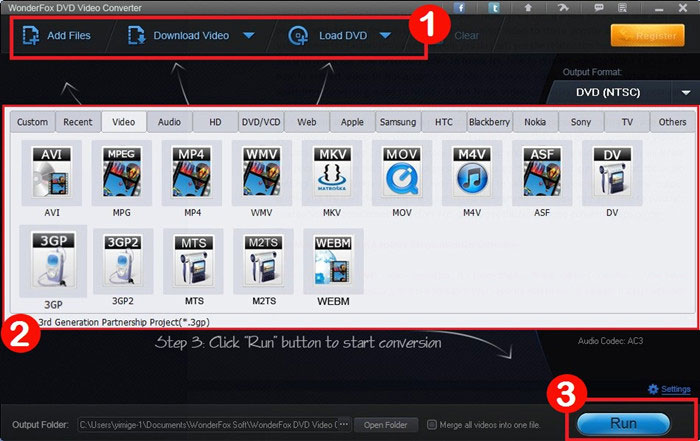
Here’s WonderFox DVD Video Converter. It’s more than a Nokia Video Converter. If you have several portable devices or you’d like to watch your favorite videos on big screen, it’s just right for you. Why? The DVD Video Converter helps you to convert DVD/video to almost all devices like Apple devices (iPhone 5S/C, iPad mini 2, iPad Air included), Nokia models, Samsung smart phones and tabs, BlackBerry, HTC, Sony Play Station 4/3, Surface, Nexus, Kindle Fire, etc. You can also download online video from YouTube, Facebook, Vimeo, Liveleak and more. Free download to have a try now.
BlackBerry Video Converter Factory Pro is specially designed for BlackBerry devices. This BlackBerry video converter has nearly all BlackBerry devices as its output choices like Torch 9800,Bold 9700,PlayBook,etc with optimized profile, that is, you can convert any pop video or audio like MKV, AVI, MP3,FLAC, etc to BlackBerry devices directly without figuring out the right video format, display resolution, bitrates, frame rate and encoder for BlackBerry devices. Download a free BlackBerry Video Converter Factory Pro here.
Resolution: It is usually quoted as width × height, with the units in pixels: for example, "1024x768" means the width is 1024 pixels and the height is 768 pixels.