


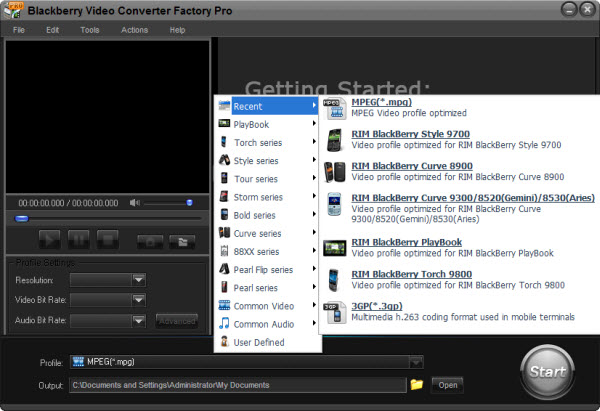
We all know that Blackberry Series are famous for its business functions like the e-mail function, but many video fans may ask whether the Blackberry Series performance well or not in the filed of video playing. Actually the BlackBerry Series will not let you feel disappointed in the filed of video playback. Let's set Blackberry Pearl Flip 8230/8220 as an example, these two popular cell phones have large screen, higher main screen resolution and good memory and so on, which make it have a good performance in the video playing. So, if you are a business man and you also like playing videos, you should not waste the good video playing function of BlackBerry Series.
Although Blackberry Pearl Flip 8230/8220 have good performance in the filed of video playing, there is still an apparent shortcoming of these two cell phones while playing videos, which is the limitation of video formats. The video formats that Blackberry Pearl Flip 8230/8220 can support include MP4, 3GP (H.263), Real Video and WMV. There are many popular and common video formats that these two cell phones can not support like Flash video (FLV and SWF), MKV, RMVB, AVI, DV formats and some HD video formats and so on. Thus, at this time, you need Blackberry Pearl Flip 8230/8220 video converter to help you solve the problem. With a video converter for Blackberry Pearl Flip 8230/8220, your Blackberry Pearl Flip 8230/8220 will surely have a better performance in the filed of video playing.
When searching conceptualization video converter on the internet, you will find a lot, but not all of them can really meet your needs. Thus, we need to know how to choose a video converter for Blackberry Pearl Flip 8230/8220 in a proper way. There are some advices below:
1. You should concern about whether it is easy to use.
2. You should concern about whether it is safe or not.
3. You should concern about whether it has good qualiity converted videos
4. You should concern about whether it has fast converting speed.
5. You should concern about whether it can support importing popular videos and outputing compatible videos for BlackBerry Pearl Flip 8230/8220.
These are the main advices that you need to follow, but each of them seems a little conceptualization to follow. If you need a good video converter for Blackberry Pearl Flip 8230/8220 directly, here I can suggest BlackBerry Video Converter Factory Pro to you. Its neat interface and optimized profile will make you easily understand how to use it, it is safe without any virus, and it has good quality converted videos and fast converting speed. In addition to that all, this video converter also has rich extra functions like merge, clip, crop and add effects to your videos. It is right to choose Blackberry Video Converter Factory Pro for your Blackberry Pearl Flip 8230/8220.
If you think are interested in the Blackberry video converter that I suggested above, I think it is necessary for to know how to convert video to Blackberry Pearl Flip 8230/8220 with this video converter.
Step1: Add your video files to this software that you want to convert
This video converter can support importing nearly all the popular video formats
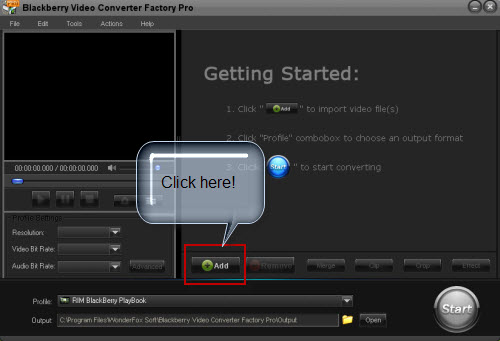
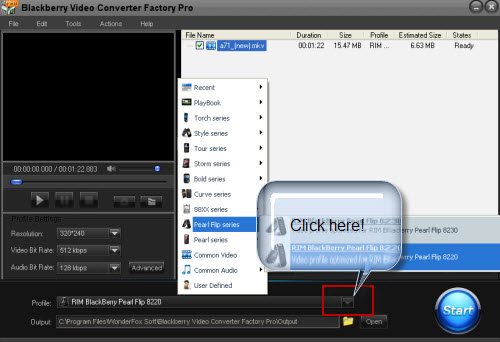
Step2: Choose the output format that Blackberry Pearl Flip 8230/8220 can support
The neatly organized profile will make you easy to find the most suitable video format that your Blackberry Pearl Flip 8230/8220 can support; you just need to find your Blackberry model in the profile combo box and everything will be done.
Step3: Click 'Start' button to begin the converting processes
The moment you open this video converter, you will see the 'Start' button on the interface of it.
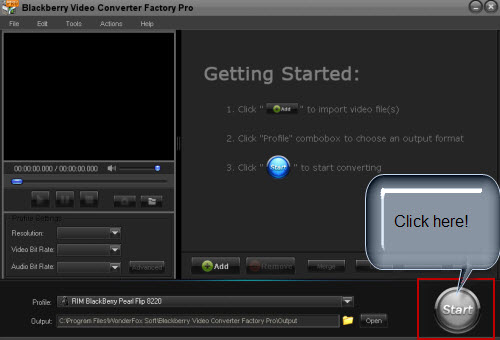
Like what you see, you just need three steps and then how to convert video to Blackberry Pearl Flip 8230/8220 can be solved and the converting speed will surely make you satisfied. For more using information, you can see the user guide of this video conversion software.
Screenshot of BlackBerry Video Converter
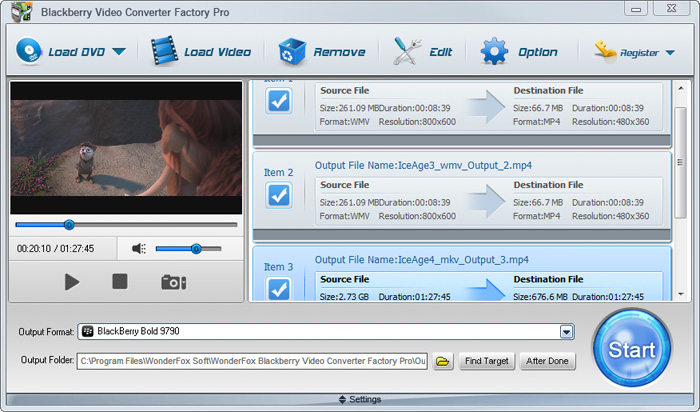


BlackBerry Video Converter Factory Pro has nearly all BlackBerry devices as its output choices with optimized profile, that is, you can convert video/audio to BlackBerry devices directly without figuring out the right video format, display resolution, bitrate, frame rate and encoder for BlackBerry devices. This BlackBerry Video Converter completely supports the latest BlackBerry Strom 2, BlackBerry Bold 9700, Blackberry Storm 9530, BlackBerry Storm 9500, BlackBerry Tour 9630, BlackBerry 8800, 8830, 8820, BlackBerry Pearl 8100, BlackBerry Curve 8300 and more other Blackberry series.
The below passage will show you some hot topics, hot tips and useful tutorials. I hope they will be useful to you.
For users who want to enjoy FLV videos on BlackBerry cell phones or PlayBook, BlackBerry Video Converter Factory Pro can help you convert FLV to BlackBerry Curve 9300, convert FLV to BlackBerry Style 9670, convert flv to BlackBerry Strom 9520 and much more.
And, for users who want to play MKV files, including HD MKV files, BlackBerry Video Converter Factory Pro can easily help you convert MKV to BlackBerry PlayBook supported video, help you effortlessly convert MKV to nearly all BlackBerry cell phones, such as converting MKV to BlackBerry Curve 8900 and converting MKV to BlackBerry Bold 9700.
In conclusion, BlackBerry Video Converter Factory Pro is definitely the best chocie for you to convert video to BlackBerry devices supported videos. If you want to know more tips and tutorials about BlackBerry Video Converter Factory Pro, please see the BlackBerry video converting tips center.


