


BlackBerry Storm is the first full-touchscreen smartphone by Research In Motion (RIM). Especially the BlackBerry Storm 2; it is the first and only smartphone in the world to have a full clickable touchscreen powered by its piezoelectric sensors underneath the screen. Besides, the business phone also contains nice entertainment functions. But such functions are full of criticize.
The SurePress touchscreen was difficult to learn and a hindrance to fast typing; the web browser was still unable to handle complex webpages correctly; the Wi-Fi support was not so well; the enterprise functionality was still the same as the previous models... There were no excellent features on the Storm. The BlackBerry Storm is so normal.
However, the change was successful; the entertainment features are well. But for video playback on BlackBerry Storm, we may need a BlackBerry Storm video converter first.
Even BlackBerry Storm supports to run MPEG-4 files, WMV video and H.264 videos, H.263 video; MP4 is still the best file format for one portable media player. So we need a video converter for BlackBerry Storm to convert videos to MP4 files.
Secondly, the display of BlackBerry Storm is larger than other BlackBerry models - about 3.2 inches; and the resolution is 480*360. Then, for converting videos to the right size with right resolution, we need a BlackBerry Storm video converter.
Besides, the supported frame rate of video playback is up to 30 fps. It is very nice and professional for video playing. But an inappropriate frame rate may lead the video file and audio file don't match each other. So, we need the professional conversion software for BlackBerry Storm to adjust the frame rate and even the video/audio bit rate.
Among mass of video converters, I suggest BlackBerry Video Converter Factory Pro to all BlackBerry users. It is the professional software for BlackBerry video conversion. It supports all BlackBerry multimedia phones. It provides fast conversion speed with good image and allows users to adjust the resolution, frame rate and video/audio bit rate. Besides, the advanced functions (merge, clip, crop and effect) are also available for users to edit videos. It is the reliable assistant for BlackBerry.
1. Download and install the software
2. Click 'Add' to import videos
3. Select output format in 'Profile' setting
4. Click 'Start' to begin converting process
5. Open output profile to get the output video
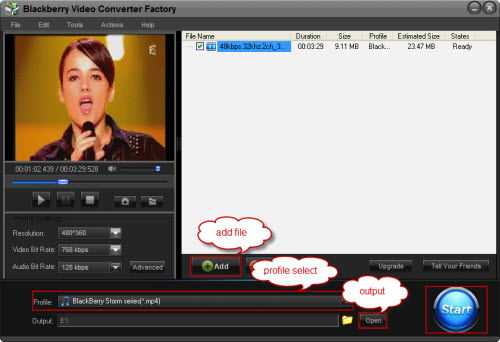
It is easy to convert videos to BlackBerry Storm with the professional and powerful BlackBerry Storm video converter; then, just a few touches, we can enjoy such videos.
Screenshot of BlackBerry Video Converter
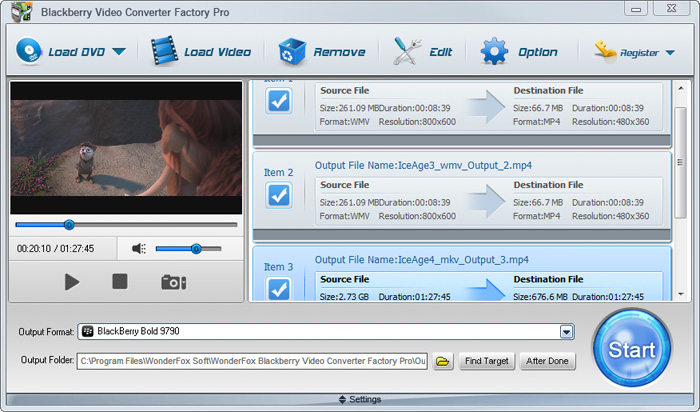


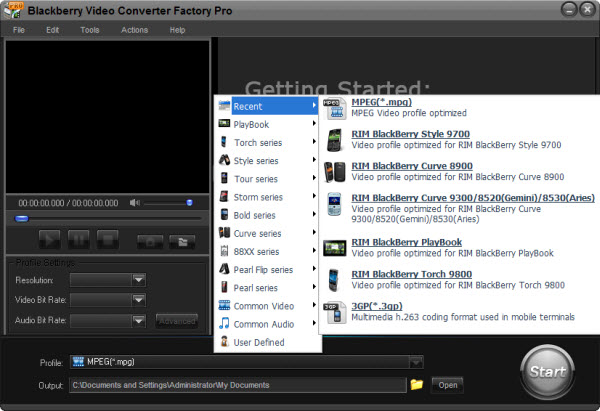
BlackBerry Video Converter Factory Pro has nearly all BlackBerry devices as its output choices with optimized profile, that is, you can convert video/audio to BlackBerry devices directly without figuring out the right video format, display resolution, bitrate, frame rate and encoder for BlackBerry devices. This BlackBerry Video Converter completely supports the latest BlackBerry Strom 2, BlackBerry Bold 9700, Blackberry Storm 9530, BlackBerry Storm 9500, BlackBerry Tour 9630, BlackBerry 8800, 8830, 8820, BlackBerry Pearl 8100, BlackBerry Curve 8300 and more other Blackberry series.
The below passage will show you some hot topics, hot tips and useful tutorials. I hope they will be useful to you.
For users who want to enjoy FLV videos on BlackBerry cell phones or PlayBook, BlackBerry Video Converter Factory Pro can help you convert FLV to BlackBerry Curve 9300, convert FLV to BlackBerry Style 9670, convert flv to BlackBerry Strom 9520 and much more.
And, for users who want to play MKV files, including HD MKV files, BlackBerry Video Converter Factory Pro can easily help you convert MKV to BlackBerry PlayBook supported video, help you effortlessly convert MKV to nearly all BlackBerry cell phones, such as converting MKV to BlackBerry Curve 8900 and converting MKV to BlackBerry Bold 9700.
In conclusion, BlackBerry Video Converter Factory Pro is definitely the best chocie for you to convert video to BlackBerry devices supported videos. If you want to know more tips and tutorials about BlackBerry Video Converter Factory Pro, please see the BlackBerry video converting tips center.


