Nokia Video Conversion Software
Watch Inter Video on BlackBerry
How to Convert WMV to iPhone 4
Convert SWF to BlackBerry 9700
Video to BlackBerry Curve Series
Blackberry Pearl Flip Converter
BlackBerry Pearl Video Converter
Blackberry 9500 Video Converter
Blackberry 9520 Video Converter
Blackberry 9530 Video Converter
BlackBerry 9550 Video Converter
BlackBerry Bold 9650 Converter
BlackBerry 88 Series Converter
BlackBerry 9650 Video Converter
BlackBerry 9700 Video Converter
BlackBerry 9780 Video Converter
BlackBerry 8350i Video Converter
BlackBerry 8900 Video Converter
BlackBerry 9300 Video Converter
BlackBerry 8100/8110 Converter
BlackBerry 8120/8130 Converter
BlackBerry 9100 Video Converter
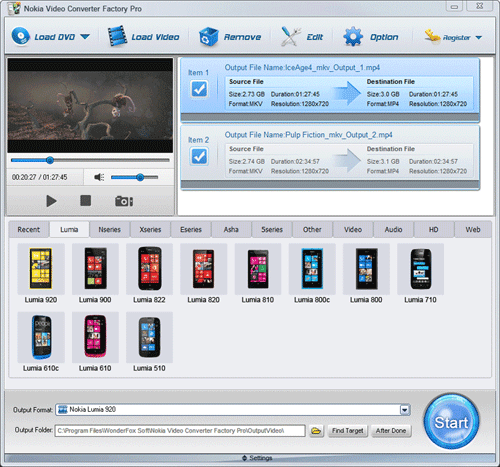
Nokia Video Converter Factory Pro (for Windows) help you convert convert video and copyright protected DVD to Nokia E65 and Lumia series, Nseries, Xseries, Eseries, Asha, 5series and video/audio/HD video/web compatible video.
Who is the biggest mobile phone manufacturer all over the world? The answer is obviously Nokia!
Nokia Company had already released countless mobile phones with different series, and each series contains many similar models; but each model contains some differences compared with others: difference in camera, difference in RAM, difference in size, difference in display... Every phone contains the difference to others. And because of the difference in video playing parameters, we need the professional Nokia video conversion software to serve for every model for video playback on Nokia mobile phones.
Because of the different details in parameter for video playback, a professional video converter for Nokia is necessary.
Display: different series of Nokia phones, the display is different. Even it is different to every model. The display of Nokia C-1 is 1.8 inches. C5-03 is 3.2 inches but C5-00 is 2.2 inches. Almost all the new models contain bigger display than the older models. Because of the different display, we need some professional Nokia video conversion software to convert videos to the right size.
Resolution: The display is different, so is the resolution. Some are 640*360, some are 320*240. So, for the different resolutions, we need a professional video converter for Nokia to adjust the parameters.
Frame Rate: The supported frame rate of different Nokia cell phones is also different. The frame rate of some models is up to 25 fps even 30 fps, but some is just about 15 fps. For this reason, we need some conversion software for Nokia to adjust the frame rate and even the video/audio bit rate.
Among the tons of different video converters, I suggest Nokia Video Converter Factory Pro to all users. It is the professional software for converting videos to Nokia mobile phones. It is easy to use and provides fast conversion speed with good image. It allows users to adjust the frame rate and video/audio bit rate. Besides, the advanced functions (merge, clip, crop and effect) are also available for users to edit videos.
1. Download the Nokia Video Conversion Software and install the software
2. Click 'Add' to import videos
3. Select output format in 'Profile' setting
4. Click 'Start' to begin converting process
5. Open output profile to get the output video
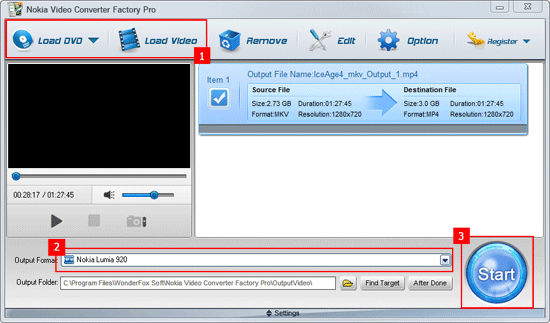
Then, with the professional Nokia video conversion software, it is easy and convenient to convert videos to Nokia mobile phones; and the advanced parameters are free to charge.
Nokia Video Converter Factory Pro (for Windows) is shareware in discounting, the price from $29.95 to $19.95 that means now buy it you will save $10. This is a limited-time discount, please seize the opportunity. If you have any questions please contact order@videoconverterfactory.com
| The Limits of Free Trial | License benefits | |||
| The unregistered edition will limited to converting maximum 5 minutes. | 
Secure Download |
|

$19.95 (Save $10) |
Nokia Video Converter Factory Pro is a professional video conversion software to help you enjoy all types of videos and audios on your Nokia cell phone.
With Nokia Video Converter Factory Pro, you can do the following converting tasksyou’re your Nokia cell phone, no matter what model of Nokia you have.
For Users who get Nokia E-series like Nokia E66, Nokia E63, Nokia E65, Nokia E71, Nokia E73, Nokia E75, Nokia E52, etc. Nokia Video Converter Factory Pro can easily help you guys convert any videos to these Nokia cell phones’ compatible videos, for example, convert video to Nokia E66, convert video to Nokia E63, convert video to Nokia E71, convert video to Nokia E73 and so forth.
Also, if you have any other Nokia cell phones like the popular Nokia N8, N9, even Nokia Lumia 800, Lumia 900 and Lumia 710, Nokia Video Converter Factory pro also can help you convert any videos to these popular cell phones’ compatible videos easily. See the related how to tutorials here: How to convert video to Nokia N8, how to convert video to Nokia N9, how to convert video to Nokia Lumia 800, how to convert video to Nokia Lumia 900, how to convert video to Lumia 710. It is really powerful and useful for you to convert videos to nearly all Nokia cell phones with the help of Nokia Video Converter Factory Pro.
With Nokia Video Converter Factory Pro, your Nokia cell phone will become more powerful in the field of video playback.