


BlackBerry Pearl is the revolution.
We all know that BlackBerry phones are famous as the business phone. It contains useful and even excellent enterprise functionality. But BlackBerry Pearl series phones are the first BlackBerry devices with camera and media player. The Research In Motion also focused on and emphasized the entertainment functions this time. The release of Pearl is the revolution of BlackBerry Families.
BlackBerry Pearl is different.
As is known to all, most BlackBerry devices have a full keyboard. But the Pearl uses a modified QWERTY layout on a 4-row, 5-column keypad, with a proprietary predictive input algorithm called SureType. And the Pearl also supports the full range of BlackBerry enterprise functionality. Besides, unlike previous BlackBerry devices, the Pearl includes a music player, camera, as well as other multimedia functions. The Pearl is different to other BlackBerry phones.
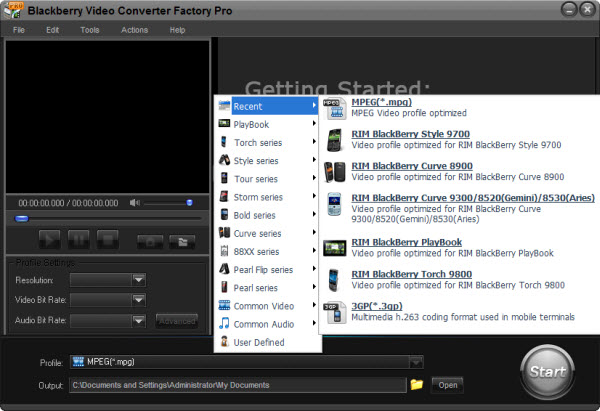
Even the revolutionary BlackBerry Pearl contains powerful multimedia functions than the previous BlackBerry phones; But for video playback on BlackBerry Pearl, we may still need a BlackBerry Pearl video converter.
First, BlackBerry Pearl supports to run MPEG-4 file, WMV videos and even H.264, H.263 videos. But as a portable media player, MP4 video is the most suitable file. So we need some conversion software for BlackBerry Pearl to convert videos to MP4 format, even the HD videos.
Second, the display of BlackBerry is about 2.4 inches. And for resolution, some is 240*260, some is 240*320; and the BlackBerry 9100 is 360*400. The resolution of Pearl series is in a mess. So we need a professional BlackBerry Pearl video converter to adjust the videos to right size and right resolution.
At last, the supported frame rate for video playback is about 15 fps to 24 fps. If the frame rate is not in the right data, the video file and audio file will not run together. It may happen that the video file runs faster than the audio file. So we need a video converter for BlackBerry Pearl to adjust the frame rate of BlackBerry videos.
For breaking such limits and playing videos on BlackBerry Pearl well, I suggest BlackBerry Video Converter Factory Pro to all BalckBerry users. It is the professional conversion software for BlackBerry devices. The converter would convert videos to the right format for BlackBerry and allow users to adjust the resolution and frame rate even the video/audio bit rate. Besides, the advanced functions (merge, clip, crop and effect) are also available for users to edit videos. It is the reliable assistant for BlackBerry video conversion.
1. Download and install the software
2. Click 'Add' to import videos
3. Select output format in 'Profile' setting
4. Click 'Start' to begin converting process
5. Open output profile to get the output video
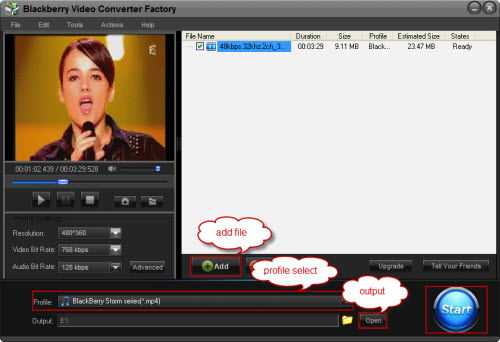
Then, with the professional and powerful BlackBerry Pearl video converter, we can convert videos to BlackBerry Pearl easily and conveniently; and we can enjoy the video with nice quality.
Screenshot of BlackBerry Video Converter
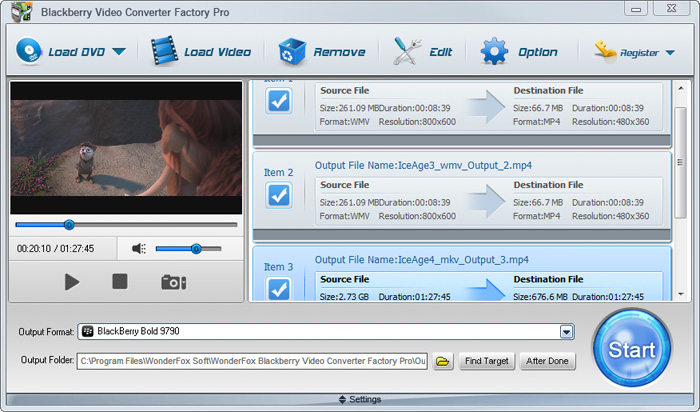


BlackBerry Video Converter Factory Pro is specially designed for BlackBerry devices, it can convert virtually all video and audio files to nearly all BlackBerry devices with optimized presets. (learn more about BlackBerry Video Converter Factory Pro and its Format References >>)
Here I will list some hot searches about converting videos to BlackBerry devices below.
For users who want to enjoy FLV videos on BlackBerry cell phones or PlayBook, BlackBerry Video Converter Factory Pro can help you convert FLV to BlackBerry Curve 9300, convert FLV to BlackBerry Style 9670, convert flv to BlackBerry Strom 9520 and much more.
And, for users who want to play MKV files, including HD MKV files, BlackBerry Video Converter Factory Pro can easily help you convert MKV to BlackBerry PlayBook supported video, help you effortlessly convert MKV to nearly all BlackBerry cell phones, such as converting MKV to BlackBerry Curve 8900 and converting MKV to BlackBerry Bold 9700.
In conclusion, BlackBerry Video Converter Factory Pro is definitely the best chocie for you to convert video to BlackBerry devices supported videos. If you want to know more tips and tutorials about BlackBerry Video Converter Factory Pro, please see the BlackBerry video converting tips center.


