Watch Inter Video on BlackBerry
Convert SWF to BlackBerry 9700
Video to BlackBerry Curve Series
BlackBerry 9550 Video Converter
BlackBerry Bold 9650 Converter
Convert MKV to BlackBerry 8900
Nokia Video Conversion Software
Watch Inter Video on BlackBerry
How to Convert WMV to iPhone 4
Convert SWF to BlackBerry 9700
Video to BlackBerry Curve Series
BlackBerry Pearl Flip Converter
BlackBerry Pearl Video Converter
BlackBerry 9500 Video Converter
BlackBerry 9520 Video Converter
BlackBerry 9530 Video Converter
BlackBerry 9550 Video Converter
BlackBerry Bold 9650 Converter
BlackBerry 88 Series Converter
BlackBerry 9650 Video Converter
BlackBerry 9700 Video Converter
BlackBerry 9780 Video Converter
BlackBerry 8350i Video Converter
BlackBerry 8900 Video Converter
BlackBerry 9300 Video Converter
BlackBerry 8100/8110 Converter
BlackBerry 8120/8130 Converter
BlackBerry 9100 Video Converter
BlackBerry Bold 9780 has good function in the field of video playing, but it also has some shortcomings. It still can not support some common video formats as other cellphones. If you are trying to enjoy videos on BlackBerry Bold 9780, you need convert video to BlackBerry Bold 9780 at first as right video format. This article mainly focuses on the guide to showing how to convert video to BlackBerry Bold 9780 for you.
If you own a BlackBerry Bold 9780, I think it is necessary for you to know why you need to convert video to this popular cell phone.
Firstly, you should not waste the excellent function of video playing that BlackBerry Bold 9780 has. It is a new cell phone published in 2010, which has excellent function in the field of video playing, it is not just a business cell phone, it is also a multimedia player, and so if you have a BlackBerry Bold 9780, you should make full use of the video playing function of it.
Secondly, we have to mention about the video and audio format issue, as a cell phone, BlackBerry Bold 9780 still can not support some popular video formats like AVI, FLV, SWF and RMVB and so on, the video formats that it can support are only MP4 and 3GP. Suppose that if you have many wonderful videos or movies that are in the format that your BlackBerry Bold 9780 can not support, which will be a great pity.
With these two reasons, I think we will never doubt whether we need to convert video to BlackBerry Bold 9780.
After know why we need to convert video to BlackBerry Bold 9780, I think some people may want to choose a related video converter now. Don't worry, I think you need to know some advices on how to choose a good BlackBerry Bold 9780 video converter.
1. Most important point is the converting function: The converting function should ensure good converting quality and fast converting speed.
2. Rich parameter settings: There are some factors like resolution, bit rate and frame rate will affect the converted video's quality, so we should choose a good video converter that has the function of setting these parameters.
3. Whether it has easy operation, nobody would like to spend plenty of time researching how to use it.
4. Safe or not: If your PC or digital devices are attacked by some virus, which will be a great pity.
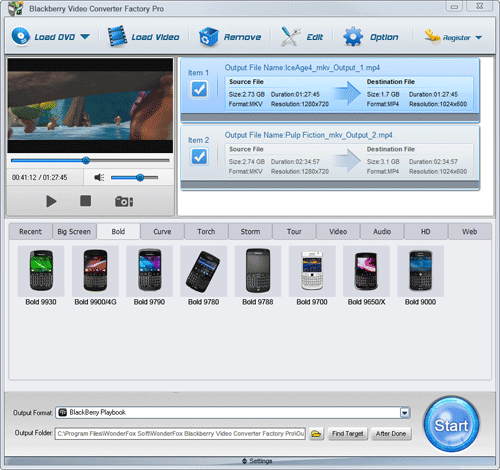
Actually, only if you choose good video converter like this, you will get the right answer of how to convert video to BlackBerry Bold 9780. If you think that it is complex for you to choose a good one, here I can suggest BlackBerry Video Converter Factory Pro to you, it has all the advantages mentioned above. In addition to that, the greatest feature of BlackBerry Video Converter Factory Pro is the optimized profile, all the conversion profiles organized so that you can find your BlackBerry model easily. Just go for one, you will surely enjoy more and how to convert video to BlackBerry Bold 9780 will not a problem.
If you have chosen or installed the BlackBerry Video Converter Factory Pro, I think you must concern about how to convert video to BlackBerry Bold 9780 with this video converter, here I will show you the processes below:
Step1: Import video(s).
Launch BlackBerry Video Converter Factory Pro - Click, 'Add' button to import video(s), click 'Remove' button to delete video(s).
Step2: Choose an output format.
Click 'Profile' combo box to choose an output format. Here are common profile settings, in most cases, we provide multi-options for each setting. You can also define more advanced profile settings.
Step3: Click 'Start' button on the interface of this video converter to begin the converting process.
As you can see, you just need three main steps and then you can finish the converting processes, you can also use some other functions of this video converter, like video edit.
BlackBerry Video Converter Factory Pro unregistered version will put a watermark on processed video, please purchase license to remove this limitation. If you have any questions please contact order@videoconverterfactory.com
| The Limits of Free Trial | License benefits | |||
| The unregistered edition will limited to converting maximum 5 minutes. | 
Secure Download |
|

$19.95 (Save $10) |
BlackBerry Video Converter Factory Pro is specially designed for BlackBerry devices, it can convert virtually all video and audio files to nearly all BlackBerry devices with optimized presets. (learn more about BlackBerry Video Converter Factory Pro and its Format References >>)
Here I will list some hot searches about converting videos to BlackBerry devices below.
For users who want to enjoy FLV videos on BlackBerry cell phones or PlayBook, BlackBerry Video Converter Factory Pro can help you convert FLV to BlackBerry Curve 9300, convert FLV to BlackBerry Style 9670, convert flv to BlackBerry Strom 9520 and much more.
And, for users who want to play MKV files, including HD MKV files, BlackBerry Video Converter Factory Pro can easily help you convert MKV to BlackBerry PlayBook supported video, help you effortlessly convert MKV to nearly all BlackBerry cell phones, such as converting MKV to BlackBerry Curve 8900 and converting MKV to BlackBerry Bold 9700.
In conclusion, BlackBerry Video Converter Factory Pro is definitely the best chocie for you to convert video to BlackBerry devices supported videos. If you want to know more tips and tutorials about BlackBerry Video Converter Factory Pro, please see the BlackBerry video converting tips center.