WonderFox HD Video Converter Factory Pro has hardware acceleration support of Intel and Nvidia products. Namely, it adopts Intel QSV and Nvidia NVENC technologies for speeding up the H.264, HEVC/H.265, and AV1 encoding process.
When you launch HD Video Converter Factory Pro for the first time, your hardware will be scanned for support for hardware acceleration.
*Note: if you replace your graphics card with a new one, please delete config.ini from
C:\Users\YOURUSERNAME\AppData\Roaming\WonderFox Soft\HD Video Converter Factory Pro
and HD Video Converter Factory Pro will re-scan your graphics card.
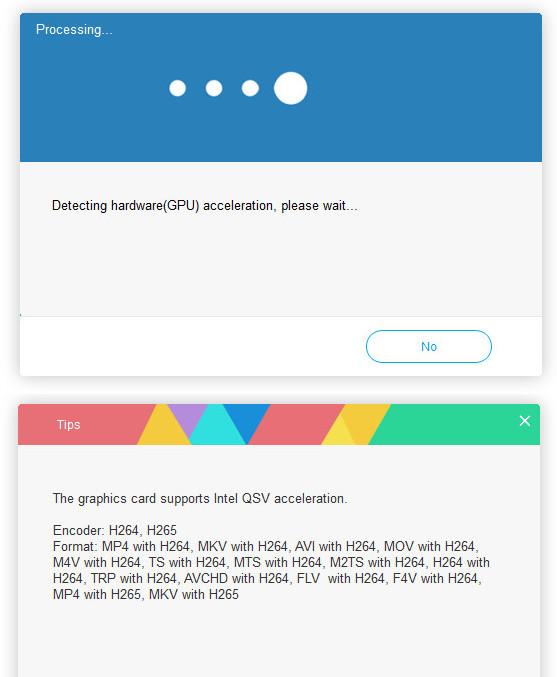
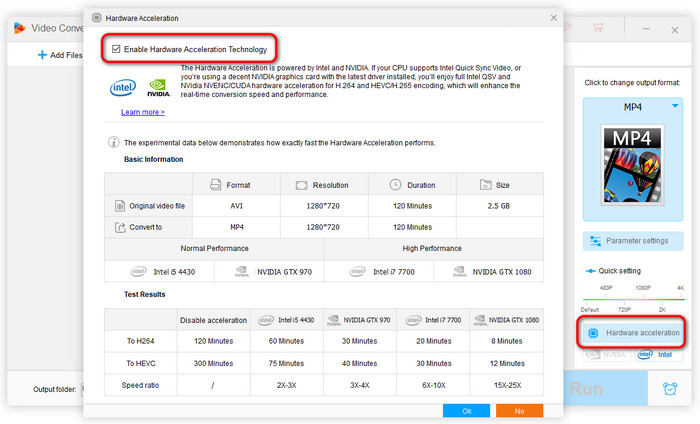
If your graphics card supports accelerated video encoding, the hardware acceleration option will be enabled automatically. You can enable/disable this feature by clicking the Hardware acceleration button in the Converter module.
* It's important to keep your graphics card drivers up to date to use hardware acceleration without a problem.
*Check if your Nvidia graphics card supports accelerated video encoding here:
https://developer.nvidia.com/video-encode-decode-gpu-support-matrix
*Check if your Intel graphics card supports accelerated video encoding here:
https://www.intel.com/content/www/us/en/developer/articles/technical/encode-and-decode-capabilities-for-7th-generation-intel-core-processors-and-newer.html
If you still have any question, please feel free to contact us: support@videoconverterfactory.com Or reach us via Facebook to get a fast response.
- Marguerite, France

Get license code immediately and enjoy our best service or get your money back.