


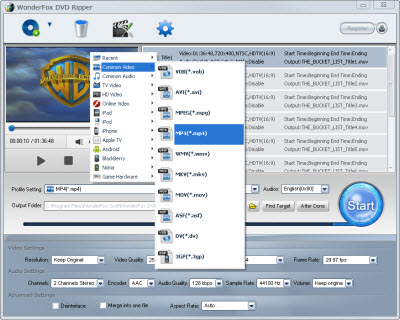
MP4 may be the most commonly-seen video format for mobile phone and portable video devices. No matter you want to enjoy videos on your cellphone, tablet computer or video players, you can always choose MP4 format. When you go somewhere by the subway or bus, you can take the videos with your lovely phones or tablets. It is really so free to enjoy MP4 videos. But your cellphone or tablet can not accomplish everything, especially for DVD disk. If you try to enjoy DVD videos as MP4 format, you do need a DVD converter for MP4 at this time. If you don't want to miss your favorite DVD videos in a free way, then it is time to convert DVD to MP4.
Just like the common video converter, DVD Converter for MP4 can help you convert DVD to MP4 for better enjoyment of DVD videos. After the converting process, you can enjoy the DVD videos on mobile devices easily and randomly as MP4 format. Here if you feel confused about how to pick up the great from various DVD converter softwares, you do need check the following suggestions. They can help you define a great DVD converter for MP4.
1. High-quality output video effect. This is the basic point of a great MP4 DVD converter.
2. Fast speed and safe conversion process, which can make users enjoy the conversion process easily and fast with less time.
3. Easy-to-use handling process.
4. Parameter settings. Users can choose the output video with different effect, bitrate, and resolutions as their own demands.
5. Extra functions. The trimming, cropping and special effect can make you enjoy the pleasure of video editing.
With these features, I recommend WonderFox DVD Ripper as your first choice. It can convert DVD to MP4 with fast speed and quality video effect. It makes it easy to get DVD videos compatible with your mobile devices.
For the basic point of the great DVD converter for MP4, WonderFox DVD Ripper is an easy-to-use DVD converter with handy operating way. You just need few clicks to finish the whole handling process.
Download the WonderFox DVD Ripper and install it.
Step1: Run the software and load the DVD disk first.
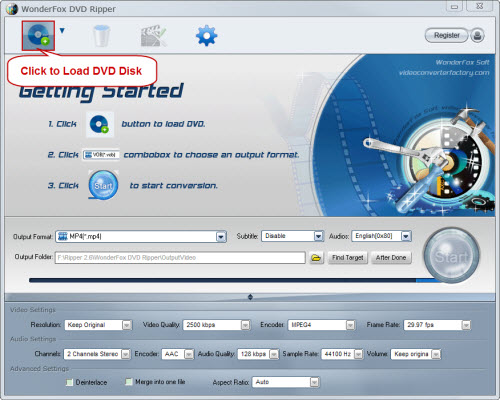
Step2: Choose "MP4" as the output video format.
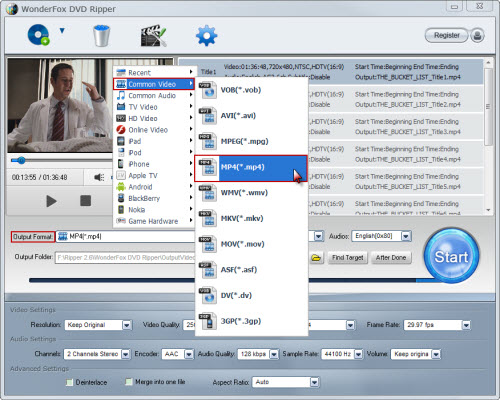
Step3: Select the output folder as your wish. (Optional)
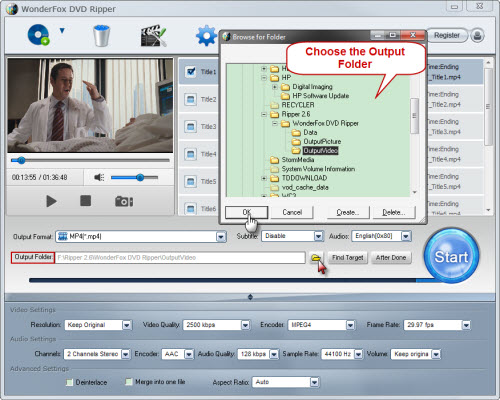
Step4: Click "Start" to launch the whole converting process.
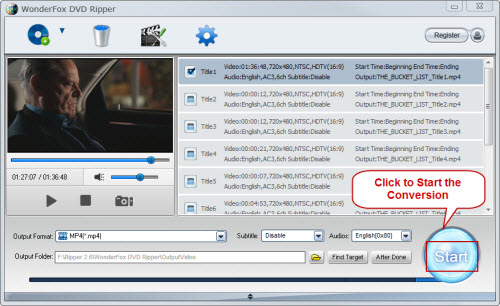
Step5: Enjoy the output quality MP4 videos freely after the converting process.
With this powerful DVD converter for MP4, you can enjoy your favorite videos as MP4 format on mobile devices randomly now.
All in all, the WonderFox DVD Ripper is really a good choice for us to rip/convert dvd to MP4 video. With a DVD to MP4 converter software, we can easily rip DVD movies to MP4 video format. By the way, the DVD ripper runs well on Windows, so, we can easily convert DVD to PC, convert DVD to Hadr Drive, copy DVD to tablet, convert DVD to cell phone with it. Furthermore, the software also allow us to convert DVD to AVI video format, convert DVD to iPad 3 compatible video, convert DVD to WMV video, convert DVD music to MP3 file, rip/convert DVD to MKV video; and besides, convert DVD to Nokia video type, convert DVD to BlackBerry video formats and convert DVD to Android devices are also available for us.




