

Digitize your DVD collection to MP4 for more convenient playback and preservation. Here are two working methods to help you convert DVD to MP4 free on Windows.
Tips. Want the easiest way to convert DVD to MP4 with the best quality? Enjoy the best DVD converter to MP4 (not free): https://www.videoconverterfactory.com/download/dvd-ripper.exe https://www.videoconverterfactory.com/download/dvd-ripper.exe
 Michelle | Updated on May 26, 2023
When it comes to converting DVD to MP4, there are plenty of DVD converters to choose from. However, many of these programs require payment. And it is unlikely that you will find a DVD to MP4 ripper full version that can help you directly rip DVD to MP4 for free.
But the good news is that there are efficient free DVD rippers like WonderFox DVD Ripper Speedy to convert DVD to MPG and MakeMKV to copy DVD to MKV. You can use them to get a digital copy of your DVD and then convert it to MP4 with a free video converter. The whole process is divided into two parts, which looks a bit complicated, but there are no errors. You can get DVD MP4 movies 100% free.
In the following, we offer step-by-step guides on how to use these programs to convert DVD to MP4 for free. Just read and follow.
Tips. Are you converting your homemade DVD to MP4? In this case, HandBrake is the best free DVD converter to MP4 to help you rip DVD to MP4 in a few clicks. Check out this article for more details: How to Convert DVD to MP4 with HandBrake?
DVD Ripper Speedy and Free HD Video Converter Factory are WonderFox products, and they are completely free for use. With DVD Ripper Speedy, you can convert a 2-hour long DVD to MPG within five minutes while preserving the quality. After that, you can use Free HD Video Converter Factory to convert (and compress) MPG to MP4 for free.
Now, follow the instructions to start your free DVD to MP4 conversion.
Download WonderFox DVD Ripper Speedy: https://www.videoconverterfactory.com/download/dvd-ripper-lite.exe https://www.videoconverterfactory.com/download/dvd-ripper-lite.exe
Download WonderFox Free HD Video Converter Factory: https://www.videoconverterfactory.com/download/hd-video-converter.exe https://www.videoconverterfactory.com/download/hd-video-converter.exe
* Please insert a DVD into your computer’s DVD drive first.
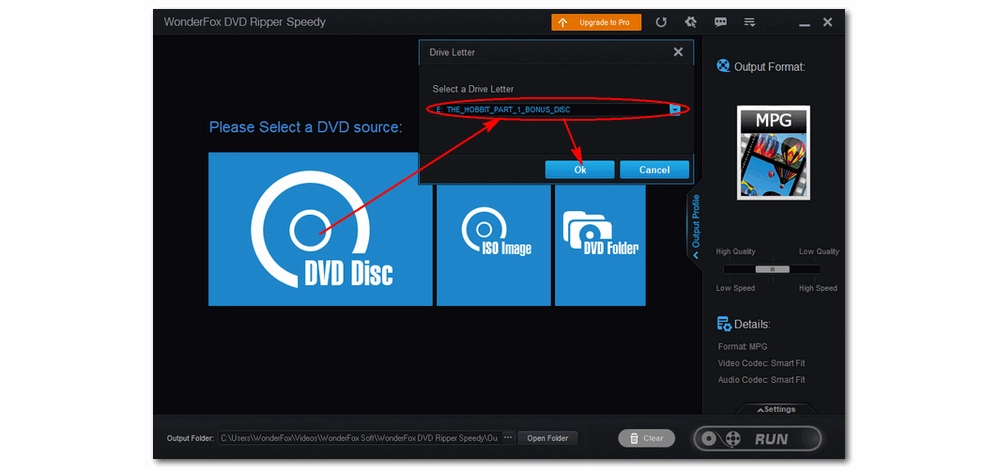
Launch DVD Ripper Speedy on your PC and click “DVD Disc” to load your DVD videos. The program will auto-mark the main movie/main title. If you want to keep other videos, you need to select them manually.
Tips. You can also load DVDs from the ISO image or VIDEO_TS Folder.
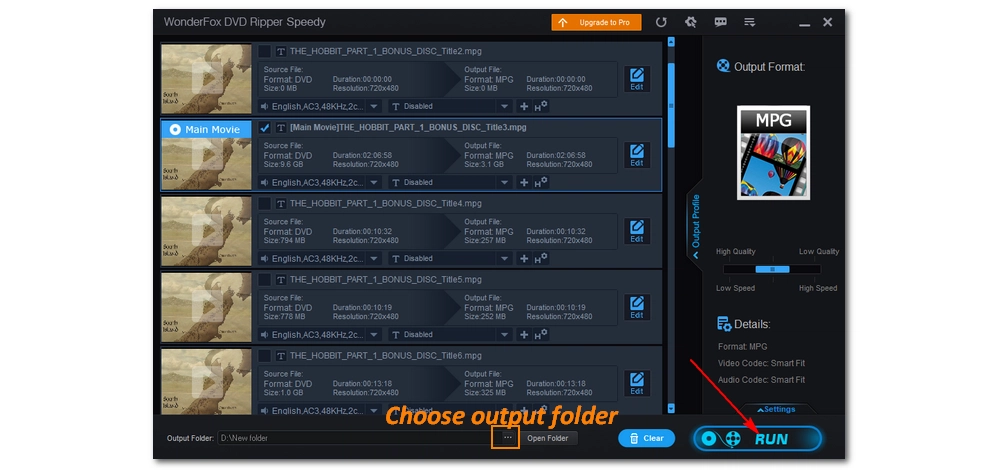
The program has MPG as the output format by default. You just need to set an output folder and click “RUN” to convert DVD to digital. But, if you want, you can modify the audio and subtitle track or edit the DVD video before conversion.
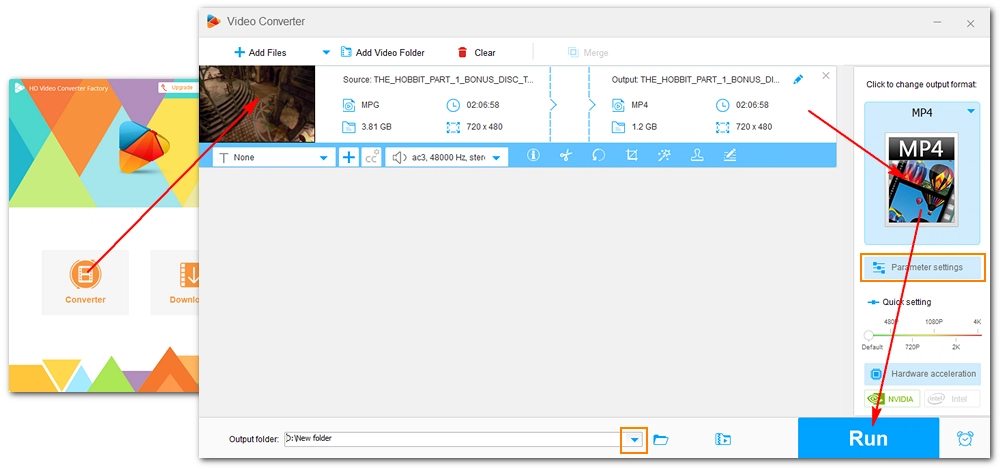
Open Free HD Video Converter Factory and enter the “Converter” module. Drag the digital DVD video into the workspace.
Next, click the right-side format image to open the output format list. Head to the “Video” category and choose “MP4” as the output format.
Finally, set an output path and click “RUN” to finish the DVD to MP4 conversion process.
Tips. Before conversion, you can open the “Parameter settings” to change the codecs, bitrate, frame rate, aspect ratio, etc.
Disclaimer: WonderFox does not advocate any illegal duplication and distribution of DVDs and all information provided in this article is presented for personal fair use only. Please refer to the DVD copyright laws in your country before you rip any DVDs.
MakeMKV and HandBrake are free, open-source software often used combined to convert DVD to MP4. Users would rip the DVD to MKV with MakeMKV and then compress the MKV file to MP4 with HandBrake. The next tutorial shows you how to rip DVD to MP4 with the two freeware in detail.
Tips. HandBrake alone can help you copy non-protected DVDs, e.g. home DVDs, to MP4 without the help of MakeMKV. Jump to Step 5 to convert homemade DVD to MP4 free with HandBrake directly.
Download MakeMKV: https://www.makemkv.com/download/
Download HandBrake: https://handbrake.fr/downloads.php
* Please insert a DVD into your computer’s DVD drive first.
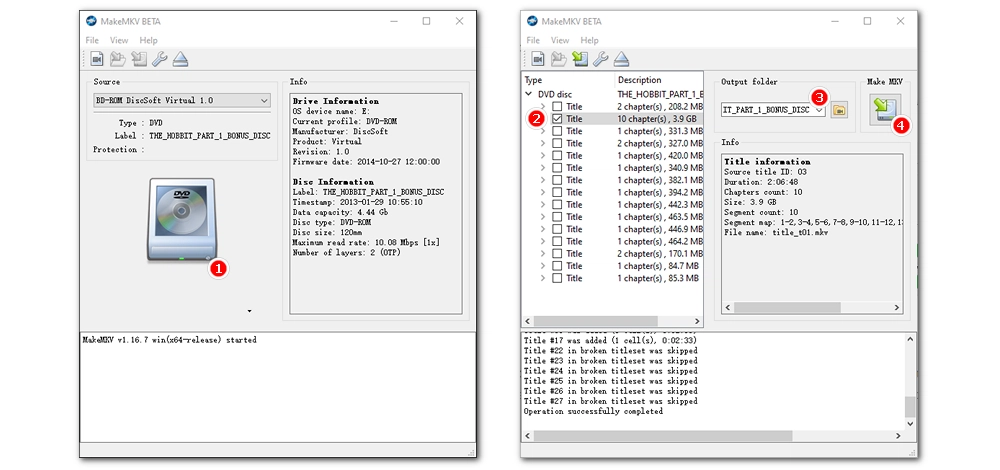
Step 1. Start MakeMKV on your Windows. It will auto-detect the disc and display the disc information.
Step 2. Click the DVD image to scan and load all the titles on the disc.
Step 3. Select your needed titles (usually, the main title is the one with the biggest size) and choose an output folder.
Step 4. Click “Make MKV” to save the selected titles as MKV.
Hot Search: How to Use MakeMKV?
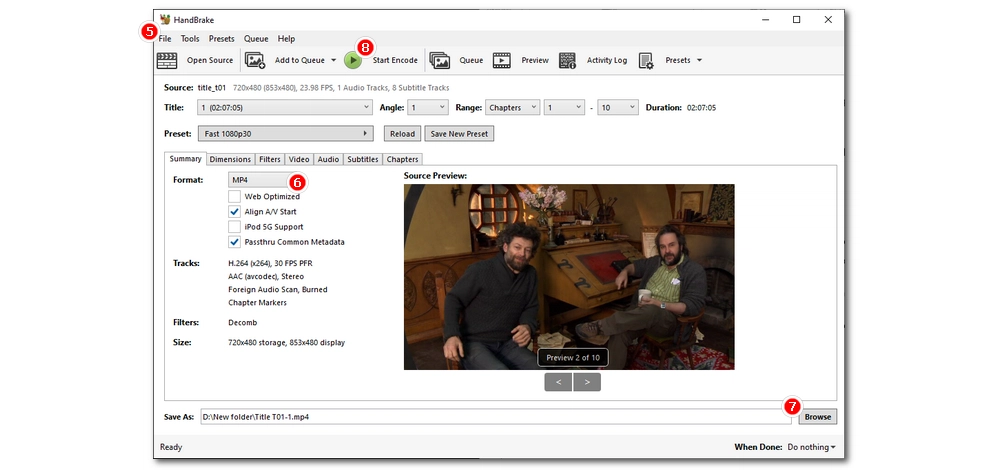
Step 5. Open the ripped DVD content with HandBrake.
Step 6. Navigate to the “Summary” tab below and choose “MP4” as the output format.
Tips. You can continue to customize other settings like video codec, FPS, subtitles, audio codec, etc. in other tabs.
Step 7. Click the bottom “Browse” button to specify an output path. Also, make sure that the file ends with the .mp4 extension.
Step 8. Finally, hit the top green “Start Encode” button to begin the conversion.
Hot Search: More HandBrake Tutorials
It's hard to find a free DVD to MP4 converter. Yet, If you’ve got time, try the two workarounds here to convert DVD to MP4 free. I hope you find these methods useful. That’s all for now. Thanks for reading!

• Convert between all mainstream video/audio formats;
• Download movies and music from 1000+ websites;
• Batch compress large video files at once;
• Record meetings, gameplay, streaming content…;
• Fast join multiple video clips into one file;
• Trim, split, crop, rotate videos at will.

Privacy Policy | Copyright © 2009-2024 WonderFox Soft, Inc.All Rights Reserved
