


It's annoying when you transfer a video, like MKV, to your phone and go to play it, you get an "unsupported file type" error or a black screen. The culprit is that the video is not in a mobile-ready format.
So, how do you get a video to play on your iPhone or an old Android? Don't worry. All you need is a simple mobi video converter. And here is a step-by-step guide on how to convert any video into the right format for your phone, including LG, Motorola, Nokia, HTC, and even the latest iPhone.
If you want a video that plays on 99% of all phones (Android, iPhone, or even older feature phones), aim for these settings. It's the universal profile that balances quality and size:
WonderFox HD Video Converter Factory Pro is a simple yet powerful tool that can handle almost any video or audio conversion. In this case, it also works as an excellent mobile video converter. With just a few clicks, you can convert videos to MP4, AVI, 3GP, 3GP2, and many other phone-friendly formats. You can also convert videos directly to profiles designed for different cell phones, smartphones, and other portable devices.
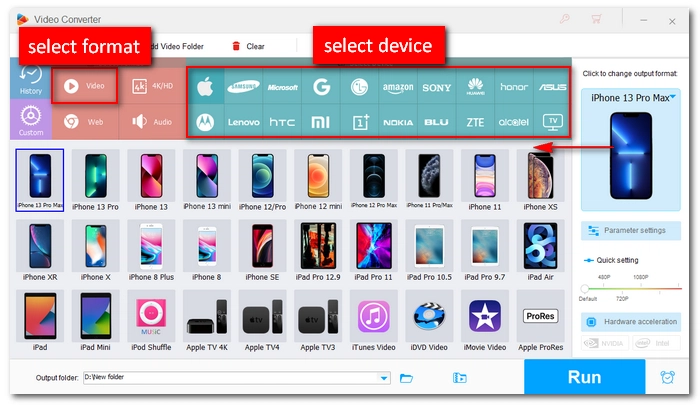
The program comes with optimized presets for most popular brands, including iPhone, Samsung, Huawei, Honor, Motorola, Nokia, HTC, Xiaomi, OnePlus, BLU, ZTE, Alcatel, Asus Zenfone, Google Pixel, and more. On top of that, it lets you fine-tune video size, resolution, and other settings so the output fits your phone perfectly.
Now, let's download download this mobi video converter and follow the tutorial to convert a video to a mobile video.
Convert any video to a format supported by your mobile phone easily and quickly. Download the software to explore more!
 Download for Free
Download for Free
Download for Free
Please free download free download the mobi video converter and follow the steps below.
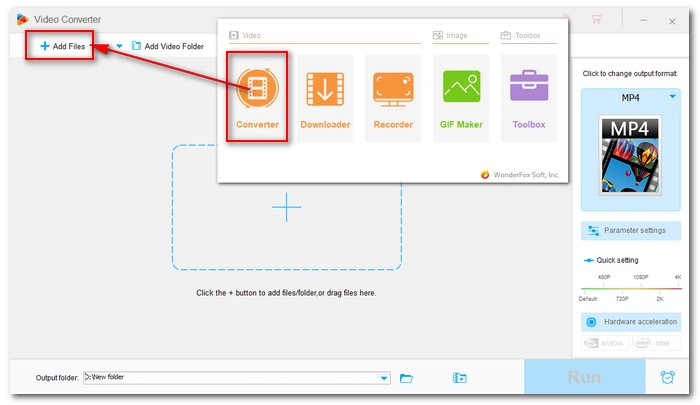
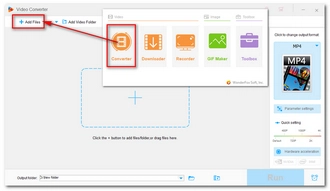
Open HD Video Converter Factory Pro and choose the Converter module from the main screen.
Click Add Files (or the + button) to load your videos. You can also drag and drop files directly into the program.
💡 You can add multiple video files for batch conversion at once.
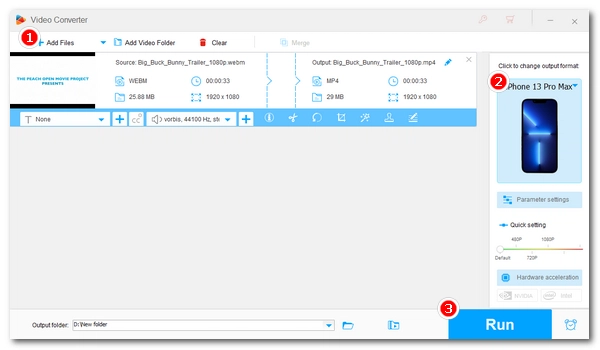
On the right, click the format icon to open the output format list. Go to the Device section, find your mobile brand/model, and select it.
If you can't find your specific mobile model, you can go to the Video tab and select H264 directly. This profile uses H264 video and AAC audio in an MP4 container, which ensures the best compatibility across devices.
🔔 Important Note:
The device profile only optimizes the video and audio codecs to ensure your phone can read the file. However, it does not automatically downscale the resolution or change the frame rate.
For example, most mid-range or older phones can't play 4K video smoothly. So if your source is 4K, after picking your profile, you'll need to open Parameter settings and manually set the resolution to 1920 x 1080, 1280 x 720, or even lower to ensure it doesn't lag. Meanwhile, you can adjust the bitrate and frame rate to make the video fit your phone.
For large videos, using the Compression slider can also reduce the video size to avoid lagging on your phone.
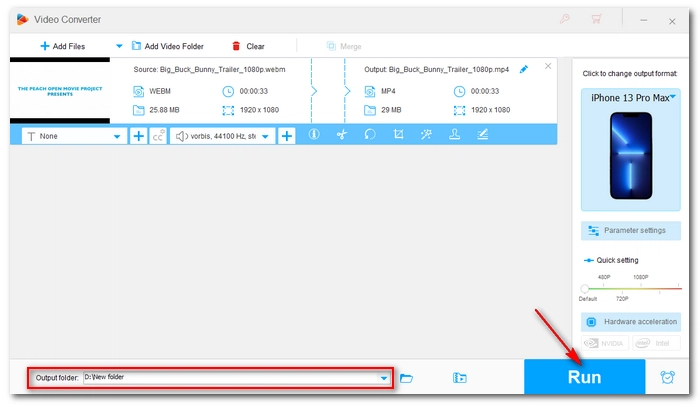
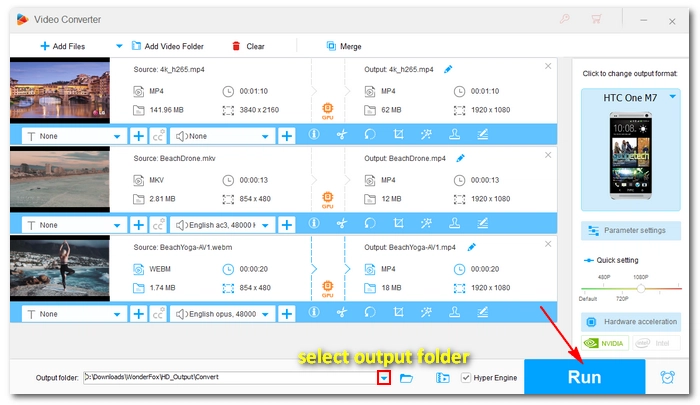
Click the ▼ icon at the bottom to set an output folder (or keep the default). Then hit Run to start converting your video.
With GPU acceleration enabled, the process can be up to 25x faster than normal conversion.
 Download for Free
Download for Free
Download for Free
It's easy to convert video to your mobile phone format with the mobile video converter. Then you can enjoy your video on the phone without interruptions.
We hope this article could be of some help to you. Thanks for reading. Have a nice day!
Hot Search: Samsung Converter
This usually happens if the video resolution or bitrate is too high. Even if it's an MP4, a massive file can choke your phone's processor. Before conversion, you can open Parameter settings and adjust the resolution or bitrate to a lower value.
If the file is massive (like a 2GB movie), it might just be too heavy for your phone to load. In this case, you can also use the Compression slider to shrink the file size.
Yes. The mobile video converter provides ready-made presets for Motorola (Moto Razr, Edge, G series), LG, HTC, and many other old Android phones. That said, if your specific model is not listed, you can manually select the H264 profile under the Video category to ensure smooth playback on your phone.
The most common video file types supported by Android include 3GP and MP4. As the Android system continues to update, the supported file types are also increasing. The following are the supported video formats for Android:
| Container Formats | Video Codec | Audio Codec |
|---|---|---|
| .3GP .MP4 .WebM .TS (Android 3.0+) .MKV (Android 4.0+) |
H.263 MPEG-4 SP VP8 (Android 2.3.3+) H.264 AVC (Android 3.0+) VP9 (Android 4.4+) H.265 HEVC (Android 5.0+) AV1 (Android 10+) |
AAC LC AMR MIDI MP3 Vorbis FLAC (Android 3.1+) PCM/WAVE (Android 4.1+) Opus (Android 5.0+) |

I write about multimedia topics, including video and audio conversion, compression, editing, and downloading. I joined WonderFox in 2020, and my goal is to help readers solve everyday tech problems more easily. In this article, you can learn the best video converter for mobile that can help you convert any video for smooth playback on mobile phones like LG, Motorola, Nokia, HTC, and even iPhone.


I write about multimedia topics, including video and audio conversion, compression, editing, and downloading. I joined WonderFox in 2020, and my goal is to help readers solve everyday tech problems more easily. In this article, you can learn the best video converter for mobile that can help you convert any video for smooth playback on mobile phones like LG, Motorola, Nokia, HTC, and even iPhone.
WonderFox DVD Ripper Pro
WonderFox DVD Ripper Pro is a professional DVD ripping program that can easily rip any DVD, be it homemade or commercial, to all popular formats including MP4, MKV, MP3, WAV, H264, H265, Android, iPhone, etc. without a hitch. It also lets you edit and compress DVD videos at high efficiency. Download it to enjoy a fast and trouble-free DVD-ripping experience.
Download for Free
Download for Free

Terms and Conditions | Privacy Policy | License Agreement | Copyright © 2009-2026 WonderFox Soft, Inc.All Rights Reserved