Free Download
Merge Your TS Files Together Conveniently
AuthorRecommended by the author

SoftwareHow to & Tips

Video FormatsConvert Video

Resources

TS Joiner – How to Join or Merge Multiple .ts Files Together

Author by Michelle

Updated on Sep 18, 2026

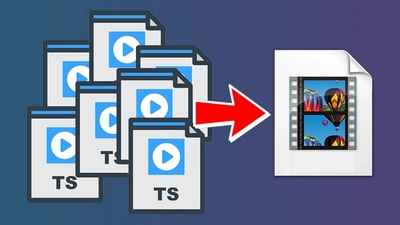
You might have downloaded a movie that takes up over 20GB of space on your device, only to find it's split into multiple fragmented TS files. Even worse, these TS files won't play on your PC, phone, or smart TV. In this situation, a powerful TS joiner is your best way out to combine these TS clips into a whole movie or merge TS files to MP4 for smooth playback. Download this quick TS file joiner and learn how to join .ts files easily:

I have some old videos that I transferred from VHS to DVD. They are now TS files. I need to combine multiple TS files into one that is YouTube friendly. So what can I do to make it?

I downloaded a film that is broken into multiple clips. I want a practical tool to merge TS files to MP4, any ideas for me?

A TS file is a video Transport Stream file mainly used in broadcast systems and old recorded tapes. When video is transmitted using the MPEG-TS or HLS protocols, it is often broken down into multiple segments with the .ts extension, such as filename1.ts, filename2.ts, etc. Managing these fragmented TS clips can be difficult, and many media players and devices don't have native support for the TS format. These all make a good TS joiner essential, as it can not only merge TS files into a single video but also directly export it as an MP4 file, which can ensure smooth playback anywhere.

In the following, I will share a powerful yet simple-to-use TS video joiner to show you how to combine TS files into one step by step. Read on!

The Best TS Joiner to Combine TS Videos Together on Windows

To efficiently merge TS video files on Windows, WonderFox HD Video Converter Factory Pro is highly recommended. It's an all-in-one video tool with a built-in merger that can merge just about any type of video, including TS.

As a dedicated TS merger, it not only easily combines multiple .ts files into one but also allows for direct splicing, without re-encoding, if the files come from the same source (sharing the same encoding parameters), which ensures lightning-fast processing and zero quality loss. Moreover, if you prefer to save the output in a different format, you can export it as MP4, MOV, AVI, or other common formats.

Equipped with GPU acceleration technology, the software can handle the merge quickly. Additionally, it supports batch processing, meaning you can start multiple merging tasks at a time.

Free downloadFree download the software and learn how to concatenate TS files with it next.

Free Download Free Download

Tutorial – How to Join .ts Files with the Recommended TS Joiner?

Import TS files

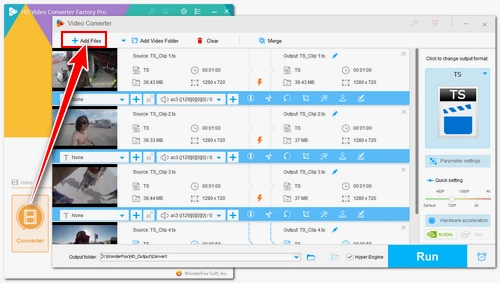
Step 1: Import Your TS files into the TS Joiner

Run HD Video Converter Factory Pro. Open Converter, click the Add Files button to add the TS files. Or you can directly drag and drop them into the program window.

Merge the TS files

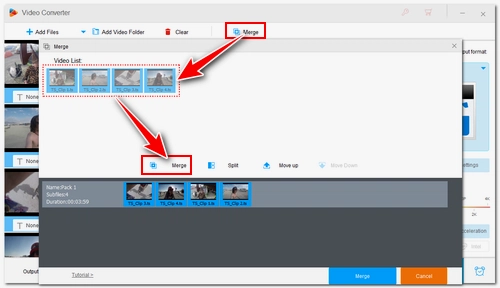
Step 2: Create a Pack to Merge the TS Files

Click Merge at the top. In the pop-up window, select all the videos in the Video List section and then click the middle Merge button to add them to Pack 1.

Create multiple packs at the same time

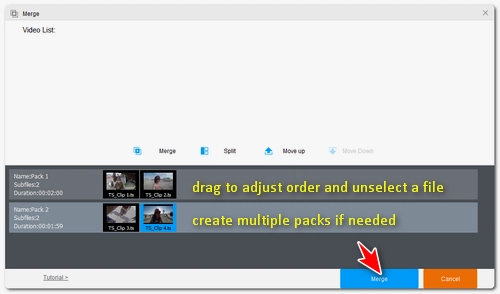
Step 3: Adjust the Order of the TS Files as Needed

You can change the video order in the pack by dragging the video to the place you want. If you don't want a video, just drag it to the original Video List or select it and click Move Up. You can continue to create Pack 2, Pack 3… if you want to combine videos into different groups.

When you're happy with the result, click the bottom Merge button to save the changes.

Various output formats

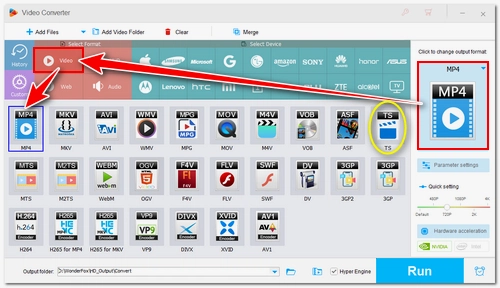
Step 4: Choose an Output Format and Export

Click the format icon on the right and select your desired output format under the Video tab. Note that if your TS files share identical encoding settings (same codec, resolution, frame rate, and aspect ratio), selecting the TS format allows for rapid merging without quality loss. But if you need maximum compatibility, MP4 or H264 is recommended. You can also explore other tabs to convert the file into a format tailored for a specific device, an audio format, or any other format you require.

Various output formats

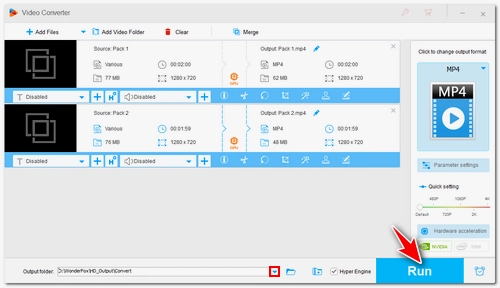
Finally, click the ▼ button at the bottom to set an output folder and click Run to export the merged video.

Hot search: AVI Joiner, VOB Merger , MTS Merger

At last...

That's all I wanted to share about how to easily and quickly merge multiple TS files into one, and export it to MP4 and other formats. With similar steps, you can merge other types of videos and also audio files without hassles. Download the program to join your TS files now:

Free Download Free Download

FAQs about Merging TS Files

1. Will merging TS files cause quality loss?

If the parameters (such as codec, resolution, frame rate) of the source TS video clips are exactly the same, WonderFox HD Video Converter Factory Pro can directly merge these clips without re-encoding, thus preserving 100% of the original image quality.


2. Why merge TS files to MP4?

The TS format is not supported on many PCa, smartphones, tablets, and TVs. So it's recommended to merge TS files to MP4 to ensure broad compatibility across various platforms and devices.


3. Does this software support merging large TS video files?

Yes. The program imposes no file size limits, so it can handle large TS files. But performance depends on your computer's specifications, and processing large files may be slower on lower-end computers.


Michelle

Michelle O'Brien

I write about multimedia topics, including video and audio conversion, compression, editing, and downloading. I joined WonderFox in 2020, and my goal is to help readers solve everyday tech problems more easily. In this article, I have shared a powerful TS merger that not only quickly and easily combines multiple .ts files into a single, complete video but also allows you to merge TS files directly into MP4 and other formats.

Email

Michelle

Michelle O'Brien

I write about multimedia topics, including video and audio conversion, compression, editing, and downloading. I joined WonderFox in 2020, and my goal is to help readers solve everyday tech problems more easily. In this article, I have shared a powerful TS merger that not only quickly and easily combines multiple .ts files into a single, complete video but also allows you to merge TS files directly into MP4 and other formats.

Email

More than a TS Joiner…

HD Video Converter Factory Pro

• Convert any video/audio to 500+ profiles;

• Download movies and music from 1000+ websites;

• Compress batches of video files at once;

• Record meetings, gameplay, streaming content…;

• Trim, crop, rotate, watermark, add special effects and subtitles to videos.

Free Download HD Video Converter Factory Pro Free Download HD Video Converter Factory Pro

More Related Articles

The 5 Best Free Music Mergers to Merge Music Files Remove Audio From MP4 Videos In Three Easy Ways The Detailed Review on Top 5 Online MP3 Editors
HD Video Editing Software - Assistant to Edit Your Videos M2TS to MP4 – Downsize File but Keep HD Quality