

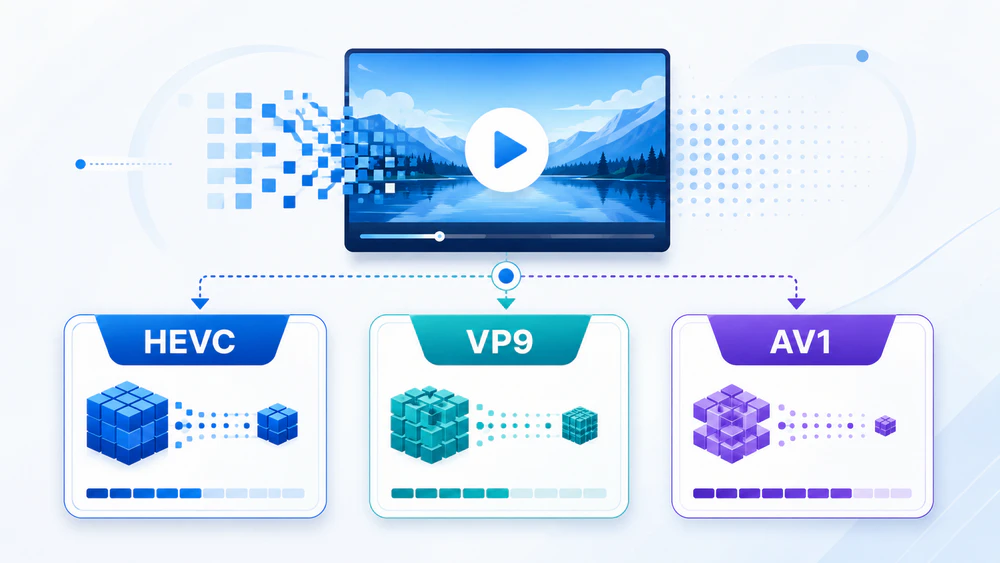
HEVC, VP9, and AV1 can all deliver high-quality video at a lower bitrate than older codecs, but they are not interchangeable in every situation. This guide compares their compression efficiency, image quality, encoding speed, hardware support, compatibility, licensing, containers, HDR capabilities, and best uses, so you can choose the right one without getting lost in technical jargon.
 Kevincy | Aug 5, 2026
There is no universal winner. The best codec depends on where the video will be played, how quickly it must be encoded, and whether licensing or bandwidth matters.
Choose HEVC (H.265) for 4K/HDR recording, local playback, TVs, phones, cameras, Apple-oriented workflows, and other situations where mature hardware support matters.
Choose VP9 for WebM-based web video, broad support across many established browsers and Android/TV devices, or a royalty-free workflow that needs faster and more mature encoding than AV1.
Choose AV1 when reducing delivery bitrate is the top priority and your viewers use reasonably modern hardware or software. It is usually the most compression-efficient of the three, but software encoding can take much longer.
Need the widest possible playback compatibility? H.264 is still safer than HEVC, VP9, or AV1 for unknown and older devices. A modern streaming service may provide AV1 or VP9 first and keep H.264 as a fallback.
👉 Codec is not the same as container. HEVC, VP9, and AV1 describe how the video track is compressed. MP4, MKV, WebM, MOV, and TS are containers that hold video, audio, subtitles, and metadata. For example, an MP4 file may contain HEVC or AV1 video, while a WebM file commonly contains VP9 or AV1.
WonderFox HD Video Converter Factory Pro can re-encode videos among HEVC, VP9, AV1, H.264, and other common codecs and formats. It also provides batch conversion, parameter controls, compression, and basic editing tools in a beginner-friendly GUI.
HEVC, also called H.265, is the successor to H.264/AVC. It was standardized by ITU-T and ISO/IEC for efficient video compression across streaming, broadcasting, video calls, storage, and high-resolution media. It is especially common in 4K and HDR playback, camera recordings, mobile devices, smart TVs, and Apple hardware.
VP9 is an open video codec developed by Google as the successor to VP8. It is closely associated with the WebM container and became a major codec for browser-based and online video. Its long deployment history gives it mature software and hardware support, especially in web, Android, Chromebook, and smart-TV environments.
AV1 was developed by the Alliance for Open Media as an open, royalty-free next-generation codec. It builds on ideas from earlier codecs, including VP9, and adds more advanced coding tools to reduce bitrate while retaining visual detail. AV1 is increasingly used for on-demand streaming, user-generated video, screen content, and high-resolution delivery.
| Item | HEVC / H.265 | VP9 | AV1 |
|---|---|---|---|
| Introduced | 2013 | 2013 | 2018 |
| Organization | ITU-T and ISO/IEC | Google / WebM Project | Alliance for Open Media |
| Licensing | Patent-licensed; commercial implementation and distribution may involve royalties | Open and offered royalty-free under the WebM licensing terms | Open and developed under AOMedia's royalty-free patent policy |
| Compression efficiency | Very good | Very good; often close to HEVC | Usually the best of the three at a similar visual quality |
| Software encoding speed | Moderate; mature encoders and hardware options | Moderate to slow, depending on encoder settings | Often the slowest at quality-focused settings |
| Hardware decode support | Very mature across phones, TVs, cameras, GPUs, and Apple devices | Mature on many browsers, Android devices, TVs, and GPUs | Common on newer chips and devices, but less universal on older hardware |
| Common containers | MP4, MKV, MOV, MPEG-TS | WebM, MKV; MP4 is possible but less common | WebM, MKV, MP4 |
| 10-bit and HDR | Yes | Yes, with suitable profiles and containers | Yes |
| Typical strength | Local 4K/HDR media, recording, TV, mobile, and Apple workflows | Mature open web video and WebM delivery | Bandwidth-efficient modern streaming and storage |
At the same resolution, frame rate, and visual quality, AV1 generally needs the lowest bitrate. This can mean smaller files or less bandwidth, especially for high-resolution and difficult content. However, there is no honest fixed percentage that applies to every video. Results change with the encoder, preset, source quality, grain, motion, animation, screen content, and quality metric.
HEVC and VP9 are usually closer to each other. One may win on a particular clip or encoder setting, but both are proven high-efficiency choices. A carefully tuned HEVC encode can outperform a fast AV1 encode, while a slow AV1 encode can offer better quality at the same bitrate than either HEVC or VP9.
Better compression normally requires more computation. AV1 has more coding tools and search choices, so quality-focused software encoding is often much slower than HEVC or VP9. Faster AV1 presets and hardware encoders reduce the gap, but they may give up some compression efficiency.
HEVC benefits from years of encoder optimization and broad GPU support. VP9 is also mature and can be practical for web pipelines. For occasional personal conversion, the difference may only affect waiting time. For a large video library or live workflow, encoding speed, electricity use, and hardware availability become major factors.
HEVC has excellent hardware support in many recent phones, cameras, TVs, streaming boxes, and GPUs. It is also deeply integrated into Apple platforms. On Windows, however, the built-in apps may require an HEVC extension (paid), and browser support still depends on the operating system and available hardware. A third-party media player with HEVC supported is highly recommended.
VP9 remains a dependable web codec with mature support in Chromium-based browsers, Firefox, many Android devices, and smart TVs. It is a useful compatibility bridge when AV1 decoding is unavailable.
AV1 decoding is now broadly available in modern browsers and increasingly common in recent GPUs, phones, TVs, and media chips. Older devices may fall back to software decoding, which can cause high CPU use, dropped frames, heat, or battery drain. A playback test on the target device is still worthwhile.
HEVC is an international standard covered by many patents. Licensing details mostly matter to hardware makers, software developers, streaming services, and commercial distributors rather than a home user converting personal videos, but the fragmented royalty landscape has influenced web adoption.
VP9 and AV1 were designed as open, royalty-free alternatives. VP9 is distributed under WebM licensing terms, while AV1 was created under the Alliance for Open Media's royalty-free patent policy. Businesses shipping encoders, decoders, or commercial services should still conduct their own legal review.
The selected codec does not decide everything about a video file. The container controls which video, audio, subtitle, chapter, and metadata streams can travel together. HEVC is most often placed in MP4, MKV, MOV, or TS. VP9 is most closely associated with WebM and MKV. AV1 is commonly delivered in WebM, MKV, or MP4.
Compatibility depends on the whole combination. A device may decode AV1 but reject the selected container or audio codec. For web delivery, provide tested combinations and a fallback instead of assuming that every browser accepts every codec-container pair.
All three codecs can be used for 4K, 8K, 10-bit color, and HDR workflows. That does not mean every profile, encoder, player, GPU, or display supports every combination. For HDR, the container, color primaries, transfer characteristics, metadata, and display pipeline must also be correct. Simply changing the codec cannot turn standard dynamic range footage into genuine HDR.
HEVC is usually the practical choice for videos recorded on phones, action cameras, drones, mirrorless cameras, and other modern devices. It offers strong compression, mature hardware decoding, and good support in media players, editors, TVs, and Apple products. Check Windows playback support before sharing the file with another user.
VP9 remains useful for WebM video, browser playback, online platforms, and older hardware that supports VP9 but not AV1. It is not obsolete simply because AV1 is newer. A working VP9 pipeline may still offer the best balance of quality, encoding speed, and device reach.
AV1 is attractive when bandwidth, storage, or visual quality at a restricted bitrate matters more than encoding time. It is well suited to video-on-demand libraries and modern delivery systems that can encode once and play many times. Keep VP9, HEVC, or H.264 alternatives for viewers with older devices.
HEVC, VP9, and AV1 are delivery codecs built to save space. Their inter-frame compression can make scrubbing and frame-accurate editing more demanding. For a heavy editing project, create proxies or transcode to an editing-friendly intermediate format first, then export to HEVC, VP9, or AV1 for delivery.
When a video will not play on a target device, takes too much space, or needs a different delivery codec, WonderFox HD Video Converter Factory Pro provides a straightforward Windows solution. It can convert between HEVC, VP9, and AV1, and it also supports common formats and codecs such as MP4, MKV, MOV, WebM, H.264, MPEG-4, and more.
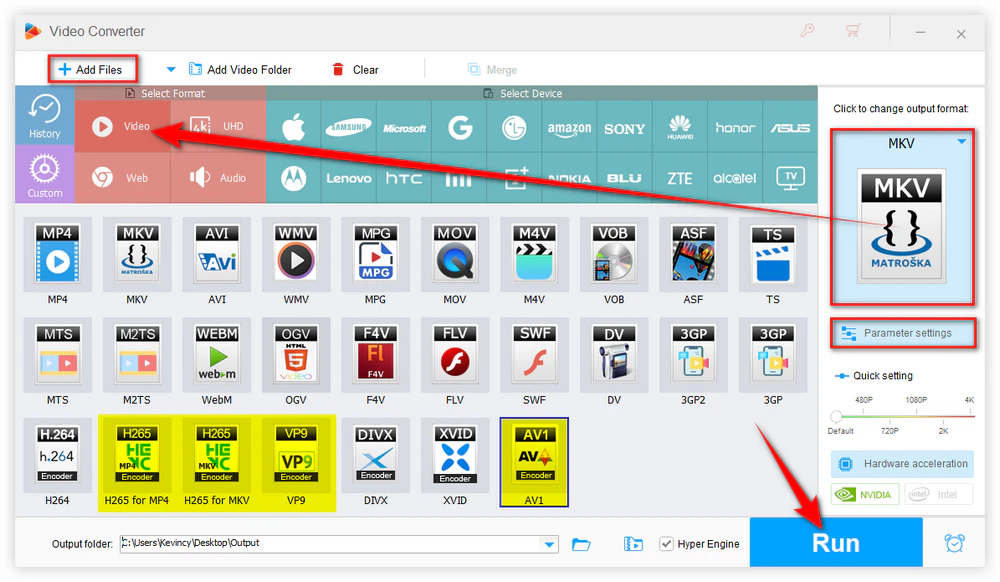
Step 1. Launch the program, open Converter, and click Add Files or drag videos into the workspace. Batch processing is available when several files need the same output.
Step 2. Open the output format list and select a profile that uses HEVC, VP9, AV1, or another codec required by the target player, website, or device. Use Parameter settings to adjust resolution, bitrate, frame rate, aspect ratio, audio, and other options when needed.
Step 3. Choose an output folder and press Run. Hardware acceleration can shorten the conversion time when the selected codec and your GPU support it.
📣 Note: Re-encoding a lossy video cannot restore details that are already missing. It may also introduce some generation loss, so avoid unnecessary repeated conversions. For a good balance, keep the original resolution and frame rate unless they must change, and use a sensible quality or bitrate setting rather than forcing the smallest possible file.
No. AV1 usually has a compression advantage, but it may encode more slowly and may not decode smoothly on older hardware. HEVC or VP9 can be the better practical choice when compatibility, encoding speed, or an existing workflow matters more.
No. VP9 is mature, royalty-free, and widely used in web video. AV1 is gradually replacing it in some delivery pipelines, but VP9 remains a useful fallback and a sensible option for devices without AV1 support.
The device may not have an AV1 hardware decoder, forcing the CPU to decode the video in software. High resolution, 10-bit color, high frame rate, or a demanding AV1 profile can make the problem worse. Updating the player or converting the file to HEVC, VP9, or H.264 can help.
Yes, the codecs can support high-resolution, high-bit-depth, and HDR video. Actual playback still depends on the chosen profile, level, container, metadata, decoder, operating system, cable or connection, and display.
No. HEVC-to-AV1 conversion cannot recreate lost source detail. AV1 may preserve similar visual quality at a lower bitrate than the HEVC source, but the new encode is still generated from already compressed video and can introduce additional loss.
HEVC, VP9, and AV1 are all capable modern video codecs. HEVC stands out for mature device support and 4K/HDR media workflows. VP9 remains a dependable open web codec with broad established compatibility. AV1 delivers the strongest compression potential for modern streaming and storage, but it asks more from the encoder and may need newer playback hardware.
Choose the codec for the real destination instead of choosing the newest name. When compatibility changes, converting the video with HD Video Converter Factory Pro offers a simple way to move among these codecs and other common formats.

Kevincy joined the WonderFox team in 2014 and has been a senior columnist ever since. With over two decades of experience in the video editing industry, he shares tutorials, tips, and how-to guides on video/audio processing and personal DVD backups. Family-oriented and passionate about helping others, he is dedicated to making video and audio processing easier for readers.


Kevincy joined the WonderFox team in 2014 and has been a senior columnist ever since. With over two decades of experience in the video editing industry, he shares tutorials, tips, and how-to guides on video/audio processing and personal DVD backups. Family-oriented and passionate about helping others, he is dedicated to making video and audio processing easier for readers.

WonderFox HD Video Converter Factory Pro
1. Convert HEVC, VP9, AV1, H.264, and other codecs.
2. Batch process video and audio with 500+ presets.
3. Adjust bitrate, resolution, frame rate, and audio.
4. Compress videos with controllable quality and size.
5. Trim, merge, crop, rotate, flip, and add subtitles.
6. Download online videos and record the Windows screen.
7. Use GPU acceleration for supported conversion tasks.

Privacy Policy | Copyright © 2009-2026 WonderFox Soft, Inc. All Rights Reserved
