

GoMovies serves as a hub that allows people to free watch a wide range of HD movies and TV series online without registration. But as you know, it's impossible to stay at a place with network connection. Sometimes, you may be prone to movies download for different purposes, thus, the following 2 GoMovies downloaders would float your boat. Keep reading!
BTW, try the novice-oriented FREE utility for video/music downloading, editing, and converting: https://www.videoconverterfactory.com/download/hd-video-converter.exehd-video-converter.exe
 Kevincy | Updated on Mar 10, 2026
The legality of downloading GoMovies videos depends on the specific use and local laws. The following guides are compiled for personal fair-use ONLY. WonderFox is in no way collaborated or affiliated with those clone websites of GoMovies, and will never advocate any copyright infringement action. The end-users should be solely responsible for your own behaviors.
GoMovies is a popular website where you can stream a wide range of movies and TV series for free. While online streaming is convenient, many people prefer downloading videos so they can watch them offline—especially when traveling or dealing with slow internet connections.
However, GoMovies itself does not provide a built-in download button. If you want to save a movie from the site, you’ll need help from third-party tools that can detect and download streaming videos.
Next, we’ll walk you through two practical methods to download videos from GoMovies using commonly used tools.
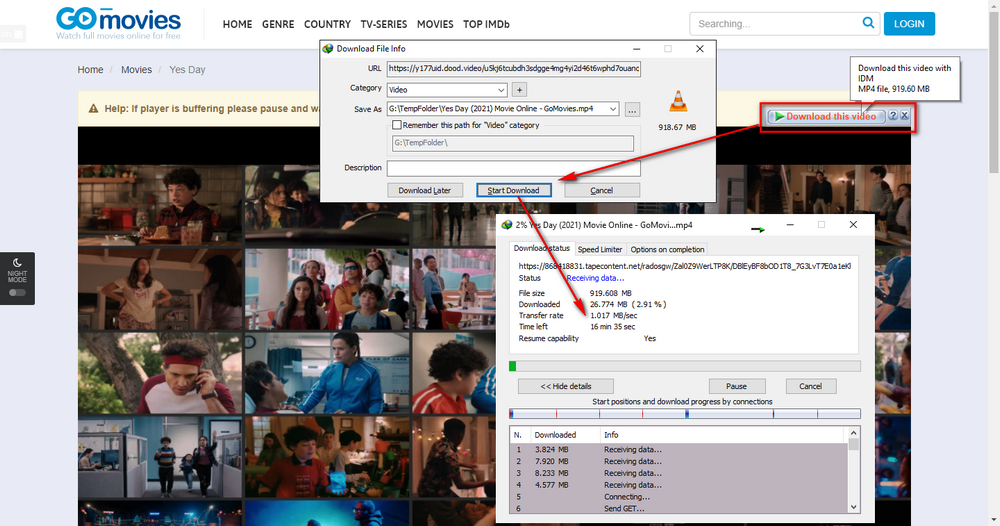
In addition to being the fast download accelerator, Internet Download Manager, also known as IDM, can also serve as a GoMovies downloader that helps inspect and download the online streaming movies in a simple click. It provides a 30-day trial period for free use. Now let's see how it works.
Step 1. Download and install Internet Download Manager through official website: https://www.internetdownloadmanager.com/download.html. After that, you'll be prompted to install an extension/add-on - IDM Integration Module to all your frequently-used browsers so as to conveniently intercept downloads from any video streaming webpage.
Step 2. Play a movie or TV episode on GoMovies to invoke the download pane, which will appear around the built-in video player. Click on the pane to rename the movie file and select a directory to save it. Then, press "Start Download" button to download from GoMovies.
Also Read: Download from FMovies | M4uFree Video Downloader | AZMovies Downloader | Download from Soap2day
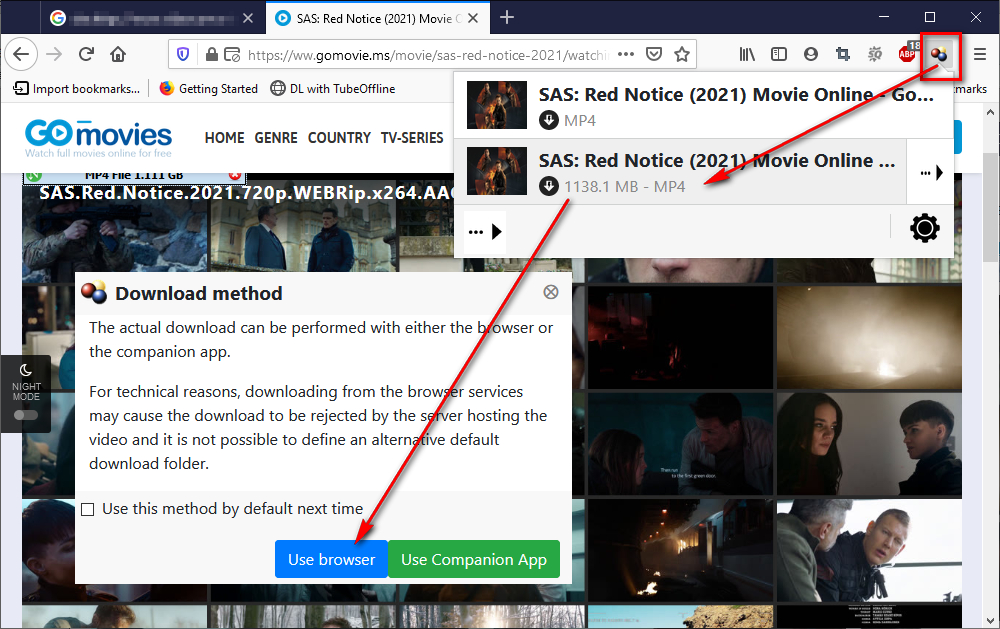
As an acclaimed browser video downloader extension, Video DownloadHelper can monitor and capture movies from GoMovies as well.
Step 1. Download and install Video DownloadHelper to your Chrome, Firefox or Edge via https://www.downloadhelper.net/install. A "colorless three-balls" icon will show up on the extension bar of the browser.
Step 2. Visit GoMovies, play a movie or TV episode you want to download, when the video is loaded and buffered, the extension will turn to a "colored three-balls" icon, which means the movie has been detected to be downloaded.
Step 3. Click on the icon to download GoMovies videos. For the first time you use it, you'll be led to a new webpage to confirm the download method. Simply mark the option "Use this method by default next time" and press "Use browser" button to save the movie. Remember, switch to another server and try it again if you come to an unfortunate Video DownloadHelper not working issue.
Ads would be a pain, but they are the only way to maintain the website. Remember, DO NOT CLICK on any suspicious and malicious AD. For a better viewing experience, you'd better install some AD blocking programs to get rid of the annoying pop-ups and redirects. That's all I want to share with you guys. If there is any question or problem in the process of downloading from GoMovies, please let me know via Facebook Messenger.

Privacy Policy | Copyright © 2009-2026 WonderFox Soft, Inc. All Rights Reserved
