

Have trouble playing or backing up DVD discs on Windows 10/11? A DVD codec pack may help in some cases, but it is not a complete fix for DVD playback or disc backup. A better approach is to decode the DVD to a digital video file, so you can watch the movie without relying on the optical drive, a specific player, or extra DVD codecs.
First, get an essential DVD decoder free download: https://www.videoconverterfactory.com/download/dvd-ripper-s.exehttps://www.videoconverterfactory.com/download/dvd-ripper-s.exe
 Kevincy | Updated on Jul 2, 2026
Table of Content
Part 1 - DVD Decoder, DVD Codec, and DVD Player: Which One Do You Need?
Part 2 - Does Free DVD Decoder Mean Imperfect? Not Really!
Part 3 - Best Free DVD Decoder Download for Windows 10/11
Part 4 - How to Decode DVD Efficiently with the Best Free DVD Decoder?
When a DVD will not play on Windows 10 or Windows 11, people often search for a DVD codec, a DVD decoder, or a DVD player. These names sound similar, but they solve different problems.
A DVD codec is a small decoding component, such as an MPEG-2 video decoder or an AC3 audio decoder. It may help when a media player can open a file but reports a missing codec. However, installing a codec alone usually does not add complete DVD playback, DVD menu navigation, region handling, or disc reading ability to Windows.
A DVD player is used for direct playback from a disc. Free players like VLC and PotPlayer are convenient for many home-made or unprotected DVDs, but playback can still fail if the disc, drive, region setting, DVD structure, or protection is the real cause.
A DVD decoder/ripper reads DVD Disc, ISO Image, or VIDEO_TS Folder and turns the movie into a regular video file. This is more practical if you want a stable digital backup, want to watch DVDs without an optical drive, or need to play the movie on Windows Media Player, TV, tablet, phone, or another device.
In short: try a DVD player for quick viewing, install a codec only when your existing player lacks MPEG-2/AC3 decoding, and use a DVD decoder when you need a playable digital copy.
Free DVD tools are not automatically bad. The problem is that many "free" solutions only solve one small part of the DVD issue. A codec pack may help your player decode MPEG-2 video, but it will not convert the disc to a file. A free DVD player may play some discs, but it may fail with a bad drive, a region mismatch, a scratched disc, or a DVD structure it cannot read.
When choosing a free DVD decoder for Windows 10/11, pay attention to these real-world problems:
WonderFox Free DVD Ripper Speedy takes a simpler route. It focuses on fast DVD-to-MPG backup without watermark or length limit. For users who mainly want to save a DVD movie as a playable file, this is often more useful than installing random DVD codec packs.
Disclaimer: WonderFox doesn't advocate any copyright infringement. All information provided in this article is presented for personal fair-use only. Figure out if it is legal to rip a DVD in your country beforehand. Ripped content CANNOT be used for unauthorized reproduction, distribution, or any commercial use.
A simple, clean, and costless DVD decoding utility that helps digitize physical DVD discs to MPG for hassle-free playback and backup. Download this free DVD decoder right now and have a try!
WonderFox Free DVD Ripper Speedy is mainly geared toward fast DVD decoding and backup. As a free DVD decoder without watermark, it only needs two steps to finalize a full-length DVDrip video in about 5 minutes by copying the DVD video to MPG without re-encoding. It supports DVD discs, ISO images, and VIDEO_TS folders, and it can read both homemade DVDs and many common commercial DVDs for personal backup where permitted.
Simply get this DVD decoder free downloadfree download for Windows 10/11, then let's jump in!
Insert a homemade or copy-protected DVD disc into the internal/external DVD-ROM drive.
LaunchLaunch WonderFox Free DVD Ripper Speedy, click on the "DVD Disc" button, select the DVD drive letter, and click OK.
The DVD decoder freeware will scan the DVD disc and list all titles after a few seconds. Meanwhile, it will remove all sorts of DVD copy protections, such as CSS, regional code, Disney X-Project DRM, etc. (if any), which is not available in nearly all free DVD decoders on the market.
By the way, you're also allowed to import a DVD ISO image file or an entire VIDEO_TS folder.
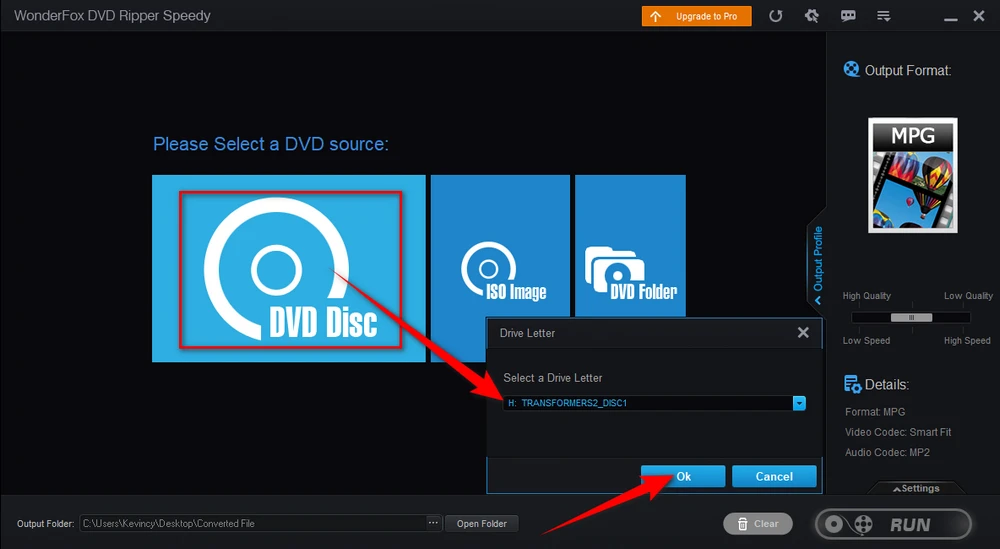
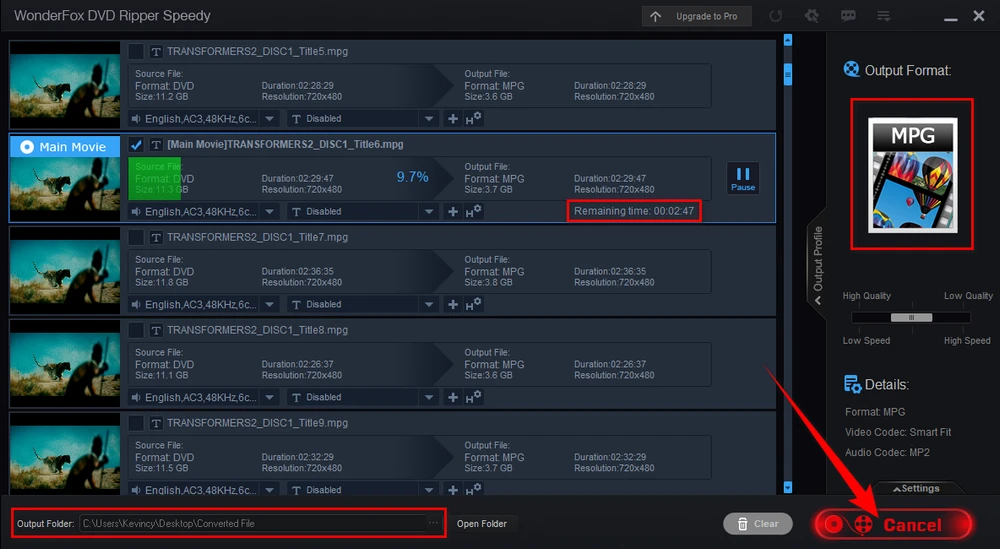
The Windows DVD decoder will intelligently identify the main movie title and skip unnecessary content such as credits, previews, trailers, ads, and warnings, so you do not have to guess from dozens of similar DVD titles.
MPG is the default and only output format for the fastest free DVD ripping without re-encoding. Click the "three-dots" icon next to the "Open Folder" button to specify a destination folder. Lastly, hit the big "RUN" button for free DVD decoding. The process will usually complete in around 5 minutes, depending on your DVD drive speed and disc condition.
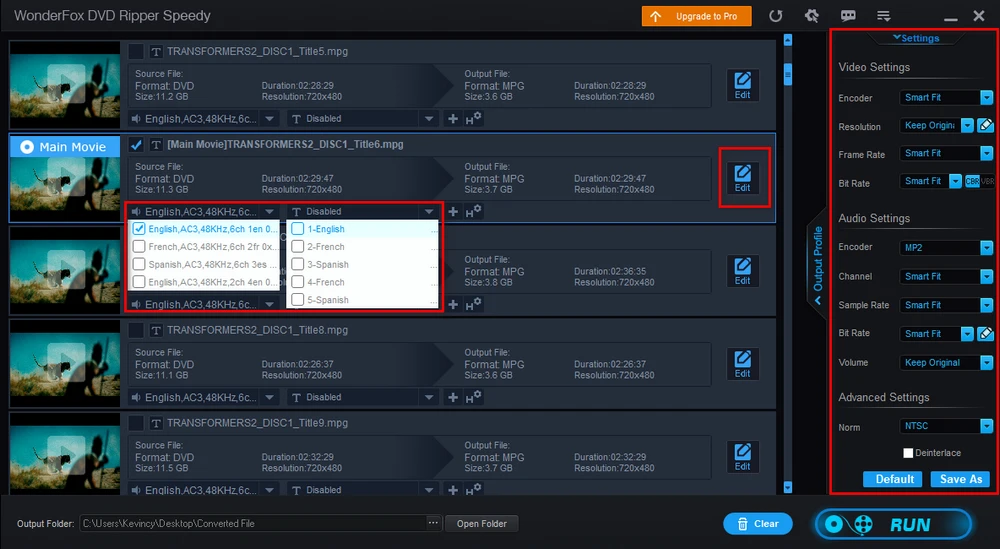
Before the DVD ripping process, you're also able to select the desired audio track, add subtitles to DVD, deinterlace DVD, upscale DVD, cut video clips from the movie, and more. Note that changing video parameters requires re-encoding, so the DVD decoding process will take longer.
MPG is the only output format in the free DVD decoder because it is designed for fast backup without re-encoding. If you're interested in other mainstream formats like MP4 or any specific device model, you can choose either option below:
1. Convert the output MPG video with Free HD Video Converter Factory: https://www.videoconverterfactory.com/download/hd-video-converter.exehttps://www.videoconverterfactory.com/download/hd-video-converter.exe
2. Upgrade to Pro versionUpgrade to Pro version of this DVD decoder freeware to directly convert DVD to MP4, MKV, AVI, ISO, VIDEO_TS, and more presets at will.

Try a free DVD player first. VLC, PotPlayer, and similar players can directly play many DVD discs without extra setup. This is the easiest route for home-made DVDs or simple movie discs.
Install a trusted DVD codec pack only when you already have a player but it fails because of missing MPEG-2 video, AC3 audio, or other DVD-related decoders. K-Lite Codec Pack and Media Player Codec Pack are common options. Avoid unknown codec installers, because codec packs from random download sites may bundle unwanted software.
If the problem is caused by the optical drive, disc region, scratched disc, complex DVD structure, or copy protection, a codec pack alone will not fix it. In that case, decoding the DVD to a regular MPG/MP4 video file is usually more reliable. You can keep the movie on your hard drive and play it later without the original disc.
A: A DVD codec helps a media player decode video or audio streams, such as MPEG-2 video or AC3 audio. A DVD decoder/ripper reads the DVD disc structure and saves the movie as a regular video file. If your goal is backup or playback on different devices, a DVD decoder is usually more useful.
A: Sometimes, but not always. A codec pack may help with missing video/audio decoders, but it will not fix every DVD playback issue. Disc reading errors, region mismatch, DVD menus, and protected DVD structures may still stop playback.
A: No, not for the default fast MPG output. WonderFox Free DVD Ripper Speedy copies DVD video without re-encoding, so the original DVD quality is kept.
A: The free DVD decoder outputs MPG only for fast backup. You can convert the MPG file to MP4 with Free HD Video Converter Factory, or upgrade to DVD Ripper Pro to decode DVD directly to MP4, MKV, AVI, and more presets.
A: Yes, it also works on Windows 7, Windows 8, and Windows Vista.
A: No. It's designed for standard DVD discs. Blu-ray discs use different disc structures and protection systems, so you need a dedicated Blu-ray playback or backup tool.
A DVD codec pack can fix some missing-codec errors, and a free DVD player can be enough for quick disc playback. But if you want a stable digital copy that can be played later without the DVD disc, WonderFox Free DVD Ripper Speedy is the more practical free DVD decoder for Windows 10/11.
Hopefully, this guide helps you choose the right solution instead of installing DVD codecs blindly. Use the method that fits your case and always respect copyright laws in your country.

Kevincy joined the WonderFox team in 2014 and has been a senior columnist ever since. With over two decades of experience in the video editing industry, he shares tutorials, tips, and how-to guides on video/audio processing and personal DVD backups. Family-oriented and passionate about helping others, he is dedicated to making video and audio processing easier for readers.


Kevincy joined the WonderFox team in 2014 and has been a senior columnist ever since. With over two decades of experience in the video editing industry, he shares tutorials, tips, and how-to guides on video/audio processing and personal DVD backups. Family-oriented and passionate about helping others, he is dedicated to making video and audio processing easier for readers.

WonderFox DVD Ripper Pro
Rip DVD/ISO/Video_TS to MP4, MKV, and 300+ presets.
Decrypt DVD protections like region code, CSS...
Fast digitize DVD to MPEG-2 MPG within 5 mins.
Make a 1:1 intact digital copy (VIDEO_TS or ISO).
Compress 8 GB DVD to 1-2 GB digital video file.
Support multiple audio tracks, hard/soft/forced subs.
Basic editing features and customize output parameters.

Privacy Policy | Copyright © 2009-2026 WonderFox Soft, Inc. All Rights Reserved

 Free Download
 Check Details
 Windows, 100% Clean!