

MP3, AAC, FLAC, WAV, and OGG can all store music, but they are designed for different jobs. Some save space by discarding audio data, some keep every bit of the original signal, and some favor editing or compatibility over storage efficiency. This guide explains the main differences in plain English, compares the formats from several practical angles, and helps you choose a sensible format for listening, sharing, archiving, editing, or streaming.
 Kevincy | Sep 28, 2026
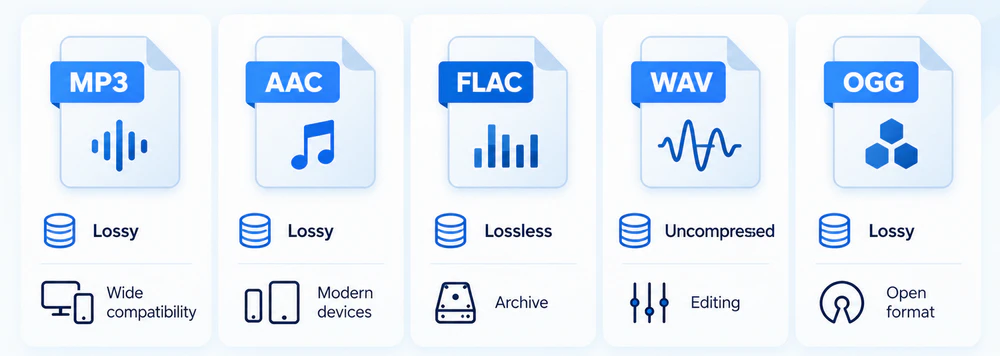
An audio file is more than a filename extension. The format determines how audio is encoded, how much space it uses, what quality can be preserved, and which devices or apps can open it. The formats below cover most everyday listening, editing, and archiving needs.
| Format | Type | Main Strength | Main Trade-off | Good For |
|---|---|---|---|---|
| MP3 | Lossy | Excellent compatibility and small files | Removes audio data permanently | General listening, sharing, older hardware |
| AAC | Lossy | Efficient quality at modest bitrates | Not as universally friendly to very old devices as MP3 | Phones, modern devices, video, streaming |
| Ogg Vorbis | Lossy | Open format and efficient compression | Less consistent hardware/app support | Open-source projects, web/game assets, controlled playback environments |
| FLAC | Lossless compressed | Preserves the source while reducing size | Larger than lossy files | Music libraries, CD backups, archiving |
| WAV (usually PCM) | Usually uncompressed | Simple, editing-friendly PCM storage | Very large files | Recording, editing, production, interchange |
Two terms are often mixed up: Ogg is a container, not a single audio codec. A typical .ogg music file contains Vorbis audio, but Ogg can also carry other codecs. Likewise, WAV is a container format. Most WAV files use uncompressed PCM audio, which is why people commonly treat “WAV” as shorthand for uncompressed audio in everyday comparisons.
You may also see ALAC (Apple Lossless Audio Codec). It serves a similar lossless purpose to FLAC and is especially useful in Apple-focused libraries. This article mainly focuses on MP3, AAC, Ogg Vorbis, FLAC, and WAV because they cover the most common comparisons in daily use.
WonderFox Free HD Video Converter Factory can convert common audio files such as MP3, WAV, AAC, FLAC, M4A, and more. You can also adjust bitrate, sample rate, channels, and volume when needed.
MP3, AAC, and Vorbis are lossy codecs. They use psychoacoustic models and other compression techniques to remove or simplify information that is less likely to be noticed by human hearing. This makes the files much smaller, which is useful for portable devices, online delivery, and large music collections.
Lossy does not automatically mean “bad quality.” A well-encoded high-bitrate file can sound transparent to many listeners. However, the removed data cannot be recovered later. Re-encoding a lossy file again and again can also introduce additional artifacts.
FLAC compresses audio without discarding the original PCM information. When a FLAC file is decoded, the audio data can be reconstructed exactly. That makes FLAC a practical choice for archiving, ripping CDs, keeping a master music library, or preserving a lossless source for future conversions.
Lossless compression saves less space than lossy compression. The actual FLAC size depends on the music, bit depth, sample rate, channel count, and encoder settings, so there is no single “FLAC bitrate” that applies to every file.
A common PCM WAV file stores the samples without perceptual compression. For example, CD-quality stereo PCM at 44.1 kHz and 16-bit uses about 1,411.2 kbps before container overhead. A three-minute track is roughly 32 MB. By comparison, three minutes at 320 kbps is about 7.2 MB, at 256 kbps about 5.8 MB, and at 128 kbps about 2.9 MB.
Those numbers explain why WAV is convenient for editing but inefficient for a portable music library. FLAC provides a middle ground: it keeps the same decoded audio data while usually taking substantially less space than uncompressed PCM.
Both MP3 and AAC are lossy, but AAC is newer and generally more coding-efficient. At the same bitrate, especially at lower and moderate bitrates, a good AAC encoder can often preserve difficult audio more cleanly than MP3. At higher bitrates, the audible gap becomes much smaller and may be difficult to identify in normal listening.
Choose MP3 when compatibility is the priority. It remains one of the safest formats for old car stereos, portable players, basic hardware, messaging, and simple file sharing. Choose AAC when you want efficient lossy audio for modern phones, tablets, video files, Apple-oriented workflows, or online media.
For MP3, 320 kbps is the highest standard MPEG-1 Layer III bitrate. AAC is not meaningfully described by a single universal maximum in the same way because different AAC profiles and containers can use different settings.
Vorbis was designed as an open audio codec and is normally stored in an Ogg container. It can be more efficient than MP3 at similar perceived quality, particularly when file size matters and you control the playback environment. Vorbis also uses variable bitrate naturally, so the encoder can spend more bits on complex passages and fewer on simple ones.
The trade-off is compatibility. MP3 works almost everywhere, while Ogg Vorbis support varies more across hardware, apps, browsers, editors, and media ecosystems. If you need to send a file to someone without knowing what they will use to play it, MP3 is usually safer.
AAC and Vorbis are both efficient lossy codecs. Their sound quality at a given bitrate depends on the encoder, settings, source material, and listener, so there is no useful rule that one always sounds better. In practice, AAC has broader support on mainstream devices and is widely used alongside video, while Vorbis remains attractive when an open format is preferred.
For ordinary users, the compatibility difference is often more important than tiny codec-efficiency differences. If your phone, car, editor, TV, website, or target app has a required format, follow that requirement first.
The biggest difference is not the brand name of the format but the compression type. FLAC is lossless. MP3, AAC, and Vorbis are lossy. If the source is lossless, FLAC can preserve it for future editing or conversion. A lossy format cannot do that because some source information is intentionally removed during encoding.
That does not mean FLAC will always sound obviously better during playback. Whether you can hear a difference depends on the source, codec and bitrate, encoder quality, headphones or speakers, listening environment, and your own hearing. The technical advantage of FLAC is certainty: the decoded audio remains lossless.
A 320 kbps MP3 can sound excellent and may be indistinguishable from a lossless source for many listeners in a casual test. But it is still lossy. FLAC preserves the complete decoded source signal; MP3 does not. Therefore, FLAC is the better preservation format, while 320 kbps MP3 is much smaller and easier to use on virtually any device.
Also remember that the bitrate numbers are not directly comparable. An uncompressed CD-quality stereo stream is about 1,411.2 kbps, while FLAC uses variable lossless compression and may end up far below that depending on the audio. A lower FLAC bitrate does not mean it has lost quality.
If a FLAC file and a PCM WAV file come from the same lossless source with matching sample format, the decoded audio can be identical. The practical difference is storage and workflow. FLAC compresses efficiently and supports rich tagging, making it convenient for a music library. WAV PCM is much larger but remains common in recording, editing, and interchange workflows because of its simplicity and broad support in audio software.
One useful distinction: WAV is a container and can technically hold more than uncompressed PCM. In everyday music comparisons, however, “WAV vs. FLAC” usually means uncompressed PCM WAV versus lossless-compressed FLAC.
This comparison needs careful wording. Ogg is a container. An .ogg file may contain Vorbis, Opus, or even FLAC in some cases. If you mean the common Ogg Vorbis vs. FLAC comparison, then Vorbis is lossy and FLAC is lossless. Vorbis is smaller; FLAC is more suitable for preservation.
There is no single format that is best for every situation. The most useful question is: what will you do with the audio next?
For maximum everyday compatibility: use MP3. It is a dependable choice for sharing files, old players, car stereos, portable devices, and situations where you do not know what the recipient uses.
For efficient audio on modern devices or inside video: use AAC. It is a strong choice for mobile devices, Apple products, video workflows, and many streaming or online-media situations.
For archiving a lossless music collection: use FLAC. It keeps the source audio intact while saving considerable space compared with uncompressed PCM. If you are building an Apple-centered lossless library, ALAC is another reasonable choice.
For recording, editing, and production: use WAV/PCM when your software or workflow expects it. File size is large, but the format is straightforward and widely accepted by audio editors and DAWs.
For open-source or controlled playback environments: Ogg Vorbis can be useful. It offers efficient lossy compression and an open format, but check your target player, browser, console, or device before committing to it.
For saving space without making a new lossy generation: convert a lossless WAV/PCM source to FLAC. If you only have MP3, AAC, or Vorbis, converting it to FLAC may stop further quality loss during later processing, but it will not restore details already removed from the original lossy file.
If the format you have does not suit your player, editor, phone, car stereo, or storage plan, converting it is often easier than changing your whole workflow. WonderFox Free HD Video Converter Factory provides a simple way to change common audio file types on Windows and supports batch conversion.
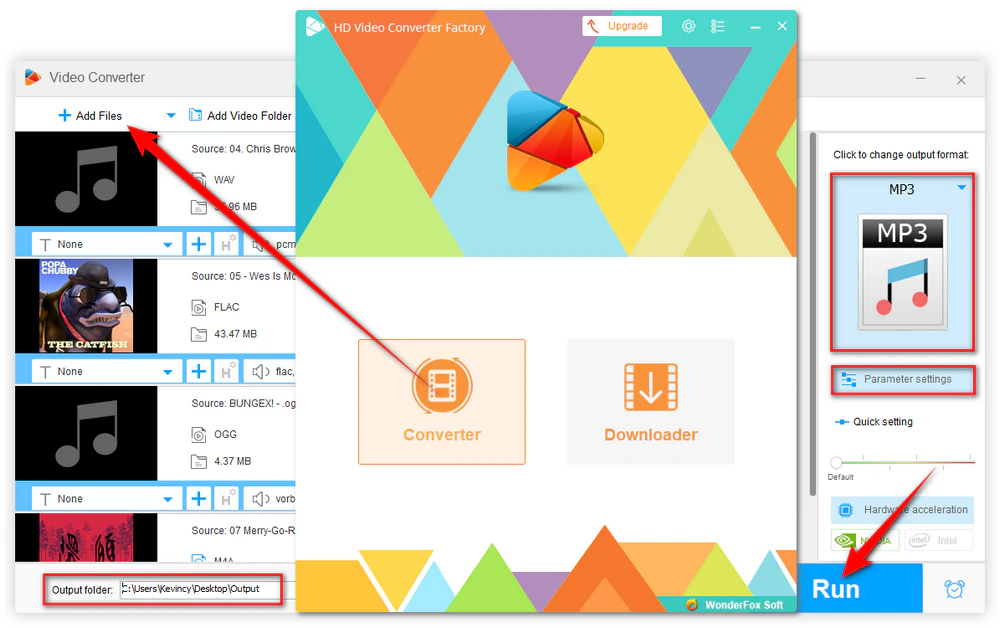
Step 1. Open the program and enter Converter. Click + Add Files or drag your audio files into the window.
Step 2. Open the Output Format list and choose the audio format you actually need. For example, use MP3 for broad compatibility, AAC for many modern devices and video workflows, FLAC for lossless storage, or WAV for editing.
Optional. Open Parameter settings to change bitrate, sample rate, channels, or volume. Avoid increasing these values just to make the number bigger. Higher settings cannot recreate detail that is missing from the source.
Step 3. Choose an output folder and click Run to start the conversion.
👉 This tool also works for video files. If you need batch conversion, GPU acceleration, screen recording, and additional processing features, HD Video Converter Factory Pro is the expanded version, with 500+ format/device presets plus extra video and audio tools.
Lossless and uncompressed formats preserve the source most faithfully. FLAC and ALAC are lossless-compressed; PCM WAV is commonly uncompressed. If they are created correctly from the same lossless source, their decoded audio can be equivalent even though the file sizes differ.
No. A 320 kbps MP3 is still lossy, while FLAC is lossless. However, many listeners may have difficulty hearing a difference in ordinary listening. For long-term preservation, FLAC has the technical advantage; for smaller files and universal playback, MP3 is more convenient.
No. The output becomes a lossless-format file, but the audio information removed during MP3 encoding cannot be recreated. The same rule applies when converting AAC or Vorbis to FLAC or WAV.
AAC is generally more efficient at a comparable bitrate, especially at lower and moderate bitrates, while MP3 has exceptional legacy compatibility. For high-bitrate listening, the audible difference can be small. Choose based on your target device and workflow rather than the format name alone.
If by OGG you mean Ogg Vorbis, Vorbis can provide efficient lossy compression and is an open format. MP3 is usually easier to play everywhere. Vorbis makes sense when your target environment supports it; MP3 is safer when compatibility is uncertain.
No. WAV is a container and can store different kinds of audio, although uncompressed PCM is by far the most common case in normal music and editing workflows. That is why many guides casually use “WAV” to mean PCM WAV.
Audio formats are easier to choose once you stop looking for one universal “best” option. MP3 favors compatibility, AAC balances efficiency with modern support, Ogg Vorbis is useful in open ecosystems, FLAC is excellent for lossless storage, and WAV/PCM remains practical for editing and production. Start with the final use case, keep a lossless source when preservation matters, and only convert to a lossy format when smaller size or compatibility gives you a real benefit.

Kevincy joined the WonderFox team in 2014 and has been a senior columnist ever since. With over two decades of experience in the video editing industry, he shares tutorials, tips, and how-to guides on video/audio processing and personal DVD backups. Family-oriented and passionate about helping others, he is dedicated to making video and audio processing easier for readers.


Kevincy joined the WonderFox team in 2014 and has been a senior columnist ever since. With over two decades of experience in the video editing industry, he shares tutorials, tips, and how-to guides on video/audio processing and personal DVD backups. Family-oriented and passionate about helping others, he is dedicated to making video and audio processing easier for readers.
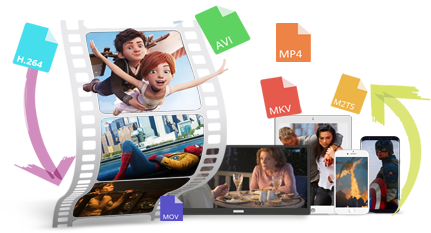
WonderFox HD Video Converter Factory Pro
1. Convert video & audio with 500+ presets.
2. Batch process video and audio files.
3. Adjust bitrate, sample rate, channels, encoder, etc.
4. Trim/split/merge/compress, and extract audio.
5. Download or record online video/audio.
6. Use GPU acceleration for supported conversion tasks.

Privacy Policy | Copyright © 2009-2026 WonderFox Soft, Inc. All Rights Reserved
