


Want an easy way to convert AAC files to other audio formats? If you want to convert AAC to MP3, WAV, FLAC, M4A, M4R or OGG, or you want to process multiple files at once with batch conversion, the right tool can do all these things in a few steps.
In this guide, we share an easy AAC converter to convert AAC files to other formats with no complicated settings. Read on to convert your audio files quickly and efficiently.
It’s easy to convert between different audio formats as long as you have the correct audio converter.
On Windows, WonderFox HD Video Converter Factory Pro is the perfect converter to handle AAC conversions. With extensive format support, it can fast convert AAC files to various formats like MP3, WAV, FLAC, and M4A in just a few simple clicks. Moreover, it features a batch mode that makes the bulk audio conversion possible, and if you have multiple AAC files, you can convert them all at once to save time.
Beyond AAC conversion, you can also convert between other audio and video formats. You can also adjust the encoder, bitrate, sample rate, and volume to suit specific needs.
Now, get this AAC audio converter and see how to convert your AAC files below.
Let WonderFox HD Video Converter Factory Pro help you convert AAC files to WAV, MP3, FLAC, AIFF, WMA, OGG, etc. Get it now to change between formats handily and rapidly.
 Download for Free
Download for Free
Download for Free
Before you begin, download and install download and install WonderFox HD Video Converter Factory on your computer.
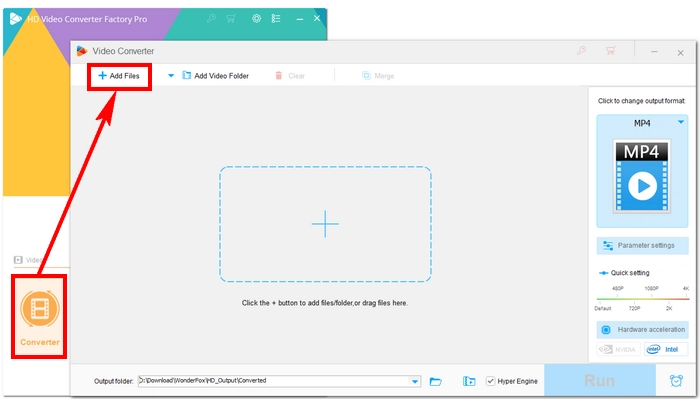
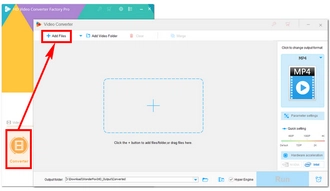
Run WonderFox HD Video Converter Factory Pro and open Converter.
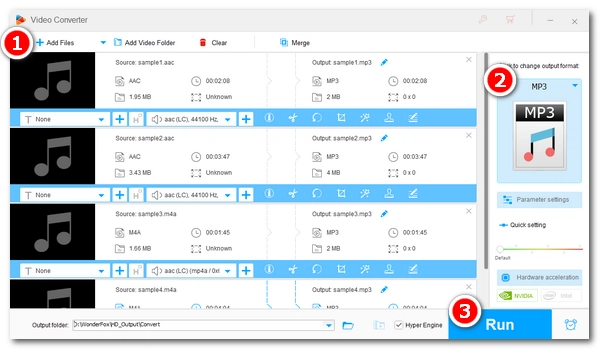
Next, click + Add Files or Add Video Folder to add AAC files to the program. Alternatively, you can drag and drop the desired AAC audio files directly into the converter.
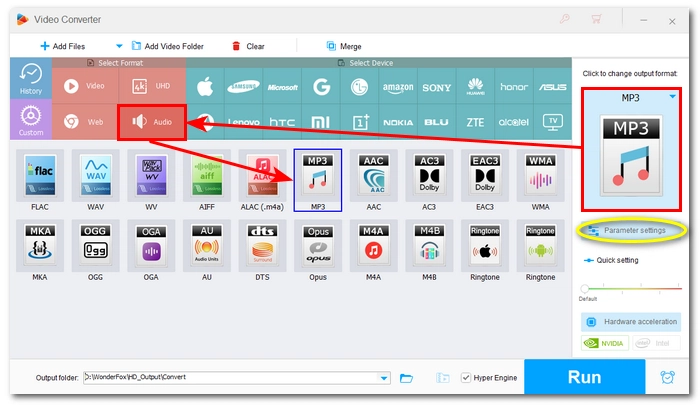
Click the format icon on the right to expand the output format list. Then, go to the Audio category and select your desired output format.
💡 Parameter settings allow you to freely change the audio bitrate, mix channels, resampling, and adjust the volume.
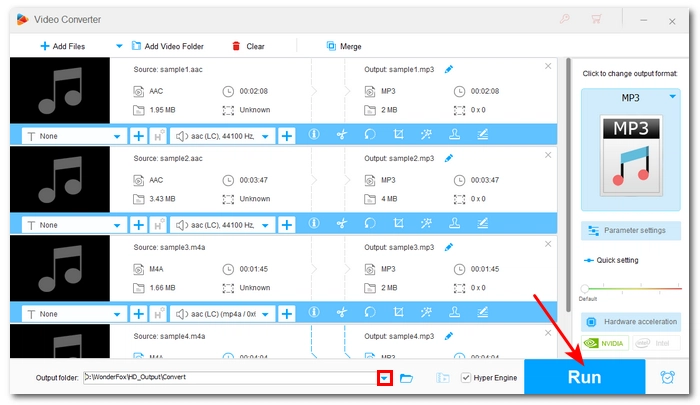
Click the ▼ button at the bottom to specify the output path, or keep the default settings..
Finally, click Run to start the conversion.
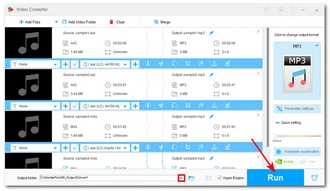
You can convert AAC to different formats to suit your specific needs:
MP3 is compatible with almost all devices and platforms. Converting AAC to MP3 improves compatibility for older players, editing tools, and social platforms that don’t support AAC.
WAV preserves uncompressed audio. Converting AAC to WAV provides higher editing flexibility in audio workstations. It avoids quality loss in further processing.
FLAC uses lossless compression. Converting AAC to FLAC maintains audio quality while reducing file size compared to WAV. It’s suitable for archiving and long-term storage.
M4A works well in Apple ecosystems. Converting AAC to M4A enhances compatibility with iTunes, iPhone, and Mac apps while keeping similar quality and structure.
M4R is the standard ringtone format for iPhone. Converting AAC to M4R means you can use them directly as custom ringtones without any additional steps or format changes.
OGG Vorbis is good in open source tools and some games. Converting AAC to OGG increases compatibility with Linux, game engines and some streaming tools.
That’s all for how to convert AAC files. Following these steps, you can easily convert AAC to any audio format. In addition, this tool can help you solve other multimedia problems, including video conversion, audio/video compression, and audio/video editing. I hope this article has been helpful. Thank you for reading.
HD Video Converter Factory Pro is designed for multimedia purposes. It can help you:
Download for Free
Download for Free
It depends. If you want smoother audio playback, converting AAC to MP3 is necessary.
You can use WonderFox HD Video Converter Factory Pro to batch convert AAC files. All you need to do is import all the AAC files you want to convert into the program, select the target format, and then start the conversion.
No. Converting AAC to WAV does not improve audio quality; it only retains the original AAC file quality.

I write about multimedia topics, including video and audio conversion, compression, editing, and downloading. I joined WonderFox in 2020, and my goal is to help readers solve everyday tech problems more easily. This article introduces a simple and quick method to convert AAC files to various audio formats to meet your specific needs. Download the AAC converter now and start converting!


I write about multimedia topics, including video and audio conversion, compression, editing, and downloading. I joined WonderFox in 2020, and my goal is to help readers solve everyday tech problems more easily. This article introduces a simple and quick method to convert AAC files to various audio formats to meet your specific needs. Download the AAC converter now and start converting!

Terms and Conditions | Privacy Policy | License Agreement | Copyright © 2009-2026 WonderFox Soft, Inc.All Rights Reserved