

FLAC, ALAC, WAV, AIFF, and DSD are all associated with high-quality audio, but they do not store sound in the same way. Some compress PCM audio without discarding data, some usually store PCM without compression, and DSD uses a different 1-bit signal representation. This guide explains the common lossless audio formats, compares their quality, file size, metadata, compatibility, and practical uses, and helps you choose the right format for your music library or workflow.
 Kevincy | Updated on Sep 4, 2026
Lossless audio means the digital audio information can be preserved without throwing away part of the source data the way MP3, AAC, or other lossy codecs do. However, “lossless” does not mean every lossless file uses the same encoding method, has the same file size, or works on the same devices.
For PCM audio, there are two broad approaches. FLAC and ALAC use lossless compression: they reduce storage space but reconstruct the original PCM samples when decoded. WAV and AIFF commonly store uncompressed PCM, so they are usually much larger even when the audible result is the same. WAV and AIFF are technically container formats and can hold other kinds of audio, but uncompressed LPCM is their most familiar use.
DSD is different. Instead of storing multi-bit PCM samples, Direct Stream Digital represents audio with a 1-bit pulse-density signal at a very high sampling rate. DSD is commonly stored in DSF or DFF/DSDIFF files. It is often discussed together with lossless and hi-res audio, but it is not simply a “higher-quality FLAC.” Comparing DSD with PCM formats also depends on the recording, mastering, conversion path, playback software, DAC, and other parts of the audio chain.
Also, lossless and hi-res are not synonyms. A 16-bit/44.1 kHz FLAC ripped from a CD is lossless but not usually marketed as hi-res. A 24-bit/192 kHz FLAC can be both lossless and hi-res. The same idea applies to ALAC, WAV, and AIFF.
Convert FLAC, ALAC, WAV, AIFF, APE, WavPack, DSF/DFF and many other audio files to the format you actually need. Batch conversion and parameter controls are included for larger libraries.
FLAC is an open lossless compression format designed for PCM audio. Its biggest advantage is efficiency: it can reduce a PCM music library significantly without changing the decoded audio samples. It also has mature support for tags, album artwork, cue information, seeking, and error checking. Today, FLAC is widely supported by desktop players, Android devices, media servers, network streamers, car systems, and many modern audio applications.
FLAC is a strong default for music libraries, CD archiving, local playback, and cross-platform storage. Its stream metadata can include an MD5 signature of the decoded PCM audio, while FLAC frames also use CRC checks, which is useful when you want to verify the integrity of an archive later. The exact file-size reduction varies with the audio content and encoder settings, so claims such as “FLAC is always 50% of WAV” should be treated as a rough rule of thumb rather than a fixed ratio.
ALAC is Apple's lossless compression codec and is commonly stored in an .m4a container. Like FLAC, it can reproduce the original PCM audio after decoding while using less space than uncompressed WAV or AIFF. ALAC has especially convenient integration with Apple-oriented libraries and devices, and Apple Music uses ALAC for its lossless catalog.
Older descriptions sometimes say ALAC works only on Apple products. That is no longer accurate. ALAC is supported by many third-party programs and devices as well. Its practical advantage is still strongest when your library depends heavily on Apple Music/iTunes-style metadata and Apple hardware.
WAV is a RIFF-based audio container strongly associated with uncompressed LPCM. It is one of the safest choices for audio editing, recording, post-production, software interchange, and other situations where broad compatibility matters. With the same PCM sample rate, bit depth, and channel layout, a WAV file does not sound better than FLAC or ALAC simply because it is uncompressed.
The trade-off is storage. Uncompressed PCM takes more space, and WAV metadata support can be less consistent between applications because several tagging conventions and chunks are used. Broadcast Wave (BWF), however, adds standardized metadata that is useful in professional broadcast and production workflows. Classic RIFF/WAVE also uses 32-bit size fields, so very large professional recordings may use extensions such as RF64 instead of treating 4 GB as a universal limit for every WAV-based workflow.
AIFF is an Apple-developed audio container commonly used for uncompressed PCM. In practical terms, standard AIFF and WAV can carry the same PCM quality at similar file sizes. AIFF has a long history in Mac-based music production, while WAV has become more universal across platforms. AIFF can also store metadata, although tag handling still depends on the software being used.
AIFF is a good fit when a production workflow or application prefers it. Note that AIFF-C/AIFC is a related variant that can contain compressed audio, so “AIFF is always uncompressed” is an oversimplification.
DSD originated with Sony and Philips for Super Audio CD. Instead of PCM, it uses a 1-bit pulse-density representation. DSD64 runs at 2.8224 MHz, with higher-rate variants such as DSD128 and DSD256 multiplying that base rate. Computer-based DSD music is commonly distributed as .dsf or .dff/.diff files.
DSD can be attractive if you already own native DSD recordings and have a compatible player, DAC, or server. But its files are large, support is more specialized, and many editing or playback workflows convert DSD to PCM internally. A larger sample-rate number alone does not prove that one release will sound better than a well-mastered FLAC, ALAC, WAV, or AIFF version.
You may also encounter WavPack (.wv), Monkey's Audio/APE (.ape), and several archival or professional formats. They can be useful in specific collections, but FLAC and ALAC are generally easier for everyday music libraries, while WAV and AIFF remain common in production.
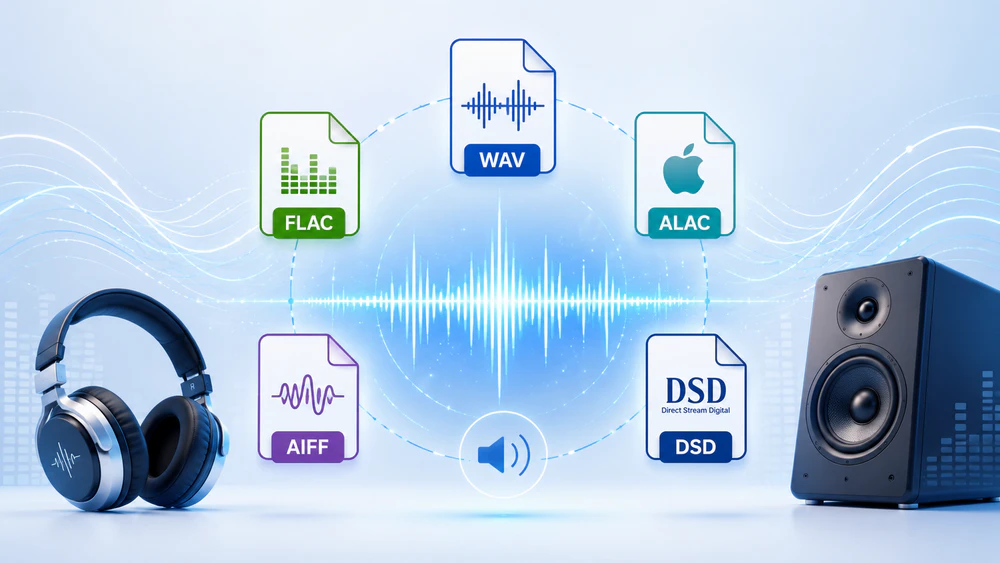
The most important point is easy to miss: FLAC, ALAC, WAV, and AIFF can deliver identical PCM audio when they come from the same source and keep the same sample rate, bit depth, channels, and samples. Their differences are mainly compression, file size, metadata, ecosystem support, and workflow. DSD uses a different signal representation, so a DSD-vs-PCM comparison is not a direct codec comparison.
| Format | Typical Audio | Compression | File Size | Metadata | Compatibility | Best For |
|---|---|---|---|---|---|---|
| FLAC .flac |
PCM | Lossless compressed | Smaller than WAV/AIFF | Excellent | Very broad | Cross-platform libraries and archives |
| ALAC .m4a |
PCM | Lossless compressed | Smaller than WAV/AIFF | Excellent | Broad, especially Apple | Apple-centered music libraries |
| WAV .wav |
Usually PCM | Usually uncompressed | Large | Supported, but conventions vary | Excellent | Recording, editing, interchange, broadcast |
| AIFF .aiff/.aif |
Usually PCM | Usually uncompressed | Large | Good, app-dependent | Good, strongest in audio/Mac workflows | Apple-oriented production and editing |
| DSD .dsf/.dff |
1-bit PDM | Typically stored at high data rates; SACD can use DST | Large | DSF is generally friendlier than DFF | Specialized | Native DSD collections and compatible audiophile playback |
If a FLAC, ALAC, WAV, and AIFF file all represent the same PCM master with the same audio parameters, the format itself does not create an inherent quality ranking. FLAC and ALAC simply pack the PCM data more efficiently. WAV and AIFF avoid that compression step but do not add missing detail.
FLAC and ALAC usually save substantial space compared with uncompressed PCM. WAV and AIFF with the same PCM settings are normally similar in size. DSD file size grows quickly as the DSD rate increases. Exact sizes depend on duration, channel count, sample rate, bit depth or DSD rate, and the compression method used.
FLAC and ALAC are convenient for organized music libraries because tags and cover art are widely supported. WAV can carry metadata too, especially in Broadcast Wave workflows, but consumer tagging behavior is not as consistent across applications. AIFF tagging is generally workable, while DSF is usually easier to tag than older DFF-based collections.
WAV remains one of the safest interchange formats. FLAC is now broadly supported on modern hardware and software. ALAC is no longer Apple-only, though it remains the natural choice for Apple-heavy libraries. AIFF is widely recognized in professional audio software. DSD support is the most specialized and may require a player or DAC that understands native DSD or DoP.
FLAC is usually the easiest all-around recommendation. It preserves PCM audio, uses less space than WAV/AIFF, handles metadata well, and works across a wide range of players, servers, computers, and portable devices.
If your collection lives mainly in Apple Music/iTunes-style libraries and Apple devices, ALAC gives you lossless compression with strong ecosystem integration. There is no need to choose FLAC over ALAC for sound quality alone when both come from the same PCM master.
WAV is a practical production format because DAWs, editors, broadcast tools, and other professional software commonly accept it. Large file size matters less in active editing projects, where compatibility and straightforward PCM access are often more important.
AIFF remains useful when a Mac-oriented audio workflow, older project, sampler, or production tool specifically expects it. If both WAV and AIFF are accepted, the choice is usually about workflow and metadata behavior rather than sound quality.
If you bought or created a native DSD release and your playback chain handles it properly, keeping the DSF/DFF master preserves that original representation. If compatibility matters more, converting a copy to FLAC or WAV can make the music much easier to use, but the DSD-to-PCM conversion changes the signal representation.
Simple rule: FLAC for most cross-platform music libraries, ALAC for Apple-focused libraries, WAV/AIFF for production, and DSD only when you specifically need a DSD workflow.
You may want to convert a lossless file because a player rejects it, a DAW prefers WAV/AIFF, an Apple library works better with ALAC, or an uncompressed collection takes too much storage. For Windows users, WonderFox HD Video Converter Factory Pro provides a simple graphical way to convert between common audio formats without writing commands.
It can handle FLAC, ALAC, WAV, AIFF, APE, WavPack and many other audio formats, and it can also decode DSD files such as DSF/DFF to more widely compatible PCM-based outputs including FLAC or WAV. Batch mode is useful when you need to reorganize an entire music folder.
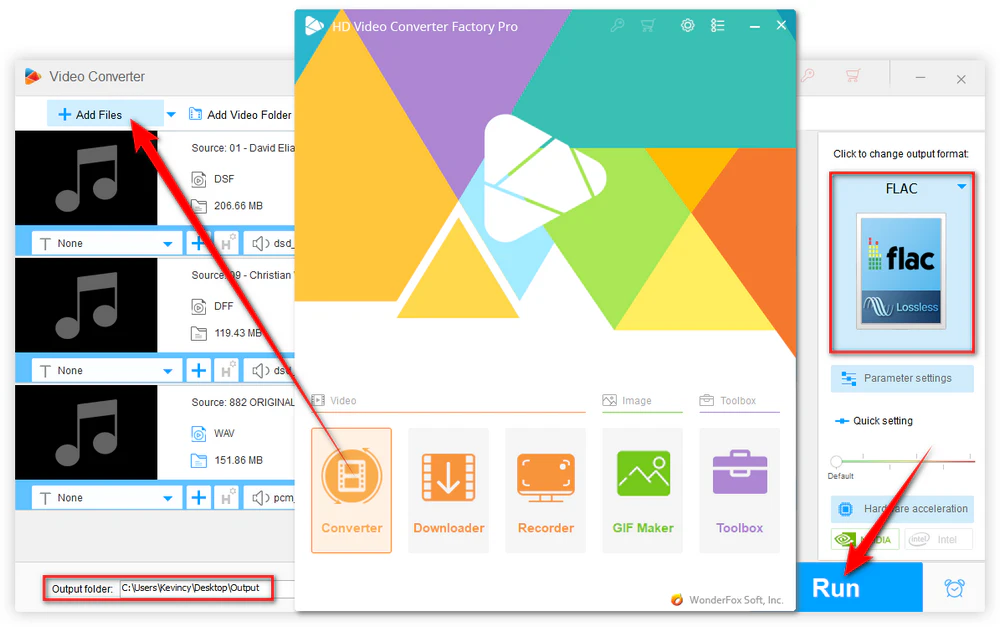
Step 1. DownloadDownload, install, and run the software. Open the Converter module and add your audio files.
Step 2. Open the output format list and choose the format that fits your goal, such as FLAC for a compact archive, ALAC for an Apple-oriented library, or WAV/AIFF for editing.
Step 3. Choose an output folder and click Run. If your goal is a PCM lossless-to-lossless conversion, avoid unnecessary changes to sample rate, bit depth, or channel layout.
FLAC/ALAC/WAV/AIFF to another PCM lossless format: the decoded PCM samples can be preserved if the conversion keeps compatible sample rate, bit depth, channels, and other relevant audio properties. The new file will not be byte-for-byte identical as a file because its container and encoding are different, but the audio samples can remain lossless.
DSD to FLAC/WAV/AIFF/ALAC: this is DSD-to-PCM conversion. It normally involves filtering and resampling, so the result is not a bit-identical DSD copy even if the PCM output itself is stored in a lossless format.
MP3/AAC to FLAC/ALAC/WAV/AIFF: saving a lossy source as FLAC does not restore information that was already discarded. It only prevents additional lossless-compression damage from that point forward.
No. If FLAC and ALAC are encoded from the same PCM source without changing its samples, both decode back to the same audio data. Choose between them mainly for compatibility, library management, and ecosystem preference.
No. Uncompressed storage does not automatically improve the source. If WAV/AIFF and FLAC come from the same PCM master and use the same audio parameters, FLAC can decode to the same PCM samples. Choose WAV/AIFF or FLAC based on file size, metadata, compatibility, archiving needs, and production workflow rather than sound quality alone.
ALAC is the most natural choice for an Apple-centered music library because it integrates well with Apple's music ecosystem while keeping files smaller than uncompressed WAV or AIFF. Apple software also supports several other high-quality audio formats depending on the app and workflow.
You can make a high-quality FLAC from DSD, but it is not a bit-perfect copy of the DSD signal. DSD and FLAC use different representations, so the process converts DSD to PCM. Keep the original DSF/DFF file if preserving the native DSD source matters to you.
On macOS, X Lossless Decoder (XLD) is a long-standing option for formats such as FLAC, ALAC, WAV, and AIFF. FFmpeg is a powerful cross-platform choice if you are comfortable with commands. For occasional small files, online services such as FreeConvert can convert common lossless formats in a browser, but you should consider upload time, file-size limits, and privacy before sending large or personal audio files to any online service.
There is no single lossless audio format that wins every comparison. FLAC and ALAC are efficient choices for personal libraries, WAV and AIFF are dependable for editing and production, and DSD serves a more specialized playback ecosystem. For PCM sources, format choice is usually about space, metadata, compatibility, and workflow rather than one format magically sounding better than another.
If you are unsure where to start, use FLAC for a general-purpose archive, ALAC for an Apple-focused collection, and keep WAV/AIFF for projects that specifically need uncompressed PCM. Preserve original DSD files when native DSD matters, and make PCM copies only when you need wider compatibility.

Kevincy joined the WonderFox team in 2014 and has been a senior columnist ever since. With over two decades of experience in the video editing industry, he shares tutorials, tips, and how-to guides on video/audio processing and personal DVD backups. Family-oriented and passionate about helping others, he is dedicated to making video and audio processing easier for readers.


Kevincy joined the WonderFox team in 2014 and has been a senior columnist ever since. With over two decades of experience in the video editing industry, he shares tutorials, tips, and how-to guides on video/audio processing and personal DVD backups. Family-oriented and passionate about helping others, he is dedicated to making video and audio processing easier for readers.
WonderFox HD Video Converter Factory Pro
1. Convert FLAC, ALAC, WAV, AIFF, APE, and more.
2. Convert DSF/DFF to widely supported audio formats.
3. Batch process large music folders in one conversion.
4. Adjust sample rate, channel, bitrate, and volume.
5. Trim, split, merge and extract audio from video files.
6. Download or record audio for later local processing.

Privacy Policy | Copyright © 2009-2026 WonderFox Soft, Inc. All Rights Reserved
