Free Download
HD Video Converter Factory Pro - Download/Convert 8K Videos
AuthorRecommended by the author

SoftwareHow to & Tips

Video FormatsConvert Video

Resources

4K VS 8K: What's the Difference Between 4K and 8K?

Author: Kevincy by Kevincy

Updated on Aug 11, 2026

4K is now a common choice for TVs, monitors, streaming, and gaming, while 8K TVs are commercially available but remain a more specialized option. What actually changes when you move from 4K to 8K, and is the extra resolution easy to notice in everyday viewing? This updated 4K VS 8K comparison covers resolution, motion, audio, viewing conditions, content availability, hardware demands, and cost.

👉 Want to download 8K/4K videos or upscale/downscale your videos? This video converter could be helpful:

What is 8K Resolution

What is 8KWhat is 8K

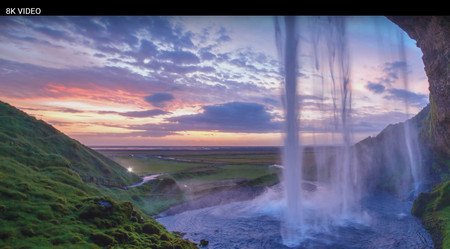
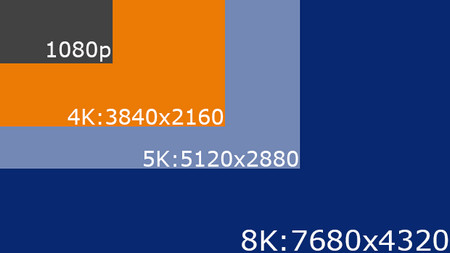
8K UHD refers to a resolution of 7680 x 4320 pixels, or about 33.2 million pixels per frame. That is twice the horizontal and vertical resolution of 4K UHD (3840 x 2160), giving 8K four times as many pixels overall.

Compared with Full HD 1080p (1920 x 1080), 8K has 16 times as many pixels. 8K is no longer just a future concept: consumer 8K TVs are available today.

However, native 8K movies, broadcasts, and streams are still much less common than 4K or 1080p content, so real-world picture quality often depends on upscaling as well as the source, screen size, viewing distance, HDR, panel quality, and image processing.

4K VS 8K: The Difference between 4K and 8K

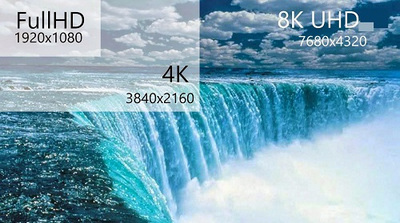
4K UHD and 8K UHD are standardized ultra-high-definition television resolutions. Full HD 1080p, by contrast, is 1920 x 1080. The basic relationship is easy to remember: 4K doubles 1080p in both width and height, while 8K doubles 4K in both directions. That means each step contains four times as many pixels as the previous one. But pixel count alone does not determine how good a TV looks. HDR performance, contrast, color, motion handling, source quality, screen size, and viewing distance can matter just as much.

Difference on 8K 4K ResolutionDifference on 8K 4K Resolution

1. 8K vs 4K – Resolution

8K UHD is 7680 x 4320, or about 33.2 megapixels. 4K UHD is 3840 x 2160, or about 8.3 megapixels, while Full HD 1080p is 1920 x 1080, or about 2.1 megapixels. So 8K has four times the pixels of 4K and 16 times the pixels of 1080p; 4K itself has four times the pixels of 1080p. This does not mean lower-resolution video occupies only part of an 8K screen. Modern TVs normally scale or upscale 1080p and 4K sources to fill the panel. Standard Blu-ray video is commonly 1080p, while Ultra HD Blu-ray can provide 4K. Upscaling can improve presentation, but the final sharpness still depends heavily on the original source and the TV’s processing.

30fps and 60fps30fps and 60fps

2. 8K vs 4K - Frame Rate

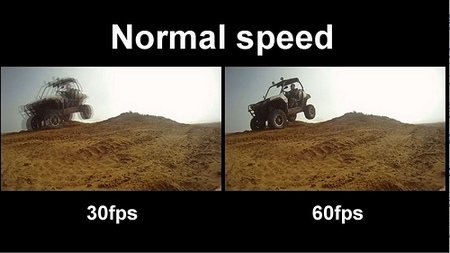
Resolution and frame rate describe different things. Resolution is the number of pixels in each frame, while frame rate is how many frames are shown per second. A 4K video can be 24, 30, 60 fps, 120 fps, or another supported rate, and 8K content can also use different frame rates. The practical limit depends on the source, codec, player, display, and connection. For example, current HDMI specifications include formats such as 8K at 60 Hz and 4K at 120 Hz, while some newer hardware can support higher combinations. So it is inaccurate to say that 4K is inherently limited to 60 fps or that 8K always means 120 fps.

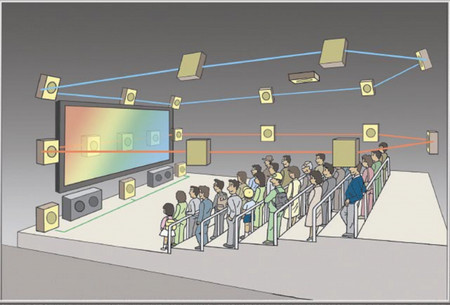
22.2 Audio Channel22.2 Audio Channel

3. 4K vs 8K - Audio Channel

Audio channel count is not determined by whether the picture is 4K or 8K. The 22.2-channel system is associated with the Super Hi-Vision broadcasting work developed around 8K, but an 8K TV does not require 22.2-channel audio, and 4K is not limited to 5.1. In normal home use, both 4K and 8K content may come with stereo, 5.1, 7.1, Dolby Atmos, or other audio formats depending on the disc, stream, broadcaster, receiver, and TV.

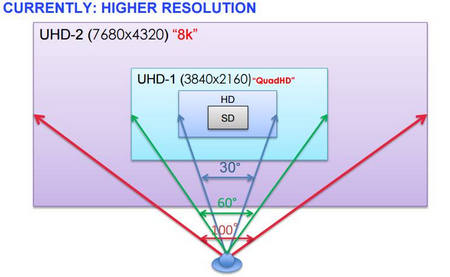
Field of view for different resolutionsField of view for different resolutions

4. 4K vs 8K - Viewing Distance and Screen Size

Resolution itself does not set a TV’s off-axis viewing angle; that depends mainly on the display technology and panel design. The wider angles sometimes shown in UHDTV diagrams refer to the intended field of view for a more immersive setup, not the angle from which a panel remains watchable. Higher pixel density lets you use a larger screen or sit closer before individual pixels become noticeable. From farther away, especially on smaller screens, the visible difference between good 4K and 8K becomes harder to notice. This is also why the jump from 1080p to 4K can be more obvious in many normal setups than the jump from 4K to 8K.

5. 4K vs 8K - File Size, Bandwidth, and Hardware

More pixels usually mean more data to process. At the same codec, frame rate, and quality target, an 8K workflow is generally more demanding than a 4K one, and 4K is more demanding than 1080p. Efficient codecs can reduce the gap, so resolution alone does not determine the exact file size or bitrate. For local playback or gaming, also check whether the GPU, media player, TV, cable, and HDMI ports support the resolution and refresh rate you want.


Also Read: Best 8K Video Converter for Windows | Compress 4K Video

Is 8K Worth It in 2026?

8K is already here, so the more useful question in 2026 is whether it is worth paying for. The answer depends on how you watch. For most homes, 4K remains the practical sweet spot because native 4K content is much easier to find and 4K TVs cover a much wider range of sizes and prices. 8K makes the most sense for buyers who want a very large premium screen, sit close enough to benefit from the extra pixel density, value high-end upscaling, or have a specific 8K production or display need.
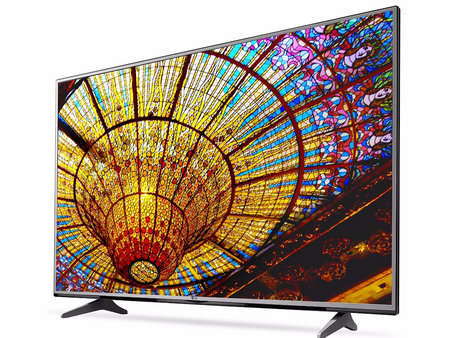
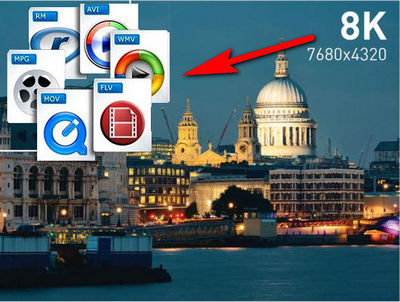
The advent of 8K TVThe advent of 8K TV

1. Native 8K content is still limited. 8K TVs can upscale 1080p and 4K sources to fill the screen, and premium models can do this very well, but upscaled video is not the same as true native 8K detail. For movies, streaming, TV shows, and games, 4K and 1080p sources are still far more common.

2. 8K remains a premium purchase. 4K TVs are now available across mainstream and high-end price ranges, while current 8K models are concentrated in larger, more expensive product lines. If budget matters, spending the difference on a better 4K panel, HDR performance, audio system, or larger screen may have a bigger effect on everyday viewing.

3. 8K asks more of the whole playback chain. With four times as many pixels as 4K per frame, 8K can require substantially more storage, processing power, decoding capability, and connection bandwidth. Actual file size and streaming bitrate still depend on the codec, frame rate, HDR, compression settings, and content complexity.

4K vs 1080p in this decision: 4K has four times the pixels of 1080p and is now widely supported by modern TVs, streaming services, game consoles, cameras, and phones. For someone upgrading from a Full HD setup, 4K is usually the more practical step. Moving from 4K to 8K can still improve fine detail on a sufficiently large screen at a close enough distance, but the benefit is more dependent on the viewing setup and source quality. In short, choose 4K for the best balance of content, hardware, and cost; choose 8K when maximum resolution on a large premium display is a real priority.

Extra Information: Download/Convert 8K, 4K, and 1080p videos

If you have an 8K-capable display, one practical way to judge the difference is to compare high-quality 1080p, 4K, and 8K samples from the same or similar material. YouTube and other video sites host 8K samples, but whether an 8K option is available depends on the upload, codec support, browser or app, device, and connection.

WonderFox HD Video Converter Factory Pro can download available high-resolution online video from supported sites and also lets you convert or downscale a file for comparison. The steps below show the basic download workflow.

Free Download Free Download
Download 8K videos

Before start, please downloaddownload this software and install it on your PC.

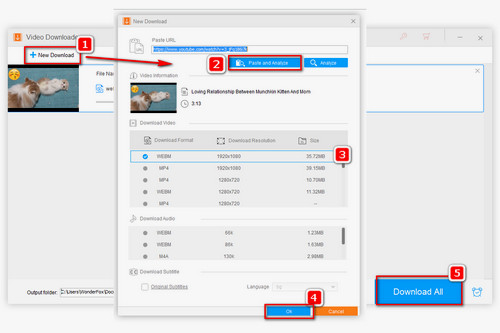
Step 1. Launch this software, select Downloader on the main window and click “+ New Download”.

Step 2. Copy and paste the 8K/4k/1080p video URL and click on “Analyze”, or directly hit "Paste and analyze".

Step 3. Choose the resolution, size and formats under the Download Video section. Then select OK > Download All.


Tips: You can edit and process the downloaded 8K/4k/1080p videos in the Converter module.


Related source: Convert 720P to 1080P | Compress and Convert 1080p to 720p | Download 1080P YouTube Videos

8K files can be very large and demanding to decode. If storage, playback performance, or compatibility is a problem, you can compress the video or convert it to 4K, 1080p, or 720p with HD Video Converter Factory Pro. The output quality will depend on the source and your encoding settings.


Wrap-up

4K and 8K both deliver impressive image quality, but they serve different needs. For most viewers today, 4K offers the best balance of sharpness, content availability, hardware support, storage requirements, and cost, while 8K is more appealing for very large screens, close viewing distances, and users who want the highest resolution currently available. Compared with 1080p, 4K already provides a clearly noticeable upgrade on larger displays, whereas the jump from 4K to 8K can be harder to appreciate in everyday viewing. So, unless you have a specific reason to choose 8K, 4K remains the more practical choice for most people.


Kevincy

Kevincy Berel

Kevincy joined the WonderFox team in 2014 and has been a senior columnist ever since. With over two decades of experience in the video editing industry, he shares tutorials, tips, and how-to guides on video/audio processing and personal DVD backups. Family-oriented and passionate about helping others, he is dedicated to making video and audio processing easier for readers.

Email

All-in-one Video & Audio Converter for Windows

HD Video Converter Factory Pro

WonderFox HD Video Converter Factory Pro

• Convert between any video and audio files.
• Download video and music from 1000+ sites.
• Batch convert video format, size, and quality.
• Record computer screen with audio.
• Make animated GIFs from videos and photos.
• Make a slideshow, video collage, ringtones, and extract subtitles.

Free Download HD Video Converter Factory Pro Free Download HD Video Converter Factory Pro

More Related Articles

How to Convert MP4 to 4K UHD Fast and Effortlessly? HD to SD Converter—Convert HD Video to SD Effortlessly How to Improve Video Quality For Higher Definition
How to Make a Video Bad Quality On Purpose? New Simple Tutorial on How to Download 4K Video from YouTube, Vimeo Completely How to Upload 4K Videos to Instagram