Free Methods to Download Audio and Videos from Tumblr
 Recommended by the author
 How to & Tips
 Convert Video

 by Kevincy
Updated on Jun 4, 2026
There is a lot of fantastic music and video content on Tumblr. Some posts offer direct download links, and it is easy to save them. But many audio tracks and videos are directly uploaded to Tumblr and have no visible download button. So how to download audio from Tumblr, or save a Tumblr video when needed? Don’t bother. This article will share with you 3 free and practical ways to save Tumblr audio and videos for personal offline use. Moreover, if you need to convert the downloaded audio or video files to other formats, just click the below link to have a try:
If you are still looking for some ways to download audio from Tumblr, then, you may have noticed that some old solutions are still being mentioned. For example, TumTaster used to be a popular browser plug-in, and screen/audio recording is also suggested in some guides. Unfortunately, TumTaster is no longer a reliable option, and recording audio while playing may bring noise, quality loss, or incomplete captures. For videos, screen recording works in a pinch, but it takes real time and may lower the quality. So is there a more practical way to save music or videos from Tumblr? Don’t worry. This guide is ready to help you.
Disclaimer: This guide is limited to personal fair use only. It is illegal to download copyrighted materials without the copyright holder’s consent. WonderFox does not approve of copyright infringement in any way. The end-users should be solely responsible for their own behaviors.

Free HD Video Converter Factory Makes Your Music Conversion Much Easier
Free HD Video Converter Factory enables you to easily convert audio files to popular formats, like MP3, WAV, AAC, FLAC, etc. In addition to converting audio files, it can also help convert videos to audio files when you only need the sound track. From now on, converting downloaded Tumblr audio or videos is much easier.


The first free way to download music or video from Tumblr is with Chrome or Firefox. Its built-in Developer Tools can help you find the actual media URL behind a Tumblr audio or video post, especially for files that are directly uploaded to Tumblr and have no visible download link. This method is more manual, but it avoids installing unknown downloaders and also works for many Tumblr videos. Just follow the brief steps below to save audio from Tumblr.
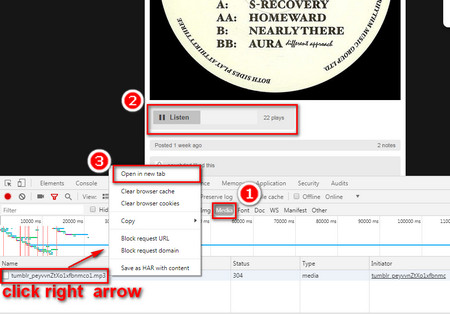 Free Download Music from Tumblr with Chrome or Firefox
Step 1. To download audio from Tumblr, first, open your wanted Tumblr music post or video post. Then, right-click a blank area of the page and choose Inspect/Inspect Element, or you can directly press F12 to open the inspect interface.
Step 2. Click the Network option on the menu bar and select the Media tab. Then, press F5 to refresh the page. Next, play the audio or video on Tumblr. The actual media request will be displayed in the Media tab. If several items appear, check the file type, size, and preview to find the right one.
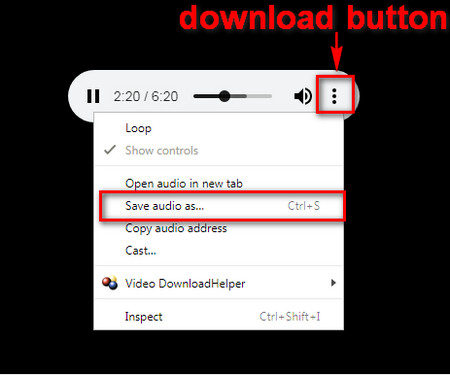 Save Music from Tumblr with Chrome or Firefox
Step 3. Right-click on the media request and choose Open in new tab. When the file opens in a player, click the download button or right-click the player and choose Save audio as/Save video as to download the Tumblr audio or video.
Besides using the built-in developer tool of Chrome or Firefox, you can try an online Tumblr downloader. SaveTumblr is a free web-based tool that can download Tumblr videos, GIFs, images, and audio by URL. It works in a desktop browser and can also be opened on a mobile browser, so you don’t have to install software when you only need to save one or two Tumblr media files. It also provides browser extensions for Chrome and Firefox if you prefer a quicker download entry in the browser.
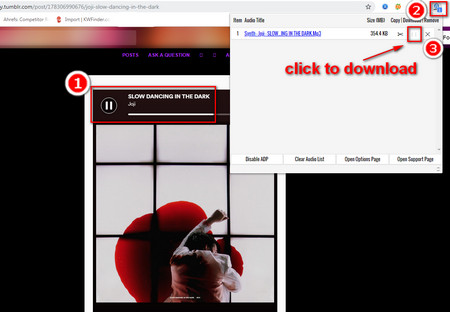 How to Download Songs from Tumblr with Audio Downloader Prime
Step 1. Open the Tumblr post that contains the audio or video you want to save. Copy the post link from the address bar. If you are using the Tumblr app on a phone, tap Share and copy the post URL.
Step 2. Visit SaveTumblr: https://savetumblr.com/. Paste the Tumblr URL into the search box and click the download button. The site will analyze the link and show the available media file.
Step 3. Choose the available download option to save the Tumblr audio or video to your device. If you often download media from Tumblr in Chrome or Firefox, you can also try its browser extension/add-on:
Chrome: https://chromewebstore.google.com/detail/tumblr-video-downloader-%E2%86%92/jgjlbofemimkganedemocjaakefdcfid?hl=en
Firefox: https://addons.mozilla.org/en-US/firefox/addon/tumblr-downloader/
For Tumblr videos, the simplest method is to use the browser’s built-in save option. Open the Tumblr video post on your computer, play the video, right-click the video area, and choose Save video as. Then, select a folder and save the video, usually as an MP4 file. This works only when the Tumblr page allows the browser to access the video file directly.
If the Save video as option does not appear, or if you need to download multiple videos from the same Tumblr blog, you can use the Downloader feature in WonderFox Free HD Video Converter Factory. Launch the program, open Downloader > New Download, paste the Tumblr post or blog URL, click Analyze, choose the detected video files, and hit Download All. After downloading, you can keep the original video, convert it to another format, or extract the audio to MP3/WAV/M4A.

On Android or iPhone, you can directly visit SaveTumblr to download Tumblr music or videos. Screen recording is a fallback method when you only need to keep a short clip for personal use. However, it records in real time and may include notification sounds or quality loss. A dedicated downloader app may be faster, but check app reviews, permissions, and ads before installing it.
1. Can I download audio directly from every Tumblr post?
No. Some posts include a visible download link or an accessible media URL, while others hide the file behind scripts or embedded players. If one method does not work, try inspecting the Media tab or using a reliable downloader.
2. Why can’t I see the media file in Chrome or Firefox Developer Tools?
Refresh the page after opening the Network > Media tab, then play the audio or video again. If nothing appears, check the All/XHR filters, disable aggressive ad blockers temporarily, or try another browser.
3. Is recording Tumblr audio or video a good idea?
Recording can work as a last resort, especially on phones, but it is not the best choice for quality. It may capture noise, notifications, cursor movement, or black screens, and it takes as long as the original playback.

Kevincy joined the WonderFox team in 2014 and has been a senior columnist ever since. With over two decades of experience in the video editing industry, he shares tutorials, tips, and how-to guides on video/audio processing and personal DVD backups. Family-oriented and passionate about helping others, he is dedicated to making video and audio processing easier for readers.


Kevincy joined the WonderFox team in 2014 and has been a senior columnist ever since. With over two decades of experience in the video editing industry, he shares tutorials, tips, and how-to guides on video/audio processing and personal DVD backups. Family-oriented and passionate about helping others, he is dedicated to making video and audio processing easier for readers.
Highly Recommend – Download and Convert Videos and Audio in Batches at High Speed
HD Video Converter Factory Pro
HD Video Converter Factory Pro is a powerful audio and video converter, supporting 500+ audio/video formats and devices. Its batch conversion feature can process multiple files at once. Also, the built-in downloading function helps save videos and audio from many popular websites in an easier way. After downloading, you can convert, trim, compress, or extract audio from the files as needed.