Free Download
HD Video Converter - Download videos and music safely and easily.
 Recommended by the authorRecommended by the author
Flvto music converter used to be one of the popular online downloading programs people usually use on the internet. Simply by pasting the URL and clicking one button, the music or video you choose can be downloaded. But like many free online converters, it may come with pop-ups, redirects, slow server response, failed analysis, or unavailable pages. This guide gives an updated Flvto review, explains the safety and legal concerns in plain words, and offers a cleaner desktop way to download and convert videos: https://www.videoconverterfactory.com/download/hd-video-converter-pro.exe

It is hard to give a simple yes-or-no answer. The FLVTO website itself may pass some online security checks, but the real risk usually comes from aggressive ads, fake download buttons, redirects, browser notifications, and optional software offers. If you use any FLVTO-style online converter, do not click pop-ups, do not allow suspicious notifications, and never install extra programs unless you fully trust the source.
In short, FLVTO may work for some simple downloads, but it is not the cleanest option for users who want a stable and distraction-free experience. A desktop Flvto alternative is safer when you want to avoid misleading ads and repeated redirects.
Using video downloader websites or programs is generally safer when you only download your own videos, royalty-free materials, or content you have permission to save. Downloading copyrighted music or videos without permission may violate the platform's Terms of Service and local copyright rules, especially if you redistribute or use the files commercially.
This article is only for personal fair use and format compatibility. WonderFox does not approve of copyright infringement. Learn More: Is It Legal to Download YouTube Videos
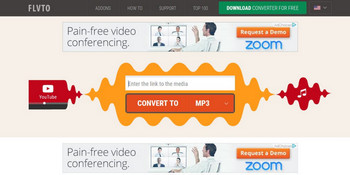
Flvto converter
Flvto is a very easy-to-use online YouTube music and video downloading program. In general, you only need to copy a video URL, paste it into the input box, choose an output format, and click the download or convert button. Depending on the available FLVTO domain or mirror you open, the output choices may include common audio and video formats such as MP3, M4A, MP4, and WEBM.
Before pressing any button, check whether you are clicking the real conversion button rather than an advertisement. If a new tab asks you to install an extension, allow browser notifications, or download an unknown installer, close it.
Along with its convenience and simplicity, Flvto MP3 downloader also contains many issues that need to be addressed.
First, available formats, quality options, and supported sites are limited and can change without notice.
Second, online conversion speed depends heavily on the website server and your network. Long videos, private videos, age-restricted videos, playlist links, or newly changed YouTube pages may fail to analyze.
Third, FLVTO-style sites often contain pop-ups and redirects, which are easy to misclick.
Finally, there are no built-in editing tools such as trimming, cropping, merging, parameter adjustment, or subtitle handling.
If you often see "Flvto not working", no-sound MP3 files, failed downloads, or suspicious installer prompts, it is better to switch to a clean desktop downloader.
According to the Flvto review above, it is useful to have an alternative to Flvto YouTube Downloader that can do more and does not rely on random online pop-ups. HD Video Converter Factory Pro should fit the bill pretty well. Over 500 formats, codecs and device types (the optimal parameters for a certain device) are available for choosing. From 240P to 4K, resolution of different values can be set. With it, frame rate, bit rate and aspect ratio can also be adjusted. Powerful editing function enables you to trim your video by cropping and clipping and adding post effects. Moreover, with HD Video Converter Factory Pro, you can download videos from many mainstream websites like Vimeo, Facebook, Yahoo, MySpace, etc. Videos can also be downloaded at a stable speed with a relatively normal network.
Free download the Flvto Alternative to download online videos and convert them to MP3, MP4, M4A, WAV, WebM, and more common formats at ease.
Launch HD Video Converter Factory Pro first and enter the Downloader window. Please make sure you only download content you own, public-domain files, or videos you have permission to save.
Similar to Flvto, just copy the URL of the video you want to download and paste it after clicking on "+ New Download" on the top of the main interface. Before it, you can also preset an output folder for the video.
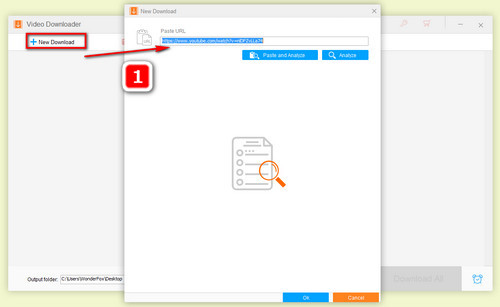
Paste the URL
Click on "Analyze" and wait for a few seconds. You will see a selection of download options under the Video and Audio section. Choose your preferred one, such as an MP4 video or an audio-only option when available.
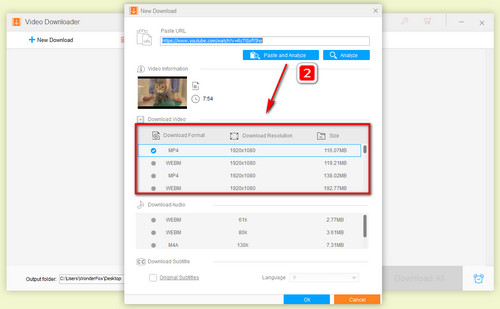
Video analysis
Click on "OK" to add the download task and then press "Download All". Your video or song will be saved to the output folder you have preset. If you want to convert it to another format or change parameters, just keep reading.
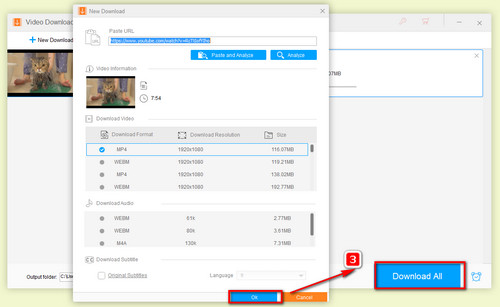
Download your video
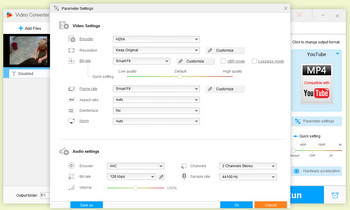
Change parameter
After the downloading is completed, go back to the start-up window and select "Converter", import the downloaded video or audio file. Then, choose an output format and click on "Parameter Settings" on the right side. You can adjust resolution, bit rate, frame rate, aspect ratio, audio bitrate, sample rate, and more based on your needs.
If you want better visual quality, you can choose a suitable resolution and increase bit rate when the source quality is good enough. If you want to make motion smoother, you can convert your video to 60fps. Or if the video has black bars, you can control its aspect ratio to fit the screen size. For music files, you can convert to MP3, M4A, WAV, FLAC, or other audio formats as needed.
FLVTO itself is usually discussed as an online converter, not a virus. The bigger concern is the surrounding ads, fake buttons, redirects, notification requests, and optional software offers. Close suspicious tabs and avoid installing anything pushed by pop-ups.
Common reasons include server downtime, blocked domains, unsupported video links, private or restricted videos, browser cache problems, ad-block conflicts, or changes from the source website. You can try another browser, clear cache, wait for the site to recover, or use a desktop downloader instead.
Online converters often have length, size, or server-side limits, so very long videos may fail or take too much time. A desktop program is usually more stable for longer files, batch tasks, and later format conversion.
The tool itself is not the key issue; what you download and how you use it matters more. Only download videos you own, copyright-free content, or files you have permission to save. Do not redistribute copyrighted materials without permission.
HD Video Converter Factory Pro is a cleaner Windows alternative because it works as a desktop downloader, converter, and editor without forcing you through random online ads. It is especially useful when you need MP3, MP4, M4A, WAV, WebM, device presets, batch conversion, or basic editing after download.

Kevincy joined the WonderFox team in 2014 and has been a senior columnist ever since. With over two decades of experience in the video editing industry, he shares tutorials, tips, and how-to guides on video/audio processing and personal DVD backups. Family-oriented and passionate about helping others, he is dedicated to making video and audio processing easier for readers.


More Distinctive Features of HD Video Converter Factory Pro
Convert Video | Rip DVD | Download Video | Play Video | Share Media Files | Record Screen | Edit Video | Toolbox | Third-party Software | Kodi
Copyright © 2009-2026 WonderFox Soft, Inc. All Rights Reserved.