

Dailymotion is a popular video-sharing platform that is often considered one of YouTube's biggest competitors. Sometimes, you may want to download videos from Dailymotion to watch offline or for other purposes. However, Dailymotion does not offer a download option. This guide introduces a powerful Dailymotion converter that helps you download and convert Dailymotion to MP4, MP3, or other formats easily.
 Kevincy | Updated on Apr 20, 2026
Looking for a reliable Dailymotion converter or Dailymotion downloader? You’ve come to the right place. In this guide, we’ll show you how to download Dailymotion videos and convert Dailymotion to MP4, MP3, or other formats without sacrificing the original quality.
Whether you want to save a single video, download a Dailymotion playlist, or convert Dailymotion to MP3, the methods below can help. For users who want a smoother and more reliable solution, desktop software is usually the best option.
Before we start, please note that this guide is for personal fair use only. WonderFox does not advocate downloading copyrighted content for commercial or illegal purposes. Please make sure your use complies with local laws and platform rules.
With its intuitive interface and simple operation, WonderFox HD Video Converter Factory Pro allows you to download videos from Dailymotion and over 1,000 other websites. Download and enjoy!
Compatible with Windows 11/10/8/7/...
100% Clean & Safe
Compatible with Windows 11/10/8/7/...
100% Clean & Safe
If you want an easy way to download Dailymotion videos in high quality, WonderFox HD Video Converter Factory Pro is a practical choice. It works as both a Dailymotion video converter and a Dailymotion downloader, helping you save videos from Dailymotion and over 1,000 websites quickly and easily.
More than a simple downloader, it also supports playlist and channel downloads, making it a practical Dailymotion playlist downloader for users who want to save multiple videos at once. In addition, it can convert the downloaded files to MP4, AVI, WMV, MOV, MP3, and more.
So whether you need to save video from Dailymotion for offline watching or turn a music video into audio, you can do it in one place. Download the application and let's jump in how it works.
If you just want to save a single Dailymotion video, the process is very simple.
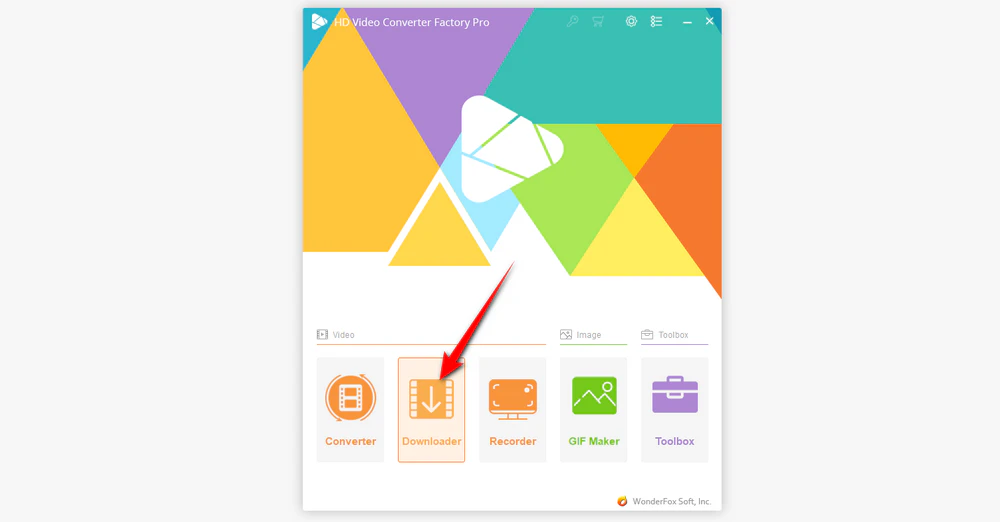
DownloadDownload, install, and run WonderFox HD Video Converter Factory Pro. Then select the Downloader module.
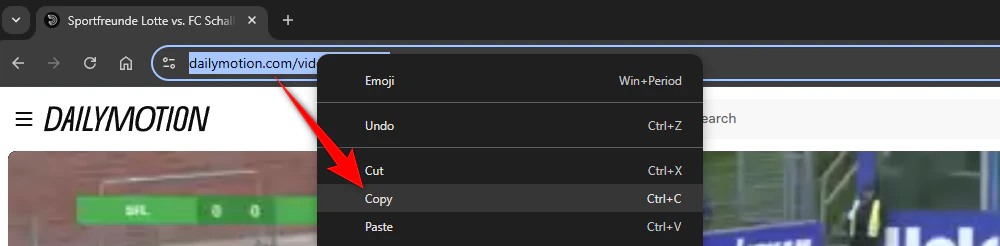
Go to Dailymotion and open the video you want to download. Then copy the video link from the address bar.
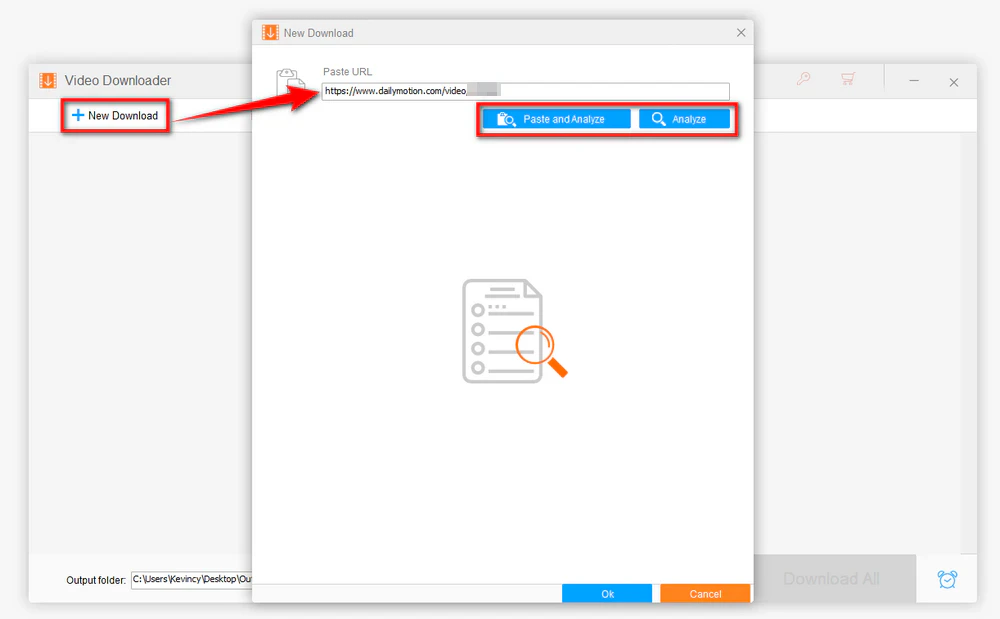
Click New Download and paste the copied link into the box. Then click Analyze.
You can also click Paste and Analyze to let the program automatically detect and parse the URL.
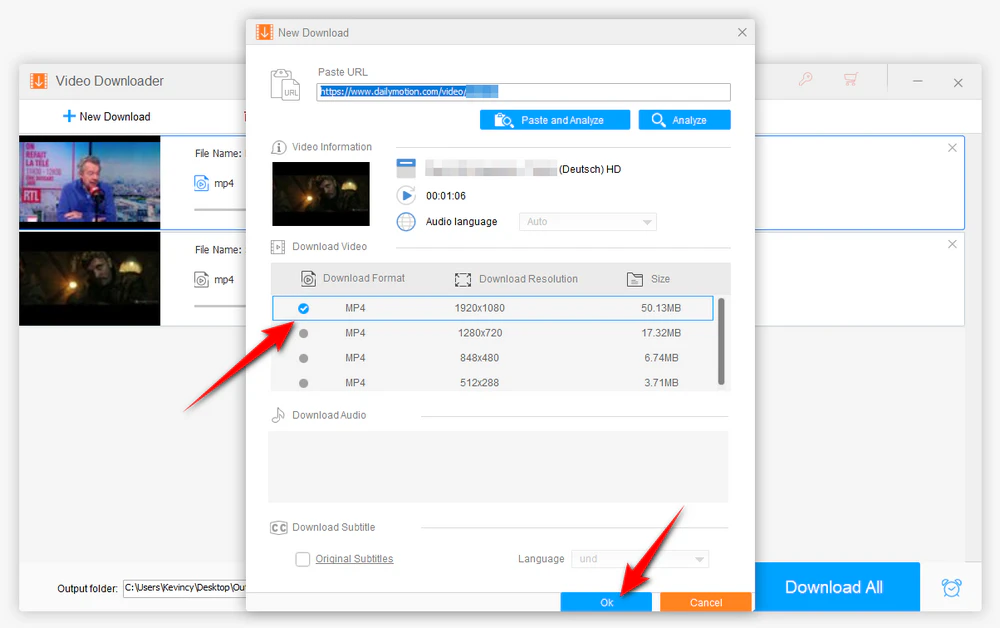
After analysis, the program will display all available download options. Choose the format, resolution, and file size you want, then click OK.
Set the output folder and click Download All to start downloading.
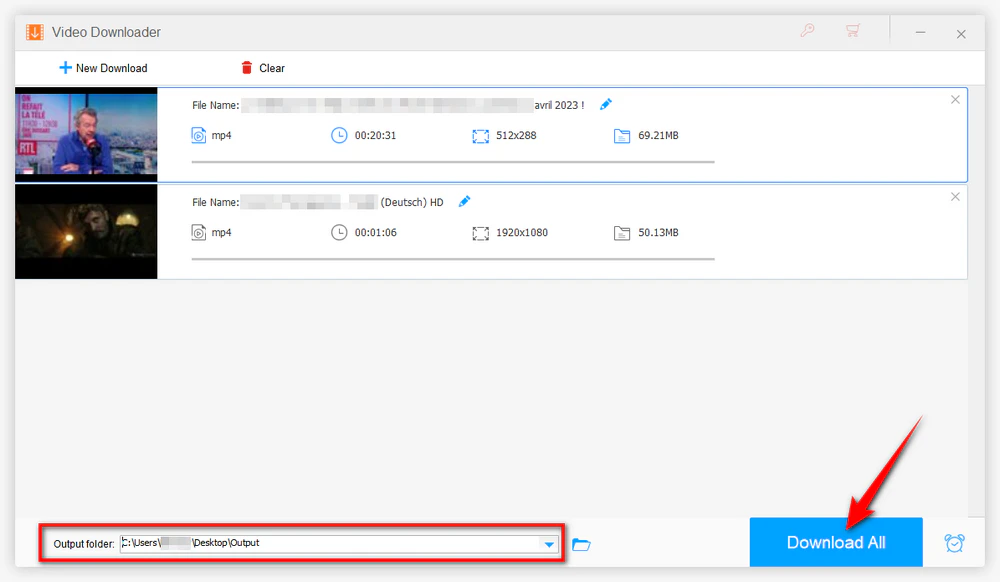
You can also add mutiple videos to the download list, and then click Download All for batch downloading.
If you need to save more than one video, downloading them one by one can be slow and repetitive. In that case, using a Dailymotion playlist downloader is a much better choice.
Open the Dailymotion playlist you want to download and copy its URL. You can also create your own Dailymotion playlist, add favorite videos, and copy its URL.
Open HD Video Converter Factory Pro and go to the Downloader module.
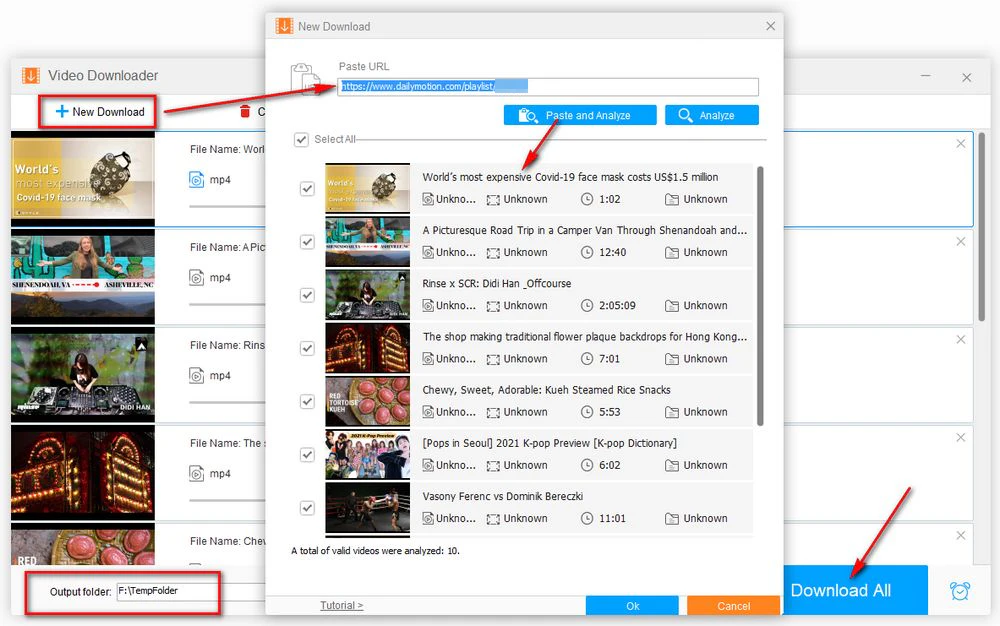
Click New Download, paste the playlist URL, and let the software analyze it.
After the playlist is parsed, choose the videos you want to save and add them to the list.
Choose the output folder and click Download All to start the batch download.
Sometimes you don’t need the video itself. You may only want the audio from a music video, live performance, interview, speech, or podcast clip. In that case, using a Dailymotion to MP3 solution is the better option.
First, use the Downloader to save the target Dailymotion videos to your computer.
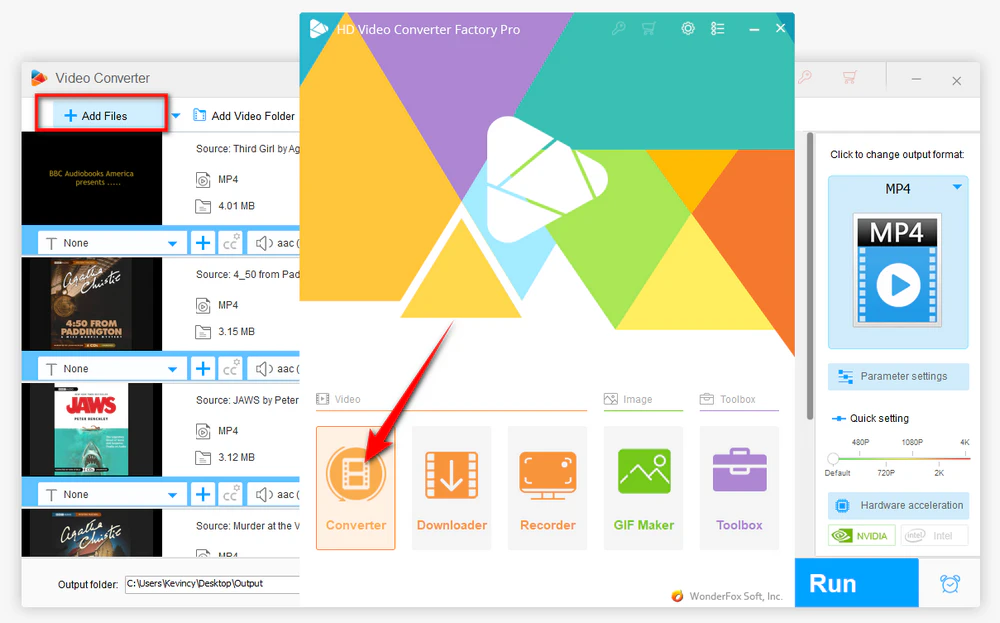
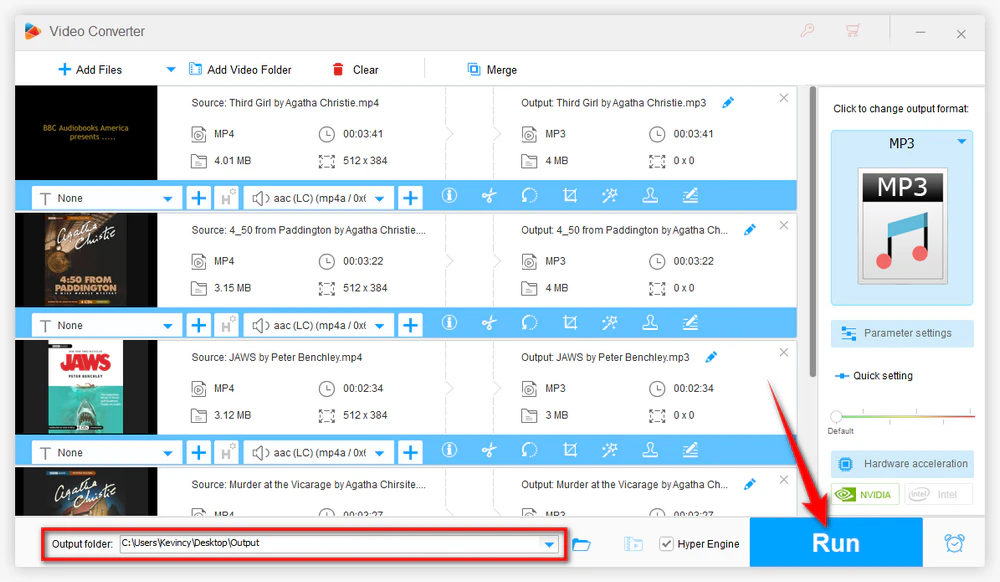
Go back to the main interface and open the Converter module. Click Add Files to import the downloaded videos.
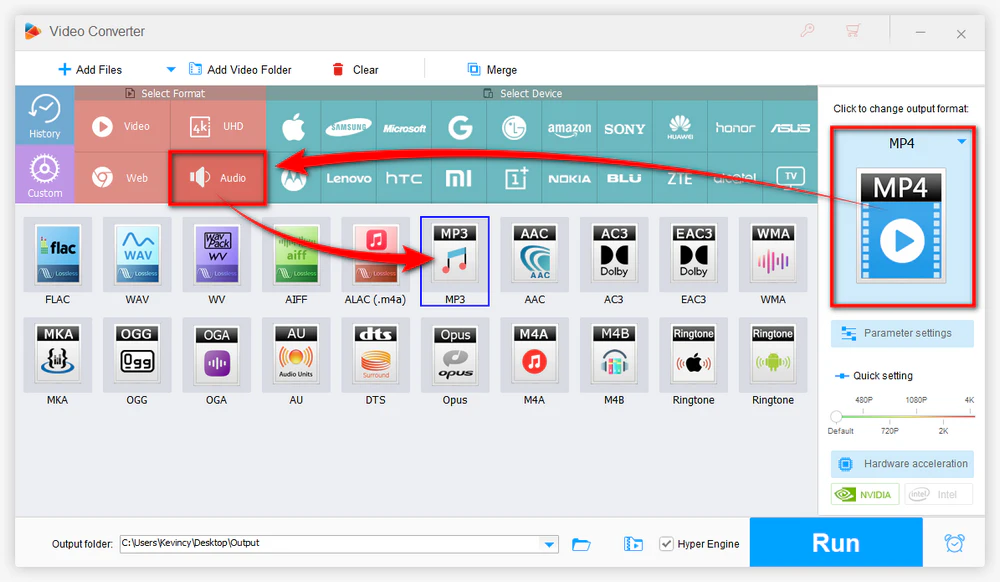
Open the output format list and go to the Audio category. Select MP3 as the output format.
Choose the output path and click Run to convert Dailymotion videos to MP3 in bulk.
After that, you’ll get the extracted audio file. If you’re looking for a simple Dailymotion MP3 converter, this built-in workflow is one of the most practical ways to save music or audio for offline listening.
Besides desktop software, there are also browser extensions and online tools that can help save video from Dailymotion. These methods may work for temporary use, but they are usually less reliable.
A browser extension can be useful if you only download videos occasionally and prefer not to install a separate program. Some extensions can detect media on the page and provide a direct download button.
However, this method may become unstable after browser updates or website changes. In addition, the available format and quality options are often limited.
An online Dailymotion downloader is another simple option. Normally, you just paste the video URL into the website, choose an available output option, and download the file.
However, online tools often come with some common problems:
Many online tools and extensions may fail when Dailymotion changes its streaming or encryption methods.
A: In most cases, users need a third-party tool to save Dailymotion videos for offline use. A video downloader, browser extension, or online service can help.
A: Yes. If the tool supports playlist parsing, you can download multiple videos in batch instead of saving them one by one.
A: First, download the Dailymotion video. Then import it into a converter and choose MP3 as the output format.
A: Online downloaders may stop working because of website updates, parsing errors, ad-heavy pages, or limited support for certain video links.
A: If you want a tool that combines downloading, playlist support, and format conversion, WonderFox HD Video Converter Factory Pro is a convenient option for Windows users.
That’s all about how to download Dailymotion videos, playlists, and MP3 audio.
If you only need a quick one-time download, an online tool or extension may help. But if you want a more reliable solution with batch download support and built-in format conversion, WonderFox HD Video Converter Factory Pro is a more practical choice.

WonderFox HD Video Converter Factory Pro
1. Record live streams, gameplay, webinar, video call...
2. Download video/music from 1000+ pop sites.
3. Convert video/music to 500+ optimized presets.
4. Compress large-sized videos with no quality loss.
5. Handy editing features suitable for green hands.
6. Create unique GIF from video or separate images.
7. Ringtone Studio, Subtitle Extractor, and MORE...

Privacy Policy | Copyright © 2009-2026 WonderFox Soft, Inc. All Rights Reserved
