

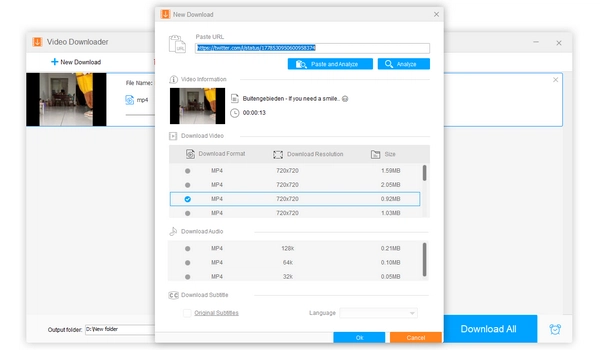


X (formerly Twitter) is one of the most popular social media platforms where you can find many interesting videos. If you want to save them, you can now do so directly within the X app on your phone via X Premium membership. But, if you're using a PC or Mac, direct downloading of X videos is still unavailable. Fortunately, there are many free third-party tools available to help you easily save X videos. Without further ado, let me show you how to download a X video exactly.
📱 If you're looking for a free X video downloader on mobile, you can scroll to the end of this article to find our mobile workarounds for Android and iOS.
| Method | Type | Download Quality | Batch Download? | Support Other Sites? | Best For |
|---|---|---|---|---|---|
| Free HD Video Converter Factory | PC Software | Original (with lower quality options) | Yes | Many (include YouTube) | PC users who want free, high-speed, and secure bulk video downloads. |
| Cobalt | Website | Original | No | A few (no YouTube) | One-off, casual video saves on mobile devices or public computers. |
| X (twitter) Media Downloader | Browser extension | Original | No | No | Quick, single-video captures directly on the site. |
Software applications are best for computer users because they are more stable and feature-rich than web-based tools.
For Windows users, WonderFox Free HD Video Converter Factory Factory is the best free X video downloader that can download X videos easily and quickly. It offers download options in various resolutions and sizes, so you can save videos as per your preferences. It can also save audio separately, and download videos and audio from other websites like YouTube. Additionally, it includes a built-in video converter and editor that come in handy when needed.
Now, let’s see how to save videos from X using this software.
Step 1: Download and install Download and install WonderFox Free HD Video Converter Factory on your PC.
Step 2: Launch the software and open the Downloader module.
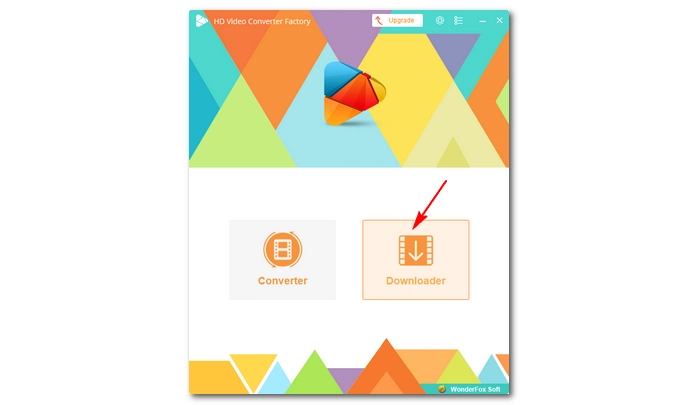
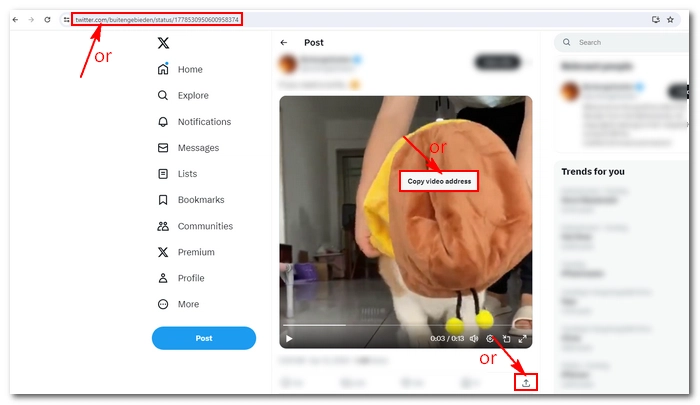
Step 3: Go to X and find the video you want to save. Right-click on the video and select Copy video address.
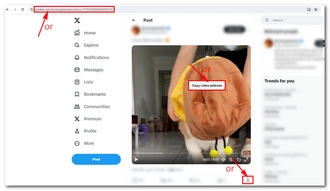
Step 4: Return to the software. Click +New Download, paste the copied link into the blank box, and click Analyze.
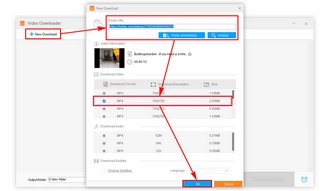
Step 5: When the download options appear, select your preferred video resolution and size. Then click OK to add it to the download list.
💡 You can add multiple videos to the download list for batch downloading all at once.
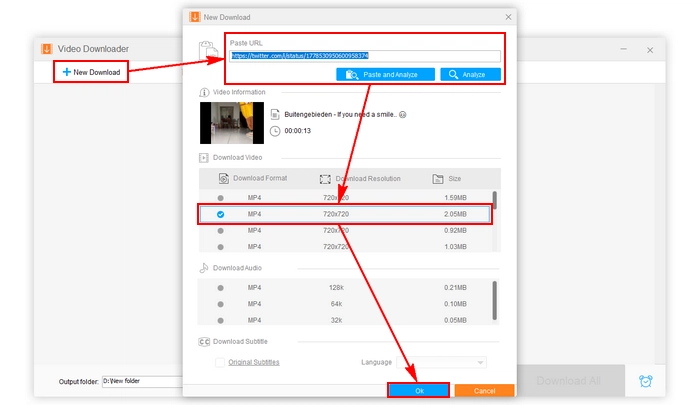
Step 6: Click the ▼ icon at the bottom to set an output folder, then click Download All to start the downloading process.
Once the download is complete, you can view the downloaded files in the folder you just specified. If you want to convert them to other formats or edit them, you can import them into the Converter module.
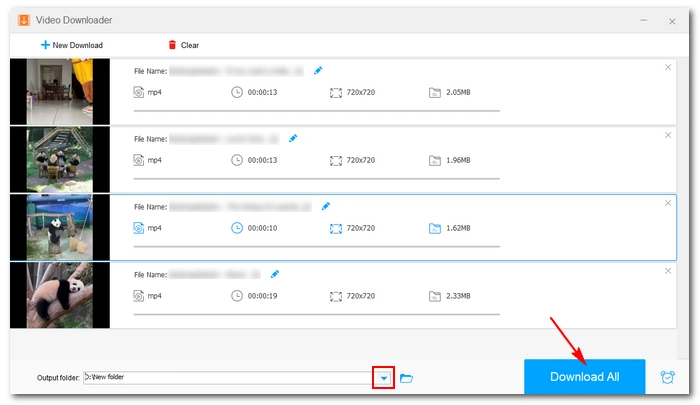
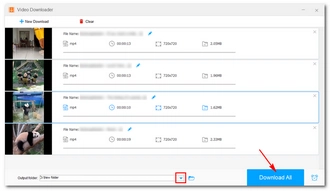
🔔 WonderFox Free HD Video Converter Factory only allows 100 downloads. However, it does not limit the number of videos downloaded per session. Therefore, to make the most of the download attempts, you can add as many videos as possible to the download task. Then click "Download All" to use a single download. If you are downloading videos from YouTube, you can also create a playlist beforehand and save the videos in the playlist with one click.
In addition to using software, online websites are also a good choice for users who do not want to download any software. Due to their web-based nature, these websites are easily accessible regardless of the device you are using.
Among the various online X downloaders, Cobalt is the cleanest and simplest tool I've found that can help you save videos from X with original quality. It can also convert X videos to audio-only files and save them offline. Best of all, it requires no registration and no payment. Without further ado, let’s see the specific steps to download X videos using Cobalt.
Step 1: Open your browser and go to the X video you want to download.
Step 2: Copy the video address or the post link.
Step 3: Visit Cobalt.tools and paste the link into the provided field. Then click >>.
💡 If you want to save audio, switch auto to audio.
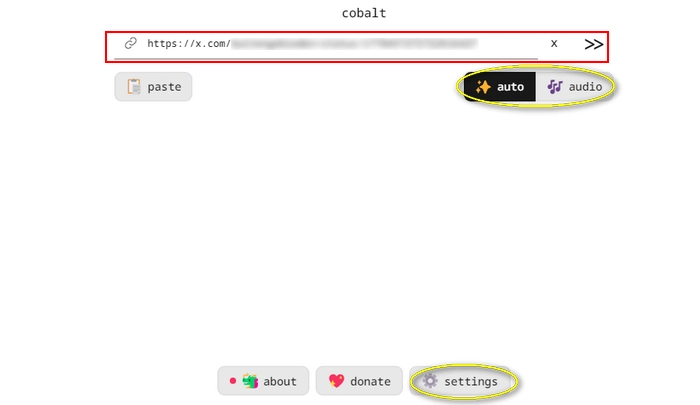
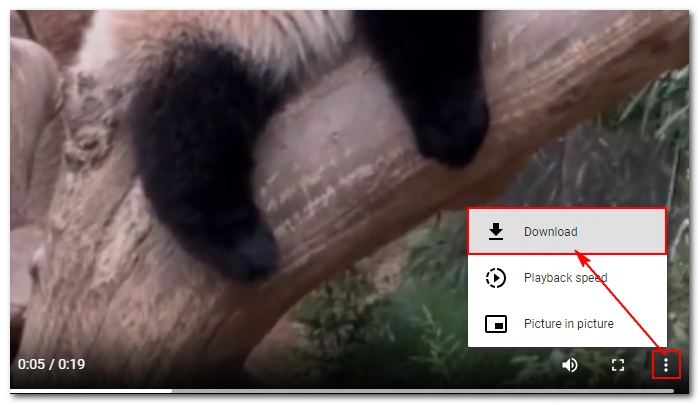
Step 4: A new page will open and play the X video. Click the three dots in the bottom right corner of the video player and click Download. The video will be saved to your device immediately.
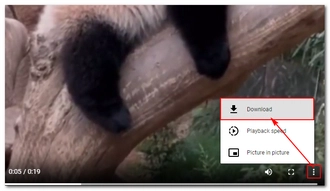
🔔 Cobalt is a powerful online file downloader that also supports several other websites, including Facebook and Instagram. Unfortunately, it doesn't support YouTube. Additionally, you can't batch download files, and as it lacks resolution options, you must download files regardless of file size, which isn't ideal for users with limited device storage.
Please note that due to high website traffic, you might encounter situations where the website is inaccessible. In such cases, use one of the other methods described in this article.
Similar to online websites, there are extensions built for browsers that can handle various tasks for you without the need to install software.
The X (twitter) Media Downloader extension by Media Harvest is a great example of quickly saving your favorite X videos with just one click. It doesn't require you to copy and paste links like with other tools. Once activated, there will be a download button below every video you want to download. Just follow these steps to use this extension:
Step 1: Visit https://github.com/EltonChou/TwitterMediaHarvest#install and install the correct extension to your browser.
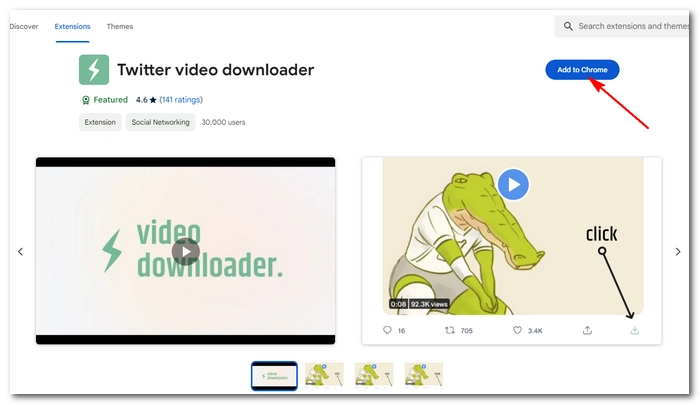
Step 2: Go to X and find the video you want to save.
Step 3: Click the download button located next to the share button. The video will be downloaded to your computer instantly.
💡 If you can’t see the download button, try refreshing the page.
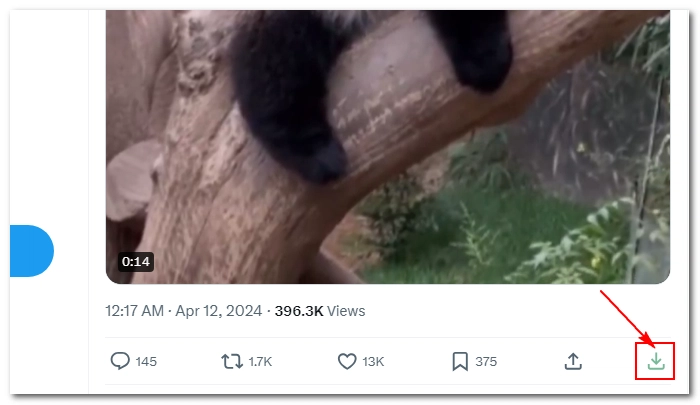
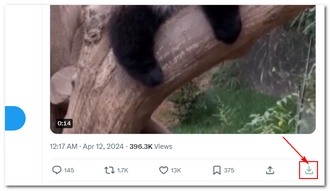
🔔 The X (twitter) Media Downloader is a way to directly download X videos right inside the website. This makes the whole process very smooth as you can download as you browse. But it still has limits:
• Only supports X
• No bulk downloads
• No resolution selection
• Cannot download audio
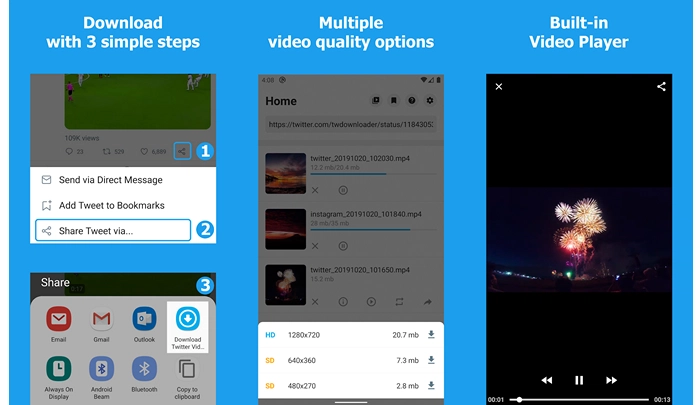
Android users can easily find Download Twitter Videos – GIF to be extremely useful for saving X videos and GIFs. This is an ad-supported free app that can download X videos very fast. Moreover, it's lightweight and easy to operate. Here are the detailed instructions.
Step 1: Go to the Play Store on your phone and search for “Download Twitter Videos – GIF”. It’s a download icon on a blue background. Install the matching item on your device.
Step 2: Open the X app and navigate to the desired video.
Step 3: Click the share icon and choose Share X via…
Step 4: Choose the Download Twitter Videos app you just installed.
Step 5: Inside the downloader app, click the download icon.
Step 6: Select the wanted resolution and start downloading.
💡 You can also copy the X video link and paste it into the app for download.
After the video is downloaded, you can watch the video with its built-in video player or save it to your phone storage.
Due to Apple policy restrictions, downloading videos on Apple devices is not as easy as on other devices. However, there are still some workarounds that can get the job done.
One easy way to do this is to use the Shortcuts app, which comes pre-installed on iOS 16 and later to quickly automate tasks. It also allows you to import X video downloader shortcuts that others have created to download the videos you want from X. Here's how to do it:
Step 1: Open Settings on your device and locate Shortcuts. Click on it and enable Allow Untrusted Shortcuts. This will allow shortcuts from third-party sources.
Step 2: Open https://www.icloud.com/shortcuts/41ed3432ea1e4bc48e881ad608bb355f and click Get Shortcut.
Step 3: Inside the Shortcuts app, find the shortcut you just downloaded and click Add Untrusted Shortcut.
Step 4: Open the X app and go to the desired video.
Step 5: Click the share button and choose Twitter Video Downloader. This will open the Shortcuts app.
Step 6: Select the video quality and let the shortcut download the X video to the Photos app.
🔔 Another way to save X videos on iOS is to use the Documents app, whose built-in browser allows you to access an online X downloader such as Cobalt and download the videos offline. All you have to do is search for "Documents by Readdle" in the App Store and install it on your device. Then open the application and enter the browser, the rest of the steps are the same as using the online X video downloader on PC.
There are various ways to download X videos. Whether you are a PC user or a mobile user, there are tools available, such as dedicated software like WonderFox Free HD Video Converter Factory, online platforms like Cobalt, and browser extensions like X (twitter) Media Downloader. Additionally, mobile users can rely on apps like Download Twitter Videos - GIF for Android or use workarounds like the Shortcuts app and Documents by Readdle for iOS devices.
By the way, besides using a X video downloader, you can also use a screen recorder to record X as an offline video. This way, you can save only the part that interests you instead of the entire video.
That’s all I want to share in this post, hope it’s useful to you. Thanks for reading. Have an amazing day!
Disclaimer: Downloading copyrighted material without the copyright holder's permission is illegal. WonderFox does not endorse copyright infringement in any way. Please download content only for personal fair use.

 Download for Free
Download for Free
Download for Free
It is generally considered legal to download videos for personal, non-commercial use. This is called fair use. However, it’s essential to respect copyright laws and terms of service when downloading X videos.
Unfortunately, no. These videos require you to be logged into an account with permission to view them, and this will block generic X downloaders from downloading them. But you may try screen recording the videos and save them offline.
It’ll be free to download videos from X using free X video downloaders such as online websites, browser extensions, or dedicated apps. However, some apps or services may offer premium features or additional functionalities for a fee.
There are several apps available for downloading X videos. For Android devices, Download Twitter Videos – GIF is a popular choice, while iOS users can use apps like Shortcuts or Documents by Readdle. Additionally, browser extensions like the X (twitter) Media Downloader or online websites such as Cobalt.tools are also good options. For PC users, WonderFox Free HD Video Converter Factory is recommended.
The best X video downloader depends on personal preference and requirements. Popular options include software like WonderFox Free HD Video Converter Factory for PC users, online platforms like Cobalt for its simplicity and accessibility, and browser extensions like X (twitter) Media Downloader for quick and easy downloads.

I write about multimedia topics, including video and audio conversion, compression, editing, and downloading. I joined WonderFox in 2020, and my goal is to help readers solve everyday tech problems more easily. In this article, I have shown the best free ways to download X (Twitter) videos on your computer and mobile devices. Hope this is helpful!


I write about multimedia topics, including video and audio conversion, compression, editing, and downloading. I joined WonderFox in 2020, and my goal is to help readers solve everyday tech problems more easily. In this article, I have shown the best free ways to download X (Twitter) videos on your computer and mobile devices. Hope this is helpful!

Terms and Conditions | Privacy Policy | License Agreement | Copyright © 2009-2026 WonderFox Soft, Inc.All Rights Reserved