

Streaming is convenient, but downloading a movie to a desktop or laptop is still useful when you want to watch offline, travel with limited Internet access, or keep a locally available copy that you are permitted to save. This article keeps the three common approaches people use on a PC: downloading from supported video-hosting sites with a URL downloader, using a BitTorrent client with a torrent file or magnet link, and downloading from third-party movie websites. If you want to save videos from supported sites, you can try this Windows downloader: https://www.videoconverterfactory.com/download/hd-video-converter.exe hd-video-converter.exe
 Kevincy | Updated on Sep 22, 2026
Must Read: The legality of downloading a movie depends on the source, the rights attached to the title, and the laws where you live. Use the methods below only for movies you are allowed to download, such as public-domain, openly licensed, purchased, or otherwise authorized content. WonderFox does not advocate copyright infringement.
A slow or unstable connection can easily interrupt a long movie, so it is understandable that many users prefer to prepare something for offline viewing. A desktop PC and a laptop use essentially the same download methods; the main differences are practical ones such as available storage, battery life, and where you want to save the file.
Below are three common approaches. Each has different advantages, limitations, and risks, so choose one based on the source you are using rather than assuming every movie can be downloaded in the same way.
High-quality PC Movie Downloader
WonderFox Free HD Video Converter Factory can download movies from YouTube, Vimeo, Dailymotion, and 500+ other websites and it supports 720P, 1080P, 4K, and even 8K video quality. Simple, fast and free!
Video-hosting and sharing sites such as YouTube, Vimeo, and Dailymotion contain movies, documentaries, short films, creator-uploaded features, public-domain titles, and many other kinds of long-form video. If the uploader or platform allows you to save the video, a URL downloader is usually the most straightforward way to get a regular video file on a Windows PC or laptop.
WonderFox Free HD Video Converter Factory includes a Downloader module that can analyze supported video URLs and show the available formats, resolutions, file sizes, audio tracks, or subtitles returned by the source. Next, we'll take YouTube as an example for illustration, and these steps also work for other popular websites.
Before start, please download download and install the software on your PC.
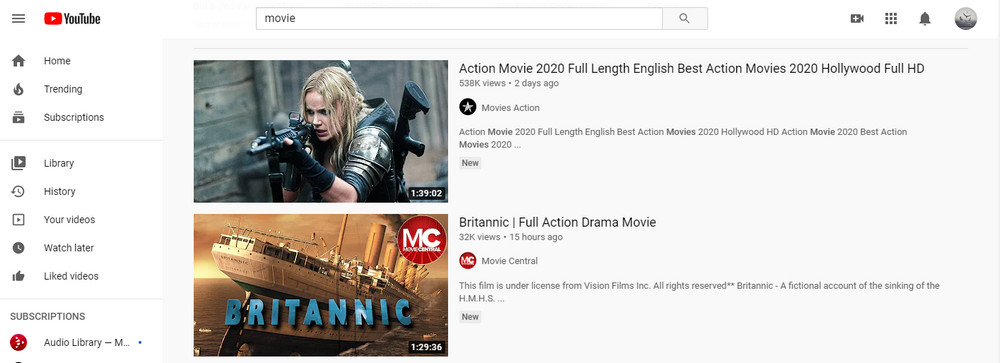
Visit YouTube. There is a search box at the top middle of YouTube website. Type in the title of a specific movie, click the Search icon and all related results will be displayed below. Browse and open the one you’re exactly looking for and copy the movie URL from the top address bar.
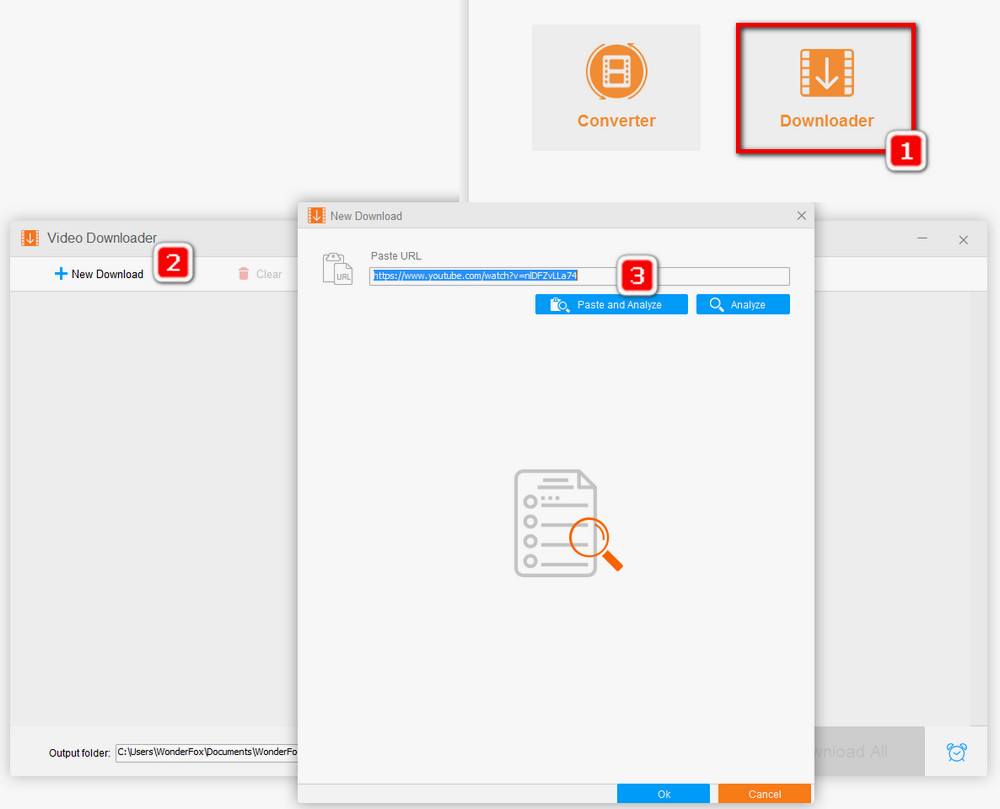
Open Free HD Video Converter Factory, go to Downloader, then click on +New Download. The new download window appears.
Click the Paste and Analyze button. The URL will be pasted into the URL box and the analysis process will start.
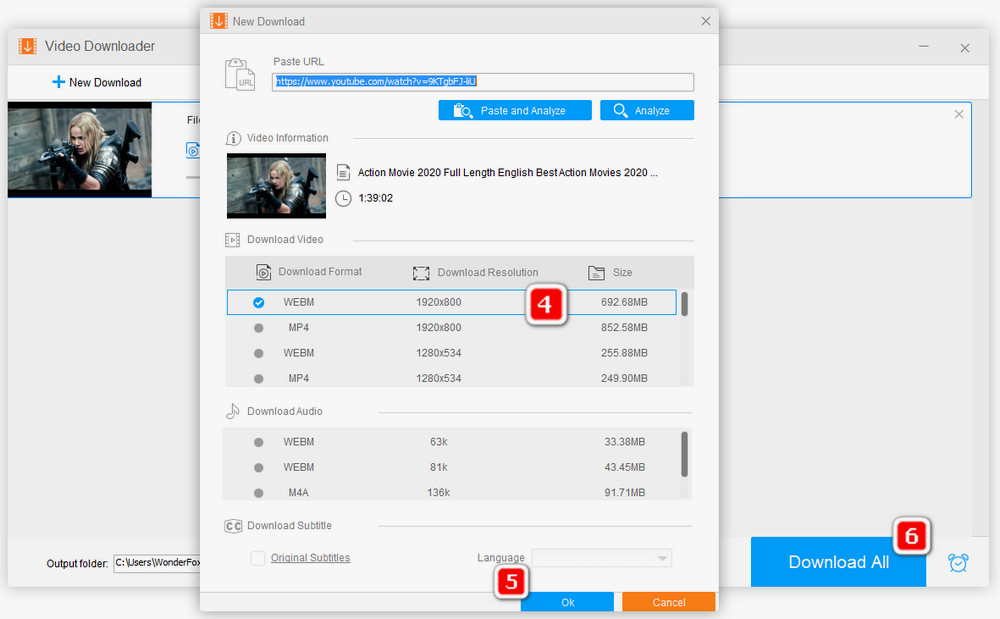
Soon, a list of available download options will be displayed. Choose the format and resolution that suit your device, storage space, and connection speed. The exact options depend on what the source provides.
Hit Ok to add it to the download list.
💡 Tips. If subtitles or multiple audio tracks are available, the downloader may list them as separate choices. Also, do not worry if you specifically want an MKV movie but the source only offers MP4 or another format. Download an available version first, then use the Converter module to convert the saved movie to MKV. MKV is useful when you want a container that can hold multiple audio tracks, subtitle tracks, and chapters.
Repeat the above steps to add multiple movies you want to download. A playlist or channel URL is also supported.
Finally, choose an output folder at the bottom, and then click Download All.
🌐 Browser-based online video downloaders are another popular choice because they require no installation. They can be handy for an occasional download, but such services often change domains, stop working, add intrusive advertisements, or fail when a video platform changes its delivery method. If you use one, avoid fake download buttons and do not install unexpected browser extensions or software.
BitTorrent remains a widely used way to transfer large files. The protocol itself is not limited to movies or to unauthorized content; public archives, open-source projects, and creators can also distribute files through torrents. To use it, first install a BitTorrent client such as qBittorrent, Transmission, or another client you trust.
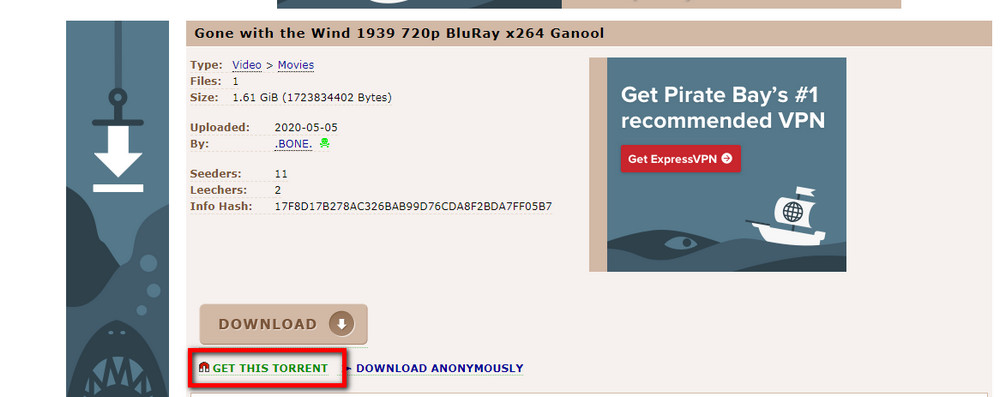
Step 1. Find a movie that is distributed through BitTorrent sites. Depending on the source, you may see a small .torrent file or a magnet link.
Step 2. For a .torrent file, download it and open it with your torrent client. For a magnet link, click the link and allow your browser to open the torrent client. A magnet link normally lets the client fetch the torrent metadata without requiring you to save a separate .torrent file first.
Step 3. Review the file list and choose the files you actually want before starting the download, especially when a torrent contains extras such as samples, artwork, or subtitle files.
Tips. Torrent index and download pages may contain misleading ads or fake buttons. Check the domain carefully, keep your browser and security software up to date, and make sure the movie is permitted to be distributed before downloading it.
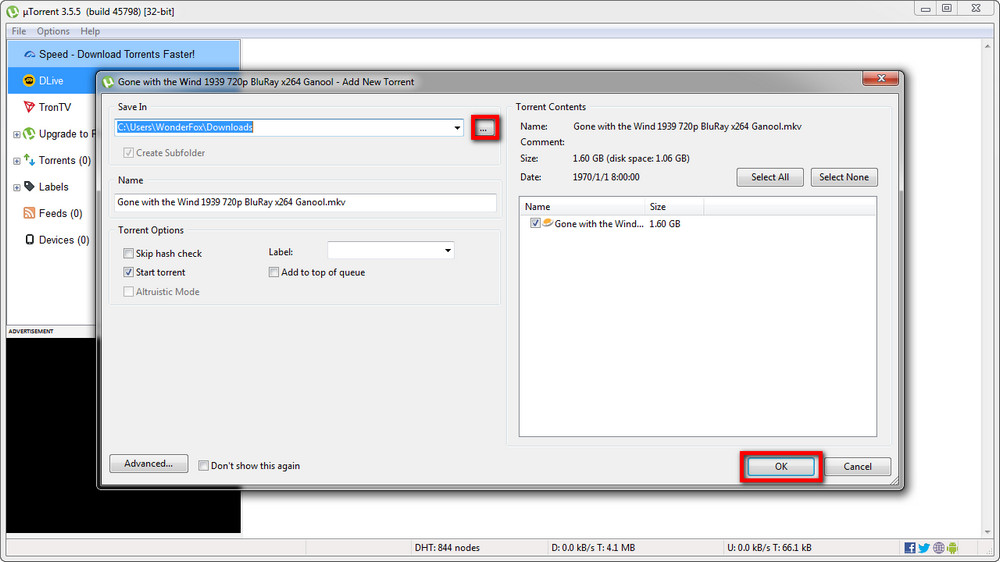
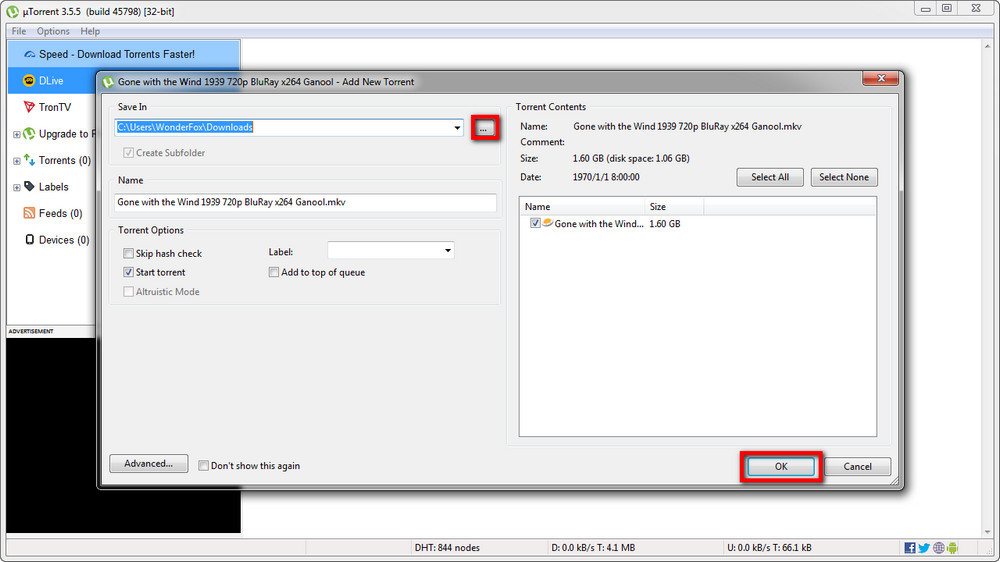
Step 4. Choose a save location with enough free disk space. Movie torrents can be much larger than ordinary web videos, especially when they contain high-bitrate video, multiple audio tracks, or subtitles.
Step 5. Start the task in your torrent client. Download speed depends on your connection, the number and speed of available peers or web seeds, client settings, and the health of the torrent.
Step 6. When the download finishes, scan unfamiliar files before opening them. A normal movie download should not require you to run an EXE, MSI, script, or other unexpected installer.
Downloading from a third-party website is still a popular option because it can be as simple as opening a movie page and clicking a direct download link. The trade-off is that movie sites and online download services are unusually unstable: domains change, old addresses stop working, mirrors appear and disappear, and a page that worked last month may no longer be usable today.
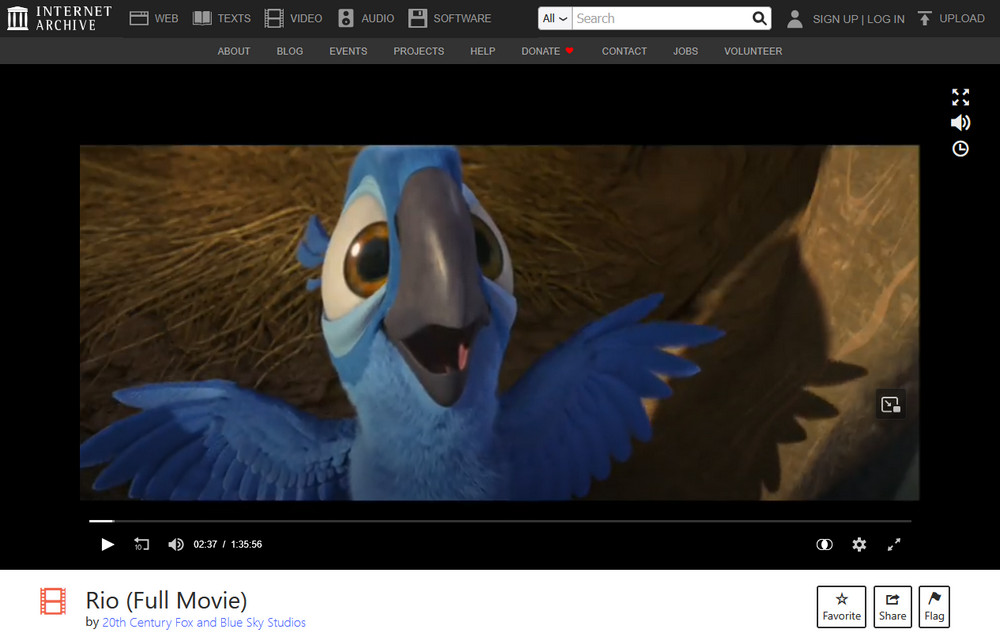
Internet Archive: https://archive.org/ is a long-running example for public-domain, archival, creator-uploaded, and other downloadable media. Many item pages provide several file formats, and some also offer a torrent. Check the rights information on the individual item rather than assuming every upload has the same reuse permissions.
Other movie download sites: Sites such as 123Movies-, FMovies-, or Filmxy-style services are often mentioned in movie-download roundups, but their availability, domains, advertising practices, and licensing status can change frequently. Treat any fixed list as temporary. If you use a third-party site, verify that you are permitted to download the title, avoid pages that ask you to install unknown software, and close pop-ups or redirects instead of following them.
Yes. A Windows laptop and desktop PC use the same URL downloader, torrent client, and browser-based methods. On a laptop, pay more attention to free disk space and choose a save folder that is easy to find, especially if you plan to copy the movie to an external drive later.
Only if the source offers an MKV download. If it does not, download one of the available formats first and convert the saved file to MKV afterward. The older MKV movie guide used this same two-stage approach.
The technical workflow is the same as for any other movie: use a URL source, an torrent/magnet link, or a third-party download site. There is no special downloader required for a particular actor. Because most commercial feature films are copyrighted, first confirm that the specific upload or download source is authorized.
Disney titles are commercial copyrighted works, so availability depends on the platform or retailer that has the rights in your region. If an authorized store or service provides its own download or offline-viewing option, use that option. A general-purpose downloader cannot turn every protected streaming title into a normal local video file.
Third-party sites can disappear because of domain changes, hosting issues, policy changes, copyright complaints, abandoned projects, or changes made by the video platforms they depend on. That is why it is better to understand the three download methods in this guide than rely on one fixed website address.
That covers the three common ways people download movies on a PC or laptop: analyze a supported video URL with a downloader, open a .torrent file or magnet link in a BitTorrent client, or use a third-party website that provides direct downloads or browser-based URL analysis. None of these methods makes a movie automatically free to download, so always check the source and rights first. For public-domain and archival films, Internet Archive remains a practical place to start; for commercial movies, use an authorized source or the download/offline feature provided by the service that carries the title.

Kevincy joined the WonderFox team in 2014 and has been a senior columnist ever since. With over two decades of experience in the video editing industry, he shares tutorials, tips, and how-to guides on video/audio processing and personal DVD backups. Family-oriented and passionate about helping others, he is dedicated to making video and audio processing easier for readers.


Kevincy joined the WonderFox team in 2014 and has been a senior columnist ever since. With over two decades of experience in the video editing industry, he shares tutorials, tips, and how-to guides on video/audio processing and personal DVD backups. Family-oriented and passionate about helping others, he is dedicated to making video and audio processing easier for readers.
WonderFox HD Video Converter Factory Pro
The pro version of HD Video Converter Factory optimizes the download experience to a new level and enables you to save videos from the network more flexibly. It owns five main function modules – converter, downloader, recorder, GIF Maker, and Toolbox so you’re able to do more other adjustments to your videos.

Privacy Policy | Copyright © 2009-2026 WonderFox Soft, Inc. All Rights Reserved
