

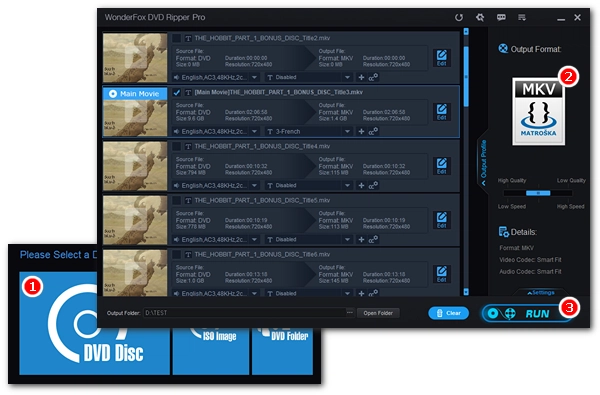


Digitizing DVDs is a trend today. While most people transform their DVD movies to MP4, many choose to convert DVD to MKV, a flexible format capable of storing multiple audio and subtitle tracks besides the video streams. But how to convert DVD to MKV efficiently? Don’t worry. We’ve got the best DVD to MKV converter to help you. Read on to know the best way to convert DVD to MKV in Windows.
Download the best DVD to MKV converter in advance: https://www.videoconverterfactory.com/download/dvd-ripper.exe dvd-ripper.exe
For the most effective DVD-to-MKV conversion, you’re recommended with WonderFox DVD Ripper Pro. It's one of the best DVD ripping software on Windows, which offers the easiest trouble-free way to convert DVD to MKV with the best quality preserved. Meanwhile, it allows you to convert DVD to MKV with subtitles and keep the desired audio tracks without error. With hardware acceleration enabled, this program can also provide a lightning-fast conversion speed, helping you finish a 2-hour DVD movie conversion less than 5 minutes.
Don’t worry if your DVD comes with copy protection because this software is equipped with advanced decryption technology that can circumvent almost all DVD encryptions including region code, 99 titles, CSS, Disney X-Project DRM, and more. Moreover, besides the MKV output, you can also convert DVD to MP4, AVI, MOV, MPG, WAV, iPhone, iPad, and various other hot formats and devices for smooth playback.
Enjoy more features with the software:
🔔 Note: The software does not support CDs, HD-DVDs, and Blu-rays.
Now, get the software to convert your DVD to MKV in the next part.
With WonderFox DVD Ripper Pro, you can convert any DVD to MKV trouble-free. It's simple, fast, and efficient. Have a try now!
 Download for Free
Download for Free
Download for Free
Please install install the best DVD to MKV ripper on your PC first.
* The unregistered version has a 15-minute conversion limit that can only be removed after purchasing a license. You can try its features before deciding whether to purchase.
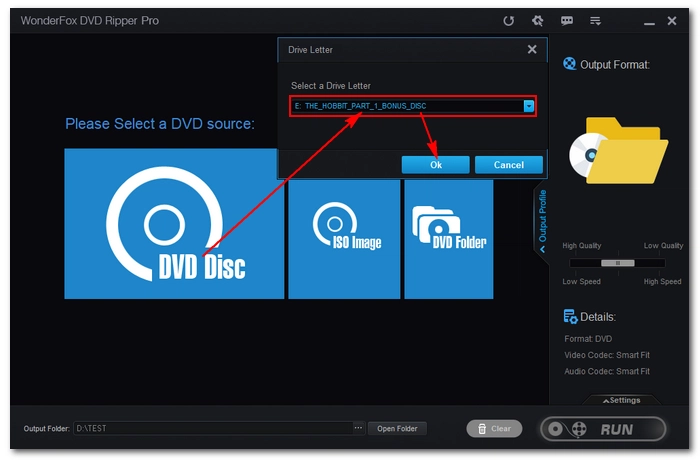
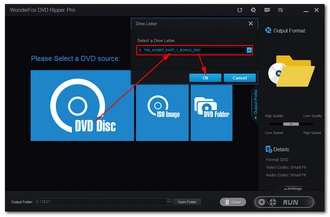
Insert your DVD into your computer and launch the DVD converter software. On the home interface, choose the DVD disc, select the drive letter of your DVD, then click OK to import the DVD videos. After the DVD is loaded, the DVD main title/main movie will be automatically selected. But you are free to check other DVD videos if you want.
💡 Tip: If you want to convert DVD ISO to MKV or DVD Folder to MKV, select the corresponding source. If the software fails to import the DVD, try to enable Enhanced Decryption for safe and smooth ripping (note that the process may take longer).
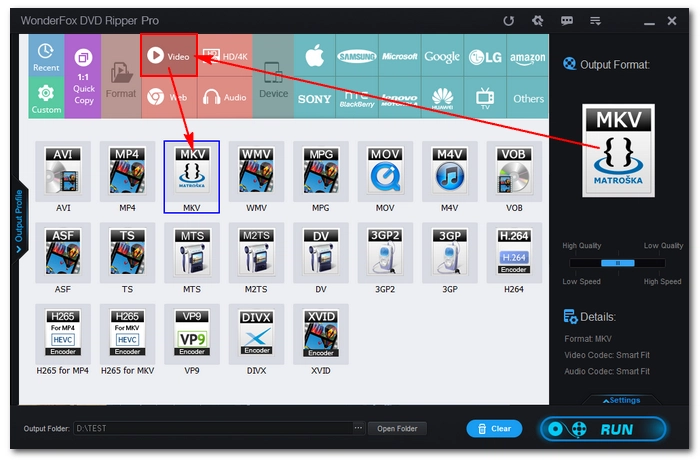
Go to the right side of the program interface. Click on the format image to unfold the output format list. Next, head to the Video section and select MKV as the output format.
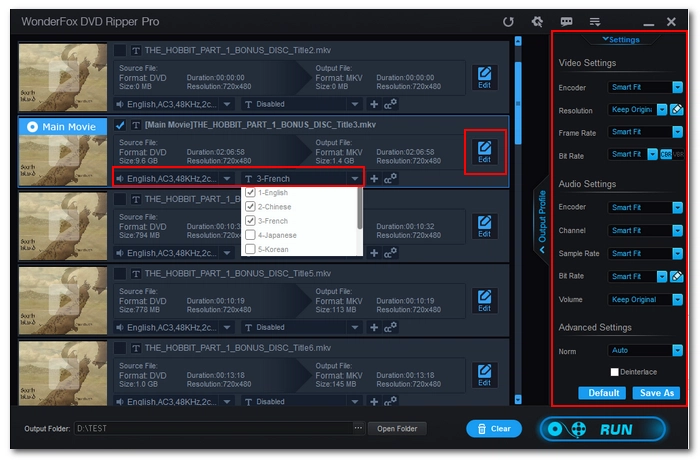
You can open Settings on the lower right corner of the program and configure encoder, bitrate, quality, etc. to control the output effect. For example, if you want to reduce the DVD size while keeping the original quality, you can use H265/HEVC encoder for the video. If you don't want to encounter audio playback issues on certain devices, it's better to keep AAC as audio. However, for the best compatibility, MP4 with H264 video is the best profile.
Nevertheless, if you’re not familiar with these settings, leave them as Smart-Fit and the program will select common settings based on the format you choose.
In addition, you can customize the DVD video with the audio and subtitle drop-down menus, or use the editing function to trim, crop, and rotate the video.
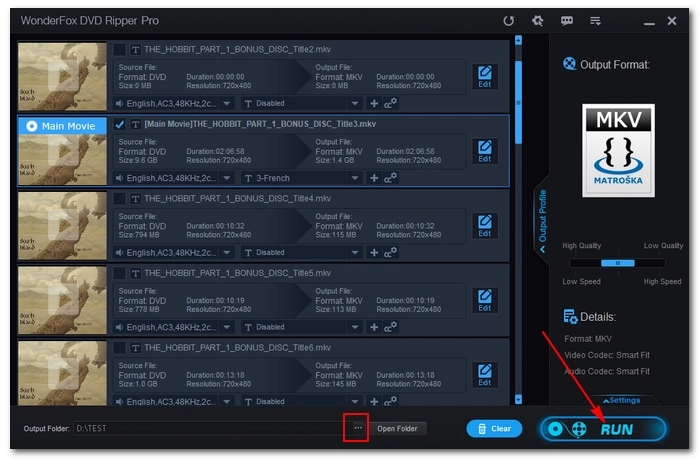
Now, click the three-dot icon at the bottom to set an output destination. Make sure that the output folder has enough space to hold the converted file (check the calculated output size from the taskbar).
Finally, hit RUN to rip the DVD to MKV at once.
💡 Tip: By default, hardware/GPU acceleration is enabled, and if your computer supports it, you can enjoy much faster conversion speed than normal conversion, such as 3 minutes to convert a 2-hour-long DVD to MKV (H264/AC-3).
Disclaimer: WonderFox does not advocate any illegal duplication and distribution of DVDs and all information provided in this article is presented for general informational purposes and personal fair use only. Please refer to the DVD copyright laws in your country before you rip any DVDs.
That’s the best DVD to MKV software I want to share with you. It’s easy and fast to complete the DVD conversion you desire, and for more complex tasks, such as customizing the DVD settings, the software can also help you with no issues. You can download the best software to convert DVD to MKV now and explore more features for yourself:
Download for Free
Download for Free
I hope you find this article helpful. Thanks for reading!
It depends on where you live and what kind of DVD you want to rip. In the US, ripping DVDs is not allowed. However, you should be alright if you only back up your homemade DVDs or digitize DVDs for personal use.
With WonderFox DVD Ripper Pro, you can also rip DVD to MP4, DVD to AVI, DVD to MP3, DVD to WAV, and other major formats without any effort.
Yes. You can rip copy-protected DVDs to MKV using WonderFox DVD Ripper Pro. It comes with a DVD decrypter that can decrypt protections such as DVD CSS, CPRM, Multi-angle, RCE, Sony ARccOS, UOP, Disney X-Project DRM and Cinavia Protection.
WonderFox DVD Ripper Pro lets you import DVD ISO files by selecting the ISO source. Then you can choose the MKV format and adjust output settings if needed to finish the conversion.
 Download for Free
Download for Free
Download for Free

Terms and Conditions | Privacy Policy | License Agreement | Copyright © 2009-2025 WonderFox Soft, Inc.All Rights Reserved