

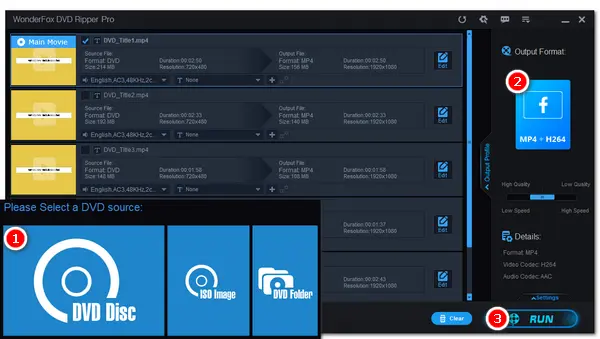


You may still cherish a collection of home movies or wedding DVDs, yet worry that these videos could be lost forever if the discs get damaged. Sharing them on social media platforms like Facebook, Vimeo, Instagram, or TikTok is a great way to preserve these memories and connect with friends and family.
But these videos are stored on discs using specific formats and complex structures, so you cannot directly copy and upload the DVD files to social media sites. Don't worry, though. This article will guide you through the entire process of uploading your DVDs to major social media platforms. It's actually quite simple and involves just two steps:
1. Convert the DVD to a digital format: Use a dedicated DVD ripper to rip and convert the DVD into a web-compatible digital format, such as MP4, and adjust settings to meet platform requirements.
2. Upload the converted DVD video to social media platforms: Simply follow the platform's publishing guidelines to upload your DVD to the desired social media site.
It's important to note that social media platforms accept only digital video files, most commonly MP4 format using H.264 video encoding and AAC audio encoding. But there are also specific requirements regarding video resolution, aspect ratio, file size, and duration limits. So you'd better check out the video specs before ripping.
| Platform | Recommended Format | Recommended Aspect Ratio | Max Resolution | Max Size/Length |
|---|---|---|---|---|
| MP4, MOV (H.264 + AAC) | 16:9 (Main), 1:1, 9:16 (Reels) | 1080p at 30 fps | 4 GB / 240 minutes | |
| Vimeo | MP4, MOV (H.264 / HEVC) | 16:9 (Standard) | 8K | 5 GB in total (Basic plan) |
| MP4, MOV (H.264) | 9:16 (Reels), 1:1 or 4:5 (Feed) | 1080p | 4 GB / 60 minutes (computer) | |
| Twitter (X) | MP4, MOV (H.264) | 16:9, 1.33:1 | 1080p | 512 MB/ 140 seconds |
| TikTok | MP4, MOV (H.264) | 9:16 (Vertical) | 1080p | 2 GB (Web) / 10 minutes max |
To get the video out of recorded or burnt DVDs, it's not a simple copy-and-paste. Rather, a proper DVD ripping program is necessary.
WonderFox DVD Ripper Pro is a fantastic piece of software for Windows users that can convert many types of DVDs, including encrypted ones, to a wide range of formats. One of its highlights is the built-in social media presets, including Facebook, Vimeo, Twitter, Instagram, and Instagram, which allows you to optimize your DVD to fit the target social media platform in one click. Additionally, you are allowed to manually adjust the parameters according to your own needs.
It's simple to use and boasts high conversion speed due to hardware acceleration. Let's see how to use it to convert a DVD for social media below.
Click here to download download the software to get started:
 Download for Free
Download for Free
Download for Free
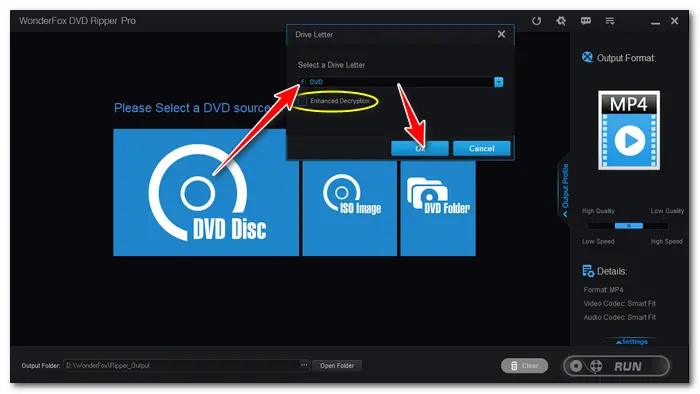
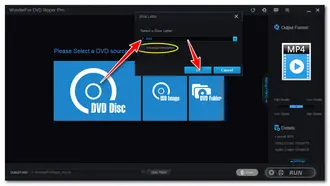
Insert a DVD into your computer and run WonderFox DVD Ripper Pro. Click the DVD Disc option, select your drive letter, and hit OK to load the DVD content to the software. The software will automatically decrypt the disc and select the main title.
* Enable Enhanced Decryption if the DVD fails to load.
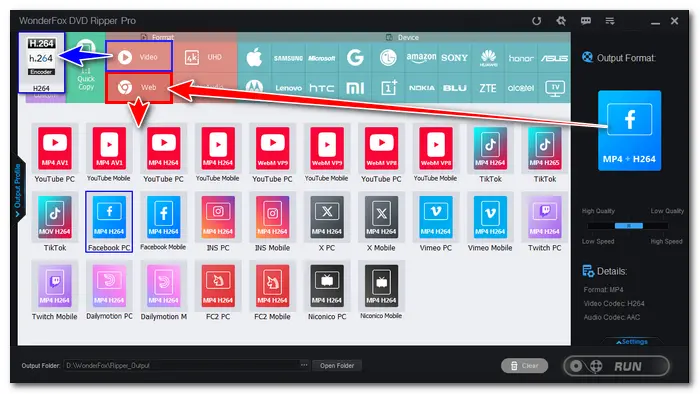
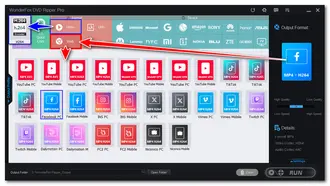
Open the Output Format panel on the right and click the Web tab. Here you can select the optimized presets for social media platforms like Facebook, Vimeo, and more. It's recommended to choose a preset that uses H264 encoding, and select either the PC or mobile version depending on where you want to upload your DVD from.
Alternatively, you can go to the Video tab and select H264, as this profile is supported natively by all social media platforms.
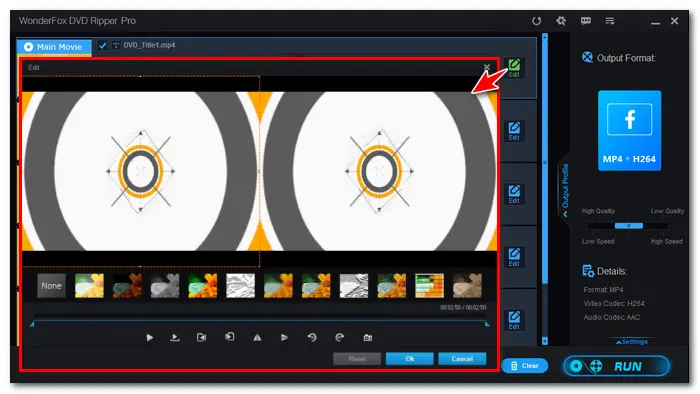
Trim DVD Video: If your target platform has specific length limits, you can use the built-in video editor to trim the video. Just click the Edit button to the right of the selected title, use the sliders on the timeline to cut out specific scenes or simply shorten the video length to required duration range.
Adjust Parameters: If the output size is too big to share on a platform, you can also open Settings, and then slightly lower the bitrate to reduce the final file size.
💡 When uploading DVD to Vimeo, where 4K content is dominant, be sure to set the resolution to 1080p for better clarity.
💡 If your DVD comes with horizontal lines moving downwards during playback, it's interlaced. To improve the viewing experience, you can enable the Deinterlace option.
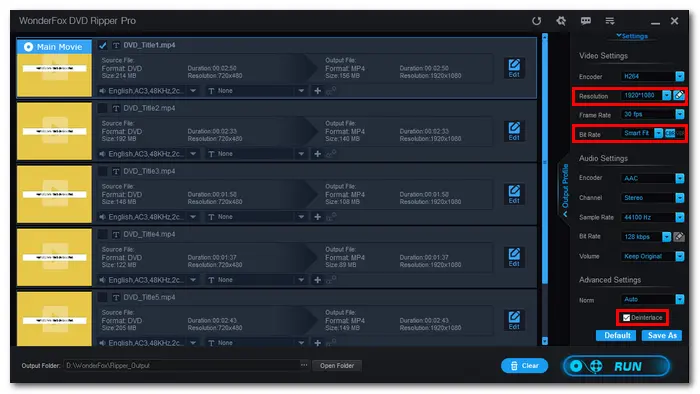
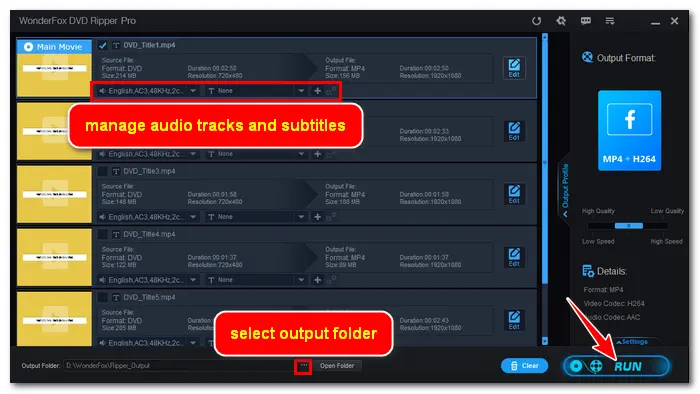
Before conversion, you can select your preferred audio and subtitle track for the selected title. Then click the three dots button at the bottom to set an output folder. Finally, click Run to start the conversion at once.
If your computer supports GPU acceleration, the conversion will be typically completed in less than 10 minutes.
Once you have the converted DVD video, you can upload it to a social media platform in just a few clicks.
Platforms like Facebook (Rights Manager) and Vimeo automatically scan uploaded videos against copyrighted media databases. If your DVD contains commercial background music, movie clips, or TV show footage, your video may be removed, or your account may be banned. Therefore, focus on uploading personal home videos and original files.
Disclaimer: Unauthorized ripping of copyrighted commercial DVDs for redistribution, commercial sale, or public re-uploading violates copyright law in many jurisdictions. The above instructions apply only to personal backups, home video conversion, and fair use for educational purposes. Always check the copyright laws in your area before ripping any DVD.
No. You can't upload VIDEO_TS folder or VOB files directly to Facebook, Vimeo, or any other major social media platforms. You must first convert the DVD into a digital video file such as MP4 or MOV.
The best format is an MP4 file container encoded with H.264 video codec and AAC audio codec. It ensures smooth playback compatibility across all operating systems, web browsers and social media apps.
The most common reasons are exceeding your account storage limits (like the 5 GB storage on the Vimeo Basic plan) or triggering copyright filters due to copyrighted materials.

I write about multimedia topics, including video and audio conversion, compression, editing, and downloading. I joined WonderFox in 2020, and my goal is to help readers solve everyday tech problems more easily. In this guide, you can learn the best way to rip, convert, and upload DVDs to social media platforms like Facebook and Vimeo successfully.


I write about multimedia topics, including video and audio conversion, compression, editing, and downloading. I joined WonderFox in 2020, and my goal is to help readers solve everyday tech problems more easily. In this guide, you can learn the best way to rip, convert, and upload DVDs to social media platforms like Facebook and Vimeo successfully.
 Download for Free
Download for Free
Download for Free

Terms and Conditions | Privacy Policy | License Agreement | Copyright © 2009-2026 WonderFox Soft, Inc.All Rights Reserved