
Help You Download FC2 Videos for Free
 Recommended by the author
 How to & Tips
 Convert Video

 by Simon
Updated on Mar 10, 2026
FC2 videos are popular with not only Japanese but also with people who are fond of the Japanese culture. However, many users face a same question - can't download FC2 videos directly. Thus, this article offers three methods to solve your problem. Click here to get the recommended video downloader.
FC2 is a popular Japanese video sharing platform where you can find all kinds of content, from anime clips and gaming videos to user-generated content and live streams. But if you’ve used the site before, you probably noticed something: FC2 doesn’t always make downloading videos easy.
In many cases, there’s no direct download button, and videos are streamed through embedded players. That’s why many users look for alternative ways to save FC2 videos for offline viewing.
In this guide, we’ll walk you through three practical methods to download FC2 videos, including desktop software, online downloaders, and browser extensions. Each method works a little differently, so you can choose the one that fits your needs.
Free Download FC2 Video
Free HD Video Converter Factory has strong detecting and analyzing ability which can help you download video from FC2 or other mainstream video websites such as YouTube, Facebook, Vimeo and more. It is totally free and clean!


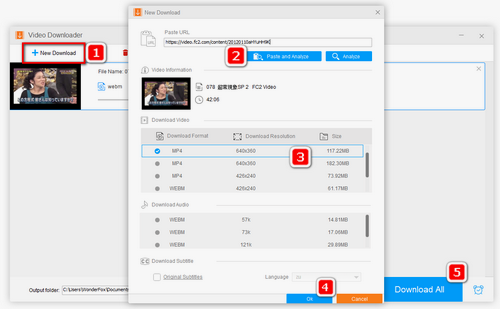
Before start, please free download the FC video downloader which supports online video download from more than 1000 mainstream video websites.
Visit FC2 Video and find the video you want to download. Copy the FC2 video URL.
Run the FC2 video downloader, select "Downloader" and click "+ New Download" button on the menu bar. Paste the URL into the first box and click "Analyze". Then wait a few seconds.
Select an output folder where you want to save the video. Click "OK", then "Download All" to start to download FC2 videos.
Hot Search: Download 1080P YouTube Videos | Download and Convert Facebook to MP3
BTW, the software also has a built-in video converter. So if you want to convert the downloaded videos to AVI, MP4, MKV, MP3, or other mainstream formats, just import the downloaded videos into Video Converter, open the output format list and select your desired preset profile right there. Then you can make it.
If you fail to download an FC2 video, try reanalyzing the URL or download it later.
WonderFox does not advocate downloading unauthorized, copyrighted videos for distribution, sell and any commercial purpose.
 Download FC2 Videos Online
Online FC2 downloader can be useful if you don't like to install software.
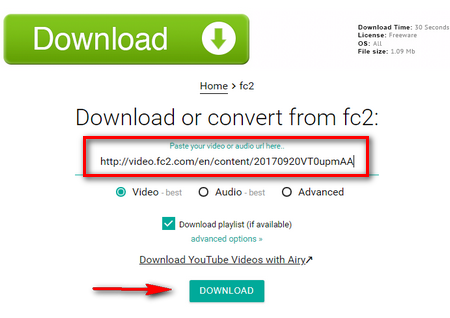
https://www.tubeoffline.com/download-FC2-videos.php is recommended for you to download FC2 videos with simple steps.
Step1: Find your favorite video on FC2 and copy the video URL.
Step2: Paste the video URL into the box and then click the "DOWNLOAD" button.
This site properly works only when you close or disable any ad blocking extension or add-on like AdBlock, etc. Don't believe ads and annoying pop-ups on the website.
 Download FC2 on Chrome and Firefox
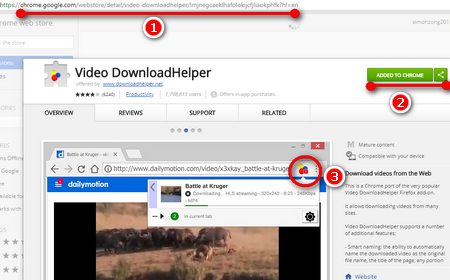
If you think neither of the methods described above is right for you, choose Video DownloadHelper. Just follow the next three steps.
1.FC2 Download Chrome
https://chrome.google.com/webstore/detail/video-downloadhelper/lmjnegcaeklhafolokijcfjliaokphfk
Step1: Copy and paste the URL to Chrome "Address Bar". Click the "ADD TO CHROME" button on the page. Then click the "Add extension" button.
Step2: Visit video.fc2.com. Find the video you want to download and play this video.
Step3: Click the "Video DownloadHelper" button on the toolbar in the upper right corner. Then click "Download".
2.FC2 Download Firefox
https://addons.mozilla.org/en-US/firefox/addon/video-downloadhelper/
Copy and paste this URL to Firefox "Address Bar" The next steps are the same as downloading FC2 video on chrome.
This article provides three methods to deal with how to download FC2 video. For my part, I would like to recommend the first one because it is totally clean, safe and free! If you benefit from this article, please share it with your friends.
At last...
Free HD Video Converter Factory creates perfect balance between file size and video quality, improves video quality and offers the best way for free HD video conversion. It also offers basic video editing that enables you to crop video or add wonderful effects to your video.

Download/Convert Videos from YouTube, Facebook, Vimeo, etc.
WonderFox HD Video Converter Factory Pro
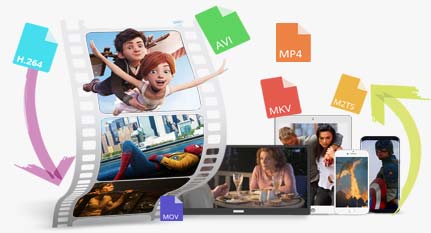
WonderFox HD Video Converter Factory Pro not only supports downloading videos from 1000+ sites, but also enables you to convert them to MP4, MP3, MKV, AVI, etc. Besides, this professional video converter can improve you video quality from SD to HD or 1080p to 4k.


More Related Articles
WonderFox HD Video Converter Factory Pro
Download HD, 4K, 8K videos fast & easily!
Support saving videos and music in bulk from YouTube, Facebook, Vimeo, Dailymotion, Twitch, and 1,000 more sites with original quality.
 Free
Download
Free
Download