Free Download
Download embedded video from any website efficiently!
AuthorRecommended by the author

SoftwareHow to & Tips

Video FormatsConvert Video

Resources

How to Download Embedded Videos from Websites?

Author by Charlotte

Updated on Apr 21, 2026

Want to download embedded videos from websites for offline viewing but don’t know where to start? You’ve come to the right place. In this post, we’ll show you 5 simple and practical methods to save embedded videos from webpages. Whether the video is hosted on a website itself or comes from a popular video platform, you can find a workable solution here.

👉 For those who want the easiest way to save online videos, a professional desktop downloader is recommended:

What Is an Embedded Video?

Embedded videos are videos played directly inside a webpage through a built-in player, such as Flash video (outdated), HTML5 video, etc. Unlike downloadable media files, they usually do not offer a clear “Download” button. Some are self-hosted on websites, while others are delivered via video platforms and embedded into the page.

In daily use, many people also refer to online playable videos as “embedded videos,” including educational talks, recipe videos, workout videos, sports clips, greeting videos, holiday videos, and more. In fact, the way to save them is often very similar.

Now, let’s move on to the workable methods.


Disclaimer: This guide is for personal fair-use only. Please do not download copyrighted content without permission. WonderFox does not approve of copyright infringement in any way.

Method 1: Download Embedded Videos Directly (Can’t Work with Most Websites Today)

how to download an embedded video directlyhow to download an embedded video directly

Some websites provide a direct saving option for their videos. If the source is not protected, you may be able to save it straight from the video player.

1. Open the webpage and play the video.

2. Right-click on the video.

3. If you see “Save video as…”, select it and save the file to your computer.

Sometimes, the video player may also include a built-in download icon. If so, just click it to download the video directly. This is the simplest method, but it only works on a limited number of sites.

Method 2: Use a Professional Video Downloader (Recommended!)

If the first method doesn’t work, the easiest alternative is to use a dedicated video downloader.

WonderFox HD Video Converter Factory Pro is a handy tool that can download online videos through URLs. It is simple to use and suitable for beginners. After downloading, you can also convert the video to a format you need, such as MP4, AVI, MOV, or MP3.

This method works well for many types of online videos, including:

embedded webpage videos

YouTube video pages

TED-style talk videos

recipe and cooking videos

exercise, yoga, and aerobics videos

football skills and badminton training videos

good morning, good night, and Christmas greeting videos

and more...

Now, get this downloader and see how to download an embedded video below.

Free Download Free Download

How to download embedded videos with WonderFox HD Video Converter Factory Pro

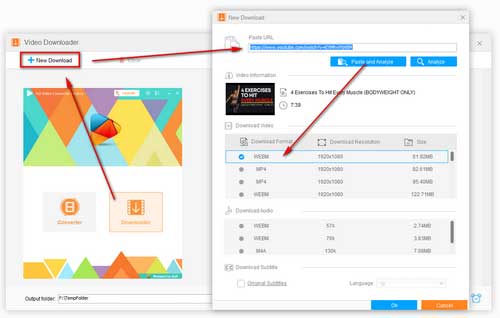
how to save an embedded video

Before start, please free downloadfree download the software.

Step 1. Open the Downloader

Launch WonderFox HD Video Converter Factory Pro and open the Downloader module. Then click New Download.

Step 2. Copy and Paste the Video URL

Open the webpage containing the video you want to save. Copy the page URL and paste it into the download box. Then click Analyze.

Step 3. Select the Download Option and Start Downloading

After the link is analyzed, choose the video resolution, format, or size you want. Click OK to add the task. Finally, set an output folder and click Download All to start downloading.

Hot search: Download HTML5 Video | WWE Video Download

Method 3: Save Videos from Webpage with Chrome/Firefox Browsers (Developer Tools)

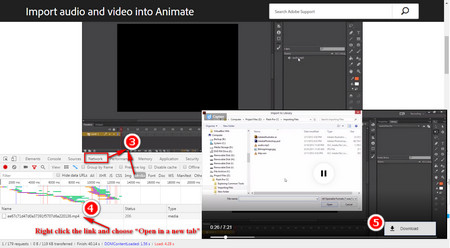
download embedded video chrome/firefoxdownload embedded video chrome/firefox

If you prefer not to install extra software, you can try extracting the media file through your browser. This method is more suitable for true embedded webpage videos, especially when the video is loaded directly from the website but cannot be saved by right-clicking.

Step 1: Run Chrome or Firefox, open the webpage and start playing the video.

Step 2: Press F12 to open Developer Tools.

Step 3: Go to the Network tab.

Step 4: Refresh the page and play the video again.

Step 5: Filter the requests and look for media files.

Step 6: Open the detected video file in a new tab, and then save it to your computer.

Method 4: Save Embedded Video with Browser Extension/Add-on – Video DownloadHelper

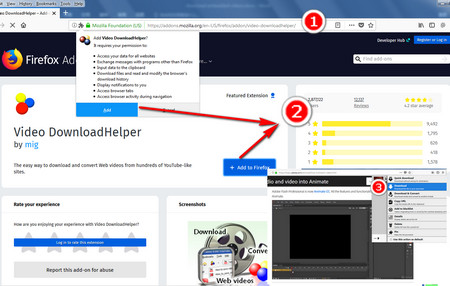
download embedded video firefoxdownload embedded video firefox

Browser extensions are another option for downloading embedded videos.

Some video downloader extensions can detect media resources on a webpage and give you a quick way to save them. Video DownloadHelper is a quick and good option for your video and audio download needs.

After installing the extension, simply open the page, play the video, and check whether the extension detects downloadable content.

This method is convenient, but the success rate depends heavily on the website and the way the video is delivered.


Related reading: How to Fix Video DownloadHelper Not Working

Method 5: Use an Online Video Downloader

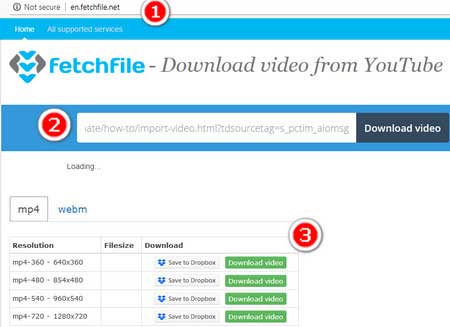
download embedded video onlinedownload embedded video online

If you don’t want to install either software or an extension, you can also try an online downloader (such as 9xbuddy, Keepvid, SaveFrom, etc.).

In most cases, you only need to:

1. Copy the video page URL

2. Paste it into the online downloader

3. Let it analyze the link

4. Choose a format or resolution

5. Start downloading


However, online downloaders are not always reliable for embedded videos, and yhey may fail to parse some pages.

Be careful of the online advertisements and pop-ups. The online downloading is usually limited by network connection speed, file size and other factors.

FAQs

Q1: Is it legal to download online embedded videos?

A: It depends on the content source and your local laws. Please make sure your download is for personal fair use only and that you have the right to save the content.


Q2: Can I download embedded videos from any website?

A: No. Some websites use encryption, segmented streaming, or other protections that make downloading difficult. In that case, one method may fail while another still works.


Q3: What is the easiest way to save videos from a webpage?

A: Using a dedicated downloader is usually the easiest method because it requires fewer manual steps and is more beginner-friendly.


Q4: Can I use the same method to download workout videos, recipe videos, or TED-style videos?

A: Yes. If the video page can be analyzed successfully, the downloading steps are basically the same.


Q5: Why can’t I download some embedded videos with online tools?

A: Because some videos are not exposed as direct files. They may be dynamically loaded, encrypted, or streamed in pieces.

Final Words

These are the 5 simple methods to download embedded videos from websites.

If you just need a quick try, direct saving, browser extensions, and online downloaders may help. But if you want a smoother and more reliable experience, using a dedicated video downloader is usually the best choice.

WonderFox HD Video Converter Factory Pro can help you download online videos with simple steps and convert them to the format you need afterward. If you prefer an easy, efficient, and beginner-friendly solution, it is worth trying.

Free Download Free Download

Rip DVD to AVI, MP4, MKV, MPG… Effortlessly!

WonderFox DVD Ripper Pro

WonderFox DVD Ripper Pro

Want to rip video from DVD for easy playback? WonderFox DVD Ripper Pro helps to fast convert any DVD, be it homemade or commercial, to popular audio/video formats and mobile devices (AVI, MP4, MKV, MP3, WAV, iPhone, Android, TV, laptop, etc.) with simple clicks. Get it to back up your DVD collections trouble-free!

Free download ripperpro Free download ripperpro

More Related Articles

How to Get 4K 60fps Video Downloaded from YouTube How to Download X/Twitter Videos on Any Device? How to Download Yandex Videos Fast & Free?
How to Download Bilibili Playlist Videos at Once How to Save Videos from xnxx.com Fast, Easily and Free How to Download Videos from TokyVideo?