Free Download
Best Free YouTube to MP3 Converter Program
AuthorRecommended by the author
Free Download X

SoftwareHow to & Tips

Video FormatsConvert Video

Resources

YouTube to MP3 Converter | How to Convert YouTube to MP3?

Author: Kevincy by Kevincy

Updated on Jul 8, 2026

Searching for YouTube to MP3 converters online can yield hundreds of results, but finding a safe, clean, and practical one is not always easy. This guide shows how to convert YouTube to MP3 on Windows, what to know about online tools and browser extensions, and how to transfer the converted songs to an MP3 player. Here is the editor’s pick for Windows users. Free, safe, and no watermark:

YouTube owns the largest video resource collection in the world, which makes it a good destination to browse videos to pass the time, learn skills, catch up on trends and so forth. While viewing videos online on YouTube is quite convenient under a good net connection, in many scenarios, people like to download favorite video clips from this site and only save the stunning and beautiful soundtracks, which drives the advent of a wide selection of YouTube to MP3 converters.

The real challenge is not only finding a really workable tool, but also choosing a clean, stable, and easy tool that can keep good audio quality without confusing ads or unwanted extras. This guide collects practical desktop, online, and browser-based options, then adds a simple section on how to put the converted MP3 music on an MP3 player.

Before converting any video from YouTube, make sure you have the right to download and use it. For example, use your own uploads, public-domain or royalty-free material, Creative Commons content that allows reuse, or videos for which you have permission from the copyright holder. DO NOT download copyrighted music or videos for commercial use, redistribution, or any other illegal purpose.

Part 1: How to Convert YouTube to MP3 with Desktop Program

For fast, high-quality YouTube-to-MP3 conversions without the distraction of ads or irrelevant plugins, we highly recommend WonderFox Free HD Video Converter Factory. It is a desktop YouTube downloader for Windows that features a user-friendly UI, stable performance, and simple workflow. Besides being a YouTube to MP3 converter, Free HD Video Converter Factory can convert downloaded media to common video and audio formats, download YouTube subtitles, and save YouTube playlists in one go. If the direct MP3 download option is not available for a certain link, you can download the available audio or video first and then convert it to MP3 in the built-in Converter module.

Free Download Free Download

Download YouTube to MP3 in Simple Steps

Before start, please free downloadfree download the software on your Windows PC.

Step 1. Open the YouTube to MP3 Converter

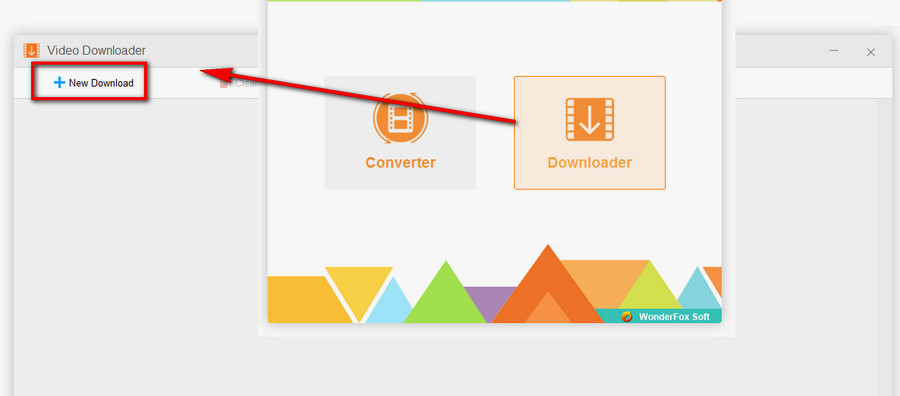
Run Free HD Video Converter Factory, go to “Downloader”, then hit “+ New Download”.

Open the YouTube MP3 Downloader

Step 2. Download YouTube Video

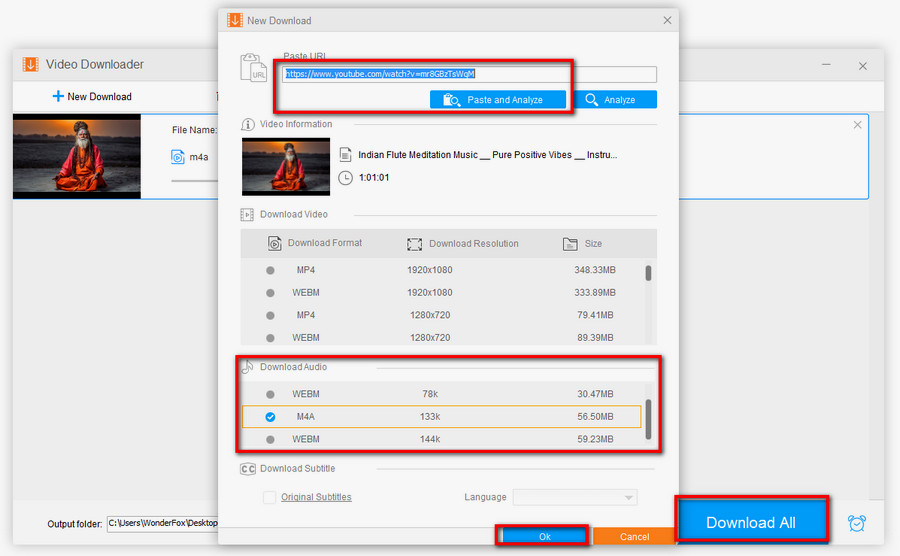
Visit YouTube.com and open the video you want to convert. Copy its URL and paste it into the program. Click “Analyze”, choose "MP3" from the “Download Audio” section if it is available, and click “OK” to add it to the download task. Finally, click “Download All”.

Download YouTube Video

Step 3. Convert YouTube Video to MP3

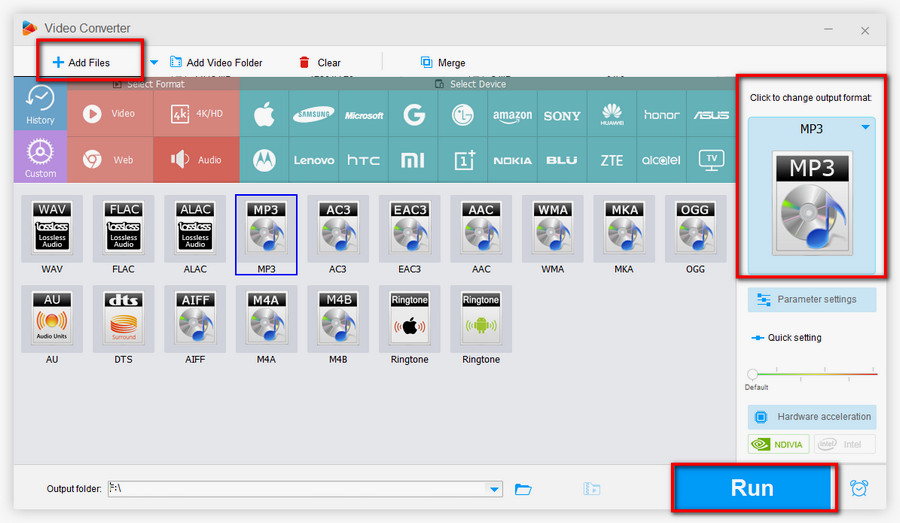
If the MP3 option is unavailable, download the audio or video in another available format, such as MP4, WEBM, or M4A. After downloading, open “Converter” and click “Add Files” to import the downloaded YouTube media. Hit the big format icon on the right side, go to the “Audio” tab, and choose “MP3”. Next, click “Run” to finalize and save the YouTube MP3 file.

Convert YouTube into MP3

Part 2: How to Put YouTube MP3 Music on an MP3 Player

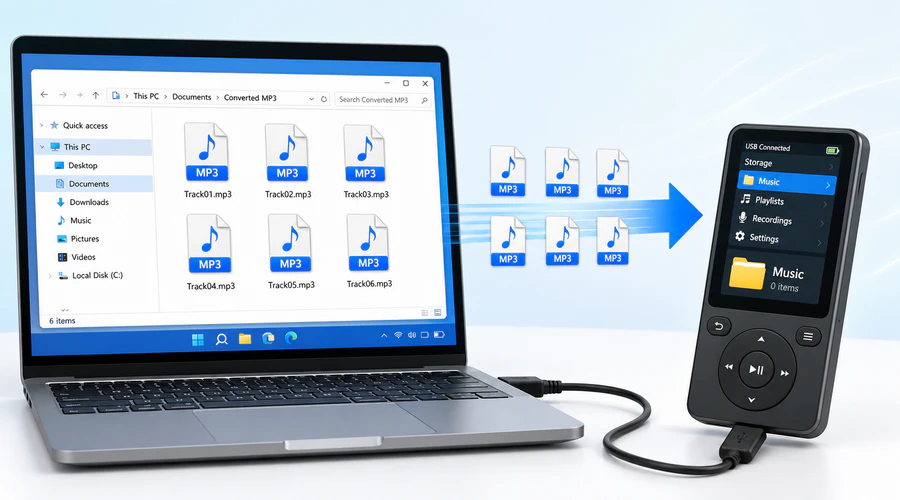
After the YouTube audio has been saved as MP3, the next step is simple: transfer the file to your MP3 player. Most MP3 players work like a USB storage device, so you can copy the converted songs directly. Some models may also support a microSD card. Before transferring, make sure the file name is clear, the audio can play normally on your computer, and the MP3 player supports the MP3 format.

Step 1. Connect the MP3 Player to Your Computer

Use a USB cable to connect the MP3 player to your Windows PC. If a prompt appears on the player, choose a mode such as “File Transfer”, “USB Storage”, or “MTP”. Then open “This PC” and find the device or removable drive.

Step 2. Copy the Converted MP3 Files

Open the folder where Free HD Video Converter Factory saved the converted MP3 files. Select the songs you want to move, copy them, and paste them into the “Music” folder or another audio folder on the MP3 player. If your player uses a microSD card, you can also copy the files to the card and then insert it into the player.

Step 3. Safely Eject and Play the Music

After the transfer finishes, safely eject the MP3 player from Windows. Turn on the player and refresh its music library if needed. If the song does not show up, check whether it is saved in the correct folder, whether the file extension is “.mp3”, and whether the player supports the file’s bitrate or sample rate.

Transfer YouTube MP3 Music to MP3 Player

Part 3: How to Download MP3 from YouTube on Online Converters

Online video converters can be useful when you only need to save one short audio file and do not want to install software. However, online tools change often. Some pages may show misleading download buttons, pop-up ads, bundled extensions, or scripts. For safety, avoid sites that ask you to install extra software, disable browser protection, or grant unnecessary permissions. Here's some sample sites for your reference.

1. ytmp3.cc (now convertytmp3.org)

YTMP3 is a clean and uncluttered website on which you will not be bothered by any ads. And the operation interface is self-explanatory. Enter a YouTube video URL, choose MP3 or MP4 according to your needs, click “Converter”, and download the converted file. YTMP3 stands out for its simple and clean steps, yet there still are some shortcomings. It doesn’t support converting a video longer than one hour in consideration of conversion speed.

Related Post: Simple Ways to Convert YouTube to MP3 Longer than 2 Hours

2. y2mate.gs

Y2mate is a multiple-purpose video converter not only for YouTube, but also supporting Facebook, Video, Dailymotion, Youku, etc. You can either enter the title or the URL of a video to the site for conversion. And it will display more than one download option for your selection. Meanwhile, you can insert “PP” after “YouTube” in the video web address to convert YouTube videos more handily.

3. keepvid.online

KeepVid is a dedicated YouTube to MP3 online converter. It offers an exceptionally simple and fast way to download YouTube video to MP3: Enter a URL, analyze the URL, convert the YouTube video, and download the MP3 file. But the ad page pops up now and then. You need to close it manually.


Part 4: What to Know About YouTube to MP3 Extensions

Browser extensions can be convenient, but they are usually the least stable choice for YouTube to MP3. Many official browser stores restrict YouTube downloading features, so extensions may disappear, lose features, require a companion app, or stop working after browser or YouTube updates. Use this method only when you trust the developer and understand the permissions it asks for.

1. Addoncrop YouTube Downloader for Chrome

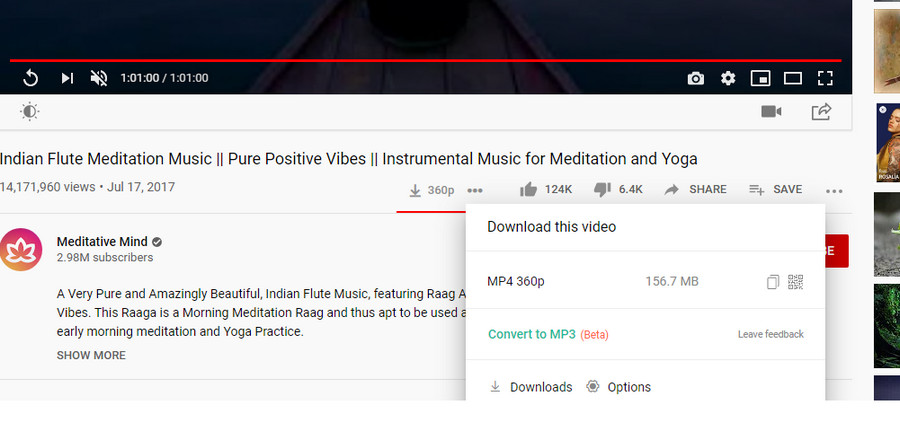
The official extensions in the Chrome web store all don’t support YouTube video download due to terms of service restrictions. So users turn to third-party Chrome video downloader and among similar options, Addoncrop YouTube Downloader is popular with the crowd for its functionality and efficiency. It supports up to 1080p resolution and can convert YouTube videos to MP3 and other common file formats. After installing it on your browser, there will be a download button under the video you’re playing. Hit the button and select the desired MP3 format for downloading.

Convert YouTube to MP3 Online via Addoncrop YouTube Downloader


2. Video DownloadHelper for Firefox

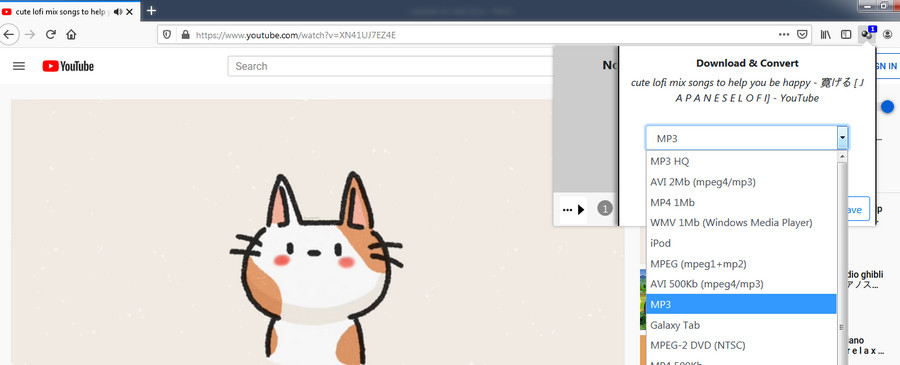
It goes without saying that Video DownloadHelper is the best file download extension for Firefox that can help users easily save any video embedded on a web page. But its conversion feature isn’t free, which requires a DownloadHelper/ConvertHelper license costing $16. You can decide whether it is worthy based on your actual needs.

Related post: How to Fix Video DownloadHelper Not Working.

How to Convert a YouTube Video to MP3 via Video DownloadHelper

In Summary

We have gone through practical online and offline ways to convert YouTube to MP3, and also covered how to transfer the converted music to an MP3 player. If you only need to convert a short clip once, an online tool may be enough, provided that you avoid suspicious ads and respect copyright rules. For longer videos, playlists, repeated downloads, or a cleaner Windows workflow, a desktop program like WonderFox Free HD Video Converter Factory is more reliable.

Free Download Free Download


Kevincy

Kevincy Berel

Kevincy joined the WonderFox team in 2014 and has been a senior columnist ever since. With over two decades of experience in the video editing industry, he shares tutorials, tips, and how-to guides on video/audio processing and personal DVD backups. Family-oriented and passionate about helping others, he is dedicated to making video and audio processing easier for readers.

Email

Download Unlimited Videos and Unblock More Conversion Features

HD Video Converter

WonderFox HD Video Converter Factory Pro

This program enables you to download videos from 1000+ websites without the free-version file amount limit. Besides, it supports batch conversion, GPU acceleration, and a line of additional tools, including screen recorder, GIF maker, video editor, split-screen maker, ringtone maker, and more. Get the overall video processing suite!

Free Download HD Video Converter Factory Pro Free Download HD Video Converter Factory Pro

More Related Articles

The Best Solution to Solve YouTube to MP3 not Working Problem with Ease How to Resolve the Windows 10 YouTube Not Working Problem Easily
YouTube to USB Converter - How to Convert YouTube to USB Rapidly How to Download YouTube Video with IDM and IDM YouTube Downloader Alternative