
Looking for a way to convert DVDs or Blu-ray discs to MKV or other common digital formats for seamless playback across devices? In this article, you’ll get 6 popular DVD conversion tools and learn how to rip a DVD to MKV with quality and efficiency on Windows and Mac.
Convert DVD to MKV & 600+ Presets on Windows
WonderFox DVD Ripper Pro

Ripping movies off from DVDs or Blu-ray discs is a great way to back up your physical collections and prevent content loss due to improper storage or accidental damage. More importantly, it allows you to enjoy digital copies on various devices without needing a disc drive. To preserve the movie quality, subtitles, and chapters, you can convert the DVD Movies to MKV format.
In this guide, we’ll share 6 hand-picked DVD conversion tools and detail how to convert DVD to MKV on Windows and Mac. Both free and paid programs are included. For those requiring advanced options to customize output settings beyond just the format, we’ve got you covered as well! Read on to find the tool that best suits your needs.
Programs |
Supported OS |
Feature Highlight |
Tutorial |
|---|---|---|---|
WonderFox DVD Ripper Pro |
Windows |
Rip DVD with various encryption to MKV and other 600 presets |
|
WonderFox DVD Video Converter |
Windows |
Convert MKV from DVDs, videos, and online URLs |
|
MakeMKV |
Windows, Mac, Linux |
Rip DVD and Blu-ray to MKV with large sizes for free |
|
HandBrake |
Windows, Mac |
Rip DVD and videos to MKV with custom settings |
|
VLC Media Player |
Windows, Mac, Linux |
Play and convert DVDs to digital MKV |
|
FFmpeg |
Windows, Mac, Linux |
Customize DVD-to-MKV conversion with various FFmpeg options |
WonderFox DVD Ripper Pro is known for its enhanced decryption capability. You can use it to rip DVDs with region code, CSS, CPRM, Multi-angle, RCE, Sony ARccOS, UOP, Disney X-Project DRM, Cinavia Protection, and all sorts of DVD copy protections. Besides, the ripper allows you to convert not only disc but also VIDEO_TS folder and ISO image to MKV, MP4, etc. 600 optimized formats and device presets are available ensuring a quick and worry-free conversion.
Download and install this powerful DVD decryption software. Then follow the steps below to rip a DVD to MKV without losing quality:
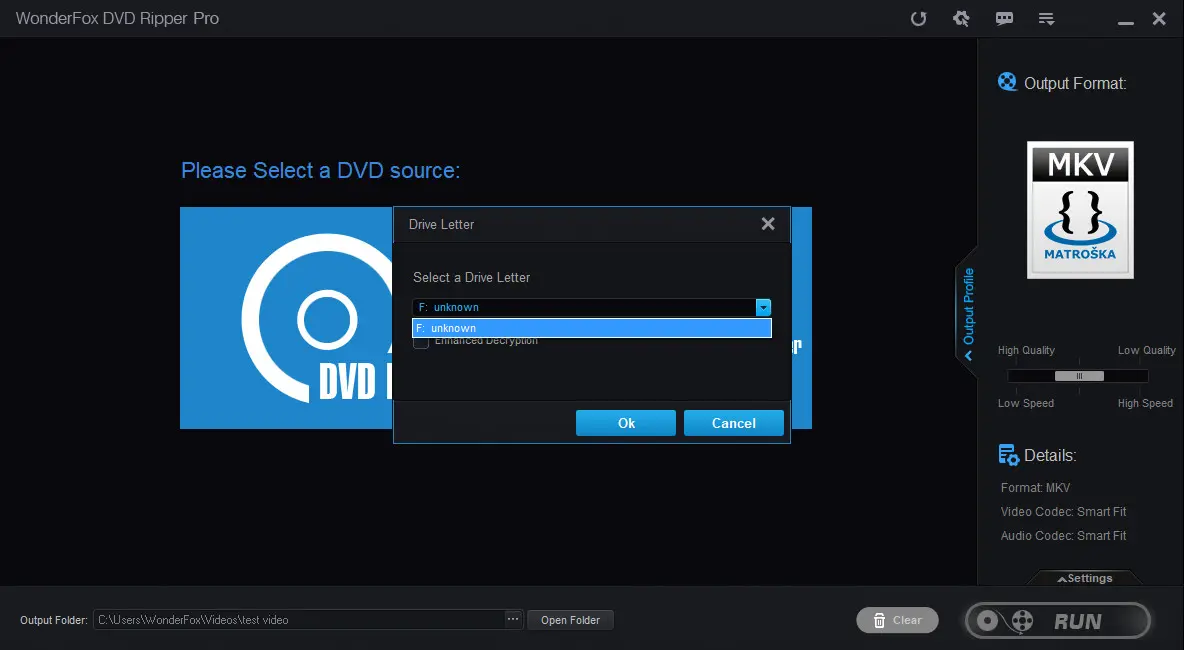
Step 1. Insert your DVD disc into your computer’s DVD drive. Then launch the program and click ‘DVD Disc’ to load the movie source. The program will auto-select the main movie/titles after loading.
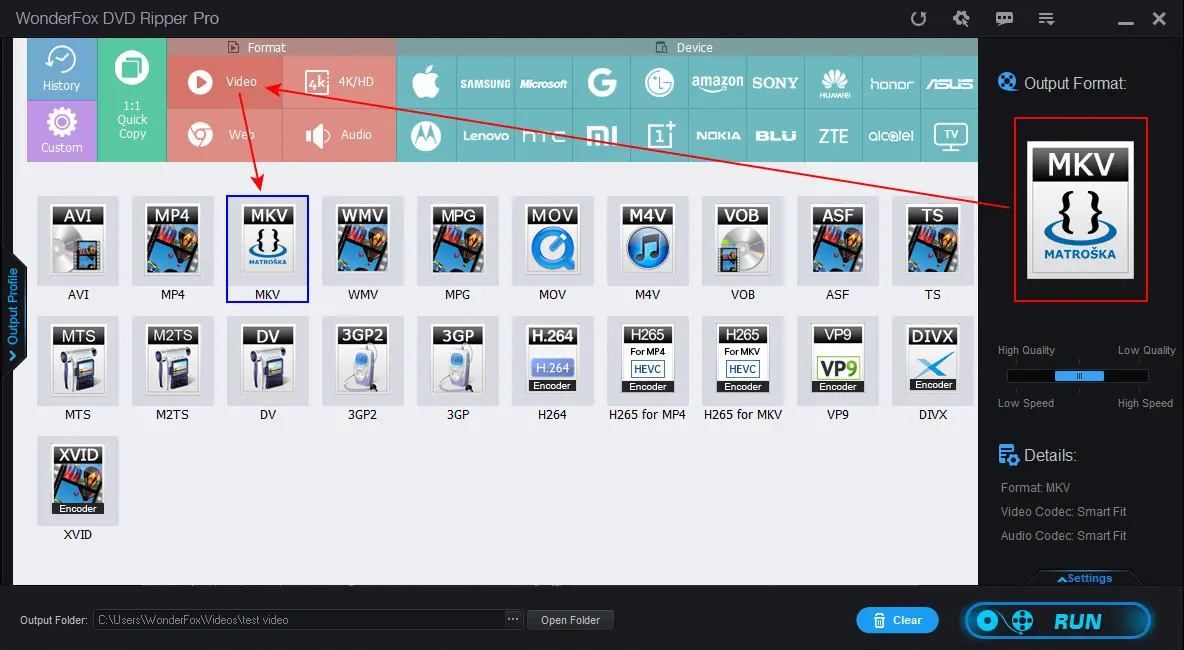
Step 2. Then click on the right-side format image to open the full list of 600+ output profiles. Enter the ‘Video’ category and click on the ‘MKV’ format image.
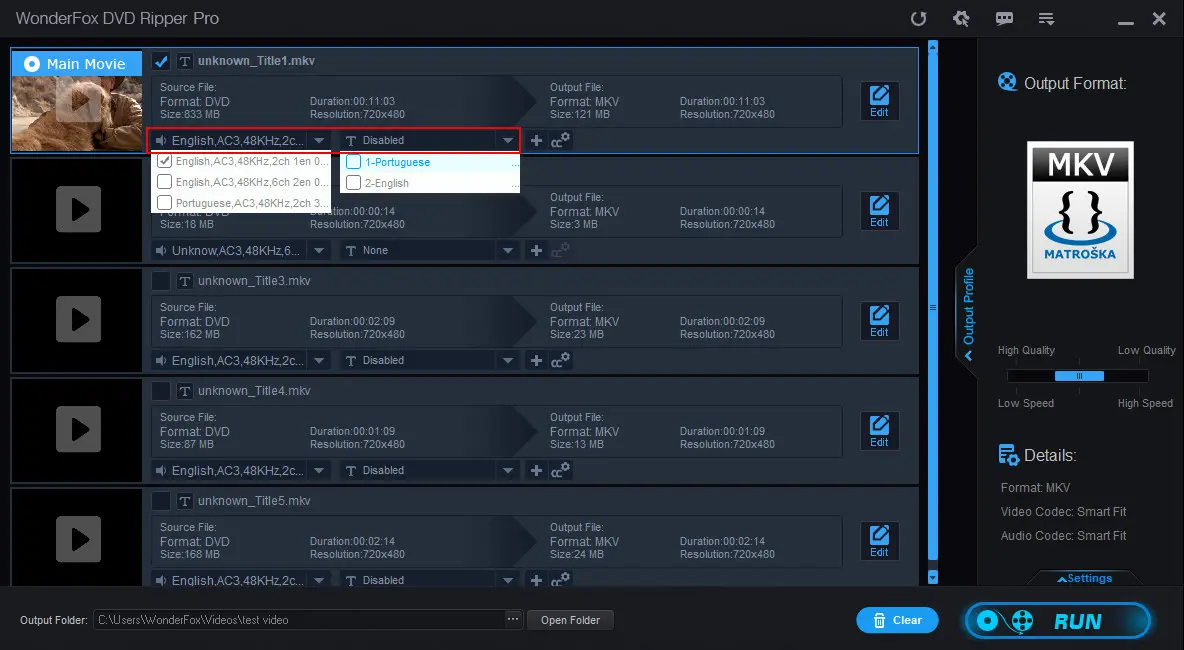
Step 3. If you’re ripping a TV series DVD or a 99-title Disney DVD and want to keep the whole content, hit the speaker icon and T-shaped icon below to keep all subtitles and audio tracks. Click the checkbox next to the filename to save all titles or episodes.
Step 4. For users with specific needs of the output parameters, such as ripping DVD to MKV with H.265 codec, you can adjust them to your preferences at the right-corner ‘Settings’ section. You can change the encoder, resolution, frame rate, bitrate, deinterlace, and more.
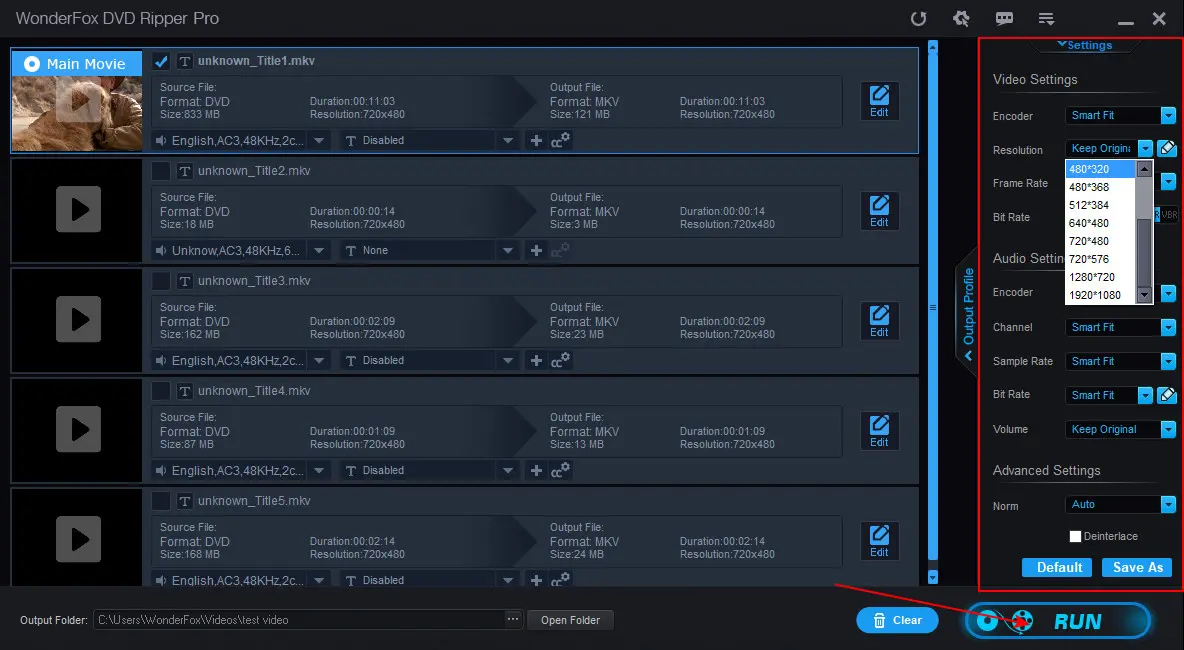
Step 5. When everything is ready, click the three dots to set a file destination and hit ‘RUN’ to start the conversion process at once.
WonderFox DVD Video Converter provides you with a more comprehensive solution to process multimedia files. It allows you to get quality MKV videos from DVD (incl. disc, folder, and ISO), videos, and also online URLs. It can handle both personal and commercial DVDs. Apart from MKV, it also comes with mainstream formats like MP4, MOV, AVI, WMV, MP3, etc., and devices such as phones, TV, consoles, and more!
The conversion process is very simple. Download, install, and launch the functional program to get started with our instructions now:
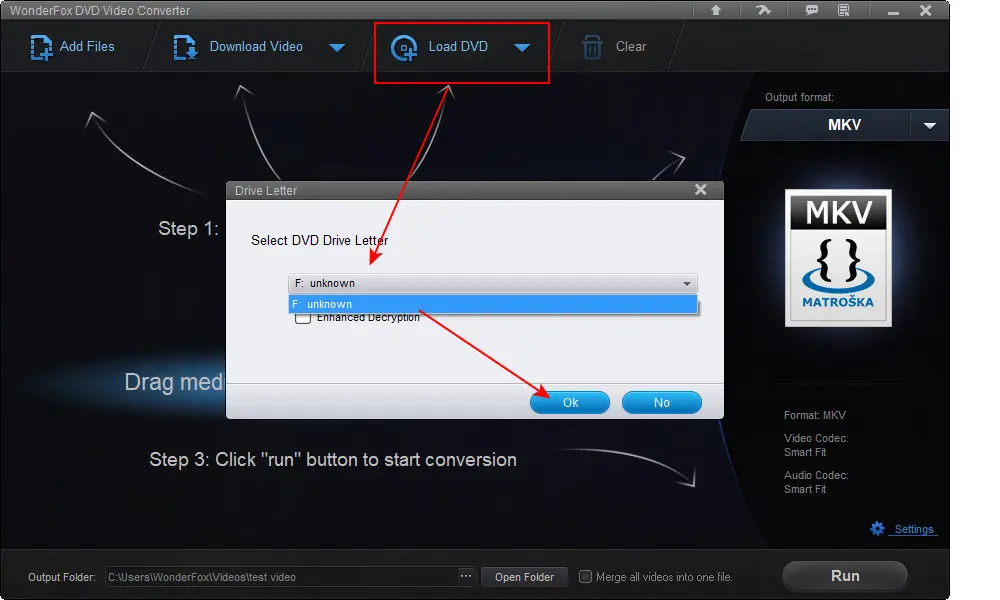
Step 1. Insert your disc into the DVD driver and then click on the top ‘Load DVD’ to select the DVD you just inserted. Hit ‘OK’ and the software will start loading all content and mark the main movies intelligently.
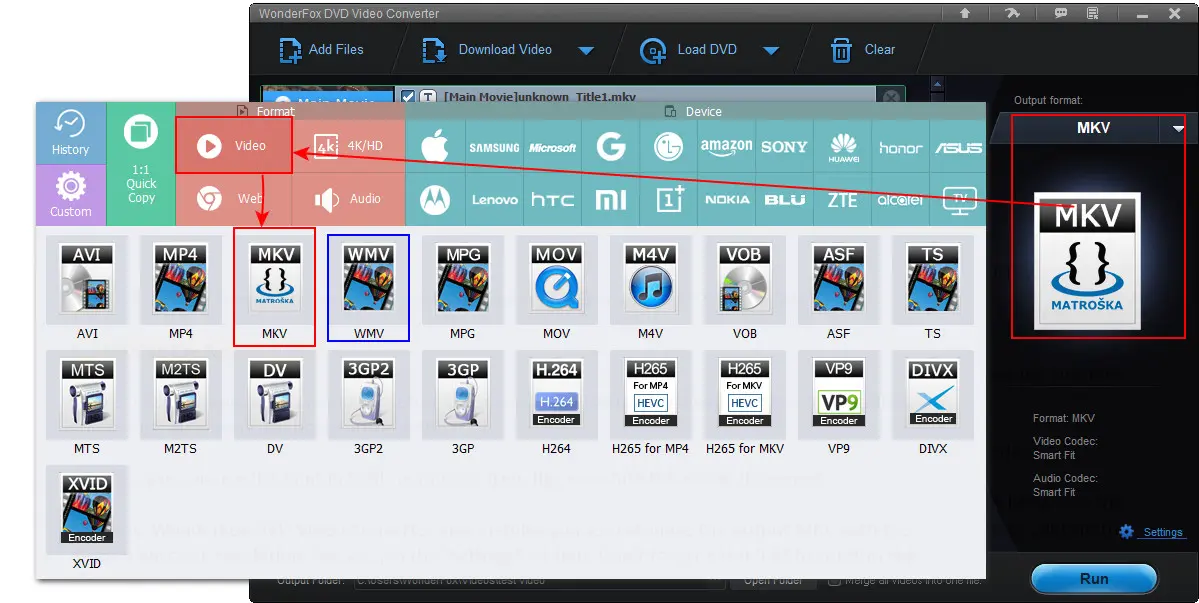
Step 2. Enter the format library on the right side of the program and click ‘Video’ > ‘MKV’.
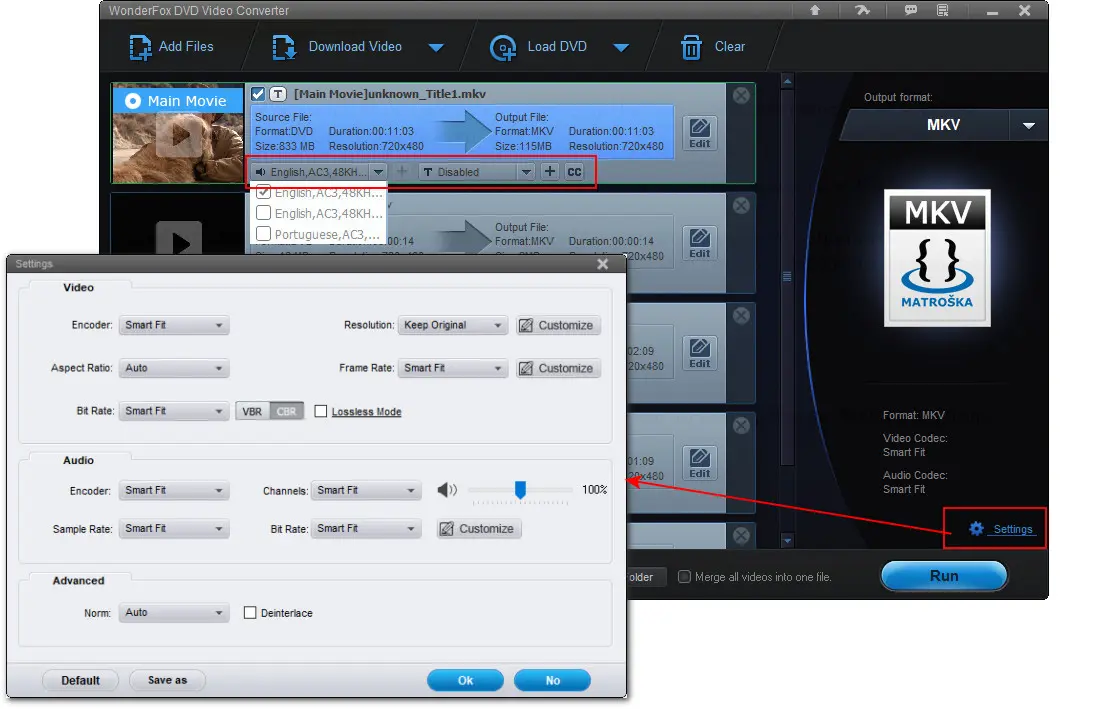
Step 3. Click the speaker icon and the letter T icon to rip the DVD to MKV with the needed subtitles and tracks. Also, you can choose to keep them all.
Besides, you can use the built-in ‘Edit’ feature to trim, flip, or rotate the movie if needed.
Similarly, WonderFox DVD Video Converter also enables you to customize the output MKV with the desired encoder, resolution, fps, etc., in the ‘Settings’ section. Don’t forget to hit ‘Ok’ to confirm the changes.
Step 4. Finally, click ‘…’ to specify an output folder and hit ‘Run’ to start ripping the MKV videos from the disc immediately.
MakeMKV is a great option when it comes to turning Blu-ray discs, DVDs, and ISO files into high-quality MKV files with audio, video, subtitle tracks, chapters, and meta info preserved. It can bypass and remove protections like AACS and BD+ for Blu-rays. Additionally, this dedicated DVD to MKV converter allows you to instantly stream decrypted files to various players. Best of all, MakvMKV offers a free 30-day trial with full functions.
Now, let’s see how to rip a DVD or Blu-ray disc to MKV files in MakeMKV:
(Note: If the 30-day trial has expired, you need to buy its lifetime license for $50 or get a beta key for free use.)
Step 1. Download MakeMKV from https://www.makemkv.com/download/ and follow its on-screen instructions to install it.
Step 2. Then insert your source disc into the computer's optical drive or the external DVD drive.
Step 3. Launch MakeMKV. It will start to auto-detect your disc. You can check the disc information in the ‘Info’ box.
Step 4. Click the big disc icon to bypass the copy protection and scan the whole content.
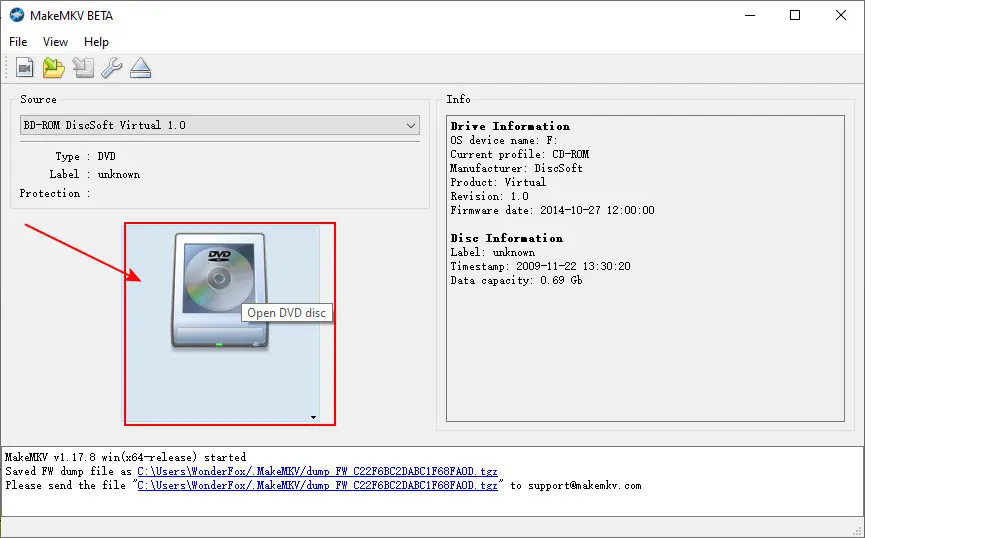
Step 5. After scanning, it will display all titles and you can select the desired titles or chapters to convert. If you just want to keep the main movies, it won’t go wrong with the one with the largest size.
Step 6. If your DVD movie has multiple audio tracks and subtitles, double-click the downward arrow icon of the ‘Title’ to expand all items. Then, you can determine which one you want to save.
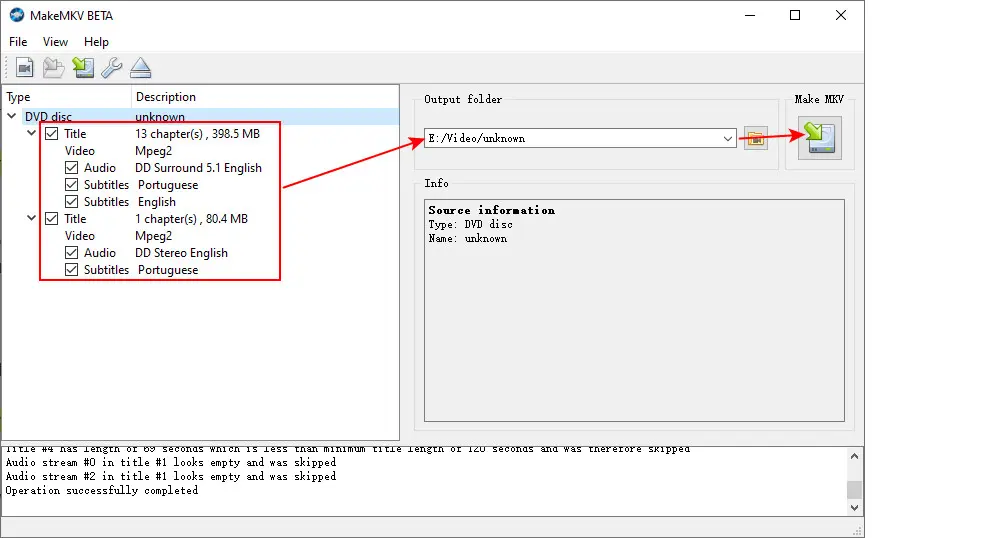
Step 7. When you’re done with all selections, set a file folder to save the exported MKV videos. Make sure there is enough space for storage because the MKV file will be quite large.
Step 8. Finally, click ‘Make MKV’ to activate the process.
Step 9. When the conversion process finishes, you can see a dialog prompting ‘Copy complete’. Check the exported MKV movie file in the folder you assigned earlier.
HandBrake is now widely regarded as a powerful open-source video transcoder, but you might not know that it was initially focused on DVD ripping for creating digital backups. It still empowers you to rip DVDs and Blu-ray Discs to format MKV, MP4, or WebM. However, HandBrake can only transcode non-encrypted discs, and even with the help of libdvdcss, can handle certain DVDs protected by CSS.
Follow our instructions to see how to quickly transcode DVD (copy-free) to MKV using HandBrake on PC:
Step 1. Download HandBrake from here: https://handbrake.fr/downloads.php, then install and start it on your computer.
Step 2. Insert your disc into the drive. You’ll see the inserted DVD Drive on the sidebar of its startup window. Click on it.
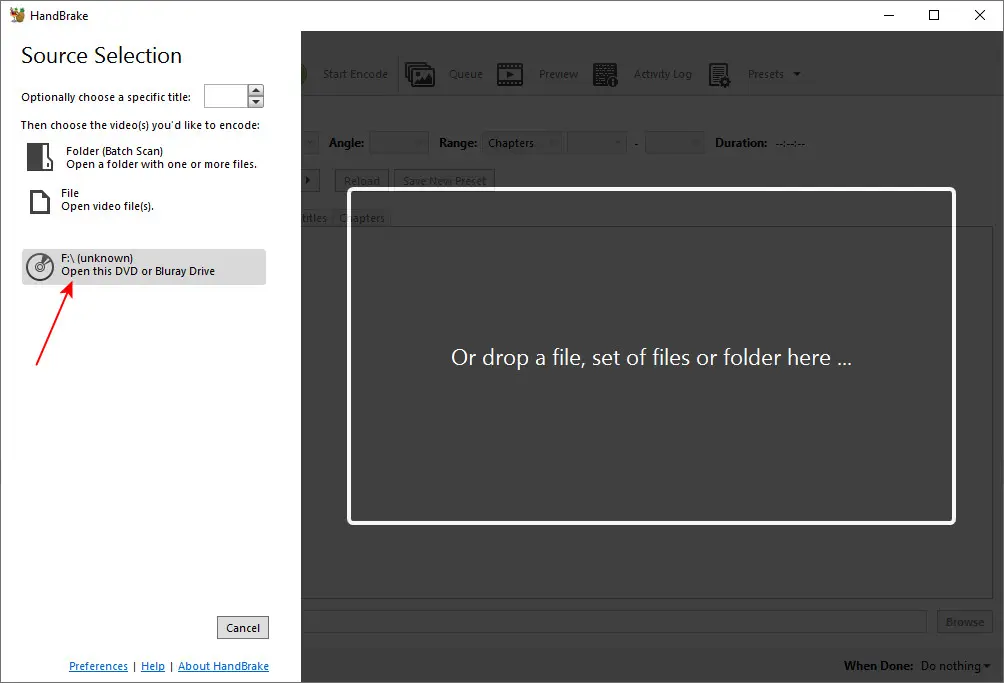
Step 3. Handbrake will scan all content and auto-mark the main movies. You can also choose to select the desired ones from the ‘Title’ drop-down menu.
Step 4. After that, you can either choose an output profile from its built-in ‘Presets’ or customize the format and settings to your needs. Head to ‘Summary’ > ‘MKV’. Switch to other tabs to adjust the encoder, resolution, bitrate, frame rate, subtitles, and more.
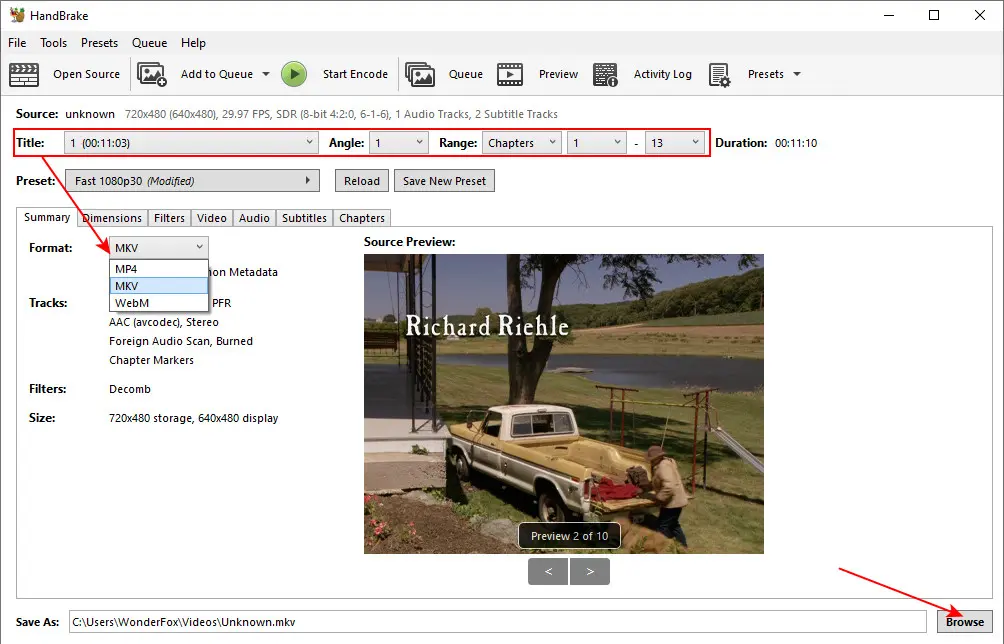
Step 5. Finally, click ‘Browse’ to set a file destination and hit the green ‘Start Encode’ button to start the conversion at once.
VLC is more than a media player. It can also serve as a handy DVD ripper, converting DVDs or Blu-ray to digital MP4, MKV, and other mainstream videos. You can see a range of adjustable settings in this VLC DVD ripper too. However, the ripping workflow is not as intuitive as other dedicated ripping tools.
To help, we offer the detailed steps to rip a DVD and save it to MKV using VLC:
Step 1. Download, install, and open VLC on your computer.
Step 2. Click ‘Media’ > ‘Convert/Save’.
Step 3. Go to ‘Disc’ and select ‘DVD’. Click ‘Browse’ to add your DVD source to VLC.
Step 4. Select the needed titles, audio, and subtitle tracks. Then click ‘Convert/Save’.
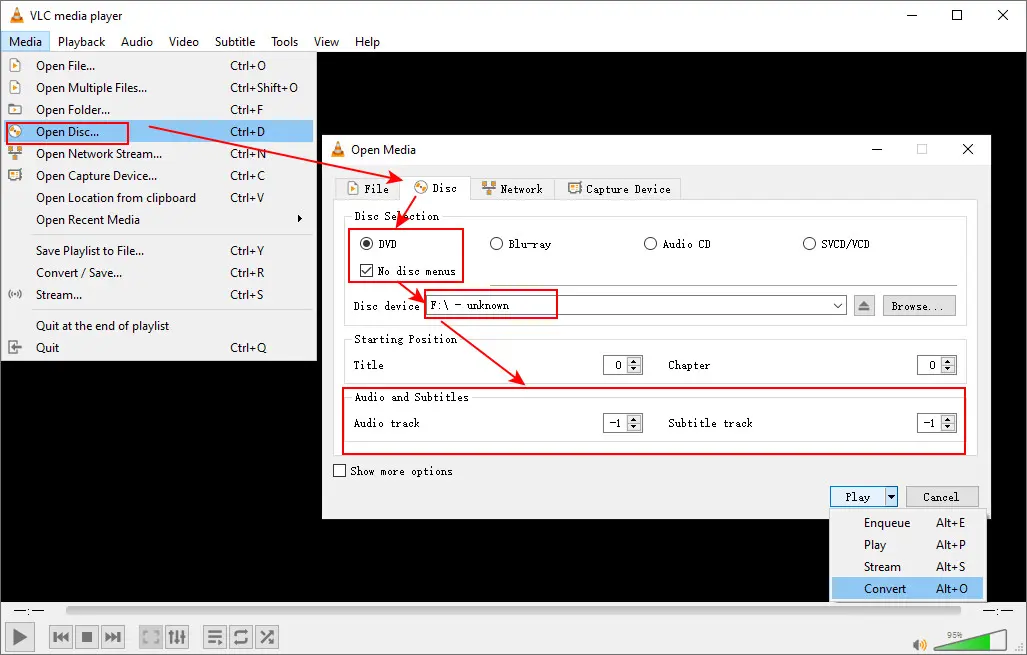
Step 5. VLC doesn’t have an ‘MKV’ preset by default. You need to create one. Click ‘Create a new profile’ and select ‘MKV’ in the ‘Encapsulation’. Then go to the ‘Video codec’, ‘Audio codec’, and ‘Subtitles’ to set parameters based on your actual needs. Once done, create a name for this profile such as Video–H.264 + AAC (MKV), and then hit ‘Create’ to save it. Set it as the export format.
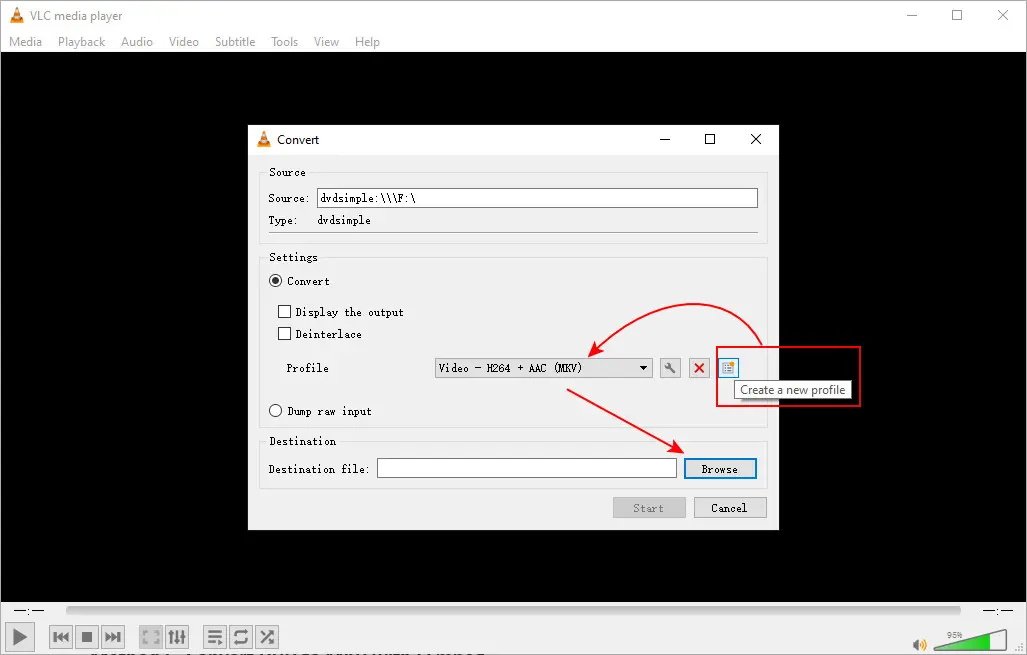
Step 6. Click the ‘Browse’ button to set an output destination.
Step 7. Press the ‘Start’ button to make VLC start the conversion. Check the conversion progress via the playback bar.
FFmpeg is a leading open-source solution to decode, encode, and edit video and audio data in almost any format, including the DVD format. So, can FFmpeg convert DVD to MKV? Yes, but it only supports unencrypted DVDs. The process can be daunting for beginners, as FFmpeg is a command-line tool, meaning all operations require commands.
But don’t worry! We’ll show you the steps and commands below. We run the conversion on a Windows 10 PC. Here are the steps:
Step 1. Free download and install FFmpeg from here: https://ffmpeg.org/download.html
Step 2. Type ‘cmd’ in the search bar right next to your ‘Start’ menu and open the Command Prompt.
Step 3. To set the environment path variable for ffmpeg, execute this command and press ‘Enter’:
Step 4. Now, insert your DVD into the computer’s disc drive and open its VIDEO_TS folder.
setx /m PATH "C:\ffmpeg\bin;%PATH%"
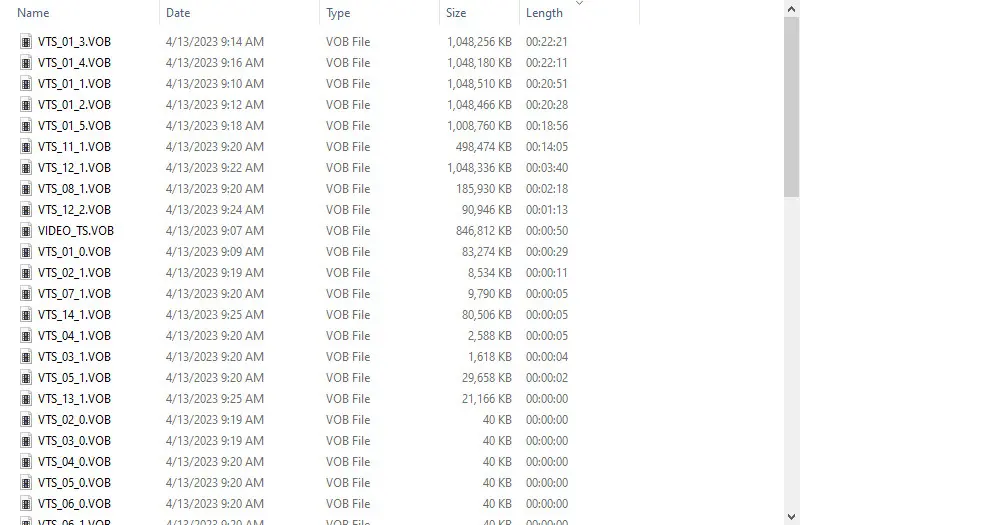
Step 5. Inside the folder, find the files with the .VOB extension. These VOB files store the actual video and audio data of the DVD. By changing the order of these files by length, you can easily locate the main titles as shown in the screenshot below:
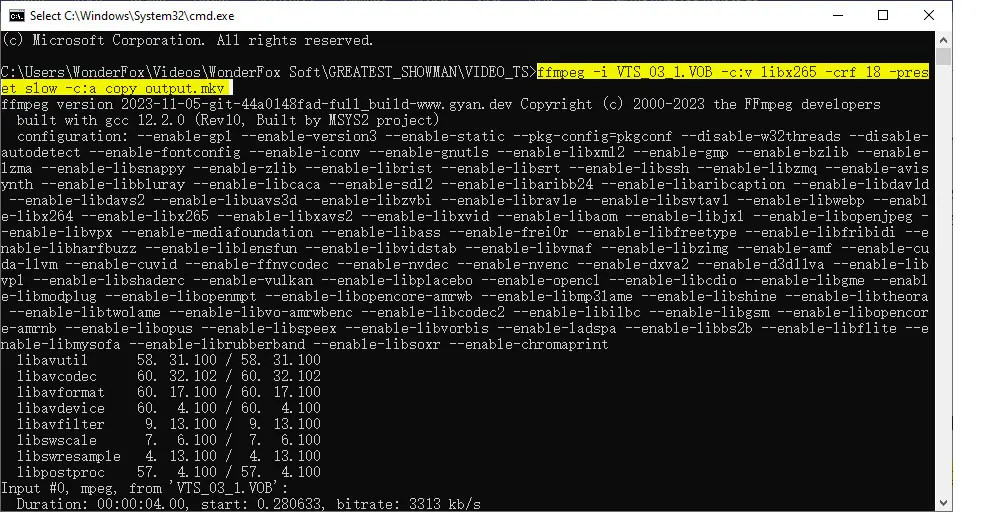
Step 6. Select the target VOB file you want to convert, such as the VTS_01_1.VOB. Then type ‘cmd’ in the file path and run a command like this:
ffmpeg -i VTS_01_1.VOB -c:v libx265 -crf 18 -preset slow -c:a copy output.mkv
or
ffmpeg -i VTS_01_1.VOB -c:v libx264 -crf 18 -preset slow -c:a aac -b:a 192k output.mkv
Press ‘Enter’ to start the conversion. You can find the exported MKV video in the same folder that stores the source VOB files.
Well, that’s all about how to convert DVD to MKV using 7 great tools. You may have noticed that few open-source or free applications can deal with encrypted DVDs. HandBrake, VLC Media Player, and FFmpeg are more suitable for processing copy-free discs like homemade DVDs. HandBrake may support certain CSS-protected DVD with additional help. However, for commercial DVDs that employ the latest or more complicated copy protection schemes from Disney, Lionsgate, etc., it is highly recommended to use paid ripping software.
Among the tools mentioned above, WonderFox DVD Ripper Pro stands out due to its excellent decryption mechanism. Moreover, it regularly updates to ensure compatibility with the newest DVDs. Additionally, this DVD decryption and ripping software offers 600+ output format options, making your outputs supported by various devices or social platforms. It’s worth the price!

Disclaimer: WonderFox does not advocate ripping copy-protected DVDs for any commercial purpose and suggests referring to the DVD copyright laws in your country or area before doing so.
We also collect some user frequently asked questions about the DVD-to-MKV conversion tools and process and provide the answers.
The overall easiest way to convert DVD to MKV 1080p is by using WonderFox DVD Ripper Pro:
To convert DVD to MKV videos for free, you can use HandBrake, VLC, FFmpeg, or the MakeMKV beta version. However, they are limited to copy-free DVDs.
If you want to rip copy-protected DVDs, you'll typically need tools with capabilities to bypass the encryption, such as WonderFox DVD Ripper Pro and WonderFox DVD Video Converter.
Use MakeMKV, VLC, HandBrake, or FFmpeg for handling DVD and Blu-ray files. These tools work well with DRM-free DVDs and Blu-rays.
No. While MKV is a widely accepted format nowadays, it is not natively supported by most standalone DVD players. Traditional DVD players are primarily designed to play physical DVD discs, which use the MPEG-2 video codec and .VOB container format.
WonderFox DVD Ripper Pro
 Download for FreeDownload for Free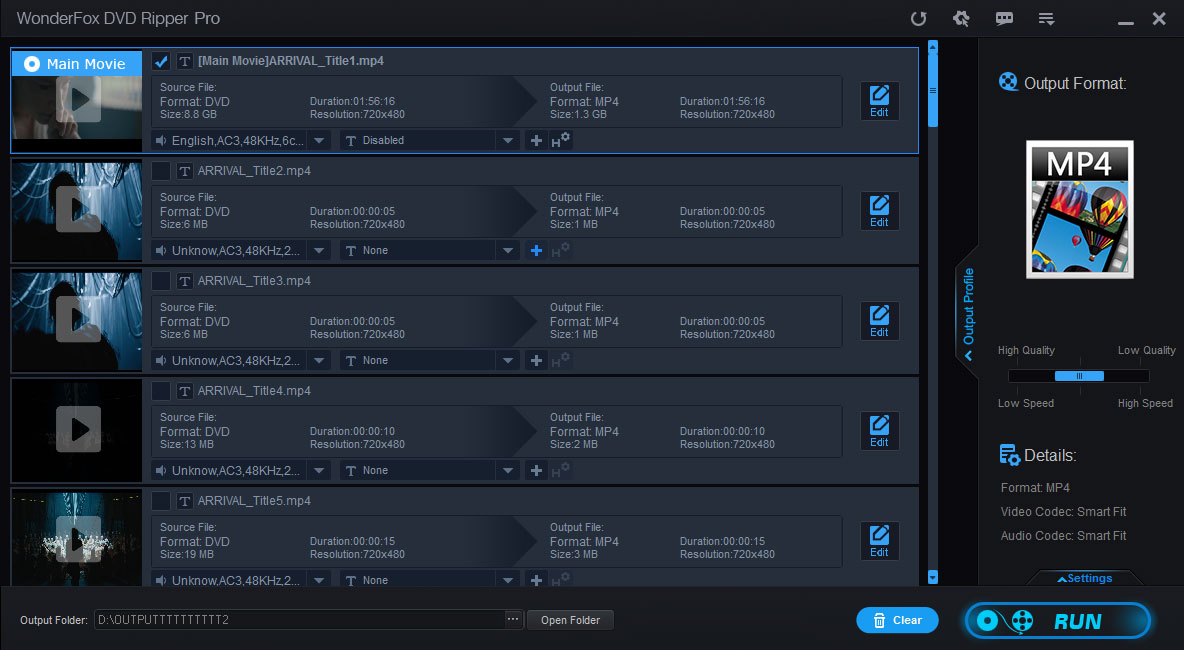



Terms and Conditions | Privacy Policy | License Agreement | Copyright © 2009-2026 WonderFox Soft, Inc. All Rights Reserved.



 Download for Free
