


Many DVDs have beautiful soundtracks like background music, classic dialogues, and you may want to extract the soundtracks from these DVDs to your portable devices for repeated listening. For this case, ripping DVD to AAC format (an audio format with a small file size and high audio quality) can help you easily enjoy the DVD audio on any devices. In the following content, I will use a powerful DVD ripper to demonstrate how to convert DVD to AAC. Download this DVD ripper and follow the tutorial: https://www.videoconverterfactory.com/download/dvd-ripper.exe https://www.videoconverterfactory.com/download/dvd-ripper.exe
WonderFox DVD Ripper Pro is a functional DVD ripper that can easily rip DVDs to AAC and other digital video and audio formats to satisfy your various needs for DVD format conversion. This ripping program is so convenient that it only needs several simple clicks to convert DVD to AAC. Besides, you can trim the video before starting conversion to keep your wanted parts of audio. Some DVDs have many language soundtracks and you can customize the audio track for your different demands. So download download this DVD ripper and start converting DVD to AAC or other formats as you need.
WonderFox DVD Ripper Pro is the best DVD audio ripper that can help you convert DVDs to AAC audio and other digital formats like FLAC, MP3, etc. for a better listening experience. Get it now and let it help you with your DVD conversion!
 Download for Free
Download for Free
Download for Free
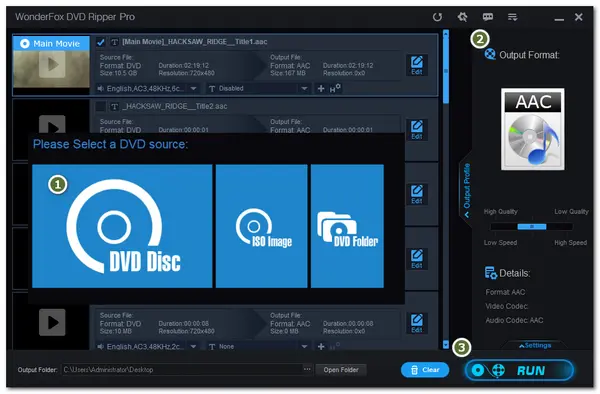
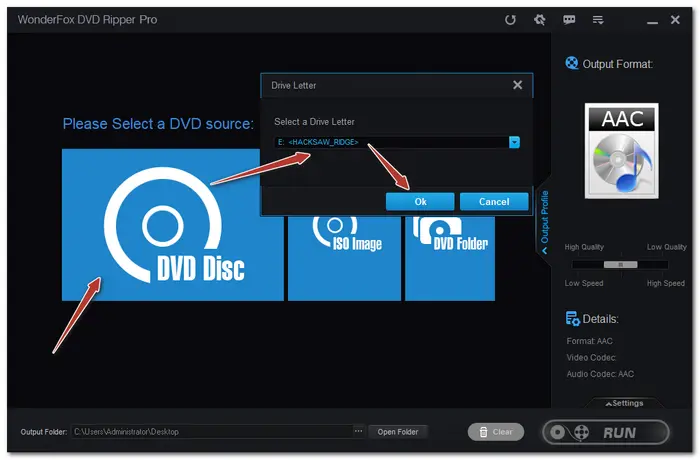
InstallInstall the program first and launch it on your PC, then select a DVD source (DVD disc, ISO image, and DVD folder). If it is a DVD disc, please insert the disc into your PC’s DVD drive. Click OK to load your DVD source into the program.
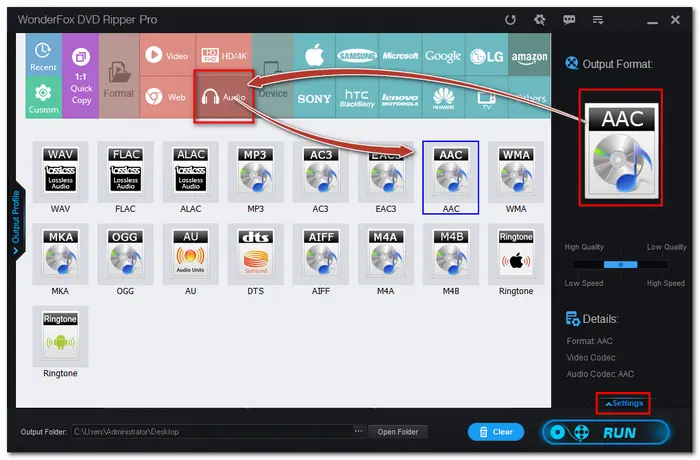
Click the format image on the right side of the interface to open the output format list. Then go to the Audio section and choose AAC as the output format. You can choose other formats as you like. Press the Settings in the lower right corner, you can customize audio volume and other parameters.
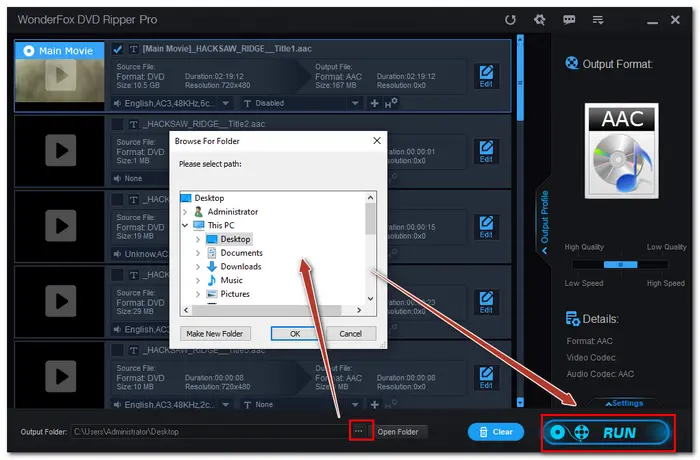
After all the settings are OK, hit the three-doted button at the bottom of the interface to select the output folder. And then press the big Run button to convert DVD to AAC immediately.
 Download for Free
Download for Free
Download for Free
That’s the whole process of how to convert DVD to AAC I want to share with you. Besides converting DVD audio to AAC, you can also rip DVD to other popular formats or create a 1:1 ISO image with this smart DVD ripper. I hope this post can be helpful to you. Thanks for your reading.
WonderFox does not approve of any illegal DVD copying and distribution behavior. The information contained in this article is all for general informational purposes and private use only. Please refer to your country's DVD copyright laws before copying DVDs.

Terms and Conditions | Privacy Policy | License Agreement | Copyright © 2009-2024 WonderFox Soft, Inc.All Rights Reserved


 Buy Now
 Buy Now