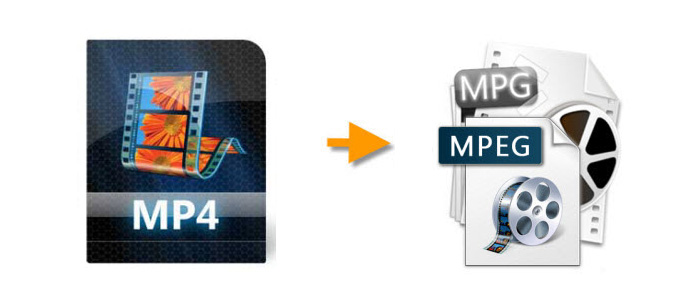
MP4 is one of the most widely used video formats today. It works well on phones, computers, websites, media players, and most modern devices. But there are still times when you may need to convert MP4 to MPEG or MPG.
For example, you may want to prepare a video for DVD burning, create a VCD-compatible file, play videos on an older TV or DVD player, or make certain video files easier to recognize by legacy software. In these cases, MPEG/MPG is still useful.
The same situation also happens with other video formats. AVI, MOV, WMV, M4V, WebM, and MPEG-4 videos may not always work smoothly on older devices or DVD-related programs. Instead of using a separate converter for each format, you can convert them all to MPEG/MPG with one simple tool.
Before starting the conversion, it helps to understand a few terms that are often mixed together. If you are already familiar with MP4 and MPEG, you can just skip to tutorial to learn how to convert MP4 to MPEG on Windows with the best MPEG video converter.

As we know, audio and video need the customizable multimedia data compression technology. Moving Pictures Experts Group, namely MPEG or MPG, is the major standard of video image compression. It contains 3 video encoder, MPEG-1, MPEG-2, and MPEG-4 for video. There’s no MPEG-3, but MPEG Audio Layer 3. MP4 and MPG both adopt MPEG as its encoder. Commonly, MPEG-1 and MPEG-2 encoder are used in MPG format; MPEG-4 encoder is used in MP4.
MPEG-1: The first MPEG compression standard for audio and video. It is used on Video CD, SVCD and can also be used for low-quality DVD Video. It was commonly used in digital satellite/cable TV services before MPEG-2 became widespread.
MPEG-2: MPEG-2 standard is considerably broader in scope and of wider appeal - supporting interlacing and high definition. MPEG-2 is important for it has been chosen as the compression scheme for over-the-air digital television ATSC, DVB and ISDB, digital satellite TV services like Dish Network, digital cable television signals, SVCD and DVD Video.
MPEG-4: MPEG-4 is a further coding method with very high compression ratio and small impact on image quality. In addition to the more efficient coding of video, MPEG-4 moves closer to computer graphics applications.
Hot Search:Convert MP4 to MPEG-2 | MPEG-2 to DVD | Compress MPG Videos | MPEG Joiner
From what's been said above, we can learn that MP4 and MPG are separate formats with different encoder. MP4 is mainly used for Internet transmission, supported by mobile media players (portable devices); MPG is used in digital devices, supported by VCD or DVD.
If you have some MP4 videos that you made yourself or downloaded from the Internet, you may want to convert MP4 to DVD or VCD as a gift for your relatives and friends. But you can't do this directly due to format issues. Considering that MPEG is a format supported by DVD/VCD, converting MP4 videos to MPEG is a wise choice. Then, you can burn it to VCD or DVD, or play it directly on a DVD player that supports MPEG digital format.
Want to know how to handle the conversion of MP4 video to MPG file? All you need is a suitable MPEG video converter. Here I will recommend you a good converter - HD Video Converter Factory Pro, which can output various video files to more than 500 formats and devices. In this case, it's very simple to change MP4 to MPEG using this program. Below, I will show you how to convert MP4 to MPEG to make VCD, DVD, or just for basic format conversion.
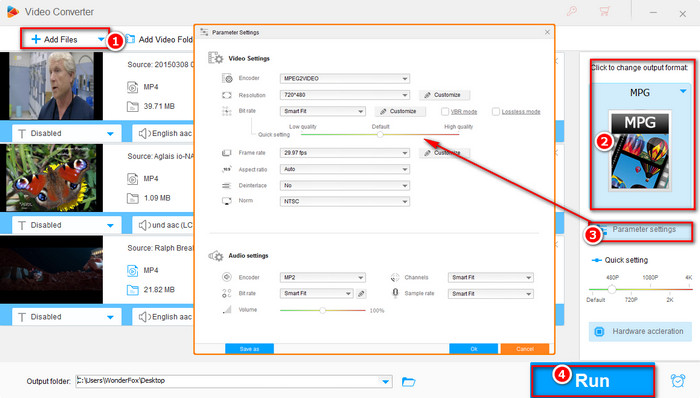
In view of that MPG format contains the video coding MPEG-2 and DVDs are also encoded in the MPEG-2 format, you can just transcode MP4 files to MPG encoded with MPEG-2 for DVD burning. Make sure that you free download HD Video Converter Factory Pro on your Windows PC first. Then, open the program and follow the below steps:
Launch the program you just installed, click on "Converter" icon to enter a new window. Here you can load your videos by clicking the "Add Files" button or directly drag the videos into the converter interface.
Note: This converter allows you to add and convert videos in batches.
Open the output format page on the right. Under the "Video" tab, select "MPG" as the output format. Then click "Parameter settings" to customize the parameters. Set resolution as 720*480, frame rate as 29.97 fps, video encoder as MPEG2VIDEO, and audio encoder as MP2. After that, press "OK" to save the settings.
Tips: You can simply choose VOB (the standard format for DVDs) as the output format and hit "Run" to convert MP4 to DVD video directly.
Click the ▼ icon to set an output folder. Then press "Run" to start the conversion, which will finish at a fast speed. When the whole process is over, you can find the final video file in the output folder you set before.
Hot Search: The Top 10 Free DVD Burning Software for Windows 10
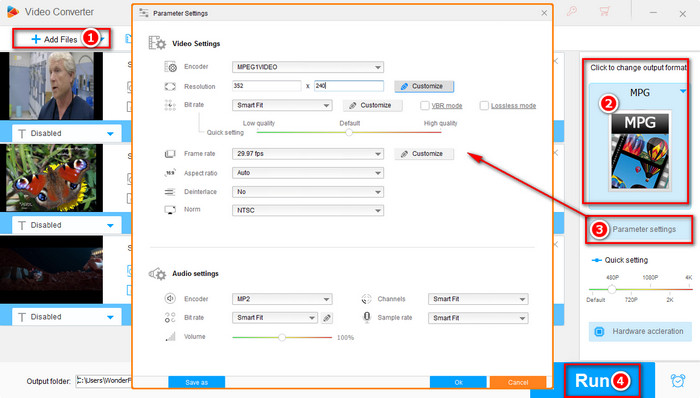
For those who want to make VCD, HD Video Converter Factory Pro can also be helpful. Seeing that MPG format has the VCD video codec – MPEG1, converting MP4 video to MPEG1 can directly empower you to make VCD. Follow my guide to customize the right VCD parameters step-by-step.
Open HD Video Converter Factory Pro, click on "Converter" icon to enter a new window. Click "Add Files" to import the videos or directly drag videos to the program.
Expand the output format page on the right-hand side and choose "MPG" as the output format under the "Video" category. Then open “Parameter settings”. To make a VCD, you have to change the resolution as 352*240 (you need to customize this parameter manually) and take 29.97 fps as frame rate, MPEG1Video as video encoder, MP2 as audio encoder. After all the parameters have been set, click "OK" to save the settings.
Specify an output path at the bottom and press "Run" to start the transcoding.
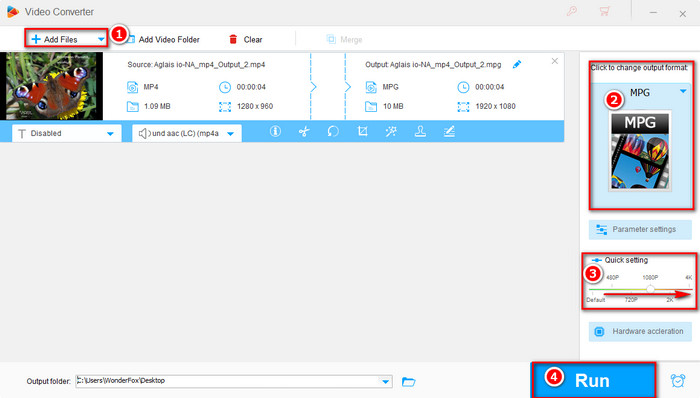
For those who just want to change MP4 files to MPEG with wanted video resolution, HD Video Converter Factory Pro can help you as it supports up to 8K (7680*4320) and more common video resolutions like 4K, 2K, 1080P, 720P and below. You can get the MPEG videos with high resolution now by following steps:
Run the software and click on the "Converter" icon. In the converter window, click "Add Files" to load the MP4 videos you want to convert.
Head to the "Output Format" section and choose the "MPG" format under the "Video" tab. If you want to modify the output settings, you can open "Parameter settings" and configure the parameters as needed.
Click the "Run" button to begin the video conversion.
With the above three handy methods, I believe you can easily convert MP4 to MPEG/MPG now for convenient storing, DVD/VCD making. Feel free to share this guide to help more friends.
Related Sources: Top 5 Free Online Video Converters l Top 9 Best Video Converter Software Completely Free
The MP4 to MPEG method above also works for many other video formats. You do not need to follow a completely different tutorial for each format. Just import your source video, choose MPG as the output format, select MPEG-1 or MPEG-2 if needed, and click Run.
This is useful when you want to prepare your videos for DVD-related use or make them easier to play on older devices.
Note that this method is for DRM-free files. Protected videos may not be converted by regular video converters.
A: Yes. If you only need basic MP4 to MPG conversion, you can try Free HD Video Converter Factory. However, if you need to convert many files at once, adjust more output parameters, process different video formats more flexibly, or get faster performance, the Pro version is the better option.
A: MPEG-1 and MPEG-2 are older compression standards. Compared with modern codecs like H.264 or HEVC, they are less efficient. That means an MPEG-2 MPG file may become larger than the original MP4, even if the visual quality does not improve. If the output file is too large, you can lower the bitrate or resolution in Parameter settings.
A: Yes, some online converters can convert MP4 to MPG or MPEG. They are convenient for small files and occasional use.
However, online tools usually have file size limits, slower upload/download speed, fewer parameter options, and potential privacy concerns. For large videos, batch conversion, or private files, desktop software is safer and more stable.
A: VLC includes basic conversion features, but the process is less straightforward for beginners. You may need to manually choose profiles, codecs, and containers. If you only want a simple GUI-based workflow, a dedicated video converter is easier.
WonderFox DVD Video Converter - All-in-one media solution includes DVD Backup, DVD Rip, Video and DVD Converter, Video Downloader, Video Editor/Player
WonderFox DVD Ripper - A professional DVD ripping tool, bypass encrypted DVD and region code, and convert DVD content to most video formats and handheld devices
Special Offer: WonderFox DVD Video Converter
Want to enjoy a complete movie night with your family instead of waiting long time for conversion? WonderFox DVD Video Converter is the best choice, which provides one-stop total solution to Rip DVDs (Disney, Paramount, Sony Included), Convert videos, Download online videos, Edit and Play movies/video with excellent performance.


Video format - different layers of video transmission and storage each provide their own set of formats to choose from.