DVD always has region code for the sake of business because the same movie in different regions has different release dates. So DVD watching is limited to the region where DVD region code is matching to the specific region and you are unable to watch DVDs anywhere.
“My foreign friend sends me a DVD; it cannot be played by my computer due to region code limitation. I am a little frustrated, how can I watch it?”
“I purchased an Australian DVD from amozon.com, but I forgot to check region code. I live in Canada. Any solution to bypass DVD region code?”
With so much inconvenience of DVD region code, the paragraphs below would help you solve this problem However, how to remove region code from DVD to watch DVD without region limitation? Newly purchased DVD can be removed region code 5 times. Steps are as follows:
Open computer > right click “DVD drive” > “Properties” > “Hardware” tab > select your DVD Drive > Properties > “DVD Region” tab to select the wanted region.
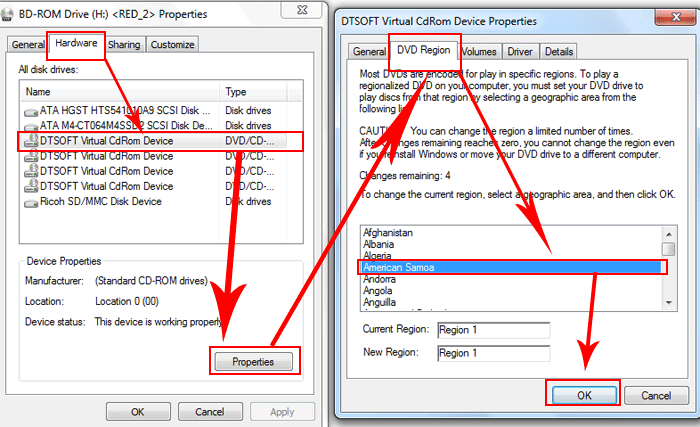
Though this method is free, it only has five DVD region code changes. After the fifth change, the DVD device would be locked. If you have many foreign DVDs, a DVD ripper to bypass DVD region code is necessary. WonderFox DVD ripper is excellent to help you unlock DVD region code for playback anywhere.
This software can disable DVD region code including all region code protected DVDs and decrypt any encryption technology such as CSS, Disney X-project DRM. Once you got this ripper, more benefits are guaranteed. You are entitled to backup DVD with superfast speed, to obtain free technical support, to enjoy lifetime free upgrades and retrieve registration code, etc.
Tips: Before you hack DVD region code, download and install this ripper first.

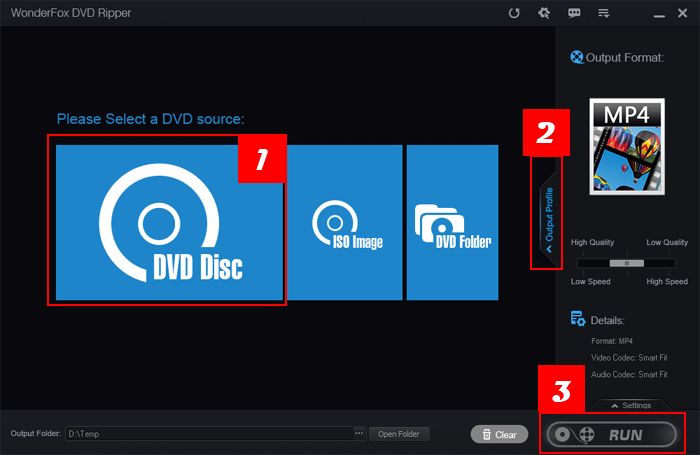
Step 1: Select a DVD source
Launch this ripper to choose a DVD source. This software automatically detects the Main Movie.
Step 2: choose output format as your will
A wide range of formats are supported. You can both rip DVD to MPG, MKV, AVI, M4V, MOV, WMV and other video formats and rip DVD to MP3, AC3, AAC and other audio formats.
Step 3: star to unlock DVD region code
Press “Run” button to start your DVD region code unlock. You also can also have your advanced settings by pressing “settings”.
Still have trouble about DVD Region Code? Please feel free to Email Us >>
Remove Region Code from DVD: Better and faster solutions to remove region code from DVD ever
Remove DVD CSS: Here’s by far the fastest and most effective solution to remove CSS encryption or remove DVD CSS.
DVD Region Hack: ou do need know the method of DVD region hack if you want to play the region-limited DVD from other places freely.
Hack DVD Copy Protection: If we want convert DVD to video (AVI, MKV, MP4, MOV...), we have to hack DVD copy protection first
Backup Encrypted DVD: If you hope to backup encrypted DVD so that you can protect them not to be broken or scratched
DVD Copy Crack: This article will help you finish the process of DVD copy crack with a professional DVD copy program.
WonderFox DVD Ripper - A professional dvd ripping tool, bypass any encrypted DVD and region code, and convert DVD content to most video formats and handheld devices
WonderFox DVD Video Converter - all-in-one media solution includes DVD Backup, DVD Rip, Video and DVD Converter, Video Downloader, Video Editor/Player
HD Video Converter Factory Pro - equipped with advanced High-Definition (HD) video conversion technology. It can help users convert videos from Standard-Definition (SD) to High-Definition (HD) like HD MP4, HD MKV, HD AVI, HD MTS, HD TRP and also enables users to cut down the video size (convert HD videos to SD videos)
DVD region codes are a digital rights management technique designed to allow film distributors to control aspects of a release, including content, release date, and price, according to the region.
Special Offer: WonderFox DVD Ripper (Buy One Get One FREE)
Provides the best solution to convert any DVD(include copy protected DVD) to a wide range of mainstream video and audio formats such as AVI, MP4, VOB, MKV, MPEG, MOV, FLV, WMV, 3GP, MP3, AIFF, FLAC, M4A, etc. And new media formats are keeping added and supported. It takes about 50 minutes to rip a 120 minutes' DVD to AVI with 0-Quality-Loss and much less time to MPG.