


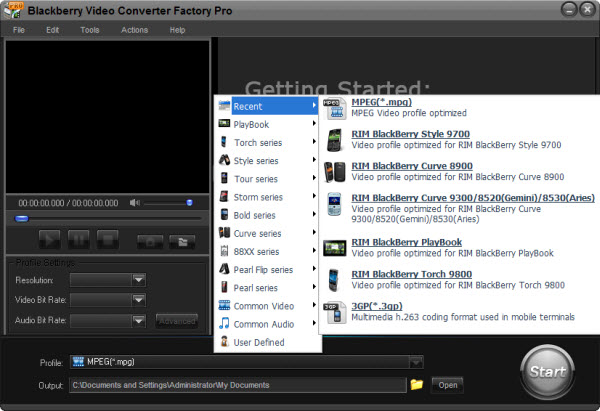
Firstly, it is delightful to play MKV videos (high definition videos) on BlackBerry Tour 9630. The BlackBerry Tour 9630 has high resolution display, 3.2-megapixel auto-focus camera and 3G data overseas, faster EVDO Rev, large memory( you can store so many videos) and long-time battery life, these features are very convenient for video taking, music/video playback and sharing. Thus, the BlackBerry Tour 9630 has the condition to play the high definition videos such as the MKV videos.
Secondly, although this cell phone has the condition to play high definition videos such as the MKV videos, it can not support play MKV videos. Thus, we need a BlackBerry Tour 9630 video converter to help us know how to convert MKV to BlackBerry Tour 9630.
If you are confused by how to choose a good BlackBerry Tour 9630 video converter, here are some advices that you need to follow when choosing this kind of video converter.
1. It should convert videos without quality loss
2. It should convert videos with fast speed
3. It should be without any virus
4. It should be easy to use
5. It should have rich extra functions and rich parameter settings
These are the main advices that you need to take into consideration. If you are still confused, here I suggest BlackBerry Video Converter Factory Pro 3.0, it can in accordance with all the standards mentioned above. It is the one that your BlackBerry Tour 9630 really need. With it, how to convert MKV to BlackBerry Tour 9630 will be easily solved.
You just need to follow several simple steps mentioned below and then how to convert MKV to BlackBerry Tour 9630 will be easily solved.
1. Download this video conversion software

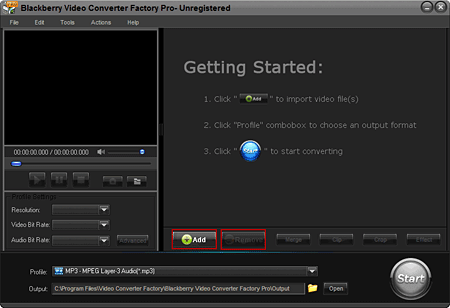
2. Click 'Add' to load your MKV files that you need to convert for BlackBerry Tour 9630
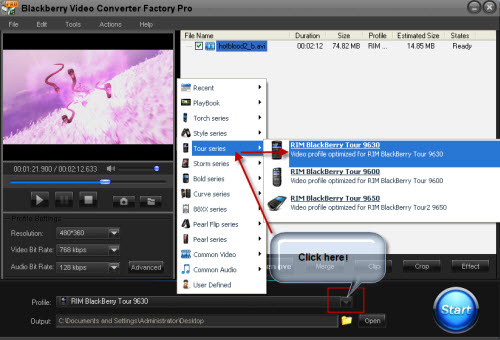
3. Choose To Tour Series as main category and To RIM BlackBerry Tour 9630 as subcategory to choose the 9630 as your output model
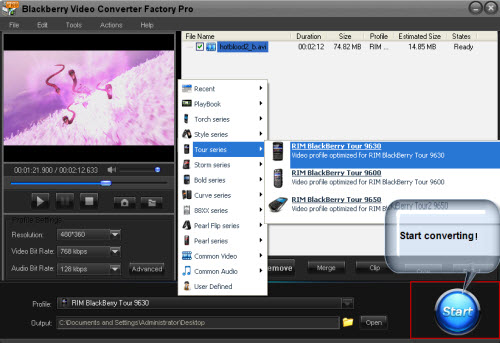
4. Just click the 'Start' button to start the converting processes.
5. Get the converted videos and enjoy them on your BlackBerry Tour 9630
If you want to know more operation guide of this video conversion software, you can see the user guide of this video conversion software.
Screenshot of BlackBerry Video Converter
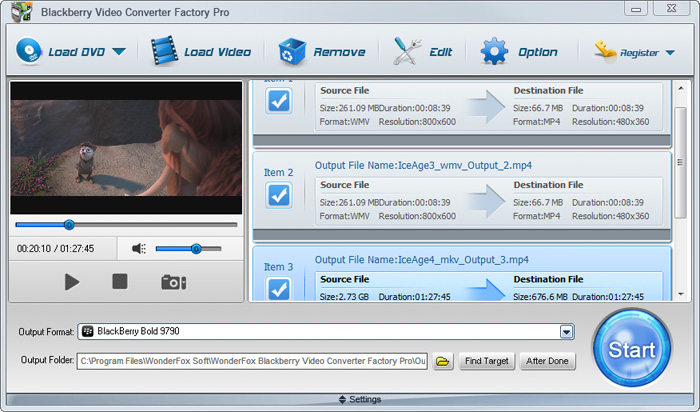


BlackBerry Video Converter Factory Pro has nearly all BlackBerry devices as its output choices with optimized profile, that is, you can convert video/audio to BlackBerry devices directly without figuring out the right video format, display resolution, bitrate, frame rate and encoder for BlackBerry devices. This BlackBerry Video Converter completely supports the latest BlackBerry Strom 2, BlackBerry Bold 9700, Blackberry Storm 9530, BlackBerry Storm 9500, BlackBerry Tour 9630, BlackBerry 8800, 8830, 8820, BlackBerry Pearl 8100, BlackBerry Curve 8300 and more other Blackberry series.
The below passage will show you some hot topics, hot tips and useful tutorials. I hope they will be useful to you.
For users who want to enjoy FLV videos on BlackBerry cell phones or PlayBook, BlackBerry Video Converter Factory Pro can help you convert FLV to BlackBerry Curve 9300, convert FLV to BlackBerry Style 9670, convert flv to BlackBerry Strom 9520 and much more.
And, for users who want to play MKV files, including HD MKV files, BlackBerry Video Converter Factory Pro can easily help you convert MKV to BlackBerry PlayBook supported video, help you effortlessly convert MKV to nearly all BlackBerry cell phones, such as converting MKV to BlackBerry Curve 8900 and converting MKV to BlackBerry Bold 9700.
In conclusion, BlackBerry Video Converter Factory Pro is definitely the best chocie for you to convert video to BlackBerry devices supported videos. If you want to know more tips and tutorials about BlackBerry Video Converter Factory Pro, please see the BlackBerry video converting tips center.


