


T-Mobile is calling their new Blackberry 9300 the Curve 3G. It's a true Blackberry Curve smartphone with everything you would expect from a modern-day Research in Motion handset including a terrific track-pad, a great little QWERTY keyboard just below the screen, the legendary Blackberry e-mail system and a whole lot more. There are only two things this terrific little phone is missing: the good video player and the newest version of the Blackberry operating system. Although we can change this fact directly. Some indirectly ways can be used to improve it. Such as using a BlackBerry 9300 video converter.
About the operating system, there are so many DIY versions made by netizen. And I think these versions actually give BlackBerry 9300 a better life because of their individuation and funny.
BlackBerry 9300 can not play any video format as we like, for example ASF. But we can use BlackBerry 9300 video converter to break this astriction. Before we learn how to convert ASF to BlackBerry 9300, some information about ASF we should know.
The ASF file type is primarily associated with Advanced Streaming Format by Microsoft Corporation. ASF is based on serialized objects which are essentially byte sequences identified by a GUID marker. ASF files often contain Windows Media Audio (.WMA) or Windows Media Video (.WMV) data.
The format specifies the structure of the video/audio stream. This is similar to the function performed by the QuickTime, AVI, or Ogg container formats. One of the objectives of ASF was to support playback from digital media servers, HTTP servers, and local storage devices such as hard disk drives.
An ASF file consists of three objects: a Header object containing information about the file itself, a Data object containing the media streams, and an optional Index object that can help support random access to data within the file. Next is how to convert ASF to BlackBerry 9300.
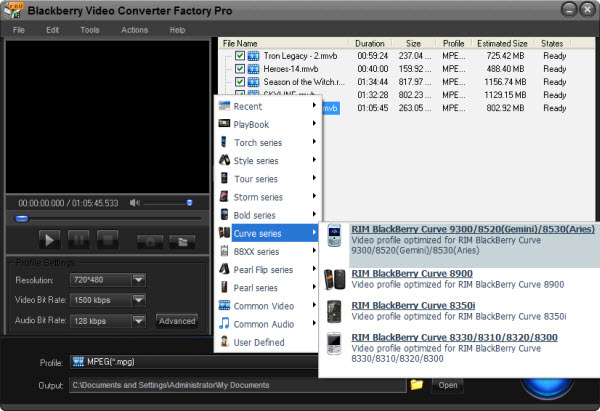
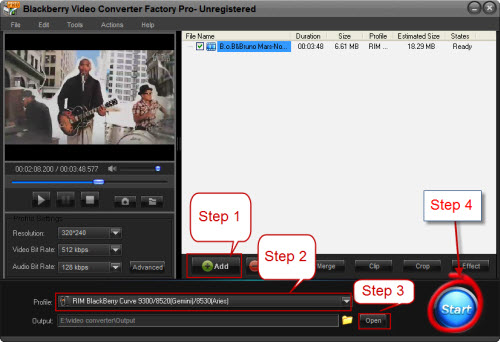
A number of software say that they can convert ASF to BlackBerry 9300. Indeed, converting video is a very general work today. We can use anyone of them. But I still suggest to use BlackBerry Video Converter Factory Pro. I have found that this one designs many programs to each cell-phone types. So you can get the best viewing effect on your BlackBerry 9300. Let me show the steps about how to convert ASF to BlackBerry 9300 by using BlackBerry Video Converter Factory Pro:
1, Dowload and run the software. > 2, Click "Add" to load video file > 3, Choose your cell-phone type. > 4, Click the icon near "Open" to set output folder > 5, Click "Start" to run the conversion process > 6, After the process down, click "Open" to get the output video
Then you can enjoy your Flash on your BlackBerry 9300!
Screenshot of BlackBerry Video Converter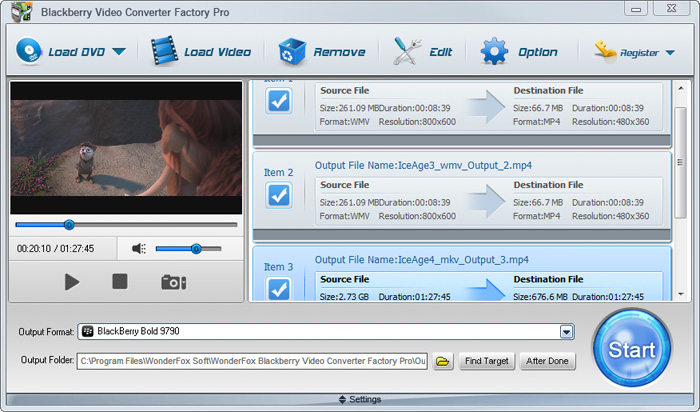


BlackBerry Video Converter Factory Pro has nearly all BlackBerry devices as its output choices with optimized profile, that is, you can convert video/audio to BlackBerry devices directly without figuring out the right video format, display resolution, bitrate, frame rate and encoder for BlackBerry devices. This BlackBerry Video Converter completely supports the latest BlackBerry Strom 2, BlackBerry Bold 9700, Blackberry Storm 9530, BlackBerry Storm 9500, BlackBerry Tour 9630, BlackBerry 8800, 8830, 8820, BlackBerry Pearl 8100, BlackBerry Curve 8300 and more other Blackberry series.
The below passage will show you some hot topics, hot tips and useful tutorials. I hope they will be useful to you.
For users who want to enjoy FLV videos on BlackBerry cell phones or PlayBook, BlackBerry Video Converter Factory Pro can help you convert FLV to BlackBerry Curve 9300, convert FLV to BlackBerry Style 9670, convert flv to BlackBerry Strom 9520 and much more.
And, for users who want to play MKV files, including HD MKV files, BlackBerry Video Converter Factory Pro can easily help you convert MKV to BlackBerry PlayBook supported video, help you effortlessly convert MKV to nearly all BlackBerry cell phones, such as converting MKV to BlackBerry Curve 8900 and converting MKV to BlackBerry Bold 9700.
In conclusion, BlackBerry Video Converter Factory Pro is definitely the best chocie for you to convert video to BlackBerry devices supported videos. If you want to know more tips and tutorials about BlackBerry Video Converter Factory Pro, please see the BlackBerry video converting tips center.


